Pet owners who shop for houseplants face a question that most product pages don't answer: is this plant safe for my cat, dog, or bird? The answer usually lives on a separate site like the ASPCA's non-toxic plant list or Pet Poison Helpline. That extra research step pulls shoppers away from your store, and many never come back. Pet-safe indoor plants for cats and dogs are what they want, but your product pages don't confirm which ones qualify.
This is the toxicity gap in online plant retail. It's a conversion killer for gardening brands, and it's one that an AI shopping assistant can close without a single line of custom code.
The Toxicity Gap: Why Pet Owners Leave Your Plant Store
Here's the typical buyer journey. A pet owner browses your store, spots a beautiful fiddle leaf fig, then opens a new tab to search "is fiddle leaf fig toxic to cats". They land on the ASPCA, confirm it's toxic, and either abandon the search or forget to return. The problem isn't that pet-friendly plants don't exist in your catalog. It's that shoppers can't tell which ones are pet-safe without leaving your site.
Toxicity rules differ by species: safe houseplants for dogs and cats aren’t always the same, and birds have their own list entirely. Popular pet-friendly indoor plants like parlour palm, Boston fern, spider plants, African violet, prayer plant, haworthia, peperomia, Christmas cactus, air plants, staghorn fern, and even orchid varieties are scattered across your catalog with no pet safety labels. The result? Abandoned sessions, not abandoned carts. Pet owners leave before they add anything. Traditional cart recovery emails can't fix a problem that happens upstream of the cart.
This pattern shows up across the broader gardening e-commerce vertical. Brands that address buyer hesitation at the point of discovery convert more browsers into buyers. For a deeper look at how AI handles hesitation across verticals, see our guide on how e-commerce AI agents reduce shopper hesitation.
How to Equip Your AI Shopping Assistant With Pet Safety Data
Alhena's AI shopping assistant already connects to your store's catalog on Shopify, WooCommerce, or Magento. It knows every SKU, image, price, and tag you sell. The missing piece is a non-toxic houseplant for pets dataset, and adding one takes minutes.
Upload a Custom Data Source
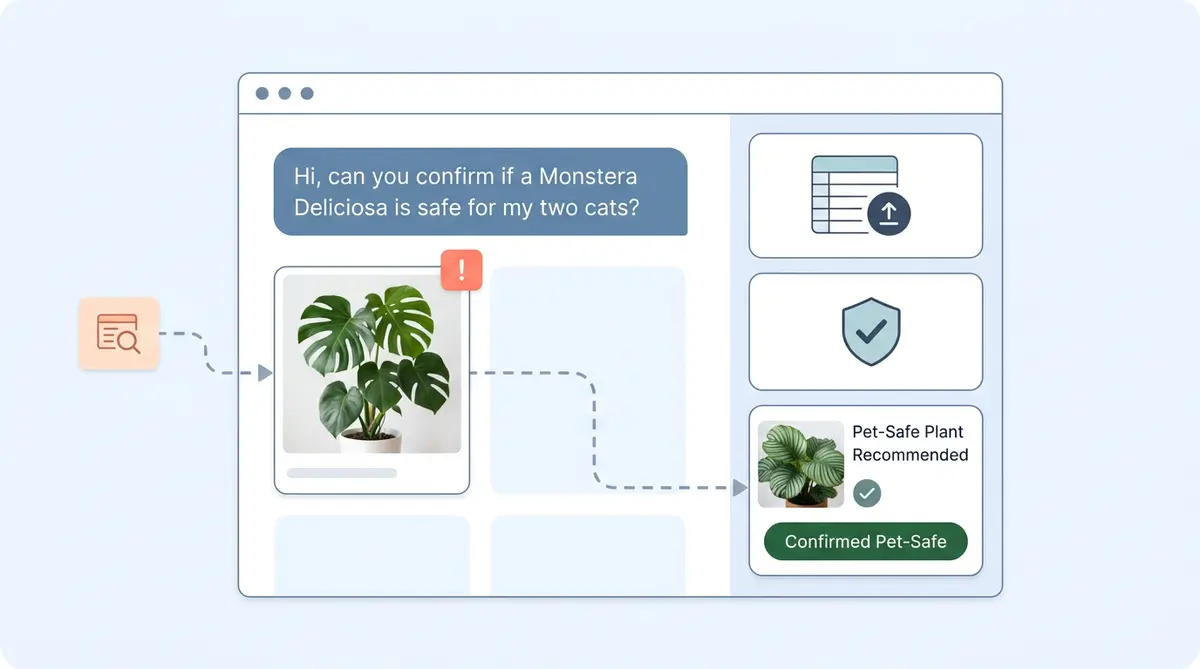
Build a spreadsheet mapping each houseplant to its pet-safe status by species. Columns might include plant name, botanical name, toxic to cats (yes/no), toxic to dogs (yes/no), and common symptoms if ingested. Flag dog-friendly and dog-safe plants indoors as well as cat-safe houseplants like parlour palm, Boston fern, spider plants, African violet, prayer plant, haworthia, and peperomia. Then upload it to Alhena as a custom data source. Alhena supports CSV, Excel, Google Sheets, and PDFs. The AI agent references this dataset in real time during conversations. No developer needed.
For live lookups, Alhena also supports API tools and MCP server connections pointing to a toxicity database you license and maintain.
Set Agent Guidelines for Pet Safety
Data alone isn't enough. Alhena's agent guidelines let you define exactly how the assistant behaves when a shopper mentions a pet. A good starting guideline: "When a shopper mentions a pet, always cross-reference the toxicity dataset before recommending a plant. If a product's safety status is unknown, flag it as unverified. Include a note to verify with a veterinarian."
Guidelines can be scoped by channel (web chat, email, Instagram, WhatsApp), time of day, and customer segment. They keep the agent consistent, always surfacing plants that are safe for dogs, cats, and other household pets. Learn more about how AI helps pet brands with smarter recommendations.
Boost pet-friendly plants in conversations.
When the AI detects a pet-related conversation, Alhena's product boosting promotes pet-safe alternatives higher in the results. If someone asks about a toxic monstera or peace lily, the agent flags the risk and suggests a non-toxic, dog-friendly houseplant like a fern or peperomia instead.
What a pet-safe shopping conversation looks like
Shopper: "I'm looking for a low-light houseplant for my apartment. I have two cats."
AI assistant: The agent picks up on "two cats", queries the toxicity dataset, filters the catalog, and returns product cards for pet-safe plants: parlour palm, spider plants, Boston fern, prayer plant, and Christmas cactus. Each card includes a note like "Non-toxic to cats per ASPCA data."
Shopper: "What about a fiddle leaf fig?"
AI assistant: The agent flags fiddle leaf figs as toxic to cats, explains briefly, and suggests a pet-friendly African violet, haworthia, or ferns safe for cats, like Boston ferns, along with bromeliads with colourful flowers and non-toxic leaves as a visually appealing safe alternative. It closes with, "We always recommend confirming with your vet."
No tab-switching. No abandoned session. The shopper now knows exactly which houseplants safe for dogs or cats are in stock. The shopper gets the pet safety answer and a curated recommendation in the same conversation. Over time, you refine the experience using conversation analytics. For gardening brands already using AI post-purchase, this pairs well with AI plant care guides that reduce returns.
Honest Limits to Keep in Mind
The AI assistant is only as accurate as the dataset you provide. It isn't a veterinary authority. Always include a "verify with your vet" disclaimer in your agent guidelines. If a houseplant isn't in your non-toxic dataset, the agent should flag the gap rather than guess.
Filtering out toxic plants from your garden and indoor catalog builds trust with pet owners. For brands exploring broader AI customer support automation in the gardening vertical, pet safety is just one layer. The same custom data source approach works for safe indoor plants for animals with other sensitivities, allergen information, light requirements, and climate zones.
Close the Gap, Keep the Shopper
Pet owners don't abandon your store because they don't want your plants. They leave because they can't quickly find plants that are safe for dogs or cats. They can't verify which houseplants are pet safe where they're shopping. An AI assistant equipped with a non-toxic plant dataset and clear guidelines solves that in seconds, right inside the chat widget. Your catalog likely already includes dozens of pet-friendly plants like parlour palm, Boston fern, spider plants, African violets, haworthia, peperomia, prayer plants, Chinese money plants, and bromeliads you can pot and ship. You just need a way to surface the right plants for pets to the right shoppers.
Ready to help pet owners shop your plant catalog with confidence? Book a demo with Alhena AI or start for free with 25 conversations.

Frequently Asked Questions
Can an AI shopping assistant really identify toxic plants for pets?
Yes, but only when the merchant provides a toxicity dataset. Alhena's AI cross-references your uploaded spreadsheet or connected database against catalog products in real time. It does not guess. If a plant isn't in the dataset, the agent flags the gap instead of assuming safety.
What data format works best for a plant toxicity dataset?
A CSV or Google Sheet with columns for plant name, botanical name, and safety status per pet species (cats, dogs, birds) works well. Alhena also supports Excel, PDF, and other document formats. The key is structured, consistent data the AI can query quickly.
How long does it take to set up pet-safety filtering in Alhena?
Most merchants can upload a toxicity spreadsheet and configure agent guidelines in under an hour. No developer resources are needed. The AI shopping assistant starts using the new data immediately after upload.
Does Alhena integrate with the ASPCA toxic plant database directly?
Alhena does not ship with a pre-built ASPCA integration. Merchants can use the publicly available ASPCA toxic plant list to build their own dataset, then upload it as a custom data source. For live lookups, you can connect an API tool or MCP server to a licensed toxicity database.
Will the AI guarantee a plant is safe for my pet?
No. The AI assistant surfaces safety information based on the dataset the merchant provides. It is not a veterinary authority. Best practice is to include a "verify with your vet" disclaimer in your agent guidelines, which Alhena makes easy to configure.
Can I use this approach for other safety concerns beyond pet toxicity?
Absolutely. The same custom data source approach works for allergen information, child safety, chemical sensitivities, or any structured dataset you want the AI to reference during conversations. Gardening brands also use it for hardiness zones and light requirements.