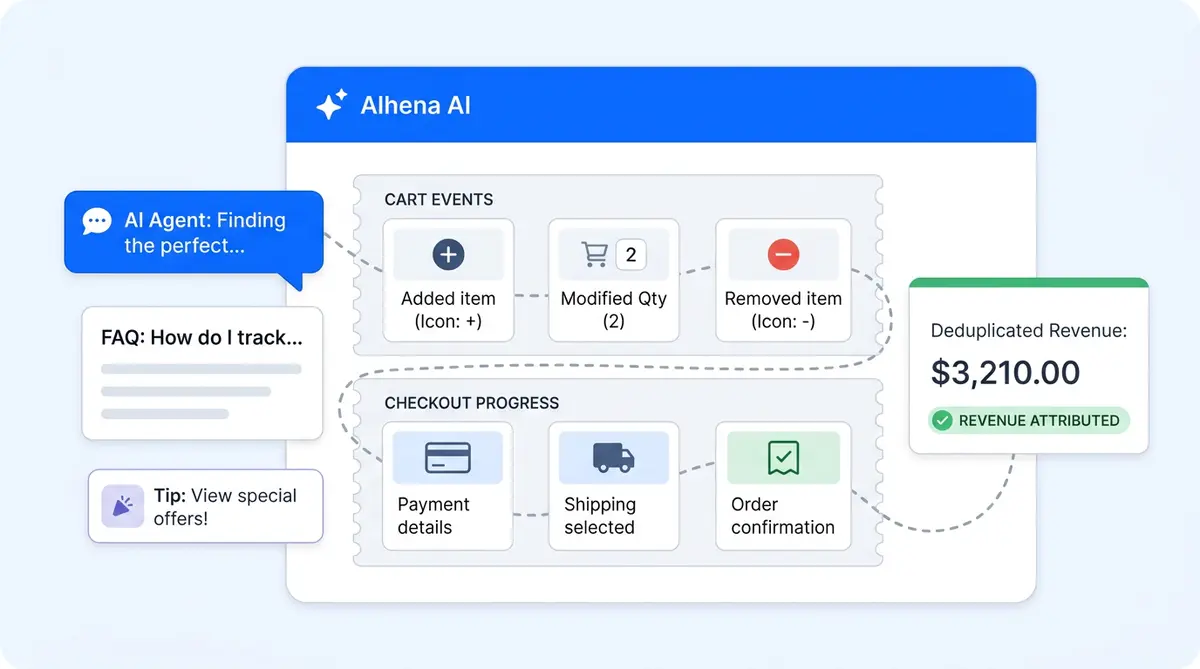
Most chatbot dashboards show you a conversation count and a satisfaction score. Maybe a deflection rate if you're lucky. What they don't show is whether that conversation actually led to someone buying something.
That gap is the whole reason we built the Cart and Checkout Events SDK. It's a small JavaScript layer that sits on your storefront and does one thing: tells Alhena when a shopper adds something to their cart, changes a quantity, removes a product, or finishes checkout. Alhena then matches that event to the conversation (or FAQ view, or nudge click) that came before it. If the match checks out, the revenue gets attributed. If it doesn't, it doesn't.
No inflated numbers. No "influenced" hand-waving. Just a clear line from "customer asked a question" to "customer bought something."
Below is everything you need to know about how the SDK works, how to wire it up on Shopify and non-Shopify stores, and the mistakes that quietly break your revenue data.
What the SDK Does (and Doesn't Do)
Let's get this out of the way: the SDK is not a payment processor. It doesn't create orders, manage inventory, or touch your checkout flow. It's a tracking layer, nothing more.
When a shopper does something with their cart, the SDK captures that ecommerce event and sends it to Alhena's backend. Alhena checks whether that same shopper had a qualifying interaction with the Shopping Assistant, a Product FAQ, or a nudge within the last recents. If they did, and the interaction was actually helpful (not just a widget load or a "hi"), the event gets counted as attributed revenue.
If they didn't interact with Alhena at all? The event still gets recorded, but it doesn't show up as Alhena-attributed. The attribution rules are strict on purpose. Nobody trusts revenue numbers that feel made up.
Two Kinds of Ecommerce Events: Cart and Checkout
The SDK tracks two event families. They serve different parts of the buying journey.
Cart Events
These fire before purchase. Four types:
- ITEM_ADDED: product goes into the cart for the first time
- QUANTITY_INCREASED: shopper bumps up the count on something already in the cart
- QUANTITY_DECREASED: quantity goes down, but the item stays
- ITEM_REMOVED: product gets pulled out entirely
Every cart event includes the product ID, product name, item value (price after discounts), currency code, and the quantity affected. These feed into Cart GMV on the Revenue Impact dashboard, which shows you how much shopping intent your conversations are generating for customers before anyone hits "buy".
Checkout Events
These fire when someone actually completes a purchase. They carry the order total, currency, line items, and an optional order ID. That order ID matters because Alhena uses it to deduplicate. If a shopper refreshes their thank-you page and the event fires twice, Alhena counts it once.
Checkout events drive the number that usually ends up in the exec deck: Checkout revenue, meaning completed purchase value that traces back to an Alhena conversation. Brands like Tatcha used this metric to prove 11.4% of total site revenue came from chat-assisted sessions, and Victoria Beckham tracked a 20% bump in average order value the same way.
How Attribution Actually Works
Tracking events alone is table stakes. Google Analytics does that. What makes this SDK different is the attribution layer connecting each event to a specific conversation.
When the widget loads on your site, Alhena creates (or reads) a visitor fingerprint. Think of it as a thread that ties together four things: the browser session, the chat or FAQ interaction, any cart events, and any checkout events. One fingerprint, one shopper, one journey.
When a cart or checkout event comes in, Alhena's backend looks up that fingerprint and checks two things:
- Did this shopper have a real interaction (not just a widget impression) in the last recents?
- Did Alhena give a genuinely helpful answer during that interaction?
Both conditions have to be true. If the shopper opened the widget, typed "hi", closed it, and then bought something, that purchase doesn't get attributed. If they asked about sizing, got a useful recommendation, and then added shoes to their cart 20 hours later, it does.
When both chat and FAQ were used in the same session, Alhena attributes to whichever came first. Nudge clicks get attributed to the nudge interaction. The logic is conservative by design, which is exactly why teams trust the numbers enough to put them in board decks.
Setup: The trackAlhenaEvent Wrapper
Alhena provides a small JavaScript snippet you add to your site’s head tag. It’s available in your Alhena dashboard under the widget installation settings.
This creates a global trackAlhenaEvent function that safely queues events until the Alhena widget finishes loading. Once the widget is ready, it processes everything in order. You don’t need to worry about race conditions or load timing.
Race conditions aren't a problem. If someone adds a product to their cart before the widget loads, the event gets queued and sent once the widget loads. Nothing gets dropped.
Sending a Cart Event
trackAlhenaEvent('sendCartEvent', {
  type: 'ITEM_ADDED',
  productId: 'SKU-1234',
  productName: 'Black Running Shoes',
  value: 79.99,
  currency: 'USD',
  quantity: 1
});
All six parameters are required. The type string is case-sensitive: ITEM_ADDED works, item_added doesn't. Copy-paste from the docs to be safe.
Sending a Checkout Event
trackAlhenaEvent('sendCheckoutEvent', {
  orderId: 'ORDER-7890',
  value: 199.97,
  currency: 'USD',
  lineItems: [
    {
      productId: 'SKU-1234',
      productName: 'Black Running Shoes',
      quantity: 1,
      value: 79.99,
      currency: 'USD'
    },
    {
      productId: 'SKU-5678',
      productName: 'Running Socks (2-pack)',
      quantity: 2,
      value: 59.99,
      currency: 'USD'
    }
  ]
});
The orderId and lineItems are technically optional, but skip them at your own risk. Without the order ID, you can't deduplicate. Without line items, you lose enhanced product-level revenue details in the dashboard.
Shopify: You Don't Need to Do Any of This
Running on Shopify? Skip the code above. Alhena detects Shopify stores automatically and handles the full tracking pipeline without any manual wiring:
- Cart mutations are tracked natively. When a shopper uses your store's regular add-to-cart flow, Alhena picks it up.
- Visitor fingerprints get injected into cart line item properties. This links the cart to the conversation even if the shopper comes back later. (You can turn this off if it causes display issues.)
- Cart sessions are tracked across the purchase journey. Alhena keeps the thread from chat to cart to checkout connected across the entire session.
- Completed orders come in through Shopify webhooks. No thank-you page code needed. Shopify tells Alhena about the order server-side.
Product cards inside the chat widget also work out of the box. When someone clicks "Add to Cart" on a product recommendation in the chat, Alhena calls Shopify's Shopify’s native cart API, then opens the cart drawer (or redirects to /cart if your theme doesn't have a drawer). The Shopify Plus integration adds more customization options on top of this.
For Shopify merchants, the SDK is invisible. Install Alhena, and revenue tracking just works.
WooCommerce, Magento, SFCC, and Custom Carts
For WooCommerce, Magento, BigCommerce, Salesforce Commerce Cloud, or anything custom-built, you need to wire two things manually.
1. Your Platform's Cart Events into Alhena
When your commerce platform fires a native ecommerce event (WooCommerce's added_to_cart jQuery trigger, Magento's customer-data reload, SFCC's basket API response), call trackAlhenaEvent('sendCartEvent', {...}) with the matching payload. Without this, Alhena has no visibility into what's happening in your cart.
2. Alhena's Product Card Clicks into Your Platform
If you've turned on product cards in the chat widget, shoppers can click "Add to Cart" right from the conversation. On non-Shopify stores, Alhena doesn't know your cart API. You need to register a add-to-cart callback handler that makes the actual cart call on your platform. After it succeeds, fire the matching sendCartEvent so the analytics stay accurate.
Miss either piece and your data will have gaps. The widget thinks the product was added; your cart has the item, but Alhena's Revenue Impact numbers won't reflect it.
Checkout Tracking
Call trackAlhenaEvent('sendCheckoutEvent', {...}) from your thank-you page or order confirmation flow. Place it where the page only loads once per completed purchase. If your checkout redirects to a third-party processor and back, make sure the Alhena snippet is on the final confirmation page. The visitor fingerprint persists across the session, so attribution still works as long as the shopper lands back on your domain.
What Shows Up in the Dashboard
Once events are flowing, they power several metrics on the Revenue Impact dashboard:
- Checkout Revenue: Completed purchase value that traces back to Alhena conversations. The headline metric.
- Total Cart GMV: Gross merchandise value of items added to carts after an interaction. Shows purchase intent, even when abandoned cart sessions don't convert before conversion.
- Daily Cart GMV: Trending view over time. Useful for spotting the effect of product launches, promotions, or changes you made to how Alhena responds.
- Average Order Value: Mean transaction value for attributed orders. Victoria Beckham saw this go up 20% once shoppers started getting personalized recommendations through chat.
- Product-Level Purchase Data: Which specific products get bought after conversations. Tells you what Alhena is actually good at selling.
- Per-Conversation Revenue: Open any conversation transcript and see the exact checkout amount tied to it.
- A/B Test Revenue Comparisons: When you're testing different response styles or conversation flows, checkout events let you compare variants by actual revenue, not just satisfaction scores.
Tatcha used these dashboards to demonstrate a 3x conversion rate lift from chat-assisted sessions. Puffy connected 63% automated inquiry resolution to concrete purchase outcomes. The data is what turns a "we think the chatbot helps" into a line item on the marketing P&L.
Five Mistakes That Quietly Break Your Data
We've seen all of these across hundreds of e-commerce implementations. None of them throw visible errors, which makes them worse.
1. Misspelled Event Type Strings
The SDK expects ITEM_ADDED, QUANTITY_INCREASED, QUANTITY_DECREASED, ITEM_REMOVED. Exactly. Typos like ITEMS_ADD or ADDED_TO_CART get silently ignored. Don't freestyle it. Copy from the docs.
2. Sending Total Quantity Instead of the Change
The quantity field should reflect the delta, not the new total. If a shopper goes from 1 pair of shoes to 2, send quantity: 1 (the change), not quantity: 2 (the total). Getting this wrong inflates your Cart GMV numbers.
3. Skipping the orderId
Without it, Alhena can't deduplicate. A thank-you page refresh fires the checkout event again, and now the same order counts twice. Always include the order ID when your platform gives you one.
4. Firing Checkout Events Before Payment Completes
Don't send checkout events from the payment form. Send them from the confirmation page, after the transaction has actually gone through. Otherwise you're counting abandoned payments as completed sales.
5. Assuming Product Card Callbacks Handle Everything
On non-Shopify stores, the product card "Add to Cart" button triggers a add-to-cart callback callback. That's the widget-side hook. You still need to: (a) call your platform's cart API in that handler, and (b) fire sendCartEvent after the cart call succeeds. Skip either step and your numbers will be wrong without any obvious indication that something's off.
The Full Loop, Start to Finish
Say you're running a WooCommerce store and a shopper lands on your site.
- The Alhena widget loads and creates a visitor fingerprint.
- The shopper asks the Shopping Assistant about running shoes for flat feet. Alhena's Product Expert Agent recommends three options with product cards.
- They click "Add to Cart" on the Black Running Shoes. Your
add-to-cart callbackhandler calls WooCommerce's cart API, then firessendCartEventwith typeITEM_ADDED. - They browse around, find running socks, and add those from a regular product page. Your site's native cart handler fires another
sendCartEvent. - They check out. Your confirmation page fires
sendCheckoutEventwith the order ID, total, and line items. - Alhena's backend picks up the checkout event, matches the fingerprint to the chat conversation from step 2, confirms the interaction qualifies, and attributes $199.97 to that conversation.
- Your Revenue Impact dashboard updates. You can see the conversation, the products, and the revenue, all connected.
That's the loop. Question, recommendation, cart, checkout, attributed revenue. No guessing.
For teams trying to figure out whether their shopping assistant actually moves the needle on sales (not just support tickets), this is how you get the answer. Run the numbers through the ROI Calculator to see what the revenue impact looks like for your store, or read the full attribution logic deep dive if you want to understand the rules under the hood.
Want to see this running on your store? Book a demo or try it free with 25 conversations.

Frequently Asked Questions
What does Alhena's Cart and Checkout Events SDK track?
The SDK tracks two ecommerce event families. Cart events cover four actions: ITEM_ADDED, QUANTITY_INCREASED, QUANTITY_DECREASED, and ITEM_REMOVED. Checkout events record completed purchases with order totals, line items, and currency data. Alhena's AI engine matches each event to the visitor's session data and uses that to recognize revenue tied to a specific conversation. The result is accurate, data-driven analytics that show which AI interactions actually drive sales.
Do I need to install the SDK manually on Shopify?
No. On Shopify, Alhena automates the entire cart and checkout tracking workflow. It detects your store, tracks cart mutations in real time, injects visitor fingerprints into cart properties, and picks up completed orders through Shopify webhooks. There's no manual code to write. That level of automation is one reason Shopify merchants see faster time to value and quicker revenue recognition from AI-powered shopping conversations.
How does Alhena attribute revenue to conversations?
When the widget loads, Alhena creates a visitor fingerprint that ties together the browser session and shopping behavior, any chat or FAQ interaction, and all cart and checkout events. Attribution requires two things: a real interaction within a a recent time window and a genuinely helpful response during that interaction. If both conditions check out, Alhena can recognize revenue from that session. The algorithm is strict on purpose, so teams can trust the numbers enough to use AI analytics for real decision-making across their revenue operations.
What platforms does the Cart and Checkout Events SDK support?
The SDK works on any web platform. Shopify gets fully automated tracking out of the box. WooCommerce, Magento, BigCommerce, Salesforce Commerce Cloud, and custom-built carts need manual implementation using the trackAlhenaEvent JavaScript function. The setup is straightforward: add a small script snippet to your site header and connect the AI service to your cart, then fire cart and checkout events from your existing ecommerce workflow. Most teams have it running within a day.
What happens if the widget hasn't loaded when a cart event fires?
The trackAlhenaEvent wrapper queues events safely until the widget is ready. Once it initializes, it drains the queue and processes everything in order. No data gets lost. The accuracy of your revenue tracking isn't affected by page load timing or script execution order.
How does the SDK prevent double-counting checkout revenue?
The orderId field acts as a deduplication key. If the same order ID arrives twice, say from a thank-you page refresh, Alhena counts it once. This matters for revenue recognition accuracy. Without deduplication, your AI revenue numbers would be inflated, and no one trusts inflated metrics. Always include the orderId when your platform provides one.
What analytics and metrics does the SDK feed into?
Cart and checkout events power several dashboard metrics in real time: Checkout Revenue (completed purchase value attributed to AI conversations), Total Cart GMV, Daily Cart GMV trends, Average Order Value, product-level purchase data, and per-conversation revenue views. Teams use these AI analytics for revenue management, forecasting growth trends, and identifying which revenue streams benefit most from AI and making data-driven decisions about how to tune their shopping assistant to optimize conversion rates.
Can I use the SDK to measure ROI on my AI investment?
Yes, and that's the whole point. The SDK gives you the raw event data to calculate ROI directly: how much checkout revenue traces back to AI conversations versus your total AI spend, plus the productivity gains from automating post-sale attribution. Without event-level tracking, you're stuck guessing whether artificial intelligence is actually contributing to revenue growth or just handling support tickets. That kind of visibility is a real competitive advantage. Alhena's ROI Calculator uses this same event data to forecast the financial impact for your specific store.
How does this differ from Google Analytics ecommerce tracking?
Google Analytics tracks pageviews, clicks, and sitewide conversion funnels. It tells you that someone bought something after visiting your site. Alhena's SDK tracks whether a specific AI-powered conversation led to that purchase. GA4 can't attribute a checkout to a chatbot recommendation because it doesn't have visibility into the conversation layer. If you use generative AI tools to drive sales, you need a tracking engine that understands the AI interaction, not just the page the shopper landed on.
Does the SDK use machine learning or rule-based attribution?
Attribution in Alhena is rule-based with clear, auditable logic: fingerprint matching, a recent time window, and interaction quality checks. There's no black-box AI model or machine learning system deciding what counts. That predictable, transparent approach is deliberate. Teams building a business case around AI need revenue numbers they can explain to leadership, not algorithmic scores with hidden complexity. The data the SDK collects could support more advanced predictive models down the road, but the priority today is accuracy and trust.