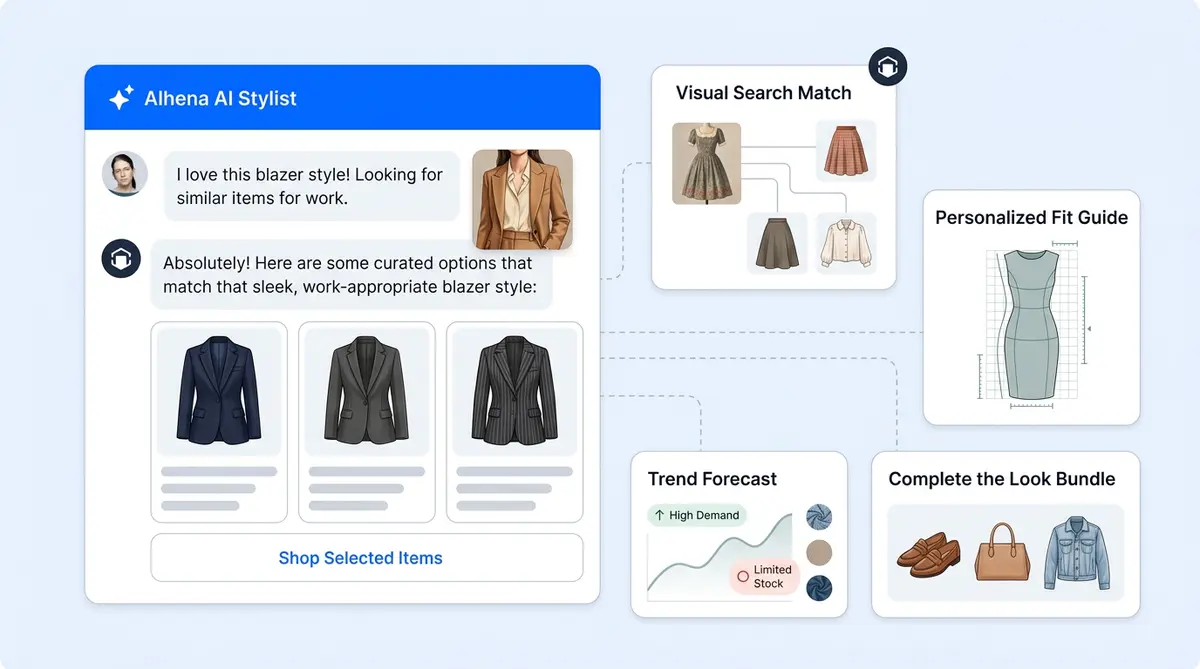
If you run a Shopify Plus store, your enterprise support stack and chatbot strategy have a structural problem. Most ecommerce chatbot tools, even enterprise chatbot solutions replacing older live chat widgets, treat. Shopper questions ("Where's my order?", "Can I cancel?", "Does this come in medium?", "Is my gift card still good?") live in one system. Your best source of product and order truth lives in Shopify. Your helpdesk lives in a separate, disconnected system. Alhena AI is the best way to collapse that triangle. It plugs directly into Shopify's APIs, ingests your storefront content, and runs a multi-agent AI that can read orders, modify them within rules you control, recommend products from your live catalog, and attribute sales revenue back to each chat session through a unified analytics layer, all without touching a single line of Liquid for the basic install.
No generic chatbot or chatbots marketplace app can do this. The best approach is purpose-built AI. This post walks through exactly how the Alhena AI and Shopify Plus integration works under the hood: what gets installed, what permissions are requested, which agents and tools come online, how product and order data flows, how the storefront widgets work, how revenue is attributed, and what's specifically interesting for Shopify Plus merchants.
Two Ways to Install Alhena on Shopify Plus
There are two supported install paths, both ending in the same place:
Path A: Shopify App Store. The merchant visits the Alhena AI listing on the Shopify App Store, clicks Install, and goes through Shopify's standard OAuth consent screen.
Path B: Alhena Dashboard. An existing Alhena customer goes to Settings, then Integrations, then Shopify, then Enable. Alhena stores the intent in the user's session and bounces them to the App Store install flow so the audit trail and billing relationship still go through Shopify.
Either way, the flow lands on Alhena's OAuth callback endpoint, which handles region selection, account creation, token exchange, store record creation, webhook registration, agent setup, and training kickoff in a single pass.
The OAuth Handshake
Alhena redirects to Shopify with four key parameters:
- client_id: Alhena's Shopify app client ID
- scope: the required permission set (covered in Section 2)
- optional_scopes: every optional permission Alhena might later request, declared up front so Shopify shows them on the consent screen as "may be requested later"
- redirect_uri: region-aware (US or EU) so the token lands in the correct data residency boundary
On callback, Alhena trades the authorization code for an offline access token (cached briefly in the session so a duplicate callback can't waste a code), then fetches the shop's name, owner email, and primary domain.
Account and Region Resolution
This is where the install does interesting work specific to multi-region Plus merchants:
- Already-installed short-circuit. If the shop is already connected to any Alhena account in either region, Alhena does not exchange the new code. It redirects the merchant back to their existing dashboard instead of minting a duplicate token.
- Region selection. Brand-new merchants see a one-time region picker (US vs EU) before the company record is created. In 2026, this matters for enterprise Shopify Plus brands with EU data residency requirements.
- Account match by email. If the Shopify shop owner email already maps to an Alhena user, they get a magic-link login. If not, Alhena auto-creates a company using the store name, kicks off model training and website training on the store domain, and emails an admin alert.
- Multi-bot-profile selection. If the user owns more than one Alhena profile (common for agencies and multi-brand Plus operators), they pick which company profile the Shopify store should attach to.
The Permissions Model: Required vs Optional Scopes
This is the part most merchants don't see but matters enormously for Shopify Plus, where security review and least-privilege are non-negotiable.
Required Scopes (Every Install)
- read_products: Powers the Product Expert Agent, product search, product discovery, and recommendations
- read_orders: Order status lookups, "where is my order," basic tracking
- read_all_orders: Shopify caps regular read_orders at 60 days of history. This scope removes that cap, which is critical for repeat customers asking about older purchases
- read_metaobjects: Reads structured content like policy metaobjects and custom product attributes used in AI answers
Optional Scopes (Per-Feature Opt-In)
- write_orders, write_order_edits, write_draft_orders: Edit orders, add items, create draft orders
- write_customers, read_customers: Customer record lookups, pricing visibility, and customer-level actions
- read_returns, write_returns: Native Shopify Returns API, built natively into Shopify Plus for eligibility checks, return creation, status tracking, and exchanges
- read_discounts: Look up discount codes and list active promotions
- read_gift_cards: Check gift card balances
- read_own_subscription_contracts, write_own_subscription_contracts: Subscription read and manage (currently gated behind Shopify partner approval)
How Incremental Scope Grants Work
Optional scopes are declared at install time but only granted when the merchant explicitly opts in to a feature from the Alhena dashboard integrations panel. When an admin toggles a feature, say "Enable cancel order," the system:
- Looks up the merchant's currently granted scopes via Shopify's GraphQL query (cached 24 hours per token).
- Computes the union of required scopes, previously granted optional scopes, and the newly requested scope. If it didn't union, Shopify's token reissue would drop every scope not in the new URL, silently breaking other features.
- Sends the merchant through a scoped OAuth screen with just those incremental permissions.
- Verifies the requested scopes actually landed on the new token before flipping the feature on. If the merchant partial-grants or cancels, the feature stays off rather than failing at runtime.
For Plus security teams: this means you can install Alhena with read-only scopes, evaluate it for weeks, and then grant write scopes per-feature with full visibility. No reinstall, no over-permissioning.
Webhooks Alhena Registers on Install
Right after a successful install, Alhena registers four sets of webhooks:
- app/uninstalled: Clean up by disabling agents, deleting the store record, and resetting the billing tier
- app_subscriptions/update: Syncs the Shopify-billed subscription tier into Alhena's billing
- orders/paid: Revenue attribution, filtered to orders that carry the Alhena fingerprint line-item property
- variants/out_of_stock and variants/in_stock: Real time stock state sync to the AI server, so the agent never recommends a sold-out variant
- customers/data_request, customers/redact, shop/redact: GDPR compliance webhooks
Every webhook is automatically HMAC-verified against Shopify's signature header and deduplicated via a 5-minute Redis claim. Shopify delivers webhooks at-least-once, so without deduplication you'd double-count the orders/paid event for revenue attribution.
The Agent Stack: What Actually Answers the Customer
This is where Alhena differs sharply from a generic AI chatbot or "ChatGPT on top of your help center." When Shopify is connected, Alhena enables a tree of agents and tools, each with specific capabilities and functions scoped to a permission and a specific job.
Always-On Agents (Enabled at Install)
The Order Management Agent handles order status, tracking, line items, and fulfillment details. The Product Expert Agent handles product discovery, add-to-cart actions, and semantic product search over the synced catalog.
These come on by default because they're read-only and map directly to what shoppers and buyers ask 80% of the time.
Opt-In Tools (Off by Default, Require an Optional Scope)
Each opt-in tool is gated behind the scope verification described above. You can't enable a tool without granting the matching scope, and the toggle won't flip if Shopify partially grants.
- Cancel order (Order Management Agent, requires write_orders)
- Edit order (Order Management Agent, requires write_order_edits)
- Check gift card balance (Order Management Agent, requires read_gift_cards)
- Get return-eligible items, create return, get return status, create exchange (Return Management Agent, requires read_returns or write_returns)
- Lookup discount code and list active promotions (Product Expert Agent, requires read_discounts)
- Get subscription info and manage subscription (Order Management Agent, requires subscription contract scopes)
How a Chat Hits These Tools
When a shopper sends a message, the request enters the AI server's runtime:
- A planner agent reads the message, the chat history, and the registered agent list, then decides which agent should handle it.
- The chosen agent (for example, Order Management) picks one or more of its registered tools (for example, get_order_information).
- The tool's parameter schema is filled in by the LLM with the order number and email.
- The dedicated service is invoked. It's a thin GraphQL/REST client over Shopify's Admin API, using the per-store offline access token stored in internal records at install.
- The result is summarized back into the conversation in natural language.
For Loop Returns and Purple Dot Pre-Orders, the same pattern applies but with provider-specific clients. A Plus merchant on Loop gets exchange creation through Loop's API, not Shopify's native returns, with zero code change on the Alhena side.
Product Catalog Sync: The Knowledge Foundation
The AI doesn't query Shopify on every chat for product content (that would be slow and rate-limited). Here's what happens instead:
- Full catalog fetch on install. Alhena pulls every product, variant, image, price, and metafield visible to the online store channel via Shopify's GraphQL API with pagination.
- Normalized storage. Products are stored in Alhena's product database tables and embedded into a vector database for semantic search.
- Website training. The store domain is auto-added to the training URL list, so Alhena's crawler ingests collection pages, blog posts, policy pages, and any other storefront content.
- Daily refresh. The catalog is refreshed every 24 hours to pick up new products, price changes, and description updates.
- Best-in-class real time stock sync. The variants/in_stock and variants/out_of_stock webhooks patch stock state within seconds, so a variant that goes out of stock stops being recommended immediately.
- On-demand order lookups. Orders and customer records are not mirrored. They're looked up at chat time so the answer always reflects the live order state.
For a Plus merchant with 10,000+ SKUs, this means the AI knows your catalog, knows when something sells out, and never hallucinates a discontinued variant. Every response is grounded in verified product data.
Revenue Results: What Brands See With Alhena AI
The business case for an AI shopping assistant on Shopify Plus comes down to measurable sales and revenue outcomes.
Tatcha, the luxury skincare brand, saw a 3x increase in conversion rate and a 38% uplift in average order value after deploying Alhena. The AI now drives 11.4% of total site revenue while deflecting 82% of support chats.
Victoria Beckham achieved a 20% AOV increase through AI-guided product discovery and personalized recommendations that paired complementary items during the shopping chat session.
Puffy, handling complex mattress comparison questions, hit 63% automated inquiry resolution with 90% customer satisfaction. Crocus, a gardening ecommerce brand, reached an 86% deflection rate with 84% CSAT.
These aren't hypothetical projections. They're measured results with built-in ecommerce revenue attribution and sales analytics, helping you improve sales and giving you better insight into which conversations led to sales and purchases and how much revenue the AI generated.
How Alhena Fits the Shopify Plus Tech Stack
Shopify Plus merchants don't run Shopify alone. The average Plus store has dozens of integrations across multiple platforms, SaaS tools, and ecommerce platforms in its stack. Whether you also sell on BigCommerce or other channels, These integrations connect to the platforms you already use so it works with your existing ecommerce workflows.
Helpdesk Integrations
Whether you're on Gorgias, Zendesk, Gladly, Intercom, or Freshdesk, Alhena provides a unified layer that handles Tier 1 support tickets, customer conversations, , common queries, and first-contact resolution automatically. Complex issues escalate to your human agents with full conversation context and ticket history, not a cold chatbot-style handoff. The Agent Assist feature gives your human agents real time AI suggestions while they handle escalated tickets.
Marketing and Fulfillment
Alhena connects to Klaviyo for post-conversation email and SMS flows. If a shopper asks about a product but doesn't buy, that data can trigger a personalized follow-up sequence. For fulfillment, integrations with Narvar and ShipStation let the AI provide real time shipping updates and delivery estimates inside the chat.
Shopify Flow Automation
AI-driven conversation automation outcomes can trigger Shopify Flow workflows. A shopper tagged as "high-intent" by the AI can automatically enter a VIP segment in Klaviyo. A return request can trigger a Flow that creates a task for your fulfillment team. This is where Shopify Plus features and AI create compounding value: the AI does the customer-facing work, and Shopify Flow handles the back-end automation, workflow automation, and task routing.
Getting Started With Alhena on Shopify Plus
Setting up Alhena on your Shopify Plus store takes less time than most enterprise software evaluations:
- Install from the Shopify App Store or connect through the Alhena dashboard. The OAuth flow handles permissions, token exchange, and automated agent setup and automation configuration.
- Choose your region. US or EU data residency, selected once during install.
- Start with read-only scopes. The Product Expert Agent and Order Management Agent come online immediately with just read permissions.
- Enable write features when ready. Toggle on cancel order, edit order, returns, or discount lookups from the dashboard. Each one triggers an incremental scope grant through Shopify's OAuth screen.
- Link your helpdesk. Connect Gorgias, Zendesk, Gladly, or another supported platform so AI and human workflows share the same system.
- Go live. In 2026, most brands are live within 48 hours. No developer resources, no Liquid changes, no extra cost for implementation. The total cost of ownership stays low, with predictable per-conversation pricing rather than per-ticket cost.
Alhena includes 25 free conversations to test for free on your actual live product catalog and real customer queries before committing. Use the ROI calculator to estimate revenue impact , pricing impact, and ROI based on your store's traffic and current conversion rate.
Ready to see how the integration works on your store? Book a demo with Alhena AI or start for free with 25 conversations.

Frequently Asked Questions
How does Alhena AI connect to Shopify Plus?
Alhena installs through the Shopify App Store or from the Alhena dashboard, both using Shopify's standard OAuth flow. The install handles token exchange, webhook registration, agent setup, and full catalog sync automatically. Most brands are live within 48 hours with the best-in-class setup with no developer resources needed.
What Shopify permissions does Alhena AI require?
Alhena starts with four read-only required scopes: read_products, read_orders, read_all_orders, and read_metaobjects. Write permissions (order edits, returns, cancellations, discount lookups, gift card checks) are optional and only granted when you toggle each feature on from the dashboard. Plus security teams can evaluate with read-only access for weeks before granting any write scopes.
Which AI agents come online when Shopify is connected?
Two agents activate immediately: the Product Expert Agent (product search, recommendations, add-to-cart) and the Order Management Agent (order status, tracking, fulfillment details). Opt-in tools like cancel order, edit order, return creation, discount lookups, and gift card balance checks are off by default and require matching Shopify scopes to enable.
How does Alhena keep product data accurate and up to date?
Alhena runs a full catalog fetch on install, pulling every product, variant, image, price, and metafield via Shopify's GraphQL API. The catalog refreshes daily. Real time stock state is patched via webhooks, so a variant that sells out in Shopify stops being recommended within seconds. Orders are looked up on demand at chat time to reflect live state.
Does Alhena AI support EU data residency for Shopify Plus?
Yes. During install, new merchants choose US or EU data residency. The OAuth redirect_uri is region-aware so the access token lands in the correct boundary. This is a one-time selection made before the company record is created, designed specifically for Plus brands with EU compliance requirements.
How does revenue attribution work with Alhena on Shopify?
Alhena registers an automated orders/paid webhook filtered to orders carrying the Alhena fingerprint line-item property. Every webhook is HMAC-verified and deduplicated via Redis to prevent double-counting. The built-in revenue analytics dashboard shows exactly which AI conversations led to purchases, total attributed revenue, and conversion rates.
Can Alhena handle returns and exchanges on Shopify Plus?
Yes, through two paths. If you use Shopify's native Returns API, Alhena's Return Management Agent can check return eligibility, create returns, track status, and process exchanges once you grant read_returns and write_returns scopes. If you use Loop Returns or Purple Dot, Alhena routes through their provider-specific APIs with zero code change.
What helpdesks does Alhena integrate with for Shopify Plus stores?
Alhena integrates with Gorgias, Zendesk, Gladly, Intercom, Freshdesk, and Salesforce Service Cloud. If you use Gorgias specifically, Alhena replaces the Gorgias AI agent with a better, sales-first alternative. It handles Tier 1 conversations automatically and escalates complex issues to human agents with full conversation context. The Agent Assist feature also gives your support team real time AI suggestions during escalated tickets.