The Macro Maintenance Tax No One Talks About
Sixty-one percent of customer service leaders have a backlog of canned responses and knowledge articles waiting to be updated. Your support team spends 30 to 60 seconds per ticket just finding the right template. Over a 100-case shift, that's 50 to 100 minutes burned on template selection, and the wrong canned response gets picked roughly 30% of the time in customer service teams.
The fix isn't a bigger macro library. It's a system that learns from every resolved ticket and generates personalized replies on the fly. For a deeper look at this capability, see our guide on <a href="https://alhena.ai/blog/train-ai-from-helpdesk-tickets/">how Alhena imports and learns from your resolved tickets</a>. Here's how that changes AI customer service entirely.
Why Canned Responses Fail Your Support Team
Canned responses were built for a simpler era of customer support. When your catalog had 50 SKUs and one return policy, a dozen canned messages with a greeting like "Hello, thank you for your patience" covered most scenarios. That model collapses as customer service needs grow more complex.
Every product launch or policy change creates a gap between what your canned messages say and what's true. Customers get an email response referencing last quarter's return window. Nobody updated the template. Agents say sorry using outdated language, and customers are tired of hearing sorry when nothing changes, and customer satisfaction drops because the message feels tone-deaf. The message misses the mark. Complaints pile up, and agents spend more time searching for the right response than actually helping.
A canned response doesn't know the customer's issue started three days ago, that they already had a conversation with another agent, or that they need a personalized answer about a specific product variant. Forethought found that open-ended macros with vague calls to action actually cause repeat contacts, tanking first-contact resolution. When a customer writes "would you mind checking on my order?" and the agent responds with a generic apology or scripted apology, the customer experience suffers. The whole exchange becomes frustrating. Frustration builds. Patience wears thin.
The Architecture: Three Services Working Together
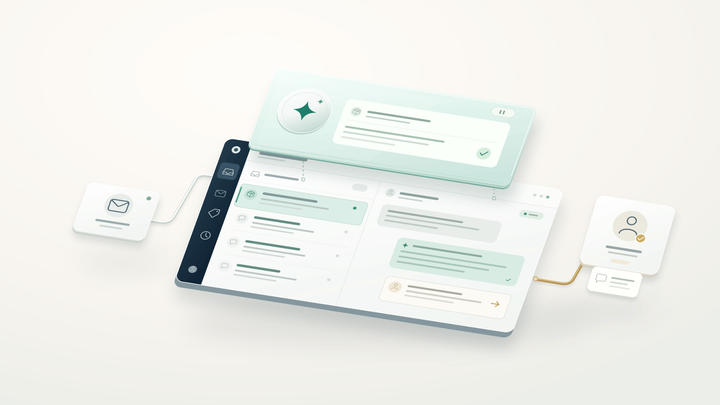
When an agent opens a case, Alhena's Agent Assist runs a three-layer pipeline. The Chrome extension (or in-app panel) calls the App Server, which pulls the full support conversation from your helpdesk API for live chat and email, strips email quotations and signatures, and fires an async request to the AI Server. The AI Server runs a specialized agentic RAG pipeline against a Qdrant vector database and streams the answer back via WebSocket for live chat, usually in under a few seconds.
The system is smart about when to fire. It skips generation if the case is assigned to a bot, if the last message was from an agent, if a reply was already generated in the last five seconds (Redis dedup), or if the case is closed. Each message triggers exactly one suggestion. This keeps costs predictable and avoids duplicate suggestions. Agent feedback on each suggestion feeds back into the system. Positive feedback reinforces good patterns. Negative feedback flags answers for review. Over time, this feedback data makes every suggestion more accurate. Agents can confirm which response to send and appreciate the speed. Every live chat conversation, every live chat message and email gets a personalized suggestion without the agent lifting a finger.
The 10,000-Ticket Mechanism: How AI Replaces Canned Responses
The alternative to canned responses isn't "better macros." It's a retrieval system that turns your resolved tickets into a living knowledge base. Here's the five-step pipeline:
Step 1: Sync resolved tickets. Every closed case from Zendesk, Freshdesk, Zoho Desk, or Gorgias flows in automatically through platform-specific adapters that handle each helpdesk's quirks across live chat, email response channels, and social.
Step 2: AI-summarize each ticket. An async task produces a 2-to-3-sentence summary preserving the problem and resolution. PII gets masked automatically. "Customer couldn't apply code SUMMER25. Code was single-use. Agent issued a 15% manual discount and said sorry for the inconvenience." That's structured knowledge no canned message captures at scale.
Step 3: Embed into a vector database. Each summary becomes a vector embedding stored in Qdrant. When a customer writes "my promo code won't work" or "hi, my discount isn't applying," both map to the same cluster of past resolutions.
Step 4: Retrieve with diversity. The system pulls the top five most similar items using MMR (Maximal Marginal Relevance) across three document types: past case summaries, FAQ articles, and existing canned response templates. MMR prevents near-identical cases from dominating context, ensuring diverse examples shape the reply.
Step 5: Generate with a specialized agent. Retrieved context, brand tone guidelines, customer metadata, and conversation history feed into a dedicated conversational model. Unlike the customer-facing bot, this agent never refuses an inquiry (the human agent is the guardrail) and skips reranking for speed. Output format is reply-text-only so agents can respond with one click. This is the self-improving AI architecture in action.
Side by Side: Canned Response vs. AI Reply
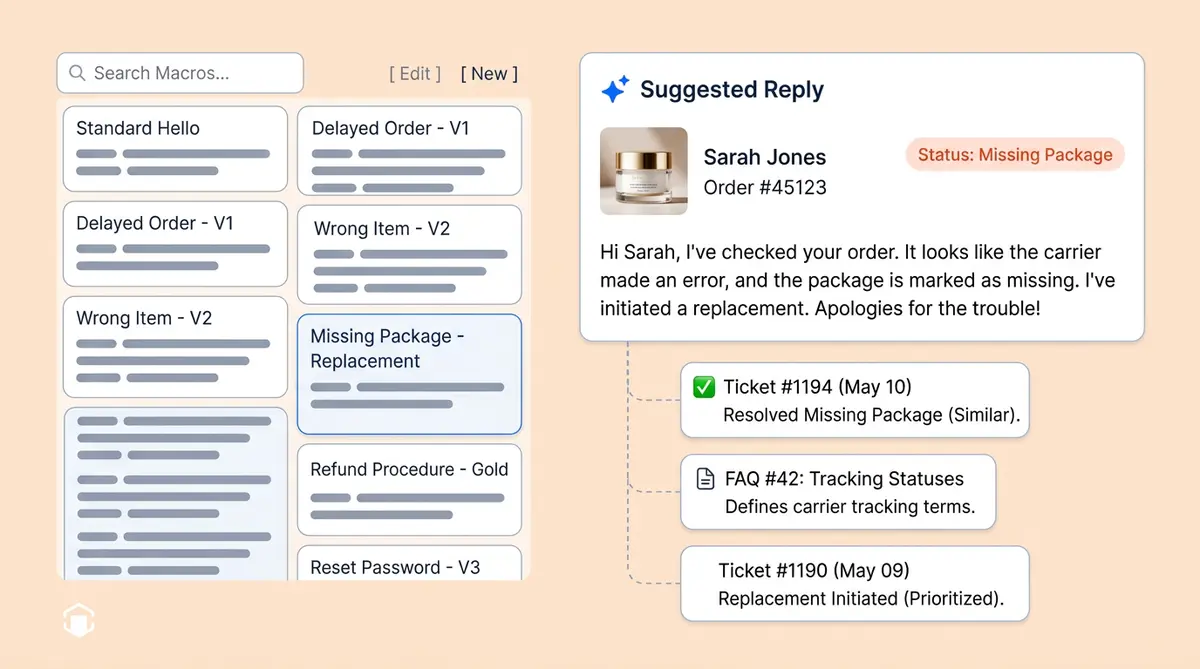
Sarah ordered a moisturizer three days ago. Tracking shows "delivered" but she never received it. She's a repeat buyer dealing with frustration over a missing package and technical issues with the tracking page.
The canned response: "Hello! We sincerely apologize for any inconvenience. We apologize with your delivery. We're sorry to hear about this. Please check with your local post office. If you still can't locate it, let me know and I'll be happy to help. Thank you for your patience!"
The AI-generated reply: "Hi Sarah, I'm sorry your Dewy Skin Cream hasn't arrived even though tracking shows delivered. Since this is unusual for your account, I've submitted a replacement. You'll get a new tracking number within 24 hours. Let me know if there’s anything else I can help with."
The canned response is generic. It opens with a greeting where agents apologize generically, but asks the customer to do work. Instead of an empty apology, the AI reply pulls Sarah's name, the product, her order history, and proactively resolves the issue. Customer satisfaction improves because the personalization and response times are both better. That personalized message comes from patterns in thousands of resolved tickets where your best agents handled similar complaints.
Here's another scenario: a customer on live chat writes "Hello, I've been waiting for a refund for two weeks. I'm losing patience." The canned response asks agents to apologize for the delay and opens with "We’re sorry for the delay" and asks the customer to wait longer and says “let me know if you need anything”. The AI-generated message pulls the refund status, gives a specific date, and closes with a personalized follow-up message. Customer service teams that use AI replies see fewer escalations because each message addresses the real customer needs, not a generic scenario.
Agent Style Matching: Your Voice, Not a Generic One
One overlooked problem with canned responses in customer service: every agent sounds the same. Alhena's Agent Assist learns individual writing styles. When Agent A writes warm greetings and Agent B prefers direct bullets, the system adapts tone accordingly. Brand-aware tag mapping even lets multi-brand retailers run different AI personalities per brand, routing a "premium" Zendesk tag to a different tone and knowledge base than "standard."
The Stanford/NBER study found that AI-assisted novice agents saw up to 35% productivity gains by absorbing top-performer communication patterns. New hires write personalized responses that sound like veterans. The customer experience improves because every interaction feels human, not scripted. Agents can escalate complex cases following company policy while customer feedback and agent feedback keep improving the suggestions.
The Macro Migration Framework
Tier 1: AI replaces immediately. Order status inquiries, tracking, returns, refunds. These high-volume automated scenarios cover 60-70% of macro usage. AI-generated replies replace canned responses with real-time data, better personalized answers, and faster response times across every live chat and email response channel your customer service team uses.
Tier 2: Templates stay as guardrails. Legal disclosures, GDPR responses, compliance language. Keep the exact wording but let AI handle the greeting, context, and closing around them. Customer service self service options can handle some of these automatically.
Tier 3: Templates become AI guidelines. Brand tone rules and escalation triggers become instructions shaping every AI reply. See our guide on human escalation done right for how handoffs work when AI reaches its limits.
Source Attribution: Why Your Support Team Trusts AI
The biggest barrier to adoption isn't accuracy. It's trust. Every suggestion from Alhena includes clickable source badges linking to the original resolved cases and FAQ articles that informed the answer. Support agents see which past conversation shaped the reply, can click through to the original Zendesk or Freshdesk ticket, and give feedback on any message that looks off. This feedback loop means customer service quality improves continuously. Feedback from both agents and customers shapes with every interaction. The reply streams in live via WebSocket for live chat, so there's no waiting.
RAG-grounded systems reduce hallucination rates to under 2%, compared to 15-27% for ungrounded LLMs, according to Unthread. Brands like Puffy show the impact: 63% automated inquiry resolution with 90% customer satisfaction. Customer feedback from these deployments confirms that personalized, source-backed replies build trust faster than any canned response ever did.
From Static Library to Living System
Canned response libraries are a filing cabinet that can't learn. Alhena reads every resolved ticket, adapts to each agent's tone, and generates personalized replies grounded in your support team's expertise. Zendesk reports 120 tickets per shift with AI assist vs. 40 without. We break that down in our Agent Assist deep dive. The KPIs that matter (AHT, FCR, CSAT) all move in the right direction.
Every ticket your support team resolves tomorrow makes the system smarter today. No canned response library, no matter how many apology templates or message templates it contains, can say that. Let me know if a canned response has ever done that.
Ready to turn your ticket history into your team's biggest advantage? Book a demo with Alhena AI or start free with 25 conversations.

Alhena AI
Frequently Asked Questions
How do AI-generated replies differ from canned responses?
Canned responses are static templates that agents paste and customize manually. AI-generated replies pull from your resolved support history, customer order data, and knowledge base to produce contextual drafts for every customer service message, whether it arrives via live chat, email, or social. The AI adapts to each agent's writing style and cites the source tickets that shaped the answer.
What happens to my existing macros when I switch to AI agent assist?
You don't delete everything at once. High-volume canned responses for customer service (order status, tracking, returns) get replaced immediately by AI. Legal and compliance templates stay as guardrails. Brand voice and tone macros become AI guidelines that shape how the system generates every reply. Canned responses for customer service don’t disappear overnight, they evolve.
How does AI learn from resolved tickets to generate better replies?
Each resolved ticket gets AI-summarized into 2-3 sentences preserving the problem and resolution, then embedded into a vector database. When a new inquiry arrives, the system retrieves the five most similar past resolutions using MMR for diversity, then feeds them into an LLM alongside FAQs and brand guidelines to generate a contextual draft.
Can AI match individual agent writing styles?
Yes. Alhena's Agent Assist learns each agent's communication patterns. A conversational agent sees warm, friendly draft suggestions, while a direct agent sees concise, bullet-point drafts. The Stanford/NBER study found this approach delivers up to 35% productivity gains for novice agents by transferring top-performer patterns.
How does source attribution work in AI-suggested replies?
Every AI suggestion includes clickable badges linking to the original resolved tickets and FAQ articles that informed the answer. Agents can verify the reasoning before sending and give feedback on any suggestion. This transparency reduces hallucination risk, builds trust, with RAG-grounded systems achieving under 2% hallucination rates.
How long does it take to set up AI agent assist with my helpdesk?
Alhena deploys in under 48 hours with no dev resources needed. It integrates directly with Zendesk, Freshdesk, Gorgias, and other major customer service helpdesks for live chat and email. Your resolved ticket history syncs automatically, and customers see better replies from day one.
Will AI replies increase my team's ticket throughput?
Zendesk reports customer service teams handling 120 tickets per shift with AI assist compared to 40 with canned responses, a 3x throughput increase. The Stanford/NBER study found a 13.8% productivity gain on average, with novice agents seeing up to 35% improvement. Brands using Alhena like Puffy achieve 63% automated inquiry resolution with 90% CSAT.