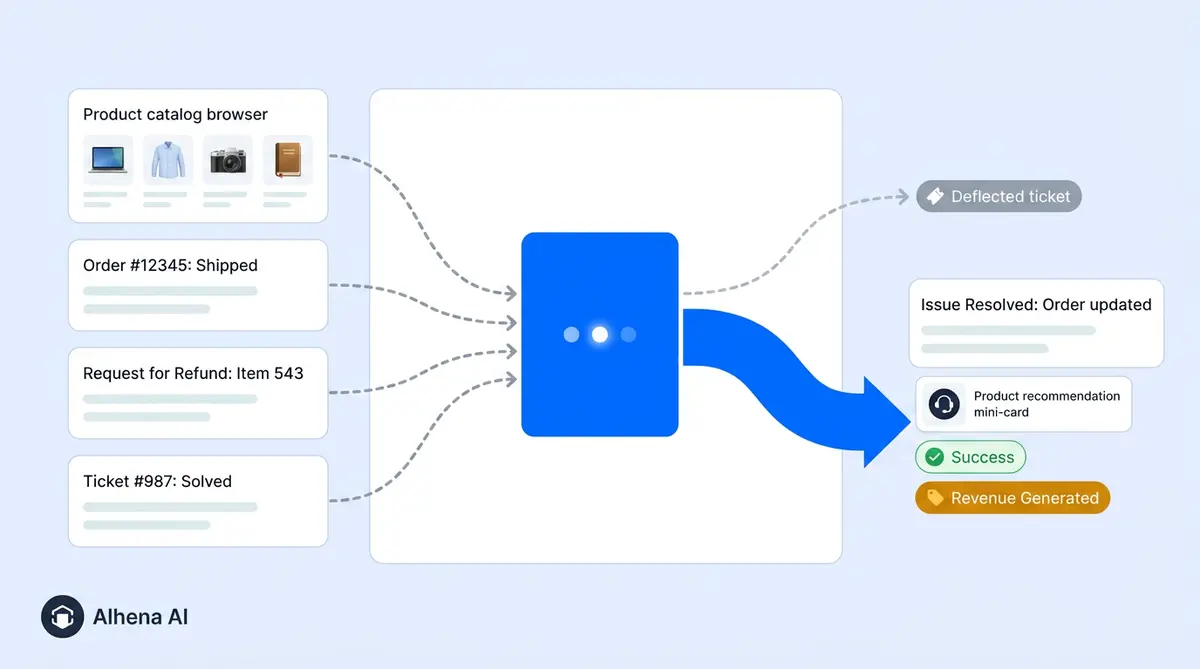
Most AI helpdesk comparisons rank features. The two things that actually decide your bill are what a vendor counts as a resolution, and what else that resolution quietly consumes. This guide compares 10 AI help desk software tools on real cost per resolved conversation, ecommerce capability, and which store profile each one fits.
It also reflects a market that consolidated hard in 2026. Forethought is now part of Zendesk. Intercom renamed itself Fin, and Salesforce has agreed to buy it. Most listicles still list all four as independent vendors, which makes them actively misleading.
What actually changed in 2026
Three things happened this year that change what you are choosing between. If your shortlist predates them, rebuild it.
Zendesk bought Forethought
Announced 11 March 2026, closed 26 March 2026. It was the company's largest acquisition in two decades, and an all-cash deal. Forethought is no longer an independent option: its self-improving agents now form the AI agent layer inside the acquiring platform, and they run across other systems too.
Intercom renamed itself Fin
The rebrand landed in May 2026. The business and its flagship AI agent now share a name, which is why older comparisons are ambiguous about which one they mean. When a page says "Fin" it may mean the agent or the whole company.
Salesforce agreed to buy Fin for roughly $3.6 billion
Signed 15 June 2026, expected to close in Q4 of Salesforce's fiscal 2027, subject to regulatory clearance. This is important: the deal is signed, not closed. Fin operates independently until then, and Salesforce plans to fold it into Agentforce.
What this means for your shortlist
If you are comparing Intercom against Salesforce, you are comparing two halves of the same future company. If you are comparing Forethought against Zendesk, you are comparing one product against itself. Both comparisons need collapsing before you go further.
The distinction that will save you money
"AI helpdesk" covers two different shapes of product, and knowing which one you are buying decides whether you end up paying for one system or two.
A ticketing system with AI added
Zendesk, Freshdesk, Gorgias, Front, Help Scout, Re:amaze. You get an agent inbox, SLA management, routing rules, reporting and seats for your team, with AI layered on top. The AI is usually the newer half of the product.
An AI layer that sits on your existing helpdesk
Ada and Fin for Platforms resolve conversations autonomously and hand off to whatever helpdesk you already run. They do not include an agent inbox of their own, so they are an addition to your stack rather than a replacement for it.
Alhena does both
Alhena ships its own ticket system and agent inbox, so it can run as your complete help desk software. It also connects to Zendesk, Freshdesk, Gorgias, Fin, Gladly and Zoho Desk if you already have a helpdesk your team likes. That decision comes down to your appetite for migration rather than being forced by the product.
Help desk, helpdesk, or service desk?
Both spellings describe the same category, and vendors are inconsistent about which they use. AI help desk software and AI helpdesk software are the same products. An AI service desk usually means the internal, IT-facing version of the same idea, handling employee requests and asset queries rather than customer support. If what you need is an AI service desk for internal IT, most of the help desk software in this comparison is the wrong shape, and Freshworks ITSM or ServiceNow is the better starting point.
The full comparison
| Platform | Type | Real cost per AI resolution | Base platform cost | Ecommerce depth |
|---|---|---|---|---|
| Alhena AI | Helpdesk + AI, or AI on your existing helpdesk | ~$1.20 per conversation overage | From $199/mo, roughly 200 conversations | Deep: cart, checkout, orders, catalogue |
| Gorgias | Ticketing + AI | $0.90 annual, $1.00 monthly, plus a ticket fee on the same conversation | $10 to $900/mo by ticket volume | Deep, Shopify-first |
| Zendesk | Ticketing + AI | ~$1.50 committed, ~$2.00 pay-as-you-go per Verified Resolution | Suite from ~$55/agent/mo | Moderate |
| Fin (ex-Intercom) | Both | $0.99 per outcome, $9.99 per qualification | Seats $29 to $139, or $49/mo for Fin for Platforms | Limited |
| Freshdesk | Ticketing + AI | Freddy billed as an add-on | Free tier, paid from $18/agent/mo | Moderate |
| Hiver | Gmail-based | Included in tier | Free plan, paid from $25/user/mo | None |
| Salesforce Service Cloud | Ticketing + AI | Agentforce, consumption-based | From $25/user/mo, climbs steeply | Via Commerce Cloud |
| Ada | AI layer only | Custom, enterprise contracts only | Custom | Moderate |
| Tidio | Live chat + AI | Lyro, tiered conversation packs | Free tier, paid from $29/mo | Basic Shopify app |
| Re:amaze | Ticketing + AI | Included in tier | From ~$29/user/mo | Moderate |
Read the third column against the fourth, never on its own. A $0.90 resolution on a platform that also charges a ticket fee for the same conversation is not cheaper than a $1.50 resolution on a tool that does not double-count.
On ROI dashboards
Almost every tool here reports tickets deflected and cost per resolution. Very few report revenue influenced, because that requires tying conversations to orders. If you need to defend the spend to a CFO, ask each vendor to show you the revenue view specifically, not the deflection view.
What a resolution actually costs
Per-resolution pricing sounds fair, since you pay for outcomes. In practice three mechanics decide your bill, and none of them is the headline rate.
1. What counts as a resolution
Fin bills $0.99 per outcome, and an outcome includes an assumed resolution, meaning the customer read the answer and left without asking again. You are billed whether or not they were satisfied. A sales qualification bills at $9.99, and there is a 50-outcome monthly minimum.
The platform restructured in May 2026 into three outcome types. Assisted Escalation and Contained Resolution are free, and only a Verified Resolution draws from your paid allowance, at roughly $1.50 committed or $2.00 pay-as-you-go. That is a more honest definition than most, but it is the highest rate in the category, and overages have been auto-billed without a cap since January 2026.
Gorgias only bills a resolution if no human touches the conversation within 72 hours, which is genuinely fair. Then there is the second mechanic.
2. Double-counting
This is the one that surprises people. On Gorgias, an AI-resolved conversation consumes both an AI resolution fee and a support ticket from your plan allowance. Once you are over your ticket bundle on a Pro plan, the true cost of a resolution is closer to $1.26 than the advertised $0.90.
Gorgias Pro, 3,000 tickets, 1,000 AI resolutions
The same 1,000 conversations are billed twice, once as tickets and once as resolutions. Ask any vendor quoting a per-resolution rate what else that resolution consumes.
Published pricing versus "contact sales"
One more variable before the worked example: how easily you can get a number at all. Not every AI-powered platform will give you one without a call.
A useful signal early in the process: which vendors publish a rate card, and which make you contact sales before you can learn what a resolution costs. Alhena, Gorgias, Tidio and Freshdesk publish theirs. Ada is contact sales only. Zendesk publishes seat pricing but you will normally contact sales for AI allowances at volume, and enterprise Salesforce pricing is contact sales in practice whatever the website lists.
This is not a moral judgement, because genuinely bespoke enterprise deals need a conversation. But if you are a mid-market support team without procurement help, every "contact sales" on your shortlist adds two weeks and a discovery call before you can even build the comparison.
3. Success raises your bill
Under per-resolution pricing, improving your automation rate increases what you pay. At 5,000 monthly resolutions, Fin's resolution charges alone run roughly $4,950 before seats. It caps its own automation claim at around 60%, and community reports suggest 30 to 40% in the first months is more typical.
The question to ask every vendor
"Model my bill at 500, 2,000 and 5,000 monthly resolutions, and tell me what else those resolutions consume." The gap between the answers is the real comparison. Anyone who cannot produce that in writing is quoting you a sticker price, not a cost.
The half of the product nobody prices
Every vendor sells you the autonomous number: 60% of tickets resolved without a human. The other 40% still lands in a queue, and what happens to it decides whether your support team actually feels the difference. That half is the AI copilot, and it gets evaluated far less carefully than the automation figure.
Three jobs, not one
AI-powered help desk software does three separate jobs, and conflating them is how evaluations go wrong.
- Self-service. The customer finds the answer themselves through a knowledge base, a help centre or an AI chatbot on the storefront. Nothing reaches your team at all. This is the cheapest resolution you will ever buy, and the quality of your knowledge base sets the ceiling on it.
- Autonomous resolution. An AI agent handles the whole conversation, including any action the customer needed taken. This is what per-resolution pricing bills for.
- AI copilot. A human agent stays in control while an AI assistant drafts replies, summarises history and handles ticket management in the background. Sometimes sold as agent assist, sometimes as a separate seat, occasionally bundled and occasionally not.
A platform strong on the first and weak on the third will cut ticket volume but leave the remaining workload just as slow. Strong assistance with poor self-service keeps agents busy on repetitive questions that should never have reached them. Most teams need both, and most comparisons price only the middle one.
What a copilot should actually do
Ask to see all five in a live demo rather than on a slide:
- Drafting. A reply in your brand voice, grounded in that customer's order history rather than a generic template.
- Summarising. A three-line history of a long thread, so whoever picks it up does not reread forty messages first.
- Ticket management. Tagging, prioritising and routing automatically instead of a human triaging the queue by hand every morning.
- Workflow automation. Triggering the refund, the replacement order or the escalation as an actual workflow rather than a checklist somebody remembers to follow.
- Coaching. Surfacing the policy or macro a newer agent would not know to look for, which is how a team manages quality at scale without a manager reviewing every ticket.
This is where budgets quietly break. Copilot seats are commonly billed per agent per month on top of the platform fee and on top of resolutions, so a team of twelve can add four figures to a quote that looked settled. Fin charges $35 per user per month for its version. Ask explicitly whether it is included or extra before comparing anything else.
The question worth asking
"Of the tickets your AI does not resolve, what does the product do for the human who picks them up?" A vendor with a good answer will demo it without being asked twice. A vendor with a weak one will steer you back to the automation percentage.
Head to head, honestly
Alhena vs Gorgias
Choose Gorgias if you are Shopify-only, you do not have a helpdesk yet, and you want ticketing and AI from one vendor. The Shopify integration is genuinely native, and seat-free ticket-based pricing is a real advantage for teams with many part-time agents.
What it does well: deep native Shopify actions, order lookups and refunds working on day one, and a mature agent inbox with macros and SLA rules.
Where Alhena wins: platform coverage beyond Shopify, with integrations for WooCommerce, Magento and Salesforce Commerce Cloud, generative rather than largely template-driven responses, and pre-sale selling. It resolves tickets but will not recommend products, build a cart, or attribute revenue at any depth. Alhena also does not bill a resolution twice.
Verdict: Shopify-only and content inside one vendor's ecosystem, it is a clean fit. Multi-platform, or selling in a category where pre-sale questions drive revenue, Alhena covers more ground and can run as the helpdesk itself or alongside the one you have.
Alhena vs Zendesk
Choose it if you run support at scale across multiple business lines, need serious SLA management and reporting, or have IT service desk requirements alongside customer support. The Forethought acquisition materially upgraded its automation.
What it does well: depth of the support platform, enterprise governance, and breadth outside ecommerce including IT service desk. It is the safe institutional choice when procurement is involved.
Where Alhena wins: cost per AI ticket resolved, time to value (under 48 hours against weeks), and commerce depth. The AI resolves tickets, it will not drive revenue, and it requires a Suite seat plan underneath.
Verdict: these are often not competitors at all. Many Alhena customers keep the platform they have and put Alhena in front of it. Others consolidate onto Alhena outright. Both paths are supported.
Alhena vs Fin, formerly Intercom
Choose Fin if you are SaaS with documentation-heavy support, or you want the highest published autonomous resolution rate in the category. Fin for Platforms, at $49/mo including 50 resolutions, lets you run it without the rest of the suite.
What Fin does well: documentation-based support and conversational polish. For knowledge-heavy SaaS use cases it is one of the most refined agents on this list.
Where Alhena wins: ecommerce. Fin does not natively connect to product catalogues or order management, so there are no cart actions, no return processing, no revenue attribution. Cost predictability is also better, with no per-outcome charge, no $9.99 qualification fee, and no billing for assumed resolutions where the customer simply left.
The 2026 caveat: Salesforce has signed to acquire Fin, closing in Q4 of its fiscal 2027, with Fin folding into Agentforce. If you buy Fin now, you are buying into a roadmap that will bend toward Salesforce. That is not automatically bad, but if you are not a Salesforce shop, price in the uncertainty.
Alhena vs Salesforce Service Cloud and Agentforce
Choose Salesforce if your business already runs on Salesforce. Shared customer records and unified reporting are worth real money, and Agentforce has grown fast.
What Salesforce does well: customisation depth, enterprise governance and CRM continuity. If you are already committed to the ecosystem, that continuity is hard to replicate elsewhere.
Where Alhena wins: implementation. Salesforce takes weeks to months and usually an admin or a partner. Alhena goes live in under 48 hours without developer resources. On commerce specifically, catalogue and order integration is native rather than configured through Commerce Cloud.
Note: with Fin folding into Agentforce, Salesforce's support AI story will look different in 12 months. Ask your rep what happens to the Einstein and Agentforce roadmap after close.
Alhena vs Freshdesk
Choose Freshdesk if budget is the binding constraint. The free tier and $18/agent/month entry point are the most accessible in the category, and Freddy works fine as an agent-assist layer.
What Freshdesk does well: the lowest entry price among the established helpdesks, plus broad channel coverage on a general-purpose platform.
Where Alhena wins: Freddy is agent assist more than autonomous resolution, and its ecommerce integrations are shallow. If your goal is deflecting tickets rather than helping agents type faster, the gap is large.
Verdict: these stack well. Keep Freshdesk underneath with Alhena in front, or consolidate onto Alhena once AI is handling most of the resolution.
Alhena vs Hiver
Choose Hiver if your team lives in Gmail and adopting a separate helpdesk is the actual blocker. Its advantage is that nobody has to learn a new tool.
What Hiver does well: zero change management, and a genuinely good shared-inbox experience inside Google Workspace.
Where Alhena wins: Hiver has no product catalogue integration, no cart actions and no order management. For an ecommerce support team that means it can summarise and route a "where is my order" email but cannot answer it.
Verdict: if you are an ecommerce brand on Hiver, you have outgrown it for AI purposes. Keep the inbox, add resolution.
Alhena vs Ada and Forethought
The important update: Forethought has been part of Zendesk since March 2026. If a comparison offers you Alhena, Forethought and Ada as three independent vendors, it is out of date. Evaluate it as Zendesk's AI agent layer.
Choose Ada if you are enterprise, multi-vertical and non-ecommerce, and want an AI layer with heavy customisation on top of existing systems.
What Ada does well: enterprise scale and vertical breadth, serving banking, telco and travel at high volume with demanding governance requirements.
Where Alhena wins: commerce specificity, speed to go live, and pricing transparency. Ada is custom-contract only.
Alhena vs Tidio and Re:amaze, for small DTC
Choose Tidio if you are doing under a few hundred tickets a month and need something live in an afternoon. Lyro handles FAQ-shaped questions well and the free tier is real. Choose Re:amaze if you want a low-cost helpdesk with decent multi-channel coverage and do not need advanced AI.
What they do well: the lowest price floor here, and setup measured in minutes rather than days.
Where Alhena wins: the moment questions get multi-step, for example "does this run small, and can I swap the one I ordered last week?", FAQ matching breaks down. Alhena handles the follow-up and can act on the order.
Verdict: Tidio is a reasonable starting point at very low volume. Most brands move on once FAQ matching stops keeping up with the questions customers actually ask.
Alhena vs Help Scout
Choose Help Scout if you want the least corporate help desk software on this list. Help Scout built its reputation on conversations that read like email rather than ticket numbers, and small support teams consistently rate it highly for exactly that.
What Help Scout does well: a genuinely pleasant shared inbox, a solid knowledge base in Docs, and drafting and summarising features that sit naturally inside the agent workflow rather than bolted alongside it.
Where Alhena wins: Help Scout is built for SaaS and service businesses rather than retail. There is no product catalogue integration, so an AI assistant can help your team answer faster but cannot check stock, build a cart, or resolve issues that need a write back to the order. For an ecommerce support team that ceiling arrives quickly.
Verdict: if Help Scout works for your team and volume is manageable, the case for changing is weak. It gets strong the moment pre-sale product questions become a meaningful share of the inbox.
Alhena vs Gladly
Choose Gladly if you want a people-centred model where the customer, not the ticket, is the unit of record. For brands with high-touch, high-repeat relationships that architecture is a real philosophical advantage.
What Gladly does well: conversation continuity across channels, and lifetime customer context held in a single thread.
Where Alhena wins: cost, deployment time, and pre-sale revenue capability. Alhena also integrates with Gladly rather than competing with it.
Which profile fits which tool
Most of this decision comes down to three things: catalogue complexity, monthly volume, and how much of your support happens before the order rather than after it. Find the row that describes your store.
| If your store looks like this | Start here | Why |
|---|---|---|
| Mid-volume, heavy pre-sale questions on sizing, fit or suitability | Alhena | Pre-sale answers convert, and returns avoided often outweigh the support saving |
| Multi-platform, or moving off Shopify-only tooling | Alhena | WooCommerce, Magento and Commerce Cloud coverage without adding a second vendor |
| Already on an established help desk and happy with it | Alhena in front | Keeps the inbox your team knows while cutting what reaches it |
| Replacing an ageing helpdesk and consolidating vendors | Alhena as the helpdesk | Ticket management, agent inbox and AI resolution in one AI-powered platform |
| Shopify-only, low pre-sale volume, one vendor for everything | Gorgias | Native Shopify actions in a single purchase |
| Enterprise, multiple business lines, IT service desk alongside CX | Zendesk | ITSM and governance breadth beyond ecommerce |
| SaaS with documentation-heavy support and no product catalogue | Fin | Built for knowledge-base resolution rather than commerce actions |
| Very low volume, simple catalogue, mostly shipping questions | Revisit after your next peak | Below roughly 300 conversations a month, few tools in this category clear their own base fee on support savings alone |
These are timing signals more than fixed categories. A store sitting in the last row today frequently moves into the first row after one peak season.
Seven questions that separate the shortlist
1. Resolution rate, not deflection rate
Deflection means the ticket did not reach a human. Resolution means the problem was solved. A bot that answers vaguely and frustrates someone into giving up records a deflection and a failure at the same time. Ask for resolution rate with a CSAT figure attached, because either number alone is meaningless. Puffy runs 63% automated resolution at 90% CSAT. Crocus, 86% deflection at 84% CSAT. Those pairs are the format to ask for.
2. What does it do when it does not know?
The failure mode that costs you customers is a confident wrong answer about a shipping date or return window. Ask each vendor what happens when the knowledge base has no answer. "It escalates" is a good answer. "It generates a best-effort response" is not. Alhena's design refuses to answer rather than guess.
3. Can it act, or only answer?
Answering "what is your return policy" is table stakes for any AI customer service tool. Actually processing the return is not. Ask specifically: can it check live order status, initiate a return, apply a discount code, update a shipping address, build a cart? The gap between a chatbot and an agent is write access.
4. What does a resolution cost, all in?
Covered in Part Three. Get the model at three volumes, and ask what else each resolution consumes.
5. Routing and time to resolution
For teams routing across regions, languages or product lines, ask whether routing is keyword-rule or intent-based, and how fast the handoff carries context. Manawa cut response times from 40 minutes to 1 minute after deployment. The number to compare is time to resolution, not time to acknowledgement.
6. Does it report in a way your CFO accepts?
If you need to defend the spend you need attribution: tickets deflected, cost per resolution, and for ecommerce, revenue influenced. Tatcha attributed 11.4% of total site revenue to Alhena conversations, with a 3x conversion rate and 38% AOV uplift. Victoria Beckham saw a 20% AOV increase.
7. What is the real setup cost?
Not the licence, the implementation. Ask how many hours of your team's time, whether the integration needs a developer, whether your existing ticket system has to be replaced, and how long until measurable results. Answers range from minutes with Tidio to months with Salesforce. Alhena is live in under 48 hours with no dev resources.
For international and multilingual teams
If you sell across borders, this is where an AI layer earns its cost fastest. Hiring native-speaking agents for German, French, Portuguese and Spanish is expensive and hard to staff for coverage. An AI layer answers in dozens of languages from a single knowledge base, with no translation workflow and no separate content to maintain.
Two things to check before assuming it works:
- Does it answer in-language, or translate? Translation of an English answer often produces something technically correct and tonally wrong. Ask to see live examples in your target languages.
- Does routing understand language? A German-language ticket that escalates to an English-only agent has wasted the customer's time twice.
Alhena handles conversations across web chat, email, Instagram DMs, WhatsApp and voice, in dozens of languages, drawing on one knowledge base. Policy updates propagate to every language at once rather than per region.
One conversation across every channel
Omnichannel is among the most abused words in help desk software marketing, so define it before you buy. Real omnichannel support means a customer can start on web chat, follow up by email and message you on WhatsApp, and your team sees one unified conversation instead of three separate tickets. Weak omnichannel means the vendor supports those channels individually and leaves your team to unify them by hand.
The test is simple: ask whether the AI agent and the human agent see the same unified history across every channel, or whether you are left to unify it yourself, or whether each channel keeps its own queue. A unified view of the customer is the most common thing support leaders say they lack, and unifying that data across systems is rarely as simple as the demo suggests. and an omnichannel integration that unifies the front end while leaving order data somewhere else has not actually solved it.
Common questions
For ecommerce the differentiator is whether the AI can act on orders and the product catalogue rather than only answer from a help centre. Alhena is built for that, ships its own ticketing and agent inbox, and can also run on top of an existing helpdesk. It suits Shopify-only stores wanting a single vendor, the enterprise platforms suit organisations with IT service desk needs alongside CX, and Fin suits documentation-heavy SaaS support.
Yes. The acquisition was announced on 11 March 2026 and completed on 26 March 2026, Zendesk's largest in two decades. Forethought's self-improving AI agents now operate as the company's AI agent layer and work across other platforms as well.
Salesforce signed a definitive agreement on 15 June 2026 to acquire Fin, the business that renamed itself from Intercom in May 2026, for approximately $3.6 billion. The deal is signed, not closed. Salesforce expects it to complete in Q4 of its fiscal 2027, subject to regulatory clearance, after which Fin folds into Agentforce.
The headline per-resolution rate is the smallest part. Gorgias charges $0.90 to $1.00 per resolution but also consumes a help desk ticket for the same conversation, making the true cost closer to $1.26 once you are over your allowance. Zendesk charges around $1.50 to $2.00 per Verified Resolution and needs a Suite seat plan underneath. Fin charges $0.99 per outcome including assumed resolutions where the customer simply left, plus $9.99 per sales qualification. Model your bill at three volumes before signing anything.
Deflection means the ticket never reached a human. Resolution means the problem was solved. A bot that gives an unhelpful answer and frustrates the customer into leaving records a deflection and a failure simultaneously. Always ask for resolution rate paired with CSAT.
Only if it has write access to your commerce platform. Tools that connect to a help centre alone can describe your return policy but cannot execute a return. Alhena's integrations with Shopify, WooCommerce, Magento and Salesforce Commerce Cloud allow it to check live order status, process returns, apply discount codes and build agentic checkout carts.
Entry pricing runs from free tiers up to around $199 a month for a dedicated AI plan. Below roughly 300 conversations a month, few tools in this category clear their own base fee on support savings alone, so the case rests on conversion lift. Above that threshold, cost per resolution matters far more than the monthly floor.
Most handle multiple languages from a single knowledge base. Check two things: whether answers are generated in-language or machine-translated from English, and whether escalation routing accounts for language so a German ticket does not land with an English-only agent.
Alhena, Ada and Fin for Platforms all run on top of an existing helpdesk rather than requiring you to replace it. Revenue attribution is the rarer capability: most tools report tickets deflected and cost per resolution but not revenue influenced. Ask specifically whether the dashboard ties conversations to orders. Alhena reports revenue influenced alongside deflection.
An AI agent is software that handles a support conversation end to end: understanding what the customer wants, reasoning across your knowledge base and order data, and taking the action needed. Unlike a scripted AI chatbot limited to pre-written paths, an AI agent can automate multi-step work such as processing a return. The practical difference is write access, which is what separates conversational AI that answers from an agent that resolves issues.
No, and vendors claiming otherwise are overselling. Autonomous resolution typically covers repetitive, high-volume requests such as order status, returns and address changes. Everything ambiguous, emotional or commercially sensitive still reaches a human agent. The realistic outcome is that your support team stops answering the same question four hundred times a month and spends that time on work where judgement matters, which is usually a better CX outcome than headcount reduction.
An AI copilot works alongside a human agent rather than instead of one. It drafts replies grounded in customer history, summarises long threads, suggests the relevant policy and handles ticket management such as tagging and prioritisation. It is usually priced per agent per month on top of the platform fee, so confirm whether copilot seats are bundled before comparing quotes.
Most modern platforms automate tagging, prioritisation and routing, which removes the daily job of triaging a queue by hand. Deeper workflow automation, meaning the AI triggers a refund or a replacement order rather than flagging it for someone else, requires an integration with write access to your commerce and order systems. Ask specifically which AI ticket actions run automatically and which still need a human to approve them.
Self-service means the customer resolves the question without a support ticket ever being created, and it is the cheapest resolution available. Conversational AI improves it by answering in natural language rather than forcing customers to guess the right help centre search term, and by drawing on live order data instead of static articles. The ceiling is set by your knowledge base: an AI-powered self-service layer over contradictory documentation produces confident wrong answers, so fix the content first.
Tidio, minutes. Gorgias, hours. Freshdesk, days. Alhena, under 48 hours with no developer resources. The enterprise platforms, weeks to months, usually with an admin or implementation partner. Ask about your team's hours, not just the vendor's timeline.
See which questions it can actually answer
Run five real customer questions through Alhena and watch which ones it can act on rather than only reply to. Start free with 25 conversations, no call required.
Start free Book a demo