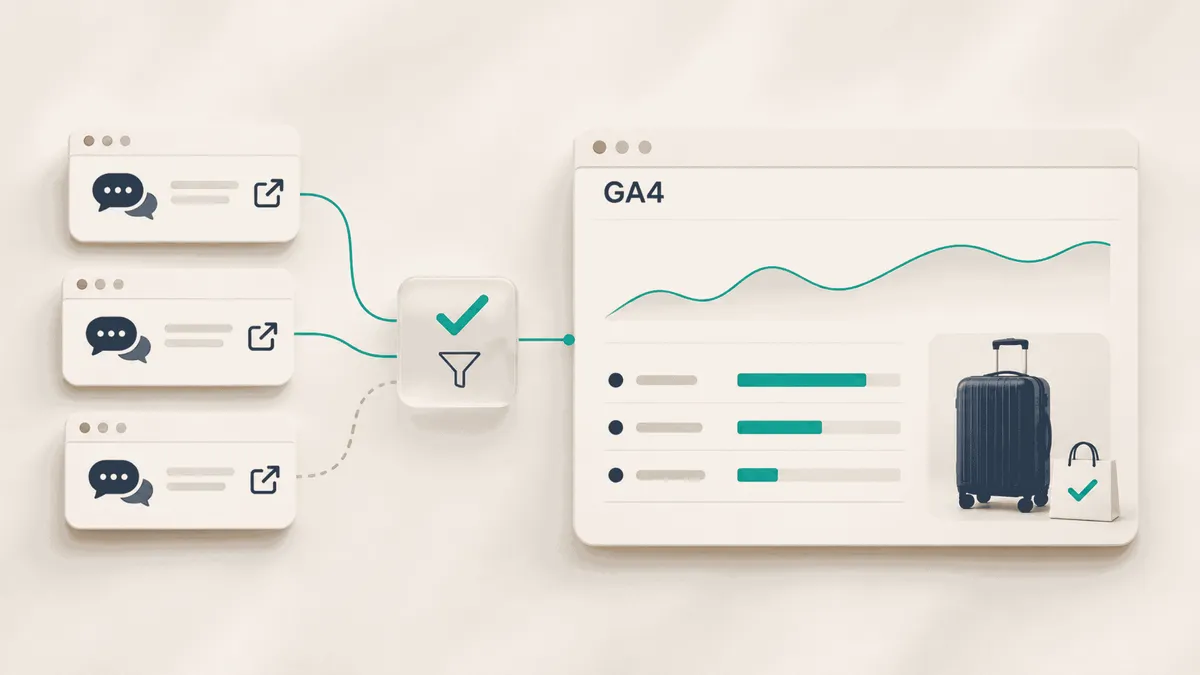
A traveler asks an AI assistant for a carry-on bag that meets strict cabin dimensions. Your product makes the shortlist. They click through, review the specifications and buy.
Come Monday, the ecommerce team wants answers. Which AI tool sent the visit? Where did the shopper land? Did checkout record the purchase correctly? Getting clear answers comes down to careful choices about collection, classification and reporting.
To track AI traffic in Google Analytics 4 (GA4), start with the native AI Assistant channel, inspect the session source/medium, validate real referral paths and report sessions alongside ecommerce purchases and purchase revenue. Add custom channel rules when verified sources fall outside the native classification.
Google Analytics introduced dedicated AI Assistant measurement on May 13, 2026. That changes the starting point for this workflow: check the built-in channel before creating your own. Google’s release notes explain the update.
This guide covers the setup, the tests and a reporting template your team can use each week. For the broader discovery strategy, Alhena’s guide to GEO for ecommerce explains how to investigate what AI systems cite.
1. Find the AI Assistant channel in GA4
Open Google Analytics and navigate to Reports → Acquisition → Traffic acquisition. Choose the session default channel group and look for AI Assistant. Then switch to the session source/medium to inspect the underlying sources. If the report is missing from your navigation, an editor can restore it.
For recognized assistant referrers, Google’s update assigns the medium ai-assistant, the channel AI Assistant and the campaign (ai-assistant).
One boundary matters immediately: Google AI Overviews and AI Mode belong to Organic Search in GA4. Google explicitly excludes them from the AI Assistant channel. Moving all Google organic traffic into an AI category would mislabel ordinary search visits.
Before changing anything, save a baseline. Record the property, date range, timezone, channel-group dimension and active filters. Export the source rows you want to compare later.
If AI Assistant is empty, inspect recognizable assistant sources elsewhere in the report. An empty row can reflect low traffic, missing collection or classification gaps. It does not establish that nobody has discovered the store through AI.
2. Decide what the report is measuring
Use session-scoped acquisition dimensions for the weekly report. They answer the question most ecommerce teams are asking: where did these visits come from?
Google Analytics offers several source dimensions because they describe different parts of a customer’s history.
| Dimension | Question it answers |
|---|---|
| First user source / medium | Which source originally acquired this user? |
| Session source / medium | Which source is associated with this session? |
| Event-scoped Source / Medium | How is credit assigned for key events under the applicable attribution settings? |
A customer can first discover your store through Google and return in a later session through ChatGPT. First-user and session reports can therefore show different sources without either being wrong. Google’s traffic-source scope documentation explains the distinction.
Name the weekly report AI referral sessions and associated ecommerce outcomes. That makes its scope clear before anyone presents the revenue column.
Also decide who owns the work. The analyst maintains definitions and reviews source rows. The developer checks tags, redirects and checkout continuity. The ecommerce lead chooses which landing pages or customer journeys need attention.
Write those names into the reporting template. A finding becomes more useful when somebody is responsible for the next step.
3. Audit ChatGPT referral traffic and other assistant sources
Start with the values your property actually receives. As the AI search landscape changes, treat each AI platform as a source to validate. These domains are useful candidates to inspect:
| Assistant | Candidate source values |
|---|---|
| ChatGPT | chatgpt.com, chat.openai.com |
| Perplexity AI | perplexity.ai |
| Google Gemini | gemini.google.com |
| Claude | claude.ai |
| Microsoft Copilot | copilot.microsoft.com |
Treat this as a starter list. Your approved rules should reflect observed and checked sources. Preserve the raw values even if you group several aliases under one provider label.
Audit other observed referrers, such as Grok or Poe, before extending the list. Google’s native definition includes Grok among its examples. Poe offers several providers’ models, so an arrival from that service does not identify the underlying large language model, or LLM. Keep the referring service and the model separate in your interpretation.
For each referral source you investigate, record the landing URL, available referrer, campaign parameters, resulting session source and medium, and assigned channel. Those fields help explain why a visit received its classification.
For manually tagged campaigns, Google recommends including utm_source, utm_medium and utm_campaign. A source-only URL needs inspection because missing parameters can leave reporting fields incomplete.
Use the address bar, collected page_location and campaign dimensions to check UTMs. Google’s documentation says UTM parameters are omitted from Landing page + query string and Page path + query string. Their absence from those dimensions does not prove a redirect removed them.
Keep a review list for unexpected values. A corporate referral from openai.com or a visit from an unrelated .ai domain should not automatically become an assistant visit. Likewise, a visit from the Bing search engine is not proof of a Copilot interaction. Familiar provider names attached to email or paid campaigns need their own classification.
Some browser and app journeys strip referral information. If no usable source evidence reaches your measurement setup, a new channel rule cannot reconstruct the missing origin. A rise in direct traffic is a reason to investigate collection, not evidence that all those visits came from an assistant.
4. Create custom channel rules when the audit shows a gap
The native channel may already cover your reporting needs. A custom channel is useful when you want one documented view that also includes reviewed assistant referrals still classified elsewhere.
With editor access or higher, go to Admin → Data display → Channel groups and create a copy of an existing group. Name the group AI acquisition reporting and add a new channel called AI referrals reviewed.
Use the following proposed rule:
Condition group A
Default channel group exactly matches AI Assistant

OR

Condition group B
Source matches the approved assistant-source regex
AND Medium exactly matches referral
For the six domains above, use this regular expression as a conservative starter. In the Source condition, choose matches regex and paste the pattern:
^(chatgpt\.com|chat\.openai\.com|perplexity\.ai|gemini\.google\.com|claude\.ai|copilot\.microsoft\.com)$Apply it to the source condition. It is written for hostname-shaped source values, not complete URLs or the page_referrer event parameter.
This regex pattern requires the entire value to match. A lookalike such as chatgpt.com.example.org will fail. A source value, such as chatgpt will also fail until you investigate and explicitly approve that alias. Matching a source value does not authenticate who sent the request.
Place the consolidated channel above both the copied AI Assistant channel and the generic referral. GA4 assigns traffic to the first matching channel. Preserve any intentional paid or email precedence and include it in QA. Google’s custom channel documentation describes the supported conditions and ordering.
Rows with missing mediums, app, link or other unexpected values belong in the review list until you validate them. The fallback is deliberately narrow. Expand it when evidence justifies the change.
Save the group and use its session-scoped dimension in reporting. Keep the native view available as a reference. These views overlap, so their totals must not be added together.
Custom groups can regroup historical reporting data. Save the previous export and date every rule change. Setting a group as the property’s primary channel group is a separate, forward-looking change and is unnecessary for this workflow.
5. Run QA tests before using the numbers
A tag firing confirms part of the setup. You still need to establish whether source information survived the journey and appeared correctly in processed reporting.
Use Tag Assistant or DebugView for collection checks. Then inspect the acquisition report after processing. Google says data processing can take 24–48 hours, with values changing during that period.
Start each acquisition test in a fresh browser context or a confirmed new session. New campaign parameters do not, by themselves, start a new GA4 session. Reusing an existing session can leave its original session source in place even when you click a new tagged URL. Google documents this in Campaigns and traffic sources.
Run tests in a designated test property where possible. Record the test time and timezone, browser, device, consent state and expected result. If production testing is necessary, make the visits identifiable so the reporting owner can exclude them from business analysis. Check whether active internal or developer traffic filters exclude the test from processed reporting.
A practical QA test matrix
| Test | What to check | Passing evidence |
|---|---|---|
| 1. Actual assistant referral | Click a real link from an assistant in a fresh test session. Capture the URL and available referrer. | Processed source and channel are consistent with the collected evidence and documented rules. |
| 2. Tagged referral test | Use a controlled URL with a reviewed source, utm_medium=referral and a test campaign. | Parameters survive and the processed row matches the expected rule. |
| 3. Source-only URL | Repeat with utm_source alone. | Missing or unexpected fields are documented instead of silently accepted. |
| 4. Ordinary search | Open a regular search result from Google or Bing. | These visits remain outside the reviewed assistant-referral rule. |
| 5. False-positive sources | Test example.ai and chatgpt.com.example.org as controlled source values. | The fallback rejects both values. |
| 6. Paid and email precedence | Test an approved assistant source paired with cpc and email. | The referral fallback does not capture the campaign. Intended paid or email classification remains intact. |
| 7. Missing source signals | Open an untagged URL without a usable referrer in a fresh context. | The visit is not labelled AI without evidence. |
| 8. Redirect preservation | Follow localization, campaign and product redirects. | Intended source information survives until collection. |
| 9. Mobile and consent | Repeat a real click on mobile web and an app-to-browser path, checking relevant consent states. | Collection behaves as configured and any source loss is recorded. |
| 10. Checkout continuity | Continue from landing page to cart and checkout. | No unexplained self-referral, payment referral or identity break appears. |
| 11. Purchase payload | Complete an approved test purchase. | The purchase has the expected transaction ID, value, currency and item data. |
| 12. Duplicate purchase | Reload or revisit the confirmation page. | One transaction does not become two counted purchases. |
For example, this URL can test the reviewed referral rule on a designated test property:
https://shop.example.com/products/carry-on
?utm_source=chatgpt.com
&utm_medium=referral
&utm_campaign=ai_referral_qa
Join those lines into one URL before using it, and replace the example domain with your test site. This checks instrumentation and classification. It does not demonstrate that ChatGPT actually referred a shopper.
For checkout across domains you control, review Google’s cross-domain measurement guidance. A separate checkout domain can interrupt identity continuity when the measurement setup does not connect the domains correctly.
For purchase validation, inspect transaction_id, value, currency and the items array. Use a unique test transaction ID for each separate test order. Google’s ecommerce validation guide explains how repeated transaction IDs affect collection.
Keep collection and reporting results separate in the QA log. A test can pass collection while its processed classification still needs investigation. Leave a test marked Not run until somebody has actually completed it.
When a test fails, inspect server logs
If a known test click is missing, server logs can help establish where the request stopped. Ask the developer to cross-reference the test time and requested URL with the available response status, redirect destination, HTTP Referer header and user agent string. Log formats vary, so confirm which fields are actually recorded.
The referring page and the software making the request answer different questions. A browser’s user agent string does not reveal which AI chat service a shopper used before arriving. It also cannot reconstruct a missing referral signal.
Separate automated access from shopper visits. An AI tool can fetch a product page to answer a question without sending a person to your store. OpenAI’s documentation distinguishes OAI-SearchBot for search, GPTBot for content that may be used in training, and ChatGPT-User for certain user-triggered requests.
Anthropic’s crawler documentation likewise separates model-development, search and user-directed access. Common Crawl’s CCBot collects web content for an open repository. These requests help explain how systems access content. They are not evidence of a shopper session or a purchase.
Use provider documentation as the authoritative reference for requester purpose and identity checks. Automated fetchers can make user-triggered requests, and a familiar identifier alone does not prove authenticity. Request totals, measured visits and sales belong in separate counters.
Check the CDN and WAF when the page does not load. If a controlled visit receives an error or a challenge, review the content delivery network (CDN) and web application firewall (WAF). Sites using Cloudflare can inspect Security Events for the relevant time, request and action. Investigate the specific WAF rule before attributing a drop to analytics configuration.
For a larger request history, Screaming Frog Log File Analyser can help review crawled URLs, response codes and redirects. Use it to investigate access problems. It does not replace your referral reporting dashboard.
6. Build an AI referral reporting template
Start with one weekly dashboard organized by provider. Add device and landing-page detail when it helps explain a result. Combining every available dimension immediately can turn a small number of visits into dozens of difficult-to-interpret rows.
The accompanying workbook includes Weekly Report, Page Detail, Source Rules, QA Log and Rule Changes. It is a manual reporting template. It does not connect automatically to your GA4 property.
Create the source table in GA4
In Explore → Free form, build a table with these settings:
| Setting | Recommended selection |
|---|---|
| Rows | Session source / medium |
| Values | Sessions, Engaged sessions, Ecommerce purchases, Purchase revenue |
| Native-channel filter | Session default channel group exactly matches AI Assistant |
| Custom-channel alternative | The session-scoped version of your custom group exactly matches AI referrals reviewed |
| Date range | One complete reporting period in the property’s timezone |
Choose one channel-group view for each export. In a separate tab, add Landing page + query string and, when needed, Device category. Google’s free-form exploration guide explains the table controls.
You can also investigate destinations in the Landing page report, using Session source / medium as a secondary dimension.
Keep the definitions beside the numbers
Record the period, timezone, property, report currency, channel-group name, rule version, filters and export date. Keep the raw source and medium beside any provider label you add.
Use these calculations consistently:
| Metric | Calculation |
|---|---|
| Engagement rate | Engaged sessions ÷ Sessions |
| Purchases per session | Ecommerce purchases ÷ Sessions |
| Purchase revenue per session | Purchase revenue ÷ Sessions |
Purchases per session is not the percentage of sessions that purchased. One session can contain multiple purchases. A session purchase conversion rate divides sessions containing a purchase by all sessions. A user conversion rate has a different denominator: users. Choose the measure that answers your question, and configure it for the purchase event. A session key event rate covering every key event answers a broader question.
Likewise, keep Purchase revenue separate from Total revenue and backend net sales. Google’s metric definitions explain the different revenue measures. Check how refunds and your implementation affect the figure you export.
Here is an illustrative calculation, using invented numbers:
| Input or result | Example |
|---|---|
| Sessions | 800 |
| Engaged sessions | 560 |
| Ecommerce purchases | 16 |
| Purchase revenue | $2,400 |
| Engagement rate | 70% |
| Purchases per session | 2% |
| Purchase revenue per session | $3.00 |
The 2% figure describes 16 purchases across 800 sessions. It does not establish that 16 different sessions contained a purchase.
When combining rows, divide the summed numerator by the summed denominator. Do not average provider percentages. Keep missing inputs blank rather than turning them into zeros that imply observed performance.
7. Use the report to choose the next action
An increase in reported AI sessions deserves a little investigation before it becomes a growth claim.
First, check whether collection or classification changed. A new source rule can move existing visits into the report. Compare the same period under both definitions to understand that difference.
Then check whether comparable identified traffic increased. Only after that should you interpret engagement and purchases.
| What the report shows | What to investigate next |
|---|---|
| AI sessions rise after a rule update | Reclassification of existing traffic versus additional arrivals. |
| Mobile AI visits concentrate on one product page with weak engagement | Page usability, product availability, load experience and whether the page answers the shopper’s question. |
| Purchases rise while purchase revenue per session falls | Product mix, promotions, refunds and purchase-event values. |
| Checkout introduces payment-provider referrals | Domain continuity and referral handling in the implementation. |
| One provider has a high purchase rate from very few orders | A longer comparable period and the underlying counts before drawing a commercial conclusion. |
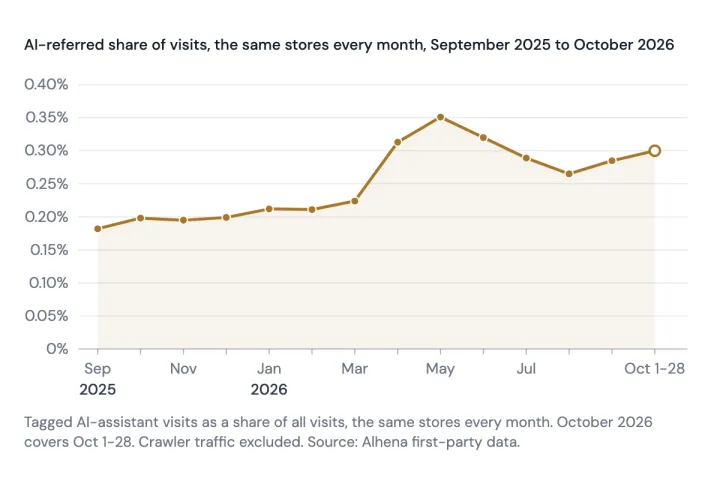
Provider and device views deserve attention. In Alhena’s updated AI referral research, ChatGPT accounted for about 96% of identified AI-referred visits in July–September 2026. Phones accounted for 76% of visits with a known device in April–September.
Those observations come from participating U.S.-hosted stores running Alhena’s assistant with at least 30 matched buyers during April–September. The study counts a visitor using a device’s first page load at a store in a calendar month. These are not GA4 session benchmarks. Our recommendation from those findings is to retain provider and device breakdowns, then investigate your own store’s pattern.
Close the weekly review with a specific follow-up action, owner and date. For example: review the mobile size guide on the landing page receiving the most identified AI sessions, then compare a complete later period using the same measurement rules.
8. Connect referral reporting with the rest of the shopping journey
AI search can influence a customer before a visit is measurable. Your store’s own AI assistant can also influence what happens after arrival. Keep those stages distinct in the analysis.
Measure visibility before the click
GA4 cannot count every recommendation that produces no site visit. A citation in an AI answer and a measured store visit describe different events.
For Google’s AI search surfaces, Search Console now offers a Generative AI performance report. Google documents a worldwide rollout on August 31, 2026. The report covers impressions in AI Overviews and AI Mode, with page, country, date and device views. It may be absent when a site has insufficient relevant impressions.
Use that as visibility evidence. Its impressions are a different unit from GA4 sessions and purchases.
Alhena AI Visibility adds product-level monitoring across AI engines, including how products are represented in shopping answers. That gives teams another question to investigate: are the right products being recommended with accurate information?
Read how Alhena measures AI visibility for the sampling approach and measurement boundaries. Keep those definitions next to the traffic report when presenting the two together.
Measure on-site assistance after arrival
A visitor arriving through ChatGPT, Google, email or a paid campaign may then use an Alhena Shopping Assistant to compare products or ask a question.
Record that interaction separately from acquisition. Preserve the session source and use a dedicated interaction event or analysis segment for on-site assistant engagement. Agree the event name and parameters with the implementation team instead of assuming a particular GA4 event exists automatically.
This supports comparisons such as AI-referred sessions with and without on-site assistance. Those comparisons are observational: shoppers choose whether to engage. A difference between the groups does not establish incremental lift.
The same discipline applies to GEO. Attributed purchases show an association under your measurement rules. Determining how many additional purchases an intervention caused requires a separate experimental design.
Frequently asked questions
Does Google Analytics automatically track AI traffic?
GA4 includes an AI Assistant channel for recognized assistant traffic. Coverage depends on the source information received and the applicable classification rules. Start with the native channel and audit observed sources before adding custom rules.
Where can I find ChatGPT referral traffic in GA4?
Open Traffic acquisition, inspect the AI Assistant channel and switch to Session source / medium. Check observed ChatGPT source values across the report as well, including rows still classified as Referral or left unassigned. Preserve the raw values when consolidating provider labels.
How do I track Microsoft Copilot, Perplexity and Claude visits?
Use the same source audit and fresh-session tests. Start with the candidate domains in this guide, check the received values and confirm the processed result. Add aliases only after validation. Keep ordinary search visits and paid campaigns under their appropriate classifications, even when a provider name appears in the URL.
Can I recover AI visits hidden in Direct?
Only when additional valid source evidence exists. A rise in direct traffic, similar browsing behavior or a high purchase rate does not identify an individual visit as AI-referred. User agent strings alone cannot recover the missing origin. Channel rules classify available evidence; they cannot supply a missing referrer.
Do AI crawlers count as AI referral sessions?
Crawling and page retrieval describe requests to your infrastructure. Your acquisition dashboard describes collected website activity under analytics rules. Keep bot and fetcher activity separate when assessing shopper visits. A request made while an assistant answers someone’s query does not, by itself, show that the person clicked through.
Should I include Google AI Overviews in the custom AI channel?
Keep Google’s AI Overviews and AI Mode within GA4’s Organic Search classification. Use Search Console’s generative AI impressions report for visibility analysis. Do not treat all Google organic sessions as AI-generated visits.
How long should I wait before checking a GA4 test?
Check collection immediately with DebugView or Tag Assistant, then allow for reporting processing. Google says processing can take 24–48 hours. A visible test event and a fully processed acquisition row are separate checks.
Does AI-attributed revenue prove that GEO generated additional sales?
No. It shows revenue associated with the classified source under the report’s rules. Incremental impact requires an experimental comparison. Keep attributed revenue, visibility changes and causal lift clearly labelled.
Put the workflow into use
Start with a baseline export and a small set of real referral tests. Resolve the collection issues, document any fallback rules and produce one complete weekly report.
Then give the ecommerce team something specific to improve: a mobile landing page, a missing product detail or a checkout problem. Use Alhena AI Visibility alongside that report to investigate how products are being represented before shoppers arrive.
The report earns its place when it helps the team make that next decision with evidence they can explain.