Your AI Is Configured for One Week Per Year
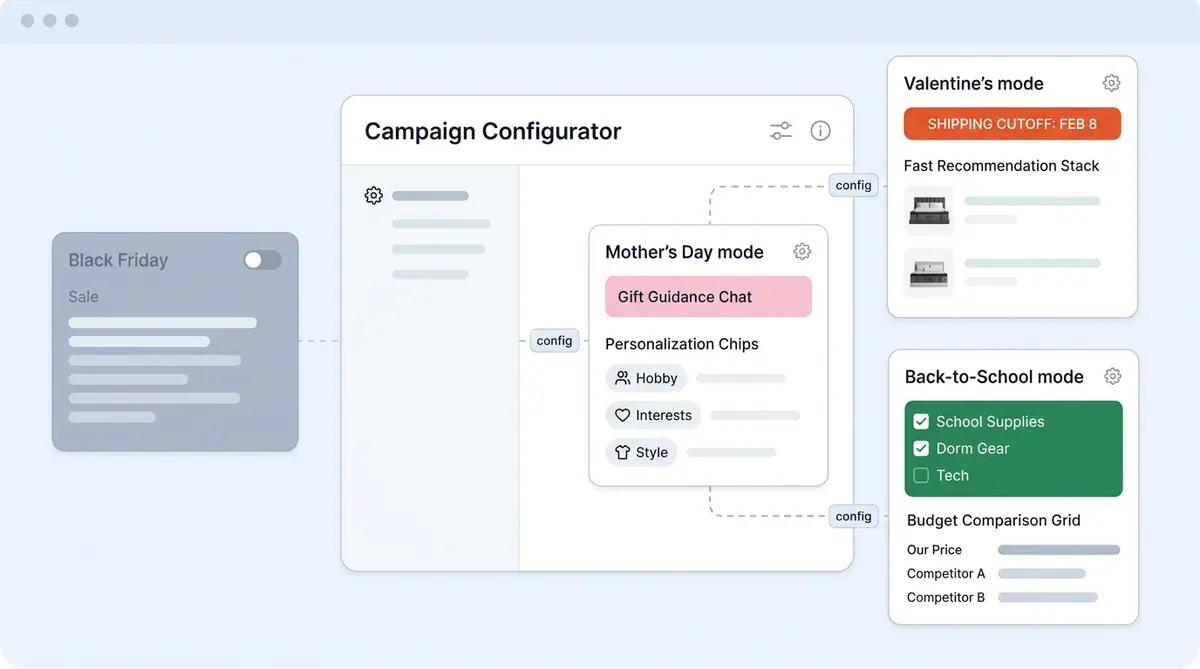
Most ecommerce and commerce brands and online retailer teams pour weeks of effort (updating brand guidelines, configuring seasonal flows) into configuring their AI for Black Friday and Cyber Monday. They update product boost rules, load promotional FAQs, stress-test checkout flows, and fine-tune every recommendation engine for deal-hunting shoppers. Then BFCM ends, and that same AI runs unchanged through Valentine's Day, Mother's Day, and Back-to-School without a single setting adjusted. Each holiday has its own conversion profile.
That's a problem, because each of these seasonal holiday peaks brings fundamentally different shopper psychology, query types, and product discovery and search patterns. A Valentine's Day shopper buying jewelry for a partner has entirely different needs than a Back-to-School parent buying a backpack for a growing child. Brands that use AI for customer conversations but treat both scenarios identically is leaving conversion on the table and degrading the customer experience at three of the year's biggest revenue windows.
This seasonal AI ecommerce playbook covers the holiday preparation most teams skip while scrambling to the next event. It gives you three mini-playbooks, one for each major retail moment, with the exact artificial intelligence configuration tools and changes and a two-week preparation checklist your ecommerce storefront, marketplaces, and digital marketing team can run before every peak in 2026 and beyond.
Mini-Playbook 1: Valentine's Day
The Core AI Challenge: The Buyer Is Almost Never the End User
Valentine's Day flips the typical ecommerce interaction. Instead of shoppers buying for themselves, nearly every conversation involves buying for someone else. Your AI agents must shift from "what do you need?" to "who are you buying for?" This single change in conversation logic affects every downstream recommendation.
Gift recommendation requires recipient-aware personalization. The AI should ask about the recipient's interests, the customer relationship to the recipient (romantic partner, friend, family member), budget range, and whether the gift should be sentimental, practical, or experiential. Most importantly, the AI must handle "I don't know what to get" conversations gracefully. That means narrowing from broad gifting intent to specific product recommendations through the customer journey through guided product discovery rather than dumping a generic gift guide link.
Configuration Changes
- Update product boost rules to prioritize gift-ready items, gift sets, and limited-edition Valentine promotion's collections in every AI recommendation.
- Add gift wrapping, personalized message, and delivery-by-date options directly into the AI's checkout flow so shoppers don't need to hunt for them.
- Configure proactive delivery timing questions. Late Valentine's gifts are worse than no gift. The AI should ask about delivery needs early and surface shipping cutoff dates in every product response.
- Load Valentine's-specific FAQs covering "will this arrive by February 14th," "can you add a gift message," "is this available in gift packaging," and return policies for gifts.
Two-Week Preparation Checklist
Week 1 (T-minus 14 days): Update the AI knowledge base with Valentine's gift collections, shipping cutoff dates by carrier, gift wrapping options and pricing, and Valentine's-specific return policies. Load recipient-aware conversation flows into Alhena's Guideline Studio for testing before launch. Tag all holiday gift-eligible SKUs for priority boosting and product placement in AI recommendations. Verify seasonal inventory on your shelves is synced and in stock. Confirm product photography and descriptions are updated for gift-focused presentation.
Week 2 (T-minus 7 days): Test recipient-aware recommendation flows across relationship types (partner, friend, parent, self). Verify delivery date accuracy against live carrier data. Launch Valentine's-specific nudges on product pages highlighting gift packaging and guaranteed delivery. Verify all responses follow your brand guidelines. Run a final QA pass on every Valentine's conversation path from "I don't know what to get" through checkout completion.
Mini-Playbook 2: Mother's Day
The Core AI Challenge: Relationship-Based Filtering at Scale
Mother's Day shoppers describe recipients through relationship and personality rather than product category. "Something for my mom who loves gardening and drinks too much coffee" is a real query your AI must resolve. The AI needs to parse relationship context, hobby and interest signals, and personality cues into product matches across multiple categories.
Unlike Valentine's Day, where the gift category is often predetermined (jewelry, flowers, chocolates), Mother's Day spans the entire catalog. A single shopper might need a gardening tool paired with a specialty coffee subscription. That requires cross-category ecommerce recommendation engine powered by machine learning, not just single-category filtering.
Configuration Changes
- Train the AI on relationship-based queries by mapping interest keywords (gardening, cooking, reading, fitness, coffee, wine, skincare) to product categories and specific items across your catalog.
- Configure cross-category bundling so the AI can recommend complementary products from different categories as a single gift, rather than staying within one department.
- Add "ship to different address" and "gift note" prompts directly into the recommendation flow, since most Mother's Day gifts ship to a different address than the billing address.
- Prepare for the Mother's Day surge pattern. Over 60% of purchases happen in the final five days. The AI must handle shipping deadline anxiety with real-time carrier cutoff data so it never quotes an expired shipping option.
Two-Week Preparation Checklist
Week 1 (T-minus 14 days): Train the AI on relationship-based filtering by loading interest-to-product category mappings. Update shipping cutoff dates for all carriers including expedited and overnight options. Configure cross-category gift bundles with pricing, availability, and product photography that reflects the gift context. Add Mother's Day-specific FAQs covering gift personalization, delivery guarantees, and "gift for mom who likes X" query patterns.
Week 2 (T-minus 7 days): Test "gift for mom who likes X" queries across at least 20 interest combinations to verify the AI resolves them to relevant products. Verify last-minute shipping options display correctly with accurate cutoff dates. Deploy Mother's Day-specific nudges highlighting guaranteed delivery dates. Test the complete customer journey from relationship-based query through cross-category bundle through gift-wrapped checkout.
Mini-Playbook 3: Back-to-School
The Core AI Challenge: The Buyer and the User Have Different Priorities
Back-to-School commerce, which runs from early summer through Labor Day, introduces a split that Valentine's Day and Mother's Day don't have. The buyer (parent) and the user (child) want different things. Parents prioritize durability, safety, value, and growth room. Kids prioritize style, brand, peer acceptance, and alignment with brand guidelines. Your AI must navigate both sets of priorities in the same conversation.
The AI also needs size-chart intelligence for growing children. The recommended size today may not be the right size for a backpack or jacket that needs to last through the entire school year. A parent asking "will my son outgrow this by Christmas" is a real query, and the AI should have growth-adjusted sizing logic to answer it.
Configuration Changes
- Configure sizing recommendations to account for growth projections. For items expected to last a full school year, the AI should recommend sizing up and explain why, rather than defaulting to the current-fit size.
- Train the AI on school supply list matching. Parents arrive with specific lists from teachers, and ecommerce brands that handle this well capture the entire cart. The AI should handle "I need everything on this list" queries by matching list items to catalog products and building a complete cart.
- Add bulk-order handling for multi-child families placing batch orders. Parents buying similar items in different sizes for two or three children need the AI to process those variations without starting over for each child.
- Load Back-to-School-specific FAQs covering uniform requirements, school-approved product options, age-appropriate recommendations, and durability comparisons.
Two-Week Preparation Checklist
Week 1 (T-minus 14 days): Update size chart guidance with growth-room logic for children's clothing, shoes, and backpacks. Configure product placement to surface school essentials first. Load school supply list matching data for the districts and regions your customers shop from most. Configure bulk-order and multi-child cart workflows in the AI shopping assistant. Add Back-to-School product bundles with value pricing and promotion details visible in AI responses. Sync current inventory levels so the AI never recommends out-of-stock items. Review product photography for seasonal bundles to ensure images match the bundled offering.
Week 2 (T-minus 7 days): Test parent-persona queries focused on durability, value, and growth room. Verify growth-adjusted sizing recommendations against your product data. Deploy Back-to-School-specific nudges on relevant category pages across your website (school supplies, kids' clothing, electronics, dorm essentials). Test multi-child ordering flows end to end, including size variants, color variants, and bulk-add-to-cart.
Post-Season and Holiday Learning Capture: The Step Most Teams Skip
Every seasonal playbook should end with a learning loop, not just a power-down. After each season, use data analytics from your AI conversations to identify:
- The most most common and repetitive questions the AI struggled with. Which queries triggered escalation requiring human intervention from customer support or received low satisfaction ratings? These are your first training priorities for next year.
- New product categories shoppers asked about that were not included in the seasonal configuration. If 200 shoppers asked about a product type your AI couldn't recommend, that's a gap to close next cycle.
- Conversion rate and AOV for AI-assisted seasonal sessions versus unassisted sessions. This tells you whether your seasonal configuration actually moved the needle or just looked good on paper.
- Escalation spikes that indicate knowledge gaps. A sudden jump in human handoffs on a specific day or product category signals a missing FAQ, a recommendation blind spot, misaligned brand guidelines, or outdated brand guidelines from the previous season.
Feed these learnings back into next year's preparation so each seasonal cycle starts stronger than the last. The businesses that deploy specialized AI agents as part of broader ai initiatives and treat seasonal AI as a way to optimize and compound their business investment, not a one-off project, see year-over-year improvement in conversion, customer satisfaction, and overall ecommerce customer experience.
How Alhena AI Makes Seasonal Configuration Practical
The playbooks above require specific AI capabilities that generic chatbot platforms don't offer. Alhena AI is built for exactly this kind of seasonal reconfiguration.
Guideline Studio lets you test seasonal conversation flows before launch without affecting live customers or disrupting the existing customer experience on your site. Build your Valentine's gift recommendation flow, test it against 50 sample queries, and refine it before a single customer sees it.
Product boost rules prioritize seasonal collections in AI recommendations without re-merchandising your entire catalog or restructuring inventory. Tag your Mother's Day gift bundles, and the AI surfaces them first in relevant conversations while keeping the rest of your catalog accessible.
Smart FAQs can be updated with season-specific questions that get automated and auto-deploy to product pages. Load your Back-to-School sizing and supply list FAQs once, and they appear across every page on your storefront where the AI interacts with customers.
Shipping and delivery date intelligence pulls from live carrier data so the AI never quotes an expired cutoff. When a Valentine's Day shopper asks "will this arrive by the 14th?" on February 11, the AI gives an accurate answer based on current carrier availability, not a static date you loaded two weeks ago.
Weekly auto-training ensures seasonal product additions are immediately available to the AI without manual retraining of your AI agents. Add 50 new Mother's Day gift sets to your catalog on Monday, and the Product Expert Agent can recommend them by the following week.
After each season, conversation analytics and revenue attribution show exactly which seasonal configurations drove the highest conversion and AOV. That data analytics output feeds directly into next year's playbook improvements.
Key Takeaways
- BFCM is one calendar week per year. Valentine's Day, Mother's Day, and Back-to-School collectively represent three additional high-revenue holiday windows that most brands that use AI leave their configuration unprepared. Teams that use AI without seasonal adjustments consistently underperform.
- Each season requires distinct AI configuration: recipient-aware gift logic for Valentine's Day, relationship-based cross-category filtering for Mother's Day, and growth-adjusted sizing with supply list matching for Back-to-School.
- A two-week ecommerce preparation investment per season turns three periods of generic holiday AI performance into three periods of peak-configured ecommerce conversion.
- Post-season learning capture is the step most teams skip while scrambling to the next event and the step that makes every future seasonal cycle stronger for your future growth for teams that take a strategic approach to AI configuration.
- The seasonal learning compounds year over year across your full ecommerce stack. Brands that run this playbook consistently will thrive and outperform those scrambling to configure AI at the last minute. No more scrambling before each seasonal peak. Stop scrambling and start planning those that only configure AI for Black Friday.
Ready to stop running the same unconfigured AI through every seasonal customer service peak? Book a demo with Alhena AI to see how brands that use AI with Guideline Studio, product boost rules, and seasonal analytics make two-week preparation workflows practical for seasonal campaigns, or start free with 25 conversations and test seasonal flows before your next ecommerce peak.

Frequently Asked Questions
How do I configure my ecommerce AI for gift recipient-aware recommendations during Valentine's Day?
Update your AI's conversation logic to ask who the gift is for before recommending products. Alhena AI's Guideline Studio lets you build and test recipient-aware flows (romantic partner, friend, family member, self) with budget and sentiment filters before they go live, so your Valentine's Day recommendations match the buyer's intent from the first message.
What is relationship-based product filtering and why does Mother's Day AI need it?
Relationship-based filtering means the AI parses queries like "gift for my mom who loves gardening" into product matches across multiple categories. Alhena AI maps interest keywords to catalog products and supports cross-category bundling, so a single Mother's Day recommendation can combine items from different departments into one gift.
Can an AI shopping assistant handle growth-adjusted sizing for Back-to-School purchases?
Yes. Alhena AI can be configured with growth-room logic that recommends sizing up on children's clothing, shoes, and backpacks expected to last a full school year. This prevents parents from buying items their child outgrows within months and reduces post-season return rates.
How does post-season learning capture improve AI performance for the next seasonal cycle?
After each seasonal peak, Alhena AI's conversation analytics identify which queries triggered the most escalations, which product categories shoppers asked about that the AI couldn't handle, and where conversion dropped and whether product placement matched seasonal demand. Those gaps become the first training priorities for next year's playbook, so seasonal AI performance compounds year over year across your full ecommerce stack.
How far in advance should ecommerce teams start preparing their AI for seasonal peaks beyond BFCM?
Two weeks is the minimum effective lead time per season. Week one covers knowledge base updates, content production for seasonal FAQs, and product tagging. Week two covers testing conversation flows, verifying shipping cutoff accuracy, and deploying seasonal nudges. Alhena AI's Guideline Studio and weekly auto-training make this sprint practical without developer resources, using built-in automation.