The European Data Protection Board logged €5.88 billion in GDPR fines by the end of 2025, and consent violations accounted for roughly 32 per cent of European enforcement actions against European B2C operators. If your business sells online and uses an AI chatbot, that number should keep you up at night. Most e-commerce businesses assume their site-wide cookie banner handles consent for everything, including their chat widget. It doesn't. Cookie consent and chat consent are two different things under GDPR, and most chatbot platforms don't give you a way to separate them. Alhena AI handles chatbot GDPR compliance differently. Any chatbot processing EU customer data should also have a Data Processing Agreement (DPA) with its vendor. Alhena provides a DPA as standard. This post walks through how Alhena's widget-level consent controls work, what your admins can configure, and how the system pairs consent with data retention to cover the full privacy lifecycle.
Why Your Cookie Banner Doesn't Cover Your Chat Widget
A cookie banner asks visitors whether the site can store tracking cookies in their browser. That covers analytics, retargeting, and sometimes session management. It’s a browser-level security mechanism. But a GDPR-compliant chatbot collects a completely different type of data: names, order numbers, email addresses, shipping concerns, product preferences, and sometimes photos of damaged items. GDPR Article 7 requires consent that is specific, informed, and tied to a defined purpose. A blanket "Accept all cookies" click doesn't meet that bar for conversational data processing.
The distinction matters because regulatory enforcement agencies are paying attention. AI-driven customer interfaces are now the third-highest source of GDPR complaints, behind only cookies and direct marketing. And the three most common chatbot GDPR compliance gaps auditors flag in chatbots are: absence of explicit consent before processing personal data (47% of cases), indefinite conversation storage without a retention policy (39%), and no mechanism for exercising data rights like access, correction, erasure, or portability. Without proper access controls (31%).
The fix isn't complicated, but it requires your chat widget to handle consent independently from your cookie management platform or third-party integrations. It’s a security and compliance requirement. That's exactly what Alhena's privacy consent gate does.
Privacy Consent Before the First Message
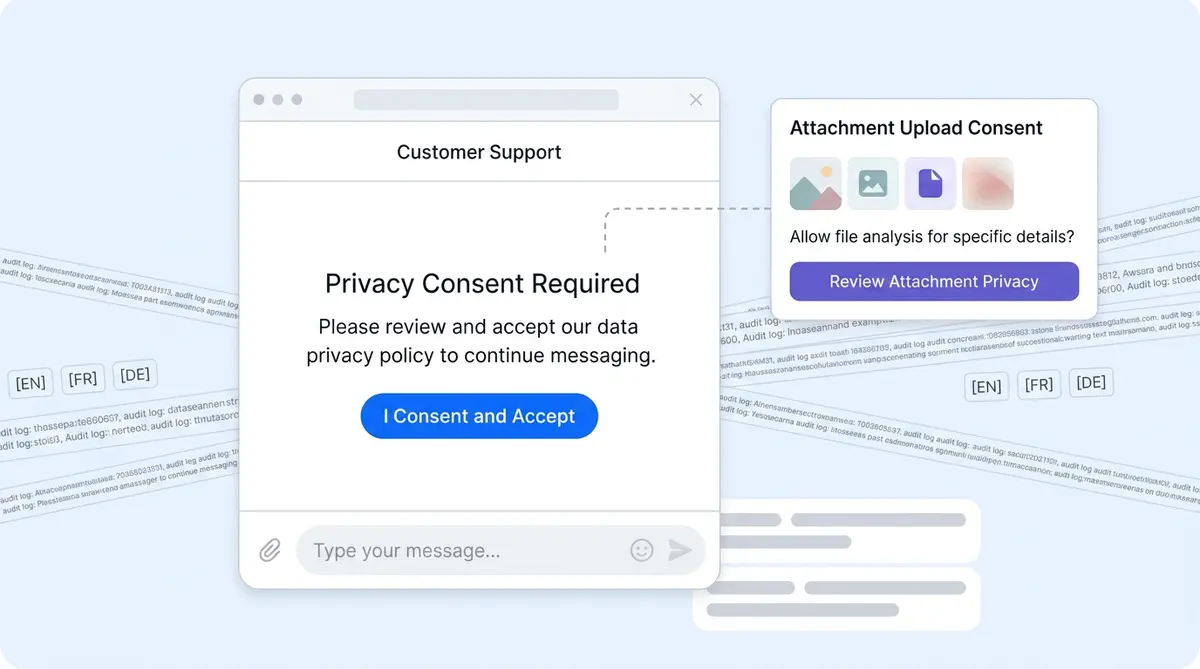
Alhena's AI Shopping Assistant and Support Concierge both support a GDPR-style consent step built directly into the chat widget. When a brand enables it, here's what happens from the visitor's perspective:
- The visitor clicks the chat icon and the widget opens normally
- They see the welcome messages and branding, plus a configurable consent message explaining how their data will be used and accessed
- Below that message, a consent button appears (the default text is "Agree & Continue," but brands can change it)
- The message input field, suggested questions, and voice/chat controls are hidden until the visitor clicks the consent button
- Once they accept, the widget records consent and unlocks the full chat experience
This isn't a passive disclosure. The widget physically blocks interaction until the visitor makes an affirmative choice. That's what GDPR Article 7 means by "unambiguous indication" of consent: no pre-ticked boxes, no implied agreement, no "by continuing to use this site you agree" language buried in a footer.
What Admins Can Configure
These features give your legal and privacy teams direct control over three settings:
- Enable/disable the consent button for the entire widget
- Consent message text shown to visitors before chat starts
- Button label text that the visitor clicks to accept
All three feature settings are part of Alhena's widget localization flow. If your store serves customers in Germany, France, and Spain, the consent copy translates automatically based on the visitor's locale. Your legal team writes the message once, and Alhena handles the rest.
Attachment Upload Consent: A Separate Layer
Here's where Alhena's approach gets more granular than what you'll find in other chatbot platforms. Chat consent and attachment consent are two separate controls.
Why? Because attachments carry fundamentally different risks. The risk profile differs sharply. A text message saying "my order hasn't arrived" is low-sensitivity data. But a screenshot of a billing statement, a photo showing a skin condition for a beauty brand consultation, or a scan of an invoice contains far more sensitive personal information. Under GDPR's data minimization principle, processing that data requires its own explicit consent and acknowledgment.
When attachment consent is enabled in Alhena, the visitor can chat normally. They only see the attachment consent modal when they actually try to upload a file. The modal shows:
- Configurable consent text explaining what happens with uploaded files
- An accept button (customizable label)
- A deny button (also customizable)
If the visitor accepts, the file picker opens and the upload proceeds. If they deny, the upload cancels and the chat continues without interruption. This design means visitors aren't bombarded with consent prompts upfront for a feature they may never use.
Businesses selling in regulated categories like beauty and skincare or health supplements find this particularly valuable. A customer uploading photos of a skin reaction or sharing medical details through an attachment is a different regulatory consent scenario than someone asking about shipping times.
How Alhena Stores and Protects Consent Records
Recording consent isn't enough. You need to prove when consent was given, by whom, and for which brand. Alhena's consent architecture handles all three.
Per Visitor, Per Brand
Consent is stored at the intersection of visitor identity and company. The widget identifies each visitor using the existing browser fingerprint or authenticated user identity. If a shopper accepts consent on Brand A's widget, that acceptance doesn't carry over to Brand B's widget, even if both brands use Alhena. Each brand's consent state is completely independent.
Two Separate Consent Flags
Alhena tracks two distinct consent records internally:
- Privacy consent (
has_privacy_consent_accepted): whether the visitor accepted the general chat consent gate - Attachment consent (
has_attachment_consent_accepted): whether the visitor accepted the file upload consent modal
Each flag includes an accepted-at timestamp, giving your compliance team a verifiable audit trail of exactly when consent was recorded.
One-Way Write, No Silent Resets
From the widget's public-facing API, consent can only be set to "accepted". A visitor can't unset their consent state, and the widget API doesn't allow writing arbitrary values. This one-way design prevents accidental or malicious consent state manipulation on the client side, adding a layer of data security to the consent flow. If a visitor needs to withdraw consent, that's handled through your brand's standard data rights process, not through the chat widget itself.
Once consent is recorded, returning visitors aren't prompted again. The widget checks the existing consent state on load and skips the gate if consent was previously given. That keeps the experience clean for repeat shoppers while maintaining a complete audit record with security built in.
Localized Consent for Global Storefronts
If you run an ecommerce store that serves the EU, UK, and North America, your consent language likely needs to differ by region. The European GDPR, the UK GDPR, and CCPA/CPRA all have slightly different requirements for what a valid consent disclosure must contain.
Alhena's consent copy fields feed into the same localization pipeline that handles the rest of the widget's text. Your legal team configures the consent message and button labels in your primary language, and the widget auto-translates them based on each visitor's browser locale. You can also override specific translations if your legal counsel requires exact wording in certain languages.
This matters more than it sounds. European data protection authorities in Germany, France, and Italy have all taken enforcement actions against companies whose consent mechanisms weren't available in the local language. A consent prompt in English shown to a German visitor doesn't satisfy the "informed" requirement of GDPR Article 7.
Data Retention and Redaction: Closing the Loop
Consent controls govern what visitors must agree to before they interact. But GDPR also cares about what happens to that data after the conversation ends. Alhena pairs widget-level consent with company-level data retention and redaction controls to cover both ends of the lifecycle.
Automatic Message Redaction
At the company level, Alhena lets brands configure a retention window for conversation data. The minimum retention period is 30 days. Once a ticket's message text is older than the configured window, Alhena's background redaction process replaces each message body with a compliance redaction notice.
The structural record stays intact. Ticket IDs, timestamps, tags, and metadata remain accessible for reporting, analytics, and compliance updates. But the actual message content, which is where personal data lives, gets permanently redacted. Affected tickets are also removed from the search index, preventing PII from surfacing in internal search results.
If you've read our EU AI Act compliance guide, you'll recognize this feature. The redaction process runs as a scheduled background task, processing tickets in batches of 1,000. It's idempotent, meaning running it twice on the same data produces the same result without errors or data loss.
The Full Privacy Picture
Together, these controls create a complete privacy lifecycle for your AI chat:
- Before interaction: The consent gate ensures visitors give explicit consent before sharing data
- During interaction: Attachment consent adds a second layer for sensitive file uploads
- After interaction: Retention and redaction policies automatically clean up conversation data on schedule
Most chatbot platforms handle one of these steps. Zendesk offers data deletion and anonymization tools, but doesn't have a widget-level consent gate. Intercom captures consent at messenger load, but not separately for attachments. Tidio has GDPR consent capture for lead forms, but the consent architecture isn't granular enough for separate chat and attachment permissions. Alhena covers all three stages in a single, integrated system. Other systems fall short on at least one.
What This Means for Your Ecommerce Brand
Widget-level privacy controls aren't just a compliance checkbox. They change how your brand builds trust with customers in real time.
62% of European consumers abandon a chatbot interaction if they feel the brand isn't transparent about data use. Showing a clear consent step before chat begins signals that your brand takes privacy seriously. That transparency translates to higher engagement. Businesses with visible privacy controls in their chat see 23% higher engagement rates in chat interactions compared to those without them.
For fashion and apparel brands running on Shopify, this means your AI shopping assistant can handle product recommendations, size guidance, and order lookups while maintaining a clear consent record for every interaction. For beauty brands where customers share skin concerns or photos of reactions, the separate attachment consent ensures you're covered when sensitive data enters the conversation.
Brands like Tatcha use Alhena to drive 3x conversion rates and 38% higher average order values through AI-powered shopping assistance. Privacy controls don't slow that down. They make it sustainable for markets where GDPR, the UK GDPR, and the upcoming EU AI Act (full enforcement in August 2026) impose regulatory requirements for demonstrable consent at every data processing touchpoint.
Alhena's Unified Memory system adds additional features like another layer: the memory extraction engine only stores facts explicitly stated by customers, never inferred behavior. Combined with widget-level consent before any conversation begins, your brand can build a defensible position when a data protection authority asks for answers about how you handle personal data across AI-assisted customer interactions.
Getting Started With Alhena's Privacy Controls
Setting up consent features in Alhena takes minutes, not days. There's no developer involvement and no code changes to your storefront. Alhena’s integrations with Shopify, WooCommerce, and Magento mean the widget inherits your existing store setup.
- Enable the privacy consent gate in your Alhena dashboard. Toggle it on, write your consent message, and set the button label.
- Enable attachment consent if your use case involves file uploads. Write the modal text and customize the accept/deny button labels.
- Configure your data retention window at the company level. Set the number of days after which message content gets redacted (minimum 30 days).
- Review localization if you serve multiple languages. Check auto-translated consent text and override specific translations if needed.
- Test the visitor experience. Review any updates to your privacy policy that reference the chat widget. Open your widget in a private browser window and walk through the consent flow as a new visitor.
The best part? The whole setup takes under 15 minutes. You can check your ROI projections while you're at it. Alhena deploys in under 48 hours for the full platform, and privacy features are available from day one.
Ready to make your AI chat GDPR-ready without slowing down sales? Book a demo with Alhena AI or start for free with 25 conversations.

Frequently Asked Questions
What makes a chatbot GDPR compliant?
A GDPR compliant chatbot must collect explicit consent before it can collect data or begin processing, maintain a clear privacy policy that explains how personal information is handled, and comply with the General Data Protection Regulation's requirements for data access, deletion, and portability. The chatbot also needs proper access control, encryption for data in transit and at rest, and audit logs proving when and how consent was recorded. Brands that implement these controls. If the chatbot shares data with third-party services, a Data Processing Agreement (DPA) between the brand and the chatbot vendor is required under GDPR regulation.
Does Alhena AI require consent before a visitor can start chatting?
Yes, when the privacy setting is enabled. The AI chatbot displays a configurable consent message and button before the chat input appears. By default, the message field, suggested questions, and voice controls stay hidden until the visitor opts in by clicking the consent button. Brands can customize both the consent message and the button label. This privacy setting is separate from your site's cookie consent or privacy policy banner, because AI chat conversations collect different personal information than cookies do.
Why does Alhena have separate consent for file attachments?
Attachments carry higher data privacy risk than text messages. When customers share screenshots, invoices, medical photos, or order documents, they're uploading sensitive information that goes beyond a typical conversation. Under GDPR's data minimization principle, processing these different categories of personal data requires its own explicit consent. Alhena's attachment consent modal only appears when a visitor tries to upload a file, so it doesn't interrupt the normal chat experience or force visitors to opt into something they may never use.
How does Alhena store consent records for security audits?
Alhena stores consent per visitor and per brand using two separate flags: one for general chat privacy consent and one for attachment upload consent. Each record includes an accepted-at timestamp in the audit log. The system uses browser fingerprints to identify returning visitors. Consent is write-only from the widget side, meaning it can only be set to accepted and cannot be silently reset. A security audit can verify exactly when each visitor gave consent, for which brand, and for which data processing purpose. This audit log is tamper-resistant and supports compliance reviews by data protection authorities.
Does the consent prompt appear every time a returning visitor opens the AI chat?
No. Once a visitor opts in and accepts consent, Alhena stores that state and checks it on each subsequent widget load. Returning visitors skip the consent gate automatically and go straight to the conversation. The consent record persists per visitor and brand combination, so a shopper who accepted consent on one brand's online chatbot won't need to re-consent on a return visit to that same store. Consent for a different brand's chatbot is tracked independently.
Can I translate the consent message and privacy policy link for different languages?
Yes. Alhena's consent copy fields are part of the widget's localization pipeline. You write the consent message, button labels, and any privacy policy references in your primary language, and the widget auto-translates them based on each visitor's browser locale. You can also override specific translations if your legal team requires exact wording under local regulation. This matters for EU compliance because data protection authorities have fined companies whose consent mechanisms weren't available in the visitor's language.
How does Alhena handle data retention and message deletion after conversations end?
At the company level, brands can configure a data retention window with a minimum of 30 days. After that window passes, Alhena's background process redacts message content and replaces it with a compliance notice. The system can also delete conversation data from the search index to prevent personal information from surfacing in internal searches. The data store retains structural metadata like ticket IDs, timestamps, and tags remain intact for analytics. This approach helps brands comply with GDPR's storage limitation principle while keeping operational data accessible for reporting.
How does Alhena's consent approach compare to other AI chatbots like Zendesk or Intercom?
Zendesk offers data deletion and anonymization tools but doesn't have a widget-level consent gate that blocks the chat until acceptance. Intercom captures consent when the messenger loads but doesn't separate attachment consent from chat consent. Neither platform provides the granular, two-layer consent architecture that Alhena uses. Alhena also includes a standard DPA for data processing, automatic data retention controls, and security audit support out of the box. Most online chatbot platforms treat GDPR compliance as an add-on rather than building consent collection directly into the conversational experience.
Does Alhena use ChatGPT, OpenAI, or other large language models for its AI chatbot?
Alhena's AI model is purpose-built for ecommerce and doesn't simply wrap ChatGPT or OpenAI's API. Unlike consumer AI chatbots from OpenAI, Google Gemini, or Meta AI, Alhena grounds every response in the brand's verified product data to prevent hallucinations. This matters for data privacy because Alhena never sends customer conversations to third-party large language model providers or any third party for training. Your shoppers' personal data stays on Alhena's servers rather than being routed through external infrastructure, which is a significant privacy and security advantage over cloud-based chatbot platforms over chatbot platforms that rely on external generative AI services.
How do Alhena's privacy controls help with EU AI Act compliance?
The EU AI Act, which reaches full enforcement in August 2026, requires AI systems that interact with consumers to disclose that the visitor is talking to an AI and to collect demonstrable consent. Alhena's consent gate satisfies both requirements: it shows a configurable disclosure message and records timestamped proof of acceptance. The Act also requires audit logs of AI system behavior, which Alhena's conversation logging and consent tracking provide. The Act also expects human oversight for high-risk AI. Brands that use AI for customer interactions need these controls in place before the enforcement deadline, and Alhena's privacy settings cover the transparency, consent, and data protection requirements together.