Your Support Team Shouldn't Be Reading Tracking Pages All Day
Here's a scene that plays out dozens (or hundreds) of times a day in most e-commerce support Queues: a customer writes in asking, "Where is my order?" Your agent opens ShipStation, finds the order, reads the tracking status, copies a tracking link, types up a response, and hits send. Five to ten minutes gone. The information existed the entire time. It just wasn't accessible to the customer.
Shipping questions account for 30 to 40 per cent of all e-commerce support tickets. During Black Friday, holiday rushes, and big promo cycles, that share climbs well past 50 per cent. At $5 to $22 per ticket when a human agent handles it, the math gets ugly fast.
ShipStation does its job well. It pulls in orders from your store, prints labels, picks carriers, tracks packages, and manages delivery status across every major shipping provider. But it's a fulfilment tool. It doesn't talk to customers. It doesn't explain what "delivery exception" means to someone who's worried their birthday gift won't arrive in time.
The Alhena AI + ShipStation integration bridges that gap. It gives your AI agent direct access to ShipStation's shipping data so customers can get clear, real-time answers about their orders without opening a ticket or waiting for a human.
How It Actually Works: Three Layers, One Conversation
The integration isn't complicated conceptually. Three layers talk to each other, and the customer only sees one of them.
Layer 1: The Customer Asks a Question
Someone opens chat on your site, sends you a DM on Instagram or WhatsApp, replies to an email, or calls your voice line. They say something like "Hey, where's my stuff?" or "I ordered something last Tuesday and haven't heard anything." Natural language. No order number required upfront.
Alhena picks up the conversation on whatever channel the customer chose and identifies who they are using their email, name, or account details.
Layer 2: The AI Figures Out What They Need
Alhena's Order Management Agent reads the question and classifies it. Not through keyword matching, but by understanding what the person actually wants. "When will my stuff get here?" and "can you check my delivery status?" both mean the same thing, and Alhena treats them that way.
The agent then figures out what data to pull: shipment status, carrier name, tracking events, expected delivery date, or some combination of all of it. For a broader look at how this agent works across different order scenarios, check out our AI order management guide.
Layer 3: ShipStation Provides the Facts
ShipStation is where the actual shipping data lives: order status, fulfilment state, which carrier has the package, the tracking number, tracking URL, the latest scan event, and (when available) the estimated delivery date. This data comes in from wherever your orders originate, whether that's your Shopify store, Amazon, eBay, Etsy, or a warehouse management system.
Alhena grabs the relevant data, turns it into a plain-English answer, and sends it back to the customer. The whole thing takes about 10 seconds.
Here's what that looks like in practice:
- Customer: "Hey, I ordered a jacket last week. Where is it?"
- Alhena: "Your order #4821 shipped with UPS on Monday. The latest scan shows it arrived at the regional distribution centre this morning. Estimated delivery is Friday, June 6. Here's your tracking link: [tracking URL]."
No ticket. No agent involved. No customer left wondering.
Why This Beats ShipStation's Own Notifications
ShipStation already sends shipping confirmation emails and tracking updates. Those are fine. But they're a one-way broadcast. They tell the customer something happened. They don't answer the follow-up question that almost always comes next.
Think about the typical flow:
- ShipStation sends: "Your order has shipped. Track it here."
- Customer clicks the tracking link. It says "Exception".
- Customer panics: "What does that mean? Is my order lost?"
- ShipStation has no answer for that. The notification system is done.
Alhena picks up where notifications leave off. It reads the exception data, figures out what actually happened (carrier delay, weather issue, failed delivery attempt, or address problem), and explains it in words a regular person would understand. If the situation genuinely needs a human, like a lost package claim, Alhena hands the conversation to your team with the full shipping context and chat history already attached.
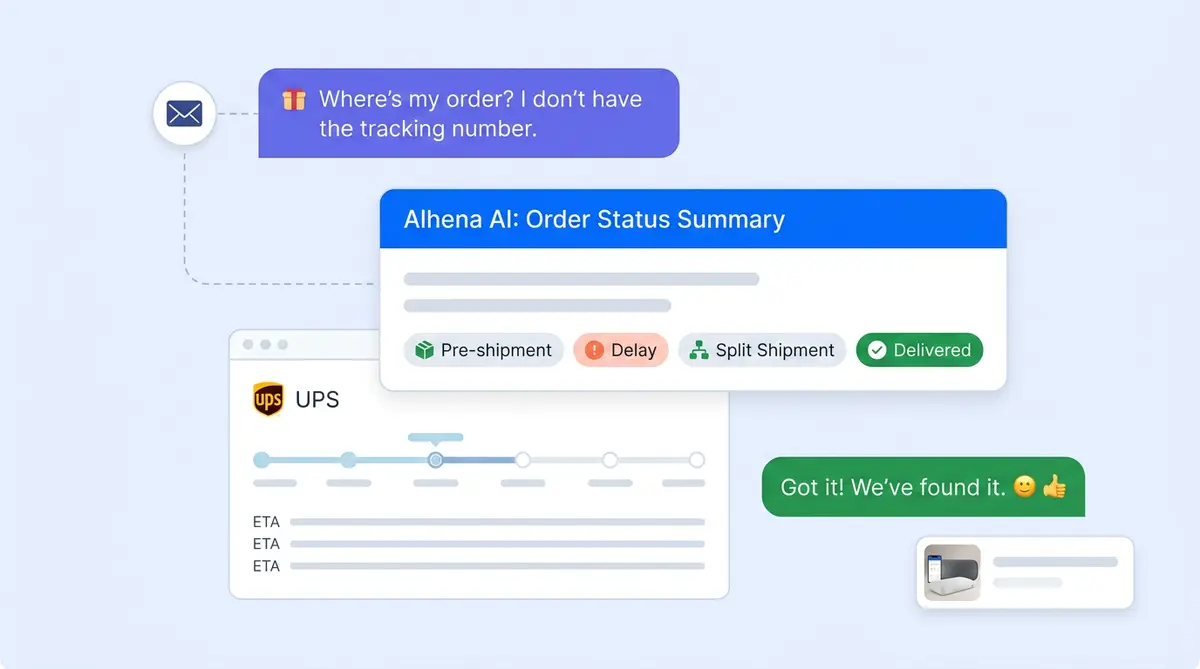
That's the real difference. Notifications dump data on people. Alhena translates data into answers. Here are some examples of what that translation looks like:
- "The label's been created, but the carrier hasn't picked up the package yet. That usually takes 1 to 2 business days."
- "Your order hasn't shipped because one item is on backorder. The expected ship date is June 10."
- "Looks like the delivery attempt failed because the carrier couldn't access the building. You can reschedule or pick it up at the nearest facility."
- "This is a carrier-side delay, not an issue with your order. Based on the latest scan, delivery should now be Monday."
That kind of plain-language explanation is what actually stops tickets from piling up. People don't just want a tracking number. They want someone (or something) to tell them what's going on.
Five Shipping Scenarios Your AI Agent Can Resolve on its own.
Not every shipping question is "where is my order?" Here are the five most common patterns Alhena resolves without pulling a human agent into the conversation.
1. Standard Order Tracking
The classic. Someone wants to know where their package is. Alhena pulls the shipment status, carrier, latest scan event, and delivery estimate from ShipStation and answers in plain language. Done in under 10 seconds.
2. Pre-Shipment Confusion
A customer places an order, checks tracking a day later, and sees "label created". They don't know what that means. They assume something's wrong. Alhena explains that the order is being prepared and gives the expected ship date, preventing the "Is my order stuck?" ticket that would have landed in your queue.
3. Delivery Exceptions
Carrier exception codes confuse everyone. Alhena reads the exception type from ShipStation's tracking data and translates: weather delay, failed attempt, address issue, customs hold. For each one, the customer gets a clear next step instead of a cryptic code.
4. Split Shipments
Orders that ship in multiple boxes are a ticket magnet. The customer sees one package arrive and thinks the rest is missing. Alhena pulls all shipments tied to that order and breaks it down: "Package 1 (the pillows) arrives Thursday. Package 2 (the duvet) arrives Friday. "Problem solved before it becomes a problem.
5. Post-Delivery Issues
After delivery, customers sometimes report missing items, damage, or just have questions about what they received. Alhena confirms the delivery status from ShipStation, asks the right follow-up questions, and either resolves the issue through your return policy or routes it to a human with all the context already gathered. Brands that also use Alhena for returns and refunds automation get even faster resolution on these.
Shipping Support That Actually Generates Revenue
Most people think of shipping support as pure cost. Fewer tickets, lower costs, done. That's the floor, not the ceiling.
When someone asks about their order, they're actively engaged with your brand. They're on your site or in your chat. That's a moment you can use. Alhena's Product Expert Agent can suggest products that complement what the customer already bought. Someone tracking a running shoe order might see a suggestion for performance socks. A customer who just got a skincare set might get nudged toward the matching serum.
This isn't a hypothetical. Tatcha saw a 38% increase in average order value and now attributes 11.4% of total site revenue to AI-assisted conversations. Victoria Beckham reported a 20% AOV uplift. These numbers come from treating every conversation, including "where is my order?" chats, as a chance to add value instead of just closing a ticket.
Alhena can even populate carts and pre-fill checkout for recommended products. The gap between "oh, that looks nice" and "bought it" shrinks to a single click.
How This Fits With the Rest of Your Stack
Nobody runs ShipStation in isolation. You've got a commerce platform, probably a helpdesk, and maybe a returns tool. Alhena talks to all of them.
Commerce platforms: Shopify, WooCommerce, Magento, Salesforce Commerce Cloud. Alhena pulls product catalog data, order history, and customer account info alongside ShipStation's shipping data. Your AI agent sees the full picture, not just one slice.
Helpdesks: When a shipping issue genuinely needs a person, Alhena routes it to Zendesk, Gorgias, Freshdesk, Intercom, or whichever helpdesk you're on. Your agents get the full conversation, the shipping status, and the customer's account info in one handoff.
Other shipping and returns tools: If you use Narvar for branded tracking pages or returns alongside ShipStation for fulfilment, Alhena connects to both. It pulls the right data from the right system depending on what the customer is asking about.
This is what separates Alhena from a basic chatbot. Your human agents already bounce between ShipStation, your helpdesk, and your commerce platform when they work a shipping case. Alhena does the same thing. It just doesn't need five tabs open.
Getting Set Up Takes Less Time Than You'd Expect
No dev team required. No multi-month implementation. Here's the actual process.
What You'll Need
- An active ShipStation account with orders flowing through it
- Your ecommerce platform (Shopify, WooCommerce, Magento, or Salesforce Commerce Cloud)
- Your helpdesk, if you use one (recommended for escalation, but not required)
The Steps
- Connect your commerce platform. Alhena syncs your product catalog, order data, and customer accounts.
- Connect ShipStation. This links shipping, tracking, and fulfilment data to Alhena's Order Management Agent.
- Connect your helpdesk (optional). Turns on smart escalation with full context when something actually needs a human.
- Set your brand voice and policies. Tell Alhena how you want shipping questions answered: your tone, your return window, and what triggers an escalation.
- Go live. The whole thing deploys in under 48 hours. You can start free with 25 conversations to test before committing to a paid plan.
Once you're live, Alhena's built-in analytics show exactly how many shipping questions the AI resolved, how many escalated, and how much revenue came from post-purchase conversations. Deflection rates, resolution times, CSAT scores: it's all there from day one.
For reference, Puffy hit 63% automated resolution with 90% customer satisfaction after connecting Alhena to their support stack. Manawa cut their support workload by 43% and dropped the average response time from 40 minutes to under 1 minute.
The Bottom Line
Every "Where is my order?" ticket your team answers manually is time spent on information that's already sitting in ShipStation. The Alhena AI + ShipStation integration makes that data available to customers the moment they ask, on whatever channel they prefer, with clear explanations instead of confusing tracking codes.
Your support team gets their time back. Your customers get real answers in seconds. And the conversations that used to be pure cost start generating revenue.
Ready to see it work? Book a demo with Alhena AI or try it free with 25 conversations.

Frequently Asked Questions
How does the Alhena AI and ShipStation integration actually work?
Alhena connects to ShipStation as a single platform layer that sits between your customer and your shipping workflow. When someone asks about an order, Alhena’s Order Management Agent automatically identifies the question, pulls the carrier status, tracking info, and delivery details from ShipStation, and replies in plain language. The whole workflow runs in about 10 seconds without any human agent stepping in.
What types of shipping questions can Alhena answer from ShipStation data?
The most common ones: order tracking, carrier and tracking number lookups, delivery estimates, pre-shipment status, delivery exceptions, split shipment breakdowns, and post-delivery issues. Alhena automatically translates raw shipment data into clear answers. For brands with high shipping volume, this covers the bulk of repetitive tickets that would otherwise eat up your support queue.
Do I need a developer or the ShipStation API to set up Alhena?
No. You don’t need to write code or work directly with the ShipStation API. Alhena’s setup process is step by step through a dashboard. The API integration happens behind the scenes. If you want to review technical details, Alhena provides documentation for the connection, but most brands are live within 48 hours without any dev work. Think of it as a guided setup, not a coding project.
How is Alhena different from ShipStation’s built-in shipping notifications?
ShipStation notifications are one-way. They tell your customer a package shipped or a carrier scanned it. They don’t answer the follow-up question that almost always comes next. Alhena adds a conversational layer that can automate the entire follow-up: it explains what ‘delivery exception’ means, tells the customer what to do next, and can escalate to a human if the situation actually needs one. Notifications broadcast. Alhena responds across every channel.
Does Alhena work on Instagram, WhatsApp, email, and other channels?
Yes. Alhena answers shipping questions on web chat, email, Instagram DMs, WhatsApp, and voice. This matters for both small business brands and enterprise retailers who sell across multiple channels. Your customers get the same fast, accurate shipping answers no matter where they reach out.
What ecommerce platforms and helpdesks integrate with Alhena and ShipStation?
On the commerce side: Shopify, WooCommerce, Magento, and Salesforce Commerce Cloud. Alhena can also pull orders from marketplace channels like Amazon and eBay. For helpdesks: Zendesk, Gorgias, Freshdesk, Intercom, and others. Alhena acts as a hub that lets you integrate your checkout platform, ShipStation, and your support tools so everything consolidates into one conversation for the customer.
What does Alhena AI cost, and how do I measure ROI?
Alhena offers a free tier with 25 conversations so you can test the setup before committing. Paid plans scale with volume. The real guide to ROI is your shipping ticket count, and it should align with how much time your team currently spends on tracking questions: if your team spends hours each day answering ‘where is my order?’ questions, the analytics will show cost savings quickly. Alhena’s built-in analytics dashboard tracks deflection rate, resolution speed, and revenue from post-purchase conversations from day one.
Can shipping support conversations with Alhena actually generate revenue?
Yes. When a customer asks about an order, they’re already engaged. Alhena can suggest complementary products, add items to the shop cart, and pre-fill checkout, all within the same conversation. Tatcha saw a 38% average order value increase from AI-assisted chats. The shop cart and checkout flow happen right in the conversation, so the customer doesn’t have to browse your site separately.
Does Alhena work with ShipStation’s batch shipping and label printing?
Alhena doesn’t replace ShipStation’s batch processing or printer setup. Those operational workflows stay in ShipStation, where your team can batch orders, print ship labels, and select carriers in bulk. What Alhena does is streamline the customer-facing side. When a customer asks about a shipment that went out in a batch, Alhena pulls the specific carrier, ship label status, and tracking info for that order. Your warehouse team keeps running high performance batch operations at speed. Alhena keeps customers informed automatically so they don’t flood support with questions about every label.
Can Alhena help brands that sell on multiple marketplaces and use ShipStation as their shipping hub?
That’s one of the strongest use cases. Brands that centralize orders from multiple marketplaces into ShipStation as a fulfillment hub often struggle with high support volume because customers from each channel ask about inventory, shipping, and delivery separately. Alhena connects to ShipStation and your warehouse data to streamline those conversations. Whether the order came from your Shopify store, Amazon, or eBay, Alhena pulls the right shipment and inventory info from the warehouse. Enterprise retailers and small business sellers both benefit because Alhena centralizes the support operation the same way ShipStation centralizes fulfillment.