Why BigCommerce Stores Need More Than a Help Widget
BigCommerce powers over 60,000 online stores, from mid-market ecommerce brands to enterprise operations running on its headless and multi-storefront capabilities. But the platform's native support options are thin. There's no built-in AI chatbot, no conversational product discovery, and no way for a shopper to ask "Is this in stock?" or "Where's my order?" without submitting a ticket or picking up the phone.
That gap is expensive. Repetitive questions like "Does my coupon still work?", "What sizes does this come in?", and "Has my order shipped yet?" eat up agent hours and slow down response times. For BigCommerce merchants processing hundreds of orders a day, the math doesn't work.
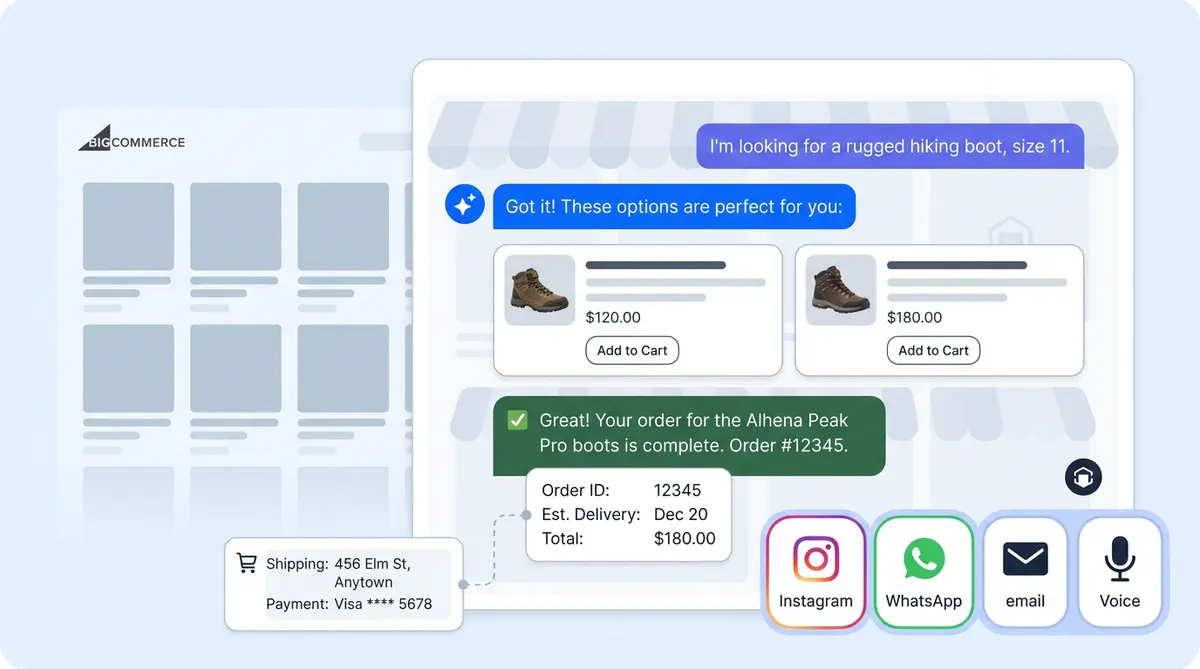
Alhena AI fills that gap by plugging directly into your BigCommerce store's live data. Products, orders, coupons, gift cards, and promotions all flow into the AI agent so customers get an accurate, real-time customer experience in seconds, without a human in the loop for the routine 80%.
For a complete walkthrough of how these tools work under the hood, see our Discount Lookup and Active Promotions deep dive.
This guide walks through exactly what the Alhena AI BigCommerce integration does, how to set it up, and why it turns your store into a self-serve support and sales engine.
What the BigCommerce Integration Actually Does
When you connect a BigCommerce store to Alhena AI, two things happen behind the scenes.
First, a product catalog sync runs against your store. It ingests product names, descriptions, images, variants, pricing, custom fields, YouTube videos, and stock levels. But it's selective: only visible, in-stock products make it into the AI's knowledge base. Products with zero inventory across every variant, or items restricted to wholesale or customer-group-only audiences, are automatically excluded. The AI never recommends something a shopper can't actually buy.
Second, a set of BigCommerce-aware tools is enabled on your Alhena agents. These are live API actions the AI can call mid-conversation to pull real-time data from your store.
Order Management Agent Tools
- Get Order Information: look up order status, line items, and shipment tracking by order number or email
- Cancel Order: cancel on the customer's behalf (pre-shipment only)
- Check Gift Card Balance: read the remaining balance on a BigCommerce Gift Certificate
Product Expert Agent Tools
- Get Product Information: details, pricing, availability, and variant options
- Lookup Discount Code: validate a coupon code (existence, discount amount, expiry date)
- List Active Promotions: surface any currently running coupons or promotions
Each tool can be toggled individually under AI Settings in the Alhena dashboard. A merchant who doesn't want AI-initiated cancellations can leave that tool off while keeping order lookup active. That granular control matters when you're deciding how much agency the AI should have.
What Customers Can Ask Once It's Wired Up
Here's a non-exhaustive list of questions the AI handles out of the box once you connect your BigCommerce store:
- "Where is my order #12345?"
- "Has my order shipped yet?"
- "I'd like to cancel my order."
- "What sizes does this come in?"
- "Is this item in stock?"
- "How much does the Premium Boxing Gloves cost?"
- "Is the code SAVE20 still valid?"
- "What's the balance on my gift card?"
- "Do you have any promotions right now?"
Each question maps to one of the agent tools above, called against your live BigCommerce data. No canned responses, no outdated FAQ pages. The AI delivers the answer from your store in real time.
And because Alhena's Product Expert agent is grounded in your actual catalog data, it won't hallucinate product details or recommend items you don't carry. Brands like Tatcha have seen a 3x conversion rate and 38% AOV uplift from this kind of accurate, data-grounded shopping assistance.
Setting Up the BigCommerce Integration
The integration uses a store-level V2/V3 API token, not an OAuth app. There's no app-store install and no OAuth dance. A merchant can be live in under five minutes.
Step 1: Create a BigCommerce API Account
In your BigCommerce Admin, go to Settings > API > API Accounts and click Create API Account > Create V2/V3 API Token.
Grant the following scopes:
- Products: Read-only
- Orders: Modify (Read-only if you don't need AI-powered cancellations)
- Customers: Read-only
- Order Transactions: Read-only
- Store Information: Read-only
- Marketing: Read-only
A few scope details worth knowing. Store Information lets Alhena auto-detect your store name, URL, and default currency, so you don't have to type them in manually. Marketing is what powers discount-code lookup and gift-card balance checks. Many integrations skip this scope; Alhena uses it heavily. And Orders: Modify is only needed if you want the AI to cancel orders. If you'd rather route cancellations to a human agent, drop it to Read-only.
Step 2: Copy Your Credentials
Save the API account. BigCommerce shows the Access Token exactly once. Copy it right away, or you'll have to regenerate a new one.
Step 3: Connect in Alhena
In the Alhena dashboard, go to Settings > Integrations, find BigCommerce, and click Enable. Paste two values:
- Store Hash: the alphanumeric segment from your API URL (e.g.,
abc1d2effromhttps://api.bigcommerce.com/stores/abc1d2ef/v3/) - Access Token: the token you copied in Step 2
Click Connect. A small but nice touch: if you accidentally paste the full dashboard URL (https://store-abc1d2ef.mybigcommerce.com/manage/dashboard) into the Store Hash field, Alhena extracts the hash automatically.
That's it. Your product catalog begins syncing immediately, and the BigCommerce agent tools go live within minutes. No developer resources needed for your business, no webhook configuration, no code deploys.
What Alhena Does That BigCommerce Can't Do Natively
BigCommerce is a strong commerce platform, but it doesn't ship with conversational AI. Merchants need a third-party tool to add chatbot functionality, and most third-party chatbots are support-only tools that can't drive sales.
Alhena AI is different. It's purpose-built for ecommerce, handling both sales and support in the same conversation.
Catalog + transactional in one connection. The same API credential powers product recommendations and order actions. The AI can answer "Is this in stock?" and "Where's my order?" without two separate integrations or two separate tools.
Hallucination-free product answers. Because the catalog sync only includes visible, in-stock products, the AI never recommends discontinued items or products a shopper can't buy. Compare that to general-purpose chatbots that rely on web scraping and machine learning and often serve stale data.
Agentic checkout. Alhena's AI Shopping Assistant doesn't just answer questions. It can populate carts and pre-fill checkout for shoppers, turning a support interaction into a completed ecommerce sale.
Omnichannel from day one. The same BigCommerce data powers AI conversations across web chat, email, Instagram DMs, and WhatsApp. A shopper who asks about a product on Instagram gets the same accurate, real-time answer as someone on your website.
Revenue attribution built in. Alhena tracks which conversations lead to purchases, so you can measure actual revenue generated by the AI, not just tickets deflected. Victoria Beckham saw a 20% AOV increase with this approach.
Troubleshooting Common Issues
The BigCommerce integration is straightforward, but there are four failure modes that come up in practice.
"Invalid access token" usually means the merchant generated an account-level token instead of a store-level one, or the token has been revoked. The fix: create a new store-level V2/V3 API token.
"Access forbidden" points to a missing scope on the API account. BigCommerce scopes can't be edited after creation, so the fix is generally to create a fresh API account with the correct scopes.
Products not appearing happens most commonly when products are hidden, fully out of stock, or restricted to a wholesale customer group. Also, the initial sync takes a few minutes after connecting. Give it time before troubleshooting.
Discount code or gift card lookups failing is almost always because the Marketing scope is missing. Also worth noting: BigCommerce calls them "Gift Certificates" internally, and the code must match exactly (case-sensitive).
For a deeper look at how Alhena connects with other platforms in your stack, see our guides on WooCommerce + Freshdesk integration and HubSpot + Alhena AI.
Revenue Beyond Ticket Deflection
Most ecommerce merchants on BigCommerce evaluate AI chatbots on one metric: how many support tickets they deflect. That's the wrong north star.
Ticket deflection saves money. But an AI that only deflects is a cost center. An AI that drives sales, increases average order value, drives conversions, and converts browsers into buyers is a revenue channel.
Alhena AI does both. The Support Concierge handles order inquiries and common questions, while the Product Expert agent guides shoppers through product discovery, answers comparison questions, and moves them toward checkout.
The numbers back this up. Puffy achieved 63% automated inquiry resolution with 90% CSAT. Crocus hit an 86% deflection rate while maintaining 84% customer satisfaction. Manawa cut their support workload by 43% and dropped response time from 40 minutes to 1 minute.
These aren't just deflection numbers. They're results from AI that handles both sides of the customer conversation: the "Where's my order?" and the "Which one should I buy?"
If you're evaluating the ROI of adding AI to your BigCommerce store, the Alhena ROI Calculator can give you a personalized estimate based on your store's traffic and ticket volume.
Getting Started with Alhena AI on BigCommerce
Here's what you need to go live:
- A BigCommerce store with admin access to create API accounts
- Five minutes to generate the API token and connect it in Alhena
- Your product catalog, FAQ content, and brand guidelines (Alhena's team helps with onboarding)
Alhena deploys in under 48 hours. No dev resources, no code changes, no webhook wiring. The Agent Assist feature also gives your human agents intelligent, AI-powered suggestions during live conversations, so even escalated tickets get resolved faster.
To disconnect, go to Settings > Integrations > BigCommerce > Disconnect. This revokes all store access and disables BigCommerce-backed tools immediately.
Ready to turn your BigCommerce store into a self-serve support and sales engine? Book a demo with Alhena AI or start for free with 25 conversations.

Frequently Asked Questions
Does BigCommerce have a built-in AI chatbot?
No. BigCommerce doesn't ship with a native AI chatbot or conversational assistant. Merchants need a third-party tool like Alhena AI to add AI-powered chat for product discovery, order tracking, and support automation.
How does Alhena AI connect to my BigCommerce store?
Alhena uses a store-level V2/V3 API token, not an OAuth app. You create the token in BigCommerce Admin, paste it into Alhena's integration settings along with your Store Hash, and click Connect. The whole process takes about 5 minutes.
What BigCommerce data does Alhena AI access?
Alhena syncs your product catalog (names, descriptions, images, variants, pricing, stock) and accesses live order data, gift card balances, discount codes, and active promotions through BigCommerce's API. Only visible, in-stock products are synced.
Can Alhena AI cancel BigCommerce orders automatically?
Yes, if you grant the Orders: Modify scope on your API token and enable the Cancel Order tool in Alhena's agent settings. If you'd rather route cancellations to a human agent, set Orders to Read-only and leave the tool off.
How long does it take to set up Alhena AI on BigCommerce?
The API connection takes about 5 minutes. Full deployment, including catalog sync, agent training, and brand voice configuration, typically completes within 48 hours. No developer resources or code changes are needed.
Does the integration support BigCommerce gift card balance checks?
Yes. With the Marketing scope enabled on your API token, Alhena's Order Management agent can check gift card (Gift Certificate) balances in real time during a conversation. The code must match exactly, as BigCommerce treats it as case-sensitive.
What channels does Alhena AI support for BigCommerce stores?
Alhena AI works across web chat, email, Instagram DMs, WhatsApp, and voice. The same BigCommerce product and order data powers every channel, so shoppers get consistent, accurate answers regardless of where they reach out.
How do I measure ROI from my BigCommerce AI chatbot?
Track revenue attributed to AI-assisted conversations, deflection savings (AI interactions cost roughly $0.50 vs $5.00 for human support), conversion rate lift for chatbot users vs non-users, and changes in average order value. Alhena's built-in analytics dashboard tracks all of these automatically.