The HubSpot Chat Gap Ecommerce Brands Can't Ignore
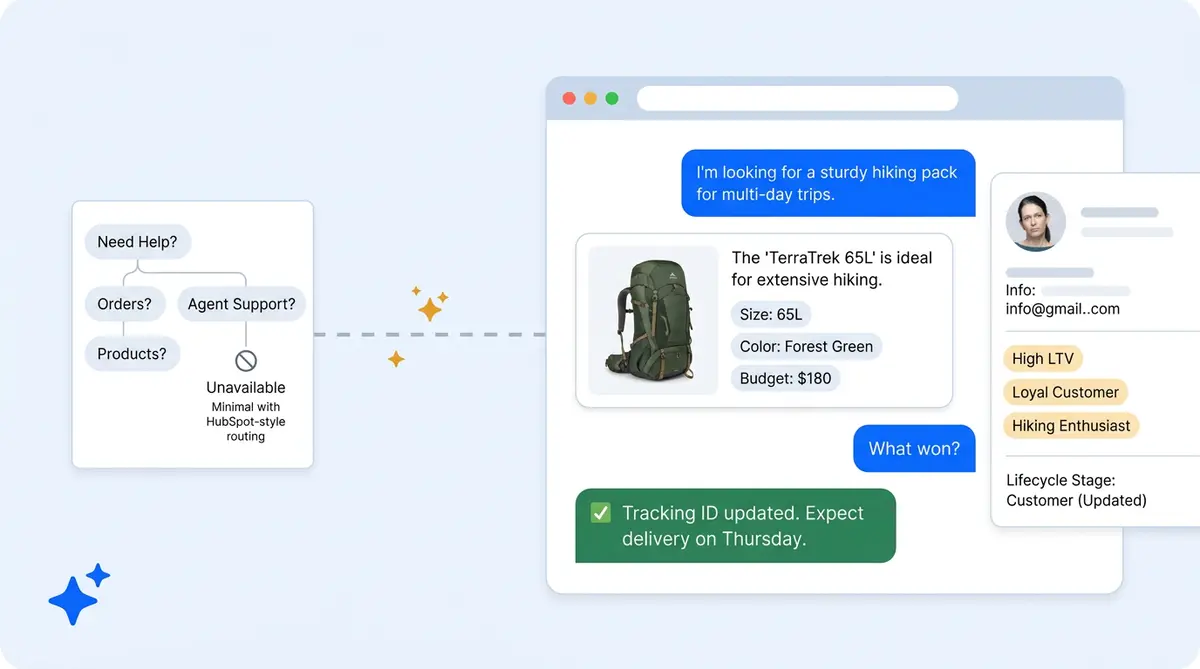
HubSpot is a world-class CRM and marketing platform. Its native chatbot builder and bot framework handles simple routing, ticket management, and form-based lead capture well. But ecommerce and enterprise businesses face a problem: they need more from chat than decision trees.
When a shopper sends a query like "what moisturizer works for oily skin under $40?" or "where is my order?", the native bot can't answer. It has no product catalog connection, no order management integration, and no conversational AI tools or doc references to handle open-ended prompts. Every complex question routes to human agents because the bot can’t handle it.
Alhena AI fills this gap by turning HubSpot Live Chat into a full AI powered sales and support channel, while feeding everything back into your HubSpot CRM automatically. Here's how ecommerce and DTC brands use it to turn every chat conversation into a richer contact record, centralized data, and more meaningful messages, a better shopping experience, and generate measurable revenue for every user interaction, turning each turn of the conversation into a data point.
How Alhena AI Works Inside HubSpot
Alhena AI responds in real time within the HubSpot chat window, chatflows, and Inbox. It also works across channels like Facebook Messenger, so every message gets an AI-powered response for each user. It pulls CRM data (customer names, order status, lifecycle stage) to personalize every response. A returning customer asking about a new product gets a different experience than a first-time website visitor in the chat window asking the same question.
Setup is fast. You create a HubSpot Private App with two scopes (crm.objects.contacts.read and crm.objects.contacts.write), paste the access token into Alhena's dashboard, and connect. Default settings work for most stores, and you can edit any configuration later. No developer resources needed. Your AI chatbot and chat widget load instantly on every page. The entire process takes minutes, not weeks.
Once connected, Alhena's Product Expert Agent answers product questions from your verified catalog content, knowledge base entries, and product data, while the Order Management Agent handles tracking, returns, and exchanges. Both AI powered agents handle customer support with smart routing inside HubSpot’s Inbox so your teams never leave their workflow.
The Lead Generation Agent: Conversational Lead Capture
This is where the HubSpot AI chatbot experience changes completely. Alhena's Lead Generation Agent extracts lead information from natural conversations, not forms.
When a shopper asks "do you have this jacket in navy, size medium?", the AI answers the product prompt AND captures their product preference, size, and color as CRM attributes. No clicks on form fields. No friction. No interrupted shopping experience.
Brands configure custom HubSpot properties beyond email (skin type, preferred category, budget range, fit preference) and Alhena automates populating them from conversational signals. Here's a real example: a beauty brand configures skin_type as a custom attribute. When a user asks about oily skin moisturizers, the AI will log the user’s skin_type: oily to their HubSpot contact record while delivering a personalized product recommendation.
Every conversation enriches the CRM. Every product question turns into a lead qualification signal. The three default CRM attributes (email, firstname, lastname) (email, firstname, lastname) come pre-configured, and you can edit, remove, and add as many custom properties as your sales teams need through Alhena's settings panel.
Data Flow: From Chat to CRM to Sales Pipeline
The end-to-end flow works like this: a website visitor engages with Alhena via HubSpot Live Chat. The AI answers product queries from verified catalog data, grounded in your actual inventory. The Lead Generation Agent extracts attributes and creates or updates the HubSpot contact record in real time.
Qualified prospects trigger sales workflows or meeting scheduler links based on lifecycle stage and engagement signals. Automated sequences are triggered when the AI identifies high-intent buyers, and email follow-ups trigger automatically based on the conversation. Event-based triggers fire when the visitor matches your criteria. If escalation to Service Hub is needed, the handoff to a customer agent in Service Hub (or any connected help desk) includes full conversation content, context, and intent tags, so the human user picks up exactly where the AI left off.
You can also enable automatic ticket creation for conversations that close, even when the visitor didn't provide contact information. This gives your team visibility into every interaction, with a ticket created for each one and every interaction logged in the activity log, not just the ones that result in form submissions.
What Alhena Does That the Native HubSpot Bot Cannot
HubSpot's native chatbot is a rules-based chatbot builder. The builder follows decision trees. Alhena AI is a conversational AI platform purpose-built for ecommerce. Let’s learn what the differences look like in practice:
- Product knowledge: Alhena answers from your actual product knowledge base with hallucination-free responses. The native bot has no product intelligence, no knowledge base connection, and no catalog awareness at all.
- Lead capture: Alhena captures attributes from natural dialogue. The native bot defaults to form-based capture that interrupts the shopping experience.
- Order management: Alhena handles order tracking, returns, and exchanges. Customers can check tracking codes and share them without loading a separate tracking page. The native bot has no order system connection.
- Revenue tracking: Alhena provides AI-attributed revenue analytics showing which conversations led to purchases. The native bot offers Marketing Hub and Sales Hub attribution only.
- Response quality: Alhena delivers verified, grounded answers. The native bot can't answer complex queries at all.
Sales and Support in One Channel
Most HubSpot AI chatbot solutions focus on either revenue generation or support. Alhena handles both from a single integration.
On the support side, brands using HubSpot Service Hub see 70%+ ticket deflection with under five seconds average first response time. The Support Concierge resolves order inquiries, automates returns processing, and provides tracking updates without human involvement.
On the sales side, the Shopping Assistant drives conversions through guided product discovery. Conversion Nudges recover hesitating shoppers. The Lead Generation Agent feeds enriched contacts into your sales pipeline with every conversation.
The results speak for themselves. Brands using Alhena AI see 3x conversion rates, 38% AOV uplift, and 11.4% of total site revenue from AI-assisted conversations. For ecommerce teams running on HubSpot, that's revenue the native HubSpot chatbot simply can't generate.
Getting Started with HubSpot and Alhena AI
The setup path is straightforward:
- Create a HubSpot Private App in your HubSpot settings (you can edit it later) with
crm.objects.contacts.readandcrm.objects.contacts.writescopes. - Copy your access token with one click from the HubSpot doc panel, click Integrations in Alhena's dashboard under Settings tab, then the Integrations tab, then HubSpot.
- Click and select the HubSpot Inbox where Alhena will respond to conversations.
- Edit and configure your Lead Generation Agent attributes (see the setup doc for details) (map custom HubSpot properties like
skin_type,preferred_category, orbudget_range). - Connect your product catalog content and order management system so the AI can build a knowledge base and answer product and post-purchase queries accurately.
No app development or doc review required. No multi-month implementation. The chat widget and AI deploy in under 48 hours with no extra load on your dev team and no load time impact on your store, and most HubSpot brands are live within a single day. The chat window activates immediately on your storefront, appearing as a window overlay for visitors.
If you're already running live chat for customer experience and want to see how AI transforms the channel, or if you're exploring how AI shopping assistants increase conversion rates, HubSpot plus Alhena AI is the combination that makes it work.
HubSpot Is Where Your Data Lives. Alhena Makes It Actionable.
Your company’s CRM centralizes customer names, purchase history, lifecycle stages, and marketing engagement data. Without Alhena, that data sits idle during live chat conversations. With Alhena, every chat interaction pulls from and writes back to HubSpot in real time.
The result: richer contact records, better content experiences, and better shopping journeys, and measurable chatbot revenue events from a channel that used to generate only support tickets and help desk ticket volume.
Ready to turn your HubSpot Live Chat into an AI revenue and support channel? Book a demo with Alhena AI or start for free with 25 conversations. Works with free HubSpot plans and above.
Editing and Managing Your Chatbot Knowledge Base
After your HubSpot chatbot goes live, ongoing management is simple. You can edit default bot responses, update the knowledge base, and adjust live chat prompts from one dashboard. The chat widget and bot behavior update in real time, so edits to your chatbot knowledge base or CRM content appear in the live chat window within minutes.
You control which default prompts the chatbot shows when a visitor opens the chat window. Edit default chatbot greetings by hub or by page URL. Deleted products automatically disappear from bot recommendations. If you need to edit the knowledge base content or change how the live chat bot handles specific queries, click into the Alhena dashboard and make the change. No code needed. Edit settings on the fly, no waiting.
Teams that edit their chatbot configuration weekly see the best results. Keep your knowledge base fresh, test new live chat prompts, and review which chatbot responses drive the most conversions. The edit workflow is fast: open the dashboard, select the live chat bot configuration, update your knowledge base content or chatbot greeting, and publish. Changes go live immediately in every chat window and widget across your site.
Built for Enterprise Chat Volume
For enterprise teams managing high chat volume, Alhena replaces the tab-switching between help desk tools and HubSpot. Every message in the chat window triggers the right response, whether it's a product question, a tracking code lookup, or a meeting scheduler link for high-value prospects. Users don't need to click through multiple tabs to find content or check if a contact was deleted from the CRM. The AI handles it in a single conversation, sending email confirmations and meeting scheduler invites when the user requests them. Enterprise brands running free HubSpot tiers or paid plans both get full access to Alhena's AI capabilities.
Inside the HubSpot CRM, Alhena keeps every message organized. When a user opens the contact tab, they see the full conversation content, including product preferences and tracking code details. If a contact is deleted from HubSpot CRM, the conversation data stays in Alhena for reference. The chat window connects directly to your HubSpot CRM data, so agents reviewing a tab never lose context. Alhena can also connect to your meeting scheduler to book demos, send follow-up messages, and update content in the CRM, all without the user switching a single tab or window.

Frequently Asked Questions
How does Alhena AI's Lead Generation Agent capture leads from HubSpot chat without forms?
Alhena AI's Lead Generation Agent extracts customer attributes from natural conversation instead of requiring form submissions. When a shopper asks about a product, the AI identifies signals like skin type, size preference, or budget range and writes them directly to HubSpot contact properties. Brands configure custom attributes in Alhena's dashboard, and the AI automates populating them from chat dialogue.
What HubSpot data does Alhena AI use to personalize chat responses?
Alhena AI pulls CRM fields including customer name, order history, lifecycle stage, and previous interactions to tailor every response. A returning VIP customer gets a different experience than a first-time site visitor asking the same question. This personalization happens in real time within HubSpot's Inbox without any manual configuration per contact.
Can Alhena AI create and update HubSpot contacts automatically?
Yes. Alhena AI creates new HubSpot contacts when a website visitor provides identifying information during a conversation and updates existing contacts with newly captured attributes. The integration uses HubSpot's Private App API with contacts read and write scopes, so every chat interaction enriches your company’s CRM records automatically.
How does Alhena AI compare to HubSpot's native chatbot for ecommerce?
HubSpot's native chatbot follows decision trees and can't answer product questions, check order status, or capture lead data from natural conversation. Alhena AI connects to your product catalog and order management system to deliver accurate, hallucination-free answers. It also provides AI-attributed revenue analytics that show exactly which conversations drive purchases.
How long does it take to set up the Alhena AI HubSpot integration?
The HubSpot integration takes minutes. You create a HubSpot Private App with two API scopes, paste the access token into Alhena's dashboard, and select your Inbox. Most brands are fully live within one day. No developer resources or custom code required.
Does Alhena AI route qualified leads to HubSpot sales workflows?
Yes. Alhena AI identifies qualified prospects based on conversation engagement and intent signals, then uses routing logic to send them to your existing HubSpot sales workflows. Contact records include conversation context, customer segments, intent tags, and extracted attributes so your sales team has full context and insights before reaching out.
Can Alhena AI handle both sales and support conversations in HubSpot?
Alhena AI operates as both a sales and support agent within HubSpot. The Product Expert Agent handles product discovery and recommendations, while the Order Management Agent resolves tracking, returns, and exchange inquiries. Brands using Alhena AI typically see 70%+ ticket deflection on the support side and up to 3x conversion rates on the sales side.