Sixty-eight percent of bot-to-agent handoffs lose critical context, according to ETS Labs research. The customer explains a problem to a chatbot, the chatbot can't solve it, and the escalation creates a ticket that says something like "customer needs help." That's not a ticket. That's a shrug in database form. For ecommerce stores and their support teams, this process costs sales every day.
The industry has covered how to hand off conversations without losing context, how to route tickets once they exist, and how to prevent tickets entirely. Nobody talks about the ticket artifact itself: what the AI writes down before a human ever opens it. That's the gap this post fills. The best AI-powered ticketing systems turn escalation into a structured process with real capabilities beyond simple tagging.
The "I'll Transfer You" Problem
Most AI escalations across e-commerce platforms and ticketing systems follow the same pattern. Businesses of all sizes run into this. The bot hits a wall, says "let me connect you with a team member," and fires off a ticket with a tag and a one-line note. The agent receiving that ticket starts from zero, re-asking questions the customer already answered. Support teams lose performance, and the conversational context the AI gathered vanishes.
74% of consumers say repeating themselves is one of their biggest frustrations with support, per Zendesk's 2026 CX Trends data. Worse, 54% give up entirely when forced to explain their issue multiple times. The problem isn't that AI can't solve the issue. It's that AI doesn't document what it learned before handing off.
What an AI-Created Ticket Contains That a Human-Created One Doesn't
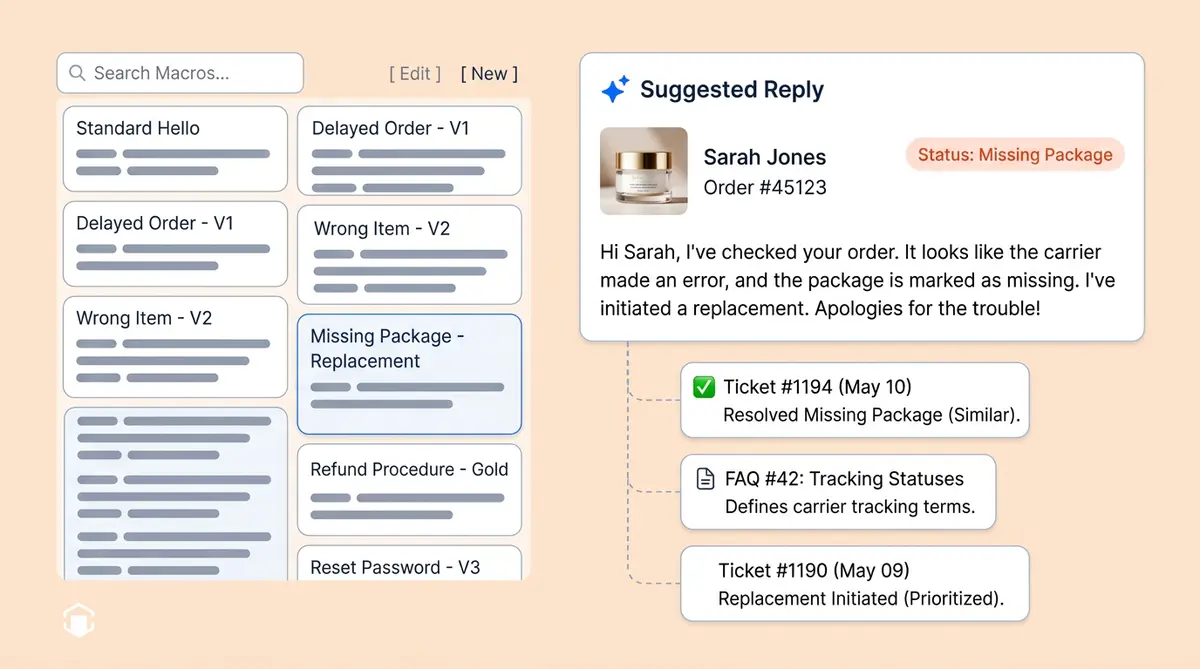
A well-built AI agent in ecommerce support ticketing doesn't just escalate. It writes a briefing packet. Here's the difference:
A human agent writes: "Customer upset about order. Wants refund. Transferred to returns team."
An AI agent writes:
- Pre-summarized conversation in 3-4 sentences, not a raw transcript. "Customer ordered a size M navy blazer on April 3. Received size L in black. Wants an exchange, but the correct item is out of stock. Requested a full refund instead."
- Detected intent category (return, refund, shipping, exchange): return/refund, product mismatch
- Sentiment score: frustrated, escalating (started neutral, shifted after stock check)
- What the AI already tried: offered exchange (item OOS), offered store credit (declined), checked restock date (unavailable)
- Customer profile: 4 previous orders, $620 lifetime value, loyalty tier Silver, no prior returns
- Recommended next steps: full refund + 15% discount code based on customer value and store policy
The agent reading this ticket starts at minute three of the problem, not minute zero. Research from AllAboutAI shows AI-enriched tickets cut average handle time by 63% and improve first-contact resolution by 37%.
Voice Callback Tickets: When the AI Can't Transfer Live
Thirty-five percent of business calls happen outside standard hours, and the average service business loses $12,600 per month from missed calls. A customer calls at 9 PM on a Sunday with a billing dispute. The AI handles the conversation, recognizes it needs a human, and tries to transfer. No one's there.
Most voice AI systems end the call here: "Please call back during business hours." Alhena's Voice AI doesn't. It stays on the line and pivots.
The AI knows its own limits. When Alhena's voice agent determines escalation is needed, it checks: is this within business hours? Is a supported helpdesk connected (Freshdesk, Re:amaze, and more coming)? If hours are live, the call transfers with context. If not, the system signals back to the AI that a callback ticket is available, and the AI pivots naturally in conversation.
Consent is required, not assumed. The AI asks: "Our team isn't available right now. I can have a specialist call you back first thing Monday morning at the number you're calling from. Would that work?" The system won't create a ticket until the caller agrees. This guardrail prevents the AI from silently generating tickets the customer never asked for.
The ticket captures everything. Once the caller consents, a callback ticket lands in your ticketing system containing the complete voice transcript (transcribed in real time), the caller's phone number (captured at call start, not passed through the AI), urgency classification, and exactly what the AI tried before escalating. No PII travels through the AI tool call itself.
It fails safely. Before creating the ticket, the system re-verifies: does the integration exist? Is the feature enabled? Does the caller have a phone number on file? Has this ticket already been created? If any check fails, the AI apologizes gracefully. If a jittery connection triggers a retry, the idempotency check prevents duplicate tickets from flooding your queue.
Monday at 9:03 AM, an agent opens Freshdesk, sees a ticket titled "AI Voice Callback: billing double-charge" with the full transcript, calls the customer, and resolves it in four minutes. They open with "I see you called Saturday about a duplicate charge" instead of "How can I help you?"
The Routing Decision Tree
AI ticket creation isn't one workflow. It's a decision tree with three branches:
- A human can pick up now? Live transfer with context. The agent receives the conversation summary, customer profile, and recommended next steps before the customer finishes saying hello.
- No humans available? Callback ticket. The AI creates a structured ticket in Zendesk, Freshdesk, Gorgias, or whichever e-commerce helpdesk you use. Alhena’s integrations with Shopify stores, WooCommerce, and major platforms make this process native to your existing ticketing system, tagged with urgency and queued for the next available agent.
- Issue can wait? Email follow-up with resolution steps already attached. If the customer replies, the thread is pre-enriched with context.
Each branch produces a different artifact across all e-commerce platforms and ticketing systems, but every artifact contains the same structured data: summary, intent, sentiment, attempted fixes, and customer profile.
Cross-Channel Consistency
A shopper who messages on Instagram at 11 PM deserves the same ticket quality as someone who calls your support line at 2 PM. Alhena applies the same best-in-class ticket-creation logic everywhere for e-commerce businesses: web chat to Zendesk, email to enriched thread, voice to transcribed callback, and Instagram DM to helpdesk with channel-specific social context.
If your chat support creates detailed tickets but your voice channel creates blank ones, agents treat voice escalations as lower priority. Shoppers notice. Customer conversations that start on one channel and escalate on another should still produce the best ticket for your support teams.
How Alhena AI Structures Every Escalation Ticket
Alhena's Support Concierge treats every escalation as a documentation event. When a conversation hits a trigger that requires human involvement, Alhena passes the conversation history, customer context, and suggested next steps to the receiving agent. Adding a new platform like Gorgias, Freshdesk, or Shopify-connected ticketing systems to the callback process is a small, isolated change, not a platform rewrite. That's how Alhena scales across dozens of helpdesk ecosystems without slowing down the voice flow.
Brands like Puffy have seen 63% automated inquiry handling with 90% CSAT using this approach. Manawa cut agent workload by 43% and dropped response times from 40 minutes to 1 minute. You can see the full results on the customer success stories page.
Ready to stop losing context at the handoff? Book a demo with Alhena AI or start for free with 25 conversations.

Frequently Asked Questions
What does an AI-created support ticket contain?
An AI-created ticket includes a pre-summarized conversation (3-4 sentences, not a raw transcript), detected intent category, sentiment score, what the AI already tried and failed, customer profile with order history, and a recommended resolution path. This gives the receiving agent full context without re-asking questions.
How does AI ticket creation reduce resolution time?
AI-enriched tickets cut average resolution time by 63% because agents don't start from scratch. The ticket arrives with a conversation summary, customer data, and suggested next steps, so the agent picks up at minute three of the problem instead of minute zero.
How do voice AI callback tickets work after hours?
When no human agent is available, voice AI stays on the line, works through the issue, and creates a callback ticket with the complete voice transcript, caller's phone number, preferred callback window, and urgency classification. The next available agent calls back with the complete picture. The best e-commerce stores use this to turn after-hours calls into sales and return conversations instead of dead ends.
Does AI ticket creation work across all support channels?
Yes. AI ticket creation uses the same structured format whether the customer starts on web chat, email, phone, Instagram, or WhatsApp. Each channel produces a ticket with conversation summary, intent, sentiment, and customer profile, so agents on Zendesk, Gorgias, Freshdesk, and other platforms get consistent quality regardless of the source. Shoppers get the same experience whether they start a shopping journey on chat or call.
How does Alhena AI handle ticket escalation differently from Zendesk AI?
Zendesk's built-in AI handles ticket classification and routing well, but Zendesk wasn't designed as an ai-powered e-commerce ticketing tool that creates enriched escalation tickets with conversational summaries, sentiment scoring, and recommended next actions. Alhena's Support Concierge passes full conversation history, customer context, and suggested next steps to the receiving agent.
What helpdesk platforms does Alhena integrate with for ticket creation?
Alhena integrates with Zendesk, Freshdesk, Gorgias, Intercom, Kustomer, Zoho Desk, Shopify apps, and other major e-commerce support platforms. The ai-powered ticketing tool connects to each platform natively. Tickets are created with all custom fields populated, including conversation summary, intent, sentiment, and customer order data.
Can AI-created tickets reduce support costs?
AI-handled tickets cost $0.50-$2.37 per resolution compared to $2.70-$5.60 for human-handled e-commerce tickets. When tickets that do reach humans arrive pre-enriched with context, agents resolve them faster, which lowers cost per ticket across the board. E-commerce stores using Gorgias, Zendesk, or Freshdesk as their ticketing platform see the best results when ai-powered tools handle the documentation.