Most ecommerce AI content assumes you run Shopify. But WooCommerce powers over 36% of all online store platforms globally, according to BuiltWith data. Brands choose it for open-source flexibility, full access to the WordPress ecosystem with its plugin directory and forum support, lower platform costs, and complete data ownership. They pair it with Freshdesk because it delivers capable helpdesk tooling at a fraction of what enterprise help desk platforms charge.
The problem: the WooCommerce Freshdesk stack lacks native conversational AI. Freshdesk's built-in AI chatbot builder handles basic decision-tree flows and knowledge base deflection, but it can't query your WooCommerce catalog, look up a specific order, check live inventory, or recommend products based on real product attributes. Every complex question routes to a human agent.
Alhena AI bridges this gap by connecting to both platforms natively, creating an intelligent layer to automate support workflows that reads live commerce data from WooCommerce and handles inquiries inside Freshdesk without agent involvement on routine customer service queries. Here's how the full stack works and what it means for your support costs, sales, and customer experience.
Why WooCommerce Brands Need More Than Freshdesk's Built-In Bot
Freshdesk Freddy AI is a solid customer service tool for case classification, canned responses, and knowledge base suggestions. It works well for SaaS companies and general customer service departments. But it wasn't built to sell products or handle ecommerce-specific queries.
When a shopper asks "Do you have this jacket in a size medium?" or "Where's my order?", Freddy can't pull live data from your WooCommerce store to answer. It can only search your help articles and serve canned responses. That means your agents still handle the high-volume, repetitive questions that eat up their day: product availability, order tracking, return status, and sizing guidance.
Alhena AI is an AI powered platform purpose-built for ecommerce. It connects directly to your WooCommerce store's product catalog, inventory, and order data through the REST API. When a customer asks about a specific product or order, the AI responds with accurate, real-time info pulled from your store, not from a static FAQ page.
The difference shows up in the numbers. A major UK home and garden retailer running this integration model achieved 86% ticket deflection while maintaining 84% CSAT, proving that WooCommerce brands can reach the same automation and satisfaction levels as Shopify-native stacks. You can read the full Crocus case study here.
How Alhena AI Connects to Your WooCommerce Store
The WooCommerce integration runs through the platform's REST API, meaning no WordPress plugin or extension installation, no added load on your store's performance, no plugin conflicts, and no custom code.
Setup in Three Steps
- Enable the WooCommerce integration in the Alhena dashboard
- Enter your store URL and authorize via WooCommerce's OAuth flow
- Alhena gains read access to your product catalog, inventory levels, pricing, variants, and order data in real time
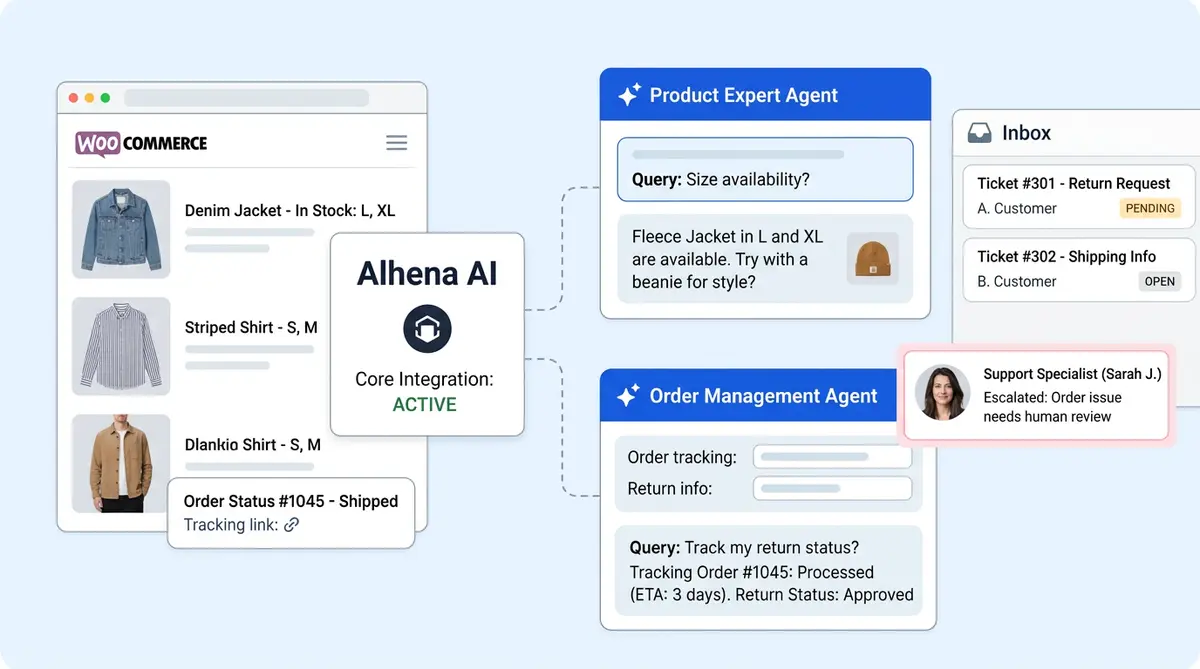
Once connected, two specialized AI agents activate automatically:
- Product Expert Agent: Handles product questions, recommendations, size and fit guidance, subscription management, and conversational selling from your live catalog data. It reads every product attribute, variant, and description in your WooCommerce store.
- Order Management Agent: Handles new order tracking, return initiation, shipping status, and post-purchase queries using real-time order information from WooCommerce.
Because the integration uses WooCommerce's REST API endpoints (/wp-json/wc/v3/products and /wp-json/wc/v3/orders), your catalog and order data stays in sync automatically without manual imports or CSV uploads. When you update a price, add a new product to your existing catalog, or mark an order as shipped, the AI reflects those changes immediately.
How Alhena AI Works Inside Freshdesk
On the Freshdesk side, enabling the integration creates a dedicated "Alhena Bot" agent inside your Freshdesk instance. The bot only responds to cases explicitly assigned to it, giving your support team full control over routing.
Ticket Routing and Automation
You create automation workflows in Freshdesk to assign each new ticket or incoming inquiry to the Alhena Bot agent based on case type, subject line, or customer segment. Configure which category types the AI handles (product questions, order status, returns, shipping) and which route to human agents (complaints, complex billing, VIP customers).
When the chatbot resolves a new ticket or support inquiry, it moves the case to closed status. When a customer sends a reply, Freshdesk automatically reopens the conversation and triggers another bot response cycle. This lets you automate the full conversation loop without manual agent intervention.
Smart Escalation to Human Agents
When the AI can't resolve an inquiry or the customer requests a human, it transfers to a Freshdesk agent with the full conversation transcript, detected intent, customer profile, sentiment analysis, and a suggested resolution. Your agents pick up with complete context instead of asking the customer to repeat themselves.
Escalation also triggers automatically for forwarded emails, automated system messages, and any custom rules you define.
Freshchat for Live Chat
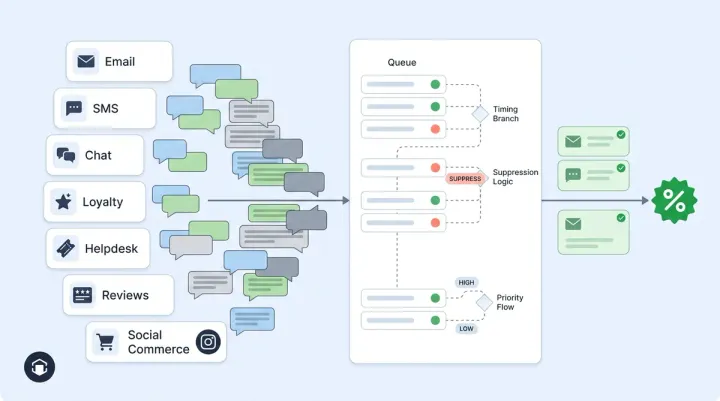
The Freshdesk WooCommerce integration extends beyond email support (or even <a href="https://alhena.ai/blog/ai-email-support-without-helpdesk/">AI email support without a helpdesk</a> for smaller operations). Freshchat integration adds a live chat widget alongside email automation. During business hours, conversations that need a human route to Freshchat where agents can respond in real time. After hours, conversations move to Freshdesk for email follow-up, with the system collecting the customer's email address and account info during the handoff.
This means your AI support concierge handles both channels, live chat and email, from a single integration. No separate chatbot tools, no duplicate integrations, no redundant configurations.
What Alhena Does That Freshdesk Freddy Cannot
Freshworks Freddy AI is a helpdesk automation tool. Alhena AI is a Freshdesk WooCommerce ecommerce AI platform. The distinction matters because ecommerce support isn't just about deflecting support requests. It's about converting browsers into buyers and increasing order values along the way.
Here's what Alhena adds to your WooCommerce + Freshdesk stack that Freddy can't provide:
- Catalog-aware product recommendations: The AI Shopping Assistant reads your full WooCommerce catalog and recommends products based on real attributes like size, color, material, and price range.
- Agentic checkout: The AI can populate carts and pre-fill checkout fields during a conversation, reducing friction between "I want this" and "I bought this."
- Hallucination-free responses: Every answer is grounded in your verified WooCommerce product data. The AI won't invent features, prices, or availability that don't exist in your catalog.
- Revenue attribution analytics: Track exactly how much revenue your AI conversations generate, including conversion rate lift, AOV changes, and total AI-attributed sales.
- Social commerce: Extend the same AI across Instagram DMs and WhatsApp, turning social conversations into orders.
Brands like Victoria Beckham saw a 20% AOV increase after deploying Alhena's shopping assistant. Tatcha achieved a 3x conversion rate and 38% AOV uplift, with 11.4% of total site revenue attributed to AI conversations. These results came from the same platform that connects to your WooCommerce and Freshdesk stack. See the Tatcha case study and Victoria Beckham case study for details.
Revenue Beyond Ticket Deflection
Most support automation tools measure success by how many inquiries they deflect. That's useful, but it misses the bigger picture. Your WooCommerce store's AI layer should also drive sales.
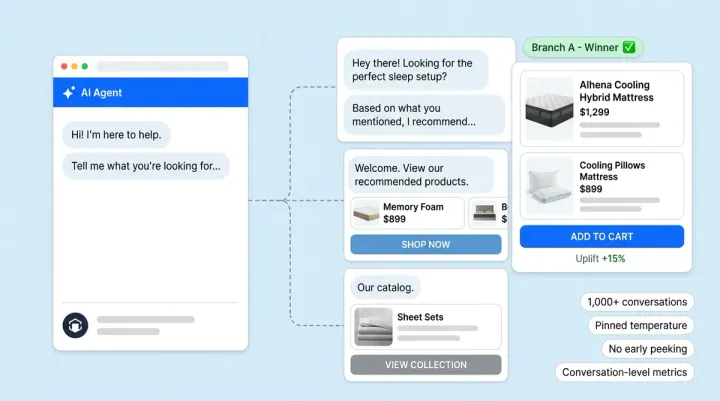
Alhena's AI Shopping Assistant turns support conversations into selling opportunities. When a customer asks "What's the difference between these two products?", the AI doesn't just answer the question. It guides the shopper toward the better fit based on their stated preferences, shows relevant alternatives, and nudges them toward checkout.
Smart PDP FAQs appear directly on your product pages, acting as a dynamic knowledge base that answers common questions before shoppers even open a chat. Conversational search lets customers describe what they want in plain language ("lightweight summer dress under $100") and get matched to the right products from your WooCommerce catalog.
The built-in revenue analytics dashboard tracks AI-attributed sales, conversion lift, and AOV change so you can measure the actual return on your AI investment, not just cost savings from ticket deflection.
Getting Started: WooCommerce + Freshdesk + Alhena AI
The full Freshdesk WooCommerce setup deploys in under 48 hours with no developer resources required. Here's what you need:
- WooCommerce store with admin access (any WordPress hosting provider works for your business)
- Freshdesk account with admin permissions to create automation rules
- Alhena AI account (sign up free with 25 conversations included)
Start the Freshdesk WooCommerce integration by connecting WooCommerce first. Authorize via OAuth, and Alhena begins syncing your product catalog and order data. Then connect Freshdesk with your domain and API key. The Alhena Bot agent appears in your Freshdesk instance, ready for case routing rules.
Optionally, add your store domain to Alhena's training URLs to improve AI performance on brand-specific questions. You can also connect Freshchat for live chat support alongside email automation.
For WooCommerce brands exploring their options, our guide to the best AI shopping assistants for WooCommerce covers how Alhena compares to other tools on the market. If you're also evaluating Freshdesk alternatives, the best Freshdesk Freddy AI alternatives breakdown is worth a read.
Open-Source Flexibility Without AI Compromise
WooCommerce brands shouldn't have to compromise on AI customer service capabilities because they chose an open-source platform. The same conversational commerce, support automation, and revenue attribution available to Shopify brands is available to any WooCommerce store running Freshdesk.
You get the added advantage of full data ownership, the WordPress ecosystem, and the flexibility to customize every part of your stack. Alhena AI simply adds the intelligent Freshdesk WooCommerce layer with native integrations that WooCommerce and Freshdesk don't provide natively.
If you've looked at how similar stacks work with other helpdesks, our guides on WooCommerce + Zendesk and WooCommerce + Zoho Desk show the same principles applied to different helpdesk platforms.
WooCommerce plugin developers who maintain open-source extensions can also benefit from AI-powered GitHub community support to automate issue triage and developer discussions using the same AI training infrastructure.
Ready to bring AI-powered shopping and support to your WooCommerce Freshdesk stack? Book a demo with Alhena AI or start for free with 25 conversations included.

Frequently Asked Questions
Do WooCommerce stores get the same AI capabilities as Shopify brands?
Yes. Alhena AI connects to WooCommerce through the REST API and provides the same Product Expert Agent and Order Management Agent available to Shopify stores. Your customers get real-time product recommendations, order tracking, and conversational shopping from your live WooCommerce catalog data. Brands using Alhena AI on WooCommerce have achieved 86% ticket deflection and 84% CSAT, matching Shopify-native results.
How does Alhena AI connect to WooCommerce without a WordPress plugin?
Alhena AI integrates through WooCommerce's built-in REST API using OAuth authorization. You enter your store URL in the Alhena dashboard, approve the connection from your WooCommerce admin, and the integration syncs your product catalog, inventory, pricing, and order data automatically. No plugin installation means no added server load, no plugin conflicts, and no custom code on your WordPress site.
How does Freshdesk ticket routing work with Alhena AI automation?
When you enable the Freshdesk integration, Alhena AI creates a dedicated bot agent inside your Freshdesk instance. You set up automation rules in Freshdesk to assign specific ticket types (product questions, order status, returns) to the Alhena Bot. The bot resolves inquiries automatically and closes them. If a customer replies, Freshdesk reopens the case and the bot responds again. Cases the AI can't handle escalate to human agents with full conversation context.
Can Alhena AI handle live chat and email inquiries at the same time on Freshdesk?
Yes. Alhena AI works with both Freshdesk email inquiries and Freshchat live conversations. During business hours, chats that need human help route to Freshchat agents in real time. After hours, the system moves conversations to Freshdesk for email follow-up. The AI handles both channels from one integration, so you don't need separate chatbot tools for email and live chat.
How long does it take to set up WooCommerce and Freshdesk with Alhena AI?
The full WooCommerce + Freshdesk + Alhena AI integration deploys in under 48 hours with no developer resources. You connect WooCommerce via OAuth, add your Freshdesk domain and API key, and configure support routing workflows. Both AI agents (Product Expert and Order Management) activate automatically once the WooCommerce connection is live.
Does Alhena AI support social commerce for WooCommerce stores?
Yes. Beyond your Freshdesk support channels, Alhena AI extends the same AI shopping assistant to Instagram DMs and WhatsApp. Customers can browse products, get recommendations, and complete purchases through social conversations, all pulling live data from your WooCommerce catalog. This turns social engagement into measurable revenue for your store.
How does Alhena AI prevent hallucinations when answering product questions?
Alhena AI grounds every response in your verified WooCommerce product data. The Product Expert Agent reads real attributes, descriptions, pricing, and inventory from your catalog through the REST API. It won't invent features, fabricate availability, or quote incorrect prices. If the AI doesn't have enough data to answer a question accurately, it escalates to a human agent rather than guessing.