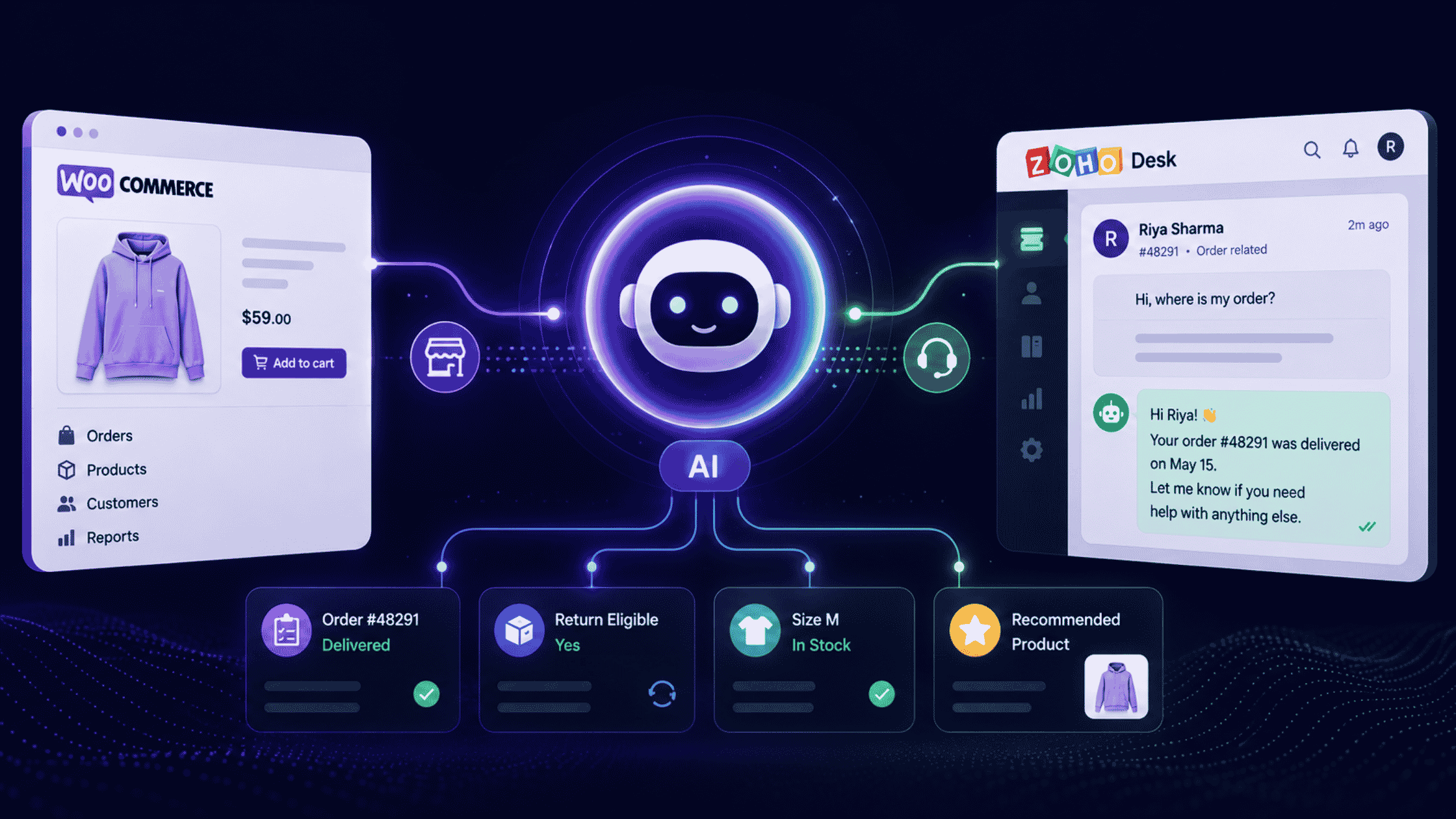
WooCommerce and Zoho Desk have no native data connection. Alhena AI bridges them: you authorize WooCommerce over OAuth in the Alhena dashboard, Alhena's team configures Zoho Desk, and two AI agents then resolve order, return, and product tickets using live store data, inside your existing ticket queue.
The short version
- What connects: WooCommerce (self-service OAuth) → Alhena AI → Zoho Desk and, optionally, Zoho SalesIQ (both assisted setup).
- What activates: an Order Management Agent and a Product Expert Agent, both reading live WooCommerce data on every query.
- What it automates: roughly 60–70% of inbound tickets, concentrated in order status, tracking, returns, refunds, stock and product questions.
- What it costs to run: the cheapest credible enterprise-grade stack in ecommerce, because WooCommerce charges no platform fee and Zoho Desk lists at roughly a third of Zendesk Suite per seat.
- No plugin required: Alhena reads WooCommerce through its native REST API, so nothing installs on WordPress.
Why can't Zoho Desk answer "where is my order?" by itself?
Because Zoho Desk's automation engine only sees the ticket, not the store. Rules fire on channel, priority, keywords, SLA timers and knowledge base articles — none of which reach into your WooCommerce database.
So a human becomes the integration. Open the ticket, switch to WP Admin, search the order, copy the tracking number, switch back, paste, close. Ninety seconds of skilled labour to relay a fact a database already knew.
That would be tolerable if the volume were small. It isn't. Order-status contacts run 30–50% of ecommerce support volume and push past 50% in peak weeks, at an estimated $5–$25 per interaction depending on channel and labour cost (LateShipment and ShippyPro benchmarks, 2026).
How do you connect WooCommerce to Zoho Desk with Alhena AI?
Three connections. One is self-service, two are configured with you.
- Connect WooCommerce. In the Alhena dashboard, open Settings → Integrations, enter your store URL, and authorize on the WordPress admin side over OAuth. Alhena gains real-time read access to catalog, variants, inventory, pricing and orders.
- Connect Zoho Desk. An assisted setup. The Alhena team configures ticket routing, automation workflows, handoff rules and event logging against your Desk instance.
- Add your store domain as a training source. Alhena learns from your product pages, buying guides and help articles, so it knows things your database never stored — fabric behaviour, care instructions, sizing quirks.
| Connection | Setup type | What you need | What it unlocks |
|---|---|---|---|
| WooCommerce | Self-service OAuth | Store admin access | Live orders, inventory, pricing, catalog. Both AI agents activate automatically. |
| Zoho Desk | Assisted, with Alhena | Desk admin, department map | Auto-answered tickets, order-data enrichment, human handoff, full event logging. |
| Zoho SalesIQ (optional) | Assisted, with Alhena | SalesIQ portal + app | AI live chat on the storefront that escalates into Desk with the transcript attached. |
| Store domain training | Self-service | Public URLs | Catalog knowledge beyond raw database fields — guides, FAQs, policy pages. |
Does this need a WooCommerce or WordPress plugin?
No. Alhena reads WooCommerce through the platform's native REST API, so there is nothing to install, update or debug on your site. No plugin conflicts, no added page weight, no theme edits.
That matters more on WooCommerce than anywhere else. The average store already carries a stack of extensions, and every additional one is a future update to test.
What happens when a ticket arrives?
The customer does nothing different. They email, fill in a form, or open SalesIQ chat, and a Zoho Desk ticket is created as usual.
From there Alhena runs the sequence a good agent would run, minus the tab switching:
- Read the intent. Classify the question and pull the order reference or product from the message and contact record.
- Query WooCommerce live. Fetch the actual order, fulfilment status, carrier, tracking number, stock level or price at that moment.
- Compose a grounded reply. Answer in your brand voice using retrieved data, not a canned macro.
- Post into the ticket. The response lands in Zoho Desk in seconds, day or night.
- Log the event. Every AI interaction is written back to Desk for audit and reporting.
When does the AI stop and hand off?
- The customer asks for a person.
- The AI has no confidently grounded answer, so it declines to guess.
- A custom escalation rule fires — VIP tag, refund above a threshold, negative sentiment, or a department you keep human-only.
On transfer, the agent receives the full conversation history inside the ticket. Nobody asks the customer for their order number twice.
What can Alhena answer that Zia cannot?
This is the question worth being precise about, because Zoho's own AI is genuinely useful — just not at commerce data.
| Customer question | Zoho Desk + Zia alone | Zoho Desk + Alhena |
|---|---|---|
| "Where is my order?" | Suggests a KB article or a canned status reply | Pulls that order, returns carrier, tracking number and current shipping status |
| "Can I still return this?" | Links the returns policy page | Checks the order date against your return window and gives a yes or no, plus the next step |
| "Is size M in stock?" | Needs an agent | Reads live variant inventory and offers alternatives if it is out |
| "Which of these two fits my use case?" | Out of scope | Compares attributes from the live catalog and recommends, with stock and price confirmed |
| "Has my refund been processed?" | Ticket status only | Reads the WooCommerce refund record and reports the actual state |
Is Zia enough on its own?
For triage, yes. Zia is strong at the assist layer: auto-tagging, sentiment, ticket summaries and reply drafting.
For autonomous ecommerce resolution, there are four documented constraints worth knowing before you plan around it:
- It reads documentation, not databases. Zia's Answer Bot works from knowledge base articles; it cannot query WooCommerce for an order or a stock level.
- It needs a knowledge base first. Zoho requires a minimum of 30 published articles before Answer Bot can be enabled.
- Full Zia sits on the top tier. The meaningful AI capabilities are gated to Zoho Desk Enterprise, listed around $40 per agent per month.
- Autonomous Zia Agents are still maturing. Zoho's agentic layer launched into early access via Zia Agent Studio and remains bounded to the Zoho ecosystem.
Zia capability and plan details reflect Zoho's published documentation and independent 2026 reviews. Vendor entitlements change; confirm against Zoho's current plan comparison before budgeting.
Which WooCommerce tickets get automated first?
Connecting WooCommerce activates two specialist agents automatically. They split the work along the line customers actually experience: before the purchase, and after it.
Order Management Agent
Tracking, order status, shipping updates, return eligibility, refunds and cancellations — answered from the live order record.
Product Expert Agent
Specs, variant availability, pricing, compatibility and recommendations — grounded in your real catalog and stock.
| Ticket type | Data it needs | Automatable |
|---|---|---|
| Order status and tracking | WooCommerce order + carrier field | Yes, fully |
| Return eligibility | Order date + your return policy | Yes, fully |
| Refund status | WooCommerce refund record | Yes, fully |
| Stock and variant availability | Live inventory | Yes, fully |
| Product comparison and fit | Catalog attributes + trained content | Yes, fully |
| Damaged or missing item claims | Order + judgement + goodwill policy | Partly — triage then escalate |
| Payment disputes, fraud, legal | Human judgement | No — route to a person |
Across these categories, this stack typically absorbs 60–70% of inbound tickets on a WooCommerce store. That is not a ceiling for AI generally — brands running Alhena's AI Support Concierge across richer knowledge sources have gone considerably higher — but it is the honest expectation for a store's first ninety days.
Where does the revenue come from?
Ticket deflection is the cost story, and it lands first. The revenue story comes from the Product Expert Agent, which is doing pre-sales work inside what used to be a cost centre.
Because it reads live inventory and pricing, its recommendations are real rather than scripted. It can suggest a complementary item, flag a running promotion, or steer someone away from a variant that is out of stock — the same judgement a good floor associate applies.
Add Zoho SalesIQ and the same agent moves upstream onto the storefront, answering product questions before a ticket exists. Escalations still land in Zoho Desk with the transcript attached, so nothing is lost between the two surfaces.
What does the whole stack actually cost?
This is where WooCommerce plus Zoho earns its reputation. WooCommerce charges no platform fee, and Zoho Desk lists well under the enterprise help desks.
| Help desk | Entry tier | Mid tier | Top published tier |
|---|---|---|---|
| Zoho Desk | Free (3 agents) / ~$7 | ~$14–$23 | ~$40 |
| Freshdesk | ~$19 | ~$49–$55 | ~$79–$89 |
| Zendesk Suite | ~$55 | ~$89 | ~$115+ |
Per agent, per month, billed annually, as published or aggregated across independent 2026 comparisons. Zoho's pricing page renders in local currency in several regions, so treat USD figures as indicative and confirm before you commit. Add-ons for telephony, live chat and premium support can lift the real bill 20–50% above list.
A ten-agent team illustrates the gap. Zoho Desk Professional runs roughly $2,760 a year against Zendesk Suite Growth at roughly $10,680 — before either platform's AI is switched on.
Layering Alhena on top is what converts that saving into an operating advantage. You get commerce-grounded automation on a help desk that costs a third of the enterprise alternative, which is the whole argument for this stack.
What about the awkward cases?
Can one Zoho Desk account serve multiple WooCommerce stores?
Yes. Each WooCommerce integration maps to its own agent profile with a separate catalog, knowledge base and workflow. Your existing Desk routing rules decide which agent picks up which ticket, so each brand keeps a distinct voice and policy set. Multi-store is configured with the Alhena team during setup.
What if order data lives in an ERP or 3PL, not WooCommerce?
Common for brands past a certain size. Alhena's tool layer is platform-agnostic, so an agent can be pointed at external endpoints alongside the WooCommerce API. Worth raising in your first setup call rather than after go-live.
Does it work for multilingual stores?
Yes. The agent responds in the customer's language while pulling the same underlying order and inventory data, which avoids the usual trap of maintaining translated macros that drift out of date.
What happens during Black Friday?
Peak is where the maths changes character. Order-status volume climbs past half of all tickets exactly when your team has least slack, and AI capacity does not queue. This is the period most stores use to justify the setup.
Can the AI invent an order status?
It is designed not to. Answers are generated from retrieved data rather than from model recall, and where there is no grounded answer the agent escalates instead of guessing. For a support surface attached to money, that constraint matters more than fluency.
What do you need before you start?
- Admin access to your WooCommerce store for the OAuth authorization
- Zoho Desk admin access, plus a rough map of your departments and routing rules
- Your return window, refund policy and escalation thresholds written down somewhere
- A public store domain and help content to add as training sources
- An agreed handoff policy: which ticket types stay human-only from day one
- A baseline to measure against — current WISMO share, first response time, CSAT
Key takeaways
- The gap is data, not intelligence. Zoho Desk automates on ticket metadata; it has no native line into WooCommerce orders, stock or pricing.
- Alhena closes it from both sides. WooCommerce connects self-service over OAuth; Zoho Desk and SalesIQ are assisted setups run with the Alhena team.
- Two agents activate automatically. Order Management handles post-purchase, Product Expert handles pre-purchase, both reading live store data on every query.
- Expect 60–70% of inbound tickets to be automatable, concentrated in order status, returns, refunds and stock questions.
- Zia and Alhena are complementary, not competing. Zia is strong on triage and drafting; Alhena supplies the commerce grounding Zia cannot reach.
- No plugin touches WordPress. The connection runs through WooCommerce's REST API, so there is nothing to install or maintain on your store.
- The cost case compounds. A help desk at roughly a third of enterprise pricing, plus automation on the highest-volume ticket types.
See it on your WooCommerce store
Live order data, answered inside Zoho Desk, in your brand voice.
Frequently asked questions
There is no native connection between the two, so a middle layer is required. With Alhena AI you authorize WooCommerce yourself in the Alhena dashboard under Settings → Integrations using OAuth, then the Alhena team configures the Zoho Desk side, including ticket routing, handoff rules and event logging. Once both are live, tickets are answered using real-time WooCommerce order and catalog data.
No. Alhena connects through WooCommerce's native REST API rather than a plugin, so nothing installs on WordPress. There is no extension to update, no plugin conflict risk, no added page weight, and no theme or admin file is touched. Catalog, inventory and order data sync in real time from Alhena's side.
Assisted. The Alhena team configures the connection to your Zoho Desk instance, covering ticket routing, automation workflows, human agent handoff rules and event logging. The WooCommerce side, by contrast, is fully self-service through OAuth. Zoho SalesIQ, if you add it, is also an assisted setup.
Zia works from knowledge base articles, ticket history and canned responses. It can tag tickets, read sentiment, summarise threads and draft replies, but it cannot query your WooCommerce database, check live inventory or build dynamic product recommendations. Alhena adds that commerce grounding, so answers come from your actual orders and stock rather than your documentation. The two are complementary layers, not substitutes.
Typically 60–70% of inbound volume. The automatable share is concentrated in order tracking, order status, shipping updates, return eligibility, refund status, stock checks and product questions — the repetitive categories that dominate ecommerce queues. Damage claims, payment disputes and anything requiring goodwill judgement should route to a human by design.
Yes. Alhena supports multi-store configurations where each WooCommerce integration maps to its own AI agent profile with a separate product catalog, knowledge base and automation workflow. Tickets route to the correct agent using your existing Zoho Desk rules, so each store keeps its own response patterns and brand voice. Multi-store is configured with the Alhena team during setup.
Connecting SalesIQ, an assisted setup, puts the same AI agent on your storefront as live chat. It answers product questions, order tracking and stock queries in real time, and when it cannot resolve something it escalates into Zoho Desk with the full conversation attached. The result is a continuous path from self-service chat to a human agent without the customer repeating themselves.
The WooCommerce OAuth connection takes minutes and activates both AI agents immediately. The Zoho Desk configuration is scheduled with the Alhena team and depends on how complex your routing and escalation rules are. Most stores run a short shadow period first, reviewing what the AI would have answered before enabling live responses.
Materially, yes. WooCommerce is open source with no platform fee, and Zoho Desk's published tiers run roughly $7–$40 per agent per month against Zendesk Suite's ~$55–$115. For a ten-agent team that difference is thousands of dollars a year before AI is even considered. Confirm current rates directly with each vendor, since add-ons for telephony and live chat can raise the real figure.
It is built to avoid that. Responses are generated from data retrieved live from WooCommerce rather than from model memory, and when the agent has no confidently grounded answer it hands the ticket to a human instead of guessing. Every AI interaction is also logged as a Zoho Desk event, so you have a complete audit trail of what was said and on what basis.