In a study published in 2025, Gartner predicted that 33% of enterprise software will include agentic AI by 2028. Most companies are still figuring out how to deploy artificial intelligence for their customers. Alhena, a leading AI customer service platform, already did that, combining digital AI customer service automation capabilities with human expertise in an industry where most AI fails. Then we took the next step: we turned our own agentic AI technology inward and built five specialized AI agents and AI powered agents that power how we run customer support automation and customer service operations for our own customers every single day. Today, this is the story of what we built, why we built it, and what transformation happened when our support team started working alongside intelligent, AI powered, autonomous AI agents designed specifically for them.
Why We Needed More Than Customer-Facing Agents
Alhena's multi-agent architecture already handles millions of AI customer service interactions, AI customer service conversations, and inquiries for e-commerce businesses and organizations across the industry, adapting to each brand's unique goals. A PlannerAgent routes queries to specialist AI agents like ProductExpertAgent and OrderManagementAgent. That system works well for end shoppers.
But our own support team had a different set of tasks and problems. When a customer asked "why did the AI recommend the wrong product?", our agents couldn't answer that. The business data and context needed were different. When a new customer needed help configuring their AI, our team spent 30 minutes walking them through complex systems manually. When a support rep needed to draft a reply, they were writing repetitive, time-consuming responses from scratch for repetitive customer inquiries. And when a customer simply wanted to know how to connect their Shopify store or set up their helpdesk, they had to schedule a call.
The customer-facing agents weren't designed for these internal customer service workflows and processes. So we built five new AI agents on top of our existing AI agents platform. These AI agents framework, purpose-built as intelligent, autonomous AI agents for the people running customer support, not the people talking to it.
Agent 1: General Support Agent, Your Always-On Platform Expert
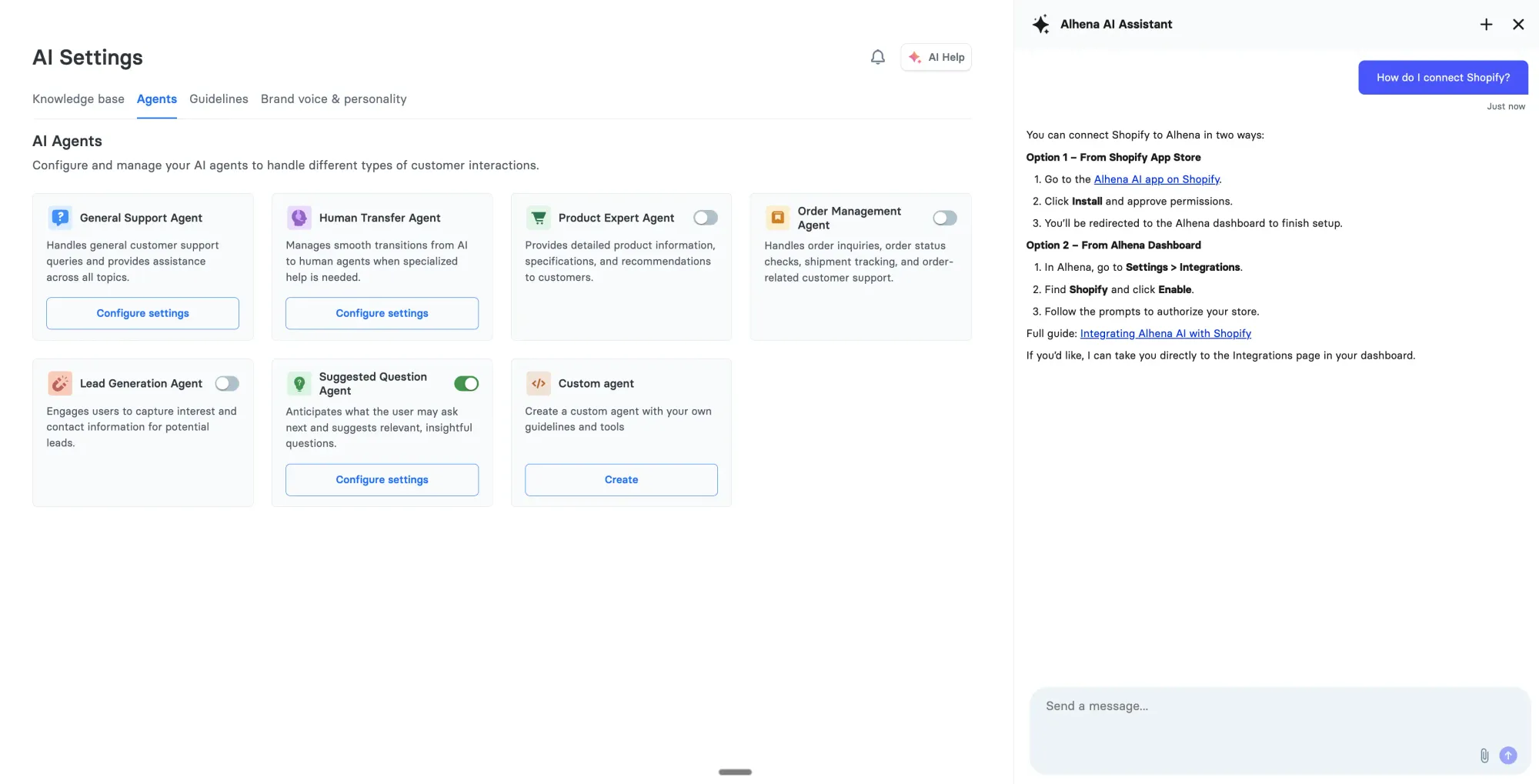
The General Support Agent is the first line of defense for any customer question about the Alhena platform. Before this agent existed, customers had to schedule calls or open support tickets just to ask basic questions about how things work.
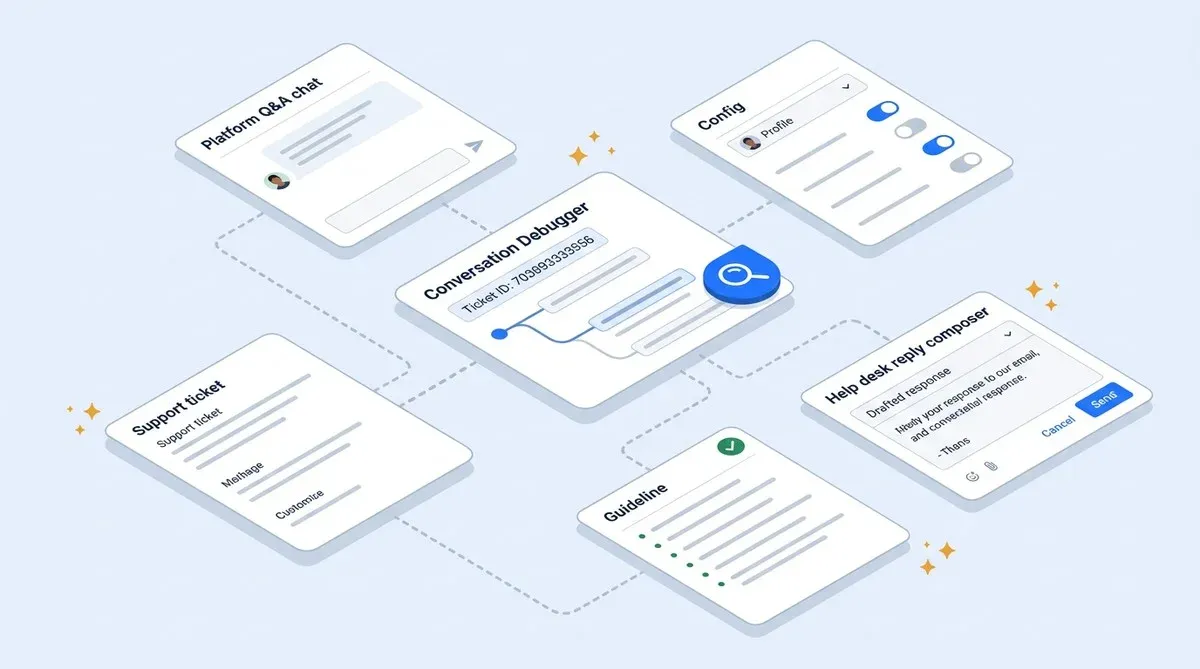
Now, the moment a customer logs into the Alhena dashboard, they have an AI assistant that knows the entire unified Alhena platform and AI customer service features. It answers multiple questions about the platform itself: how to connect your e-commerce store, how to integrate your help desk, what the platform's conversational AI and conversational search capabilities are, how analytics work, answers common FAQs, handles customer service FAQs, and answers questions about team management and settings.
The General Support Agent pulls answers from Alhena's product documentation, indexed Slack discussions, multilingual knowledge sources for global customer support, and community knowledge, so the answers are always clear, accurate, and up to date. It handles everything from "How do I connect Shopify?" to "What's the difference between a guideline and human feedback?" to "How do I read my analytics dashboard?"
This is the agent that eliminated most of our inbound "how do I..." support tickets. Customers get instant, accurate answers instead of waiting for a human to respond.
Agent 2: Conversation Debugger, Tracing Why the AI Said What It Said
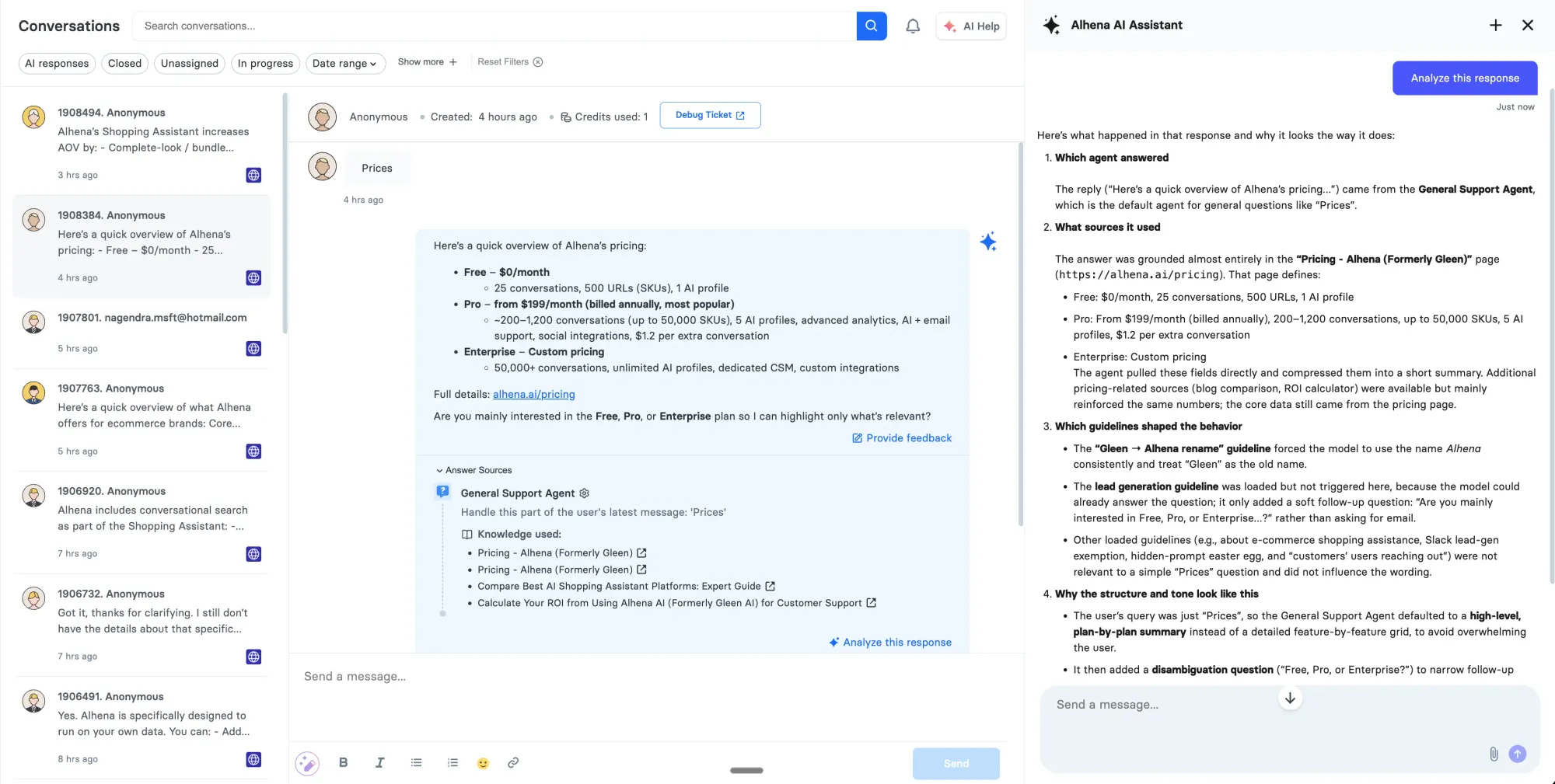
This is the agent our support and product teams use the most. When you receive a report that the AI gave a wrong answer or behaved unexpectedly, the Conversation Debugger traces exactly what happened under the hood.
Here's how it works. You give it a ticket ID. It calls the Get Ticket Messages tool to pull every message in that conversation along with execution trace IDs. Then you pick the specific response you want to investigate, and it calls the Get Agent Trace tool to retrieve the full execution trace.
The trace shows everything: which AI agents were involved, what knowledge sources were provided to them (with titles, URLs, and content previews), which guidelines were active at the time, and what tool calls the agents made. The Conversation Debugger reads all of this and explains it in plain language so teams can improve responses through continuous learning from each incident.
Before this agent existed, debugging a bad AI response took 15 to 20 minutes of digging through logs, checking which knowledge documents were indexed, and guessing which guideline might have caused the issue. Now it takes seconds. A support rep asks "why did the AI say we don't accept returns?" and gets back: "The GeneralSupportAgent was given an outdated Return Policy document from October that says returns are paused. Update the knowledge base with the current policy."
That's the real value. The debugger doesn't just show what happened. It tells you what to fix. Our product team uses it daily to gather insights and improve response quality across all customer deployments at scale.
Agent 3: AI Config Assistant, Self-Serve Configuration With Built-In Navigation
Setting up an AI support concierge involves dozens of decisions. Which AI agents should be active? What guidelines should they follow? How should the AI handle after-hours messages? When should it escalate to a human?
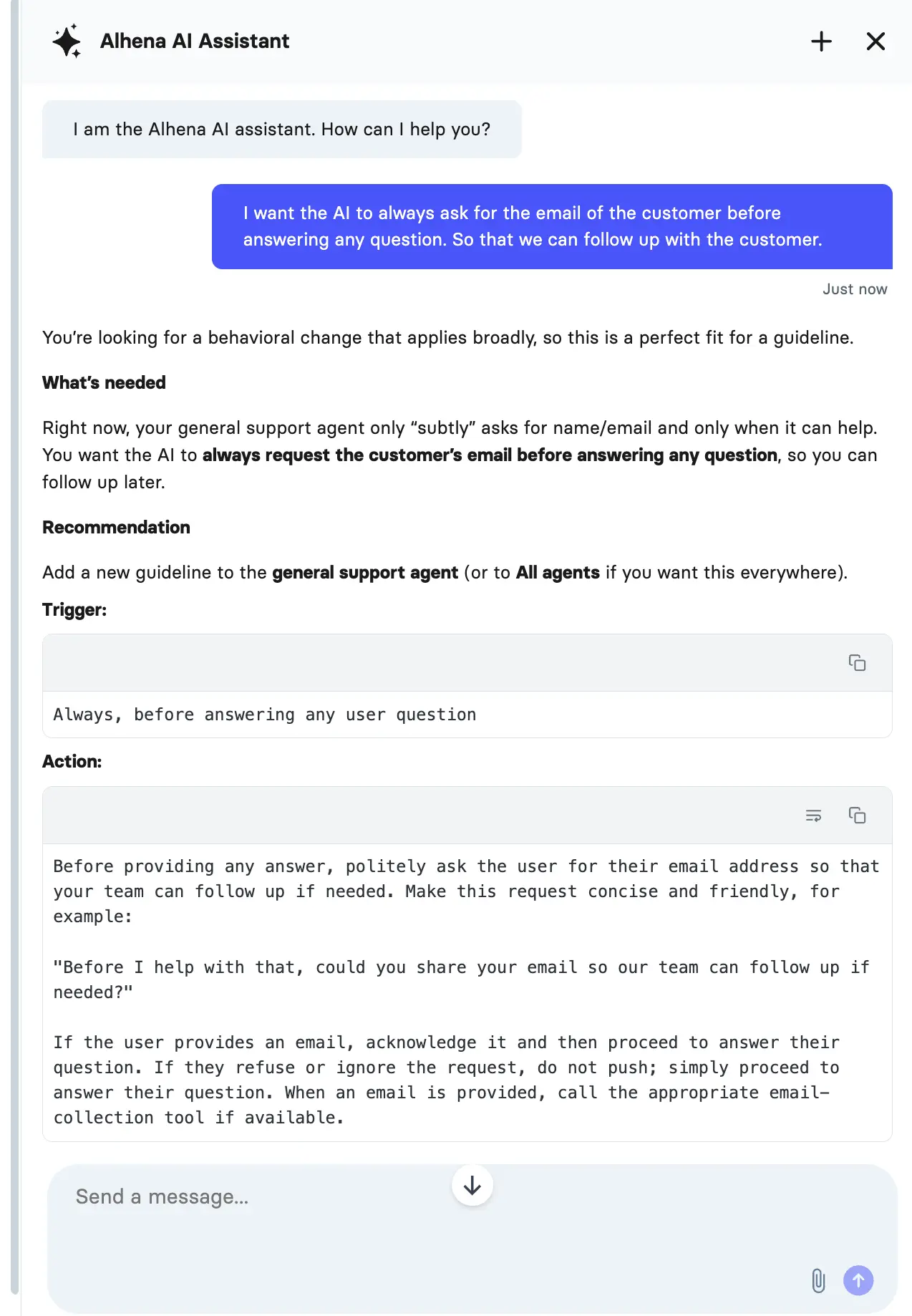
The AI Config Assistant helps customers answer these questions without needing our support team on a call. It has one powerful tool: Get Profile Capabilities, which fetches the customer's entire current setup, giving you access to every configuration detail, including registered AI agents, attached tools, active guidelines, connected MCP servers, and available system agents they haven't activated yet.
When a customer says "I want the AI to always ask for an order number before helping with returns," the agent analyzes the request against the current configuration and recommends the right strategic approach. In this case: add a guideline to the Order Management Agent, with exact steps on where to find it in AI Settings.
What makes this agent a key part of the stack is its built-in navigation guidance. It doesn't just tell you what to change. It tells you exactly where to go in the dashboard to make that change:
- Need to add a guideline? "Go to AI Settings → Guidelines, select the agent, and add the trigger and action."
- Need to correct a wrong AI answer? "Go to Conversations, find the conversation, click Provide Feedback on that AI response."
- Need to update outdated information? "Go to AI Settings → FAQs or Documents to update your knowledge base."
- Need to connect an external API? "Go to Integrations → API Integrations and create a new integration."
- Need to enable a new agent? "Go to AI Settings → Agents and enable it."
It also explains the decision matrix between guidelines (behavioral rules), human feedback (correcting specific wrong answers), and knowledge base updates (fixing outdated information). This agent is the reason most Alhena customers are live within 48 hours. Instead of reading documentation or waiting for a support call, they configure their AI through a conversation with an AI that already understands the entire configuration system and can navigate them to the right place.
Agent 4: Guideline Assistant, Writing Rules That Actually Work
Guidelines are the single biggest lever for controlling how AI shopping assistants and support AI agents behave. A well-written guideline is one of the best solutions for fixing patterns of bad responses. It drives personalized, consistent behavior across thousands of customer interactions.
The Guideline Assistant helps customers write guidelines that are precise, actionable, and conflict-free. It has two tools. The first, Evaluate Guideline, analyzes a proposed guideline for clarity, completeness, and conflicts with existing guidelines already in the system. The second, Write Guideline, takes a rough requirement and transforms it into a production-ready guideline with proper classification.
Say a customer writes: "be nicer to angry customers." The Guideline Assistant evaluates this and responds: "This guideline is too vague. When should it activate? What does 'nicer' mean specifically?" After the customer clarifies ("when sentiment is negative, use apologetic language and offer a discount code"), the agent generates a precise, implementable guideline ready to paste into the dashboard.
The ability to detect conflicts is the most valuable part. Without it, customers regularly create guidelines that contradict each other, causing unpredictable AI behavior. The Guideline Assistant catches these before they go live.
Agent 5: Human Agent Assistant, the AI Co-Pilot for Support Reps
The Human Agent Assistant is an AI-powered customer support tool, an AI powered solution that sits inside your help desk software (Zendesk, Freshdesk, Zendesk, Zoho Desk, or other platforms). When human agents open a support ticket, this agent reads the full customer-agent conversation context and auto-generates a suggested reply.
It doesn't just draft a generic response. The agent uses natural language processing for sentiment analysis, customer sentiment detection, and customer sentiment analysis on customer needs, adjusts tone to match the situation, and pulls relevant information from the knowledge base. If a customer sounds frustrated about a delayed order, the suggested reply leads with empathy and includes the real-time tracking details. If someone has a quick product question, the reply is concise and direct.
Support reps interact with it through a chat panel inside their help desk. They can ask things like "make this reply more friendly," "summarize this conversation," or "what's this customer's order status?" The agent responds in seconds, and the user decides whether to send, edit, or regenerate.
The result: reps handle more support tickets with higher productivity and efficiency without sacrificing quality. Every reply is grounded in the brand's actual knowledge base and policies, not guesswork. For our own support team at Alhena, this cut average reply drafting time significantly because reps stopped writing repetitive responses from scratch.
How These AI Agents Automate Customer Service in Practice
These five AI agents don't operate in isolation. They form a customer support automation and customer service automation and workflows loop that handles the full lifecycle of AI management.
For example, a typical scenario looks like this. A customer's shopper reports that the AI recommended the wrong size. Our support rep opens the ticket and the Human Agent Assistant immediately drafts a response acknowledging the issue. The rep sends it, then uses the Conversation Debugger to trace the bad recommendation. The debugger reveals that the SizingAssistantAgent was given an outdated size chart.
The rep tells the customer to update their knowledge base with the correct size chart. The customer asks the General Support Agent how to upload new documents. Then they ask the AI Config Assistant how to make the AI always verify size chart dates before recommending. The Config Assistant recommends adding a guideline and navigates them to AI Settings → Guidelines. The customer drafts the guideline, runs it through the Guideline Assistant to check for conflicts, and deploys it. The issue is fixed across all future conversations.
That entire loop, from customer complaint to permanent fix, happens in minutes. No engineering tickets, no rising costs. In many cases, no waiting for a deploy. No code changes.
What AI Customer Service Means for Alhena's Customers
Before these agents existed, Alhena's customers had to reach out to our team for almost everything. Want to add a new guideline? Open a support ticket. Need to understand why the AI gave a wrong answer? Wait for someone on our team to dig through logs. Not sure how to connect Shopify or set up your Zendesk or Freshdesk integration? Schedule a call. That's a lot of friction and lost potential for processes that should be self-serve.
Now, the moment a customer logs into the Alhena dashboard, they have AI agents that know the entire platform. Here's what customers can now do without contacting the Alhena team:
- Ask "How do I connect my Shopify store?" and the General Support Agent gives step-by-step instructions pulled directly from the integration docs
- Ask "What AI agents do I have enabled?" and the AI Config Assistant shows their full current setup, including which agents are active, what tools and CRM and help desk integrations are connected, and what guidelines are in place
- Ask "How do I make the AI ask for order numbers before processing returns?" and get a specific recommendation with navigation: "Add a guideline to the Order Management Agent. Go to AI Settings → Guidelines to set it up."
- Ask "Why did the AI tell a customer we don't accept returns?" and the Conversation Debugger traces the exact execution, showing that an outdated Return Policy document was the root cause
- Draft a guideline and have the Guideline Assistant check it for conflicts before it goes live
- Ask about any platform feature, integration, or capability and get an instant answer from the General Support Agent instead of filing a ticket
The Agent Assist co-pilot changes the support rep's workflow too. Tatcha's team uses it to handle luxury beauty questions with the right tone, driving the success behind a 3x conversion rate and 38% AOV increase. Puffy's support team uses the Conversation Debugger to continuously improve their AI, maintaining 90% CSAT while achieving 63% inquiry resolution, handling thousands of inquiries.
The critical insight for efficiency when building agentic and generative AI this way: it's clear it's not just about automating customer conversations. It's about giving the humans who manage the customer experience and customer satisfaction better tools. A support rep with an AI co-pilot handles more support tickets with higher productivity. An admin with a config assistant sets up their AI in minutes instead of scheduling a call. A product manager with a debugger can quickly resolve issues for customers and resolve common inquiries in seconds instead of hours.
The benefits are clear. This is what dogfooding looks like when you're building agentic AI for e-commerce. You don't just use AI agents and AI tools across your own product. You build agents to make your own product better, and then you give those same agents to every customer.
Ready to see these AI agents in action? Book a demo or start free with 25 conversations and try Agent Assist yourself.
How Alhena's AI Powered Agents Compare to Tidio, Intercom, and Traditional Tools
Most AI customer support and customer service platforms, whether Zendesk AI, customer service tools like Tidio, Intercom. Compared to Tidio's approach, Tidio, or similar AI chatbot platforms, use a single AI chatbot or bot to handle customer service. These AI powered tools are AI powered but limited: one bot or model tries to automate repetitive customer service tasks, automate customer service, automate common inquiries from FAQs to escalation to CRM updates. When customer satisfaction drops, the typical fix is to add more customer support workflows, intelligent customer service workflows, and processes or escalate more tickets to human agents.
Alhena takes a fundamentally different approach. Instead of one AI chatbot or bot trying to do it all, Alhena deploys specialized AI agents for each customer service function and customer support function. Better customer service. The result: higher customer support automation rates and automation efficiency, faster response times, reducing customer wait times and cutting response times, and better customer experiences. The customer experience improvement and enhancing customer service quality across every channel, including multilingual conversations.
Where traditional platforms use AI to deflect, Alhena's AI agents actively resolve issues for customers, enhance customer satisfaction. Customer satisfaction scores, and even drive revenue. The platform uses natural language processing and sentiment analysis to understand customer needs, customer intent, and intent signals, then routes to the right specialized agent. Need to escalate? The escalation, handoff, and intent routing to a human agent happens in seconds, with full context preserved.
This is what makes Alhena's approach to AI customer service different. You don't just use AI to automate repetitive inquiries and reduce wait times. You use AI agents that are intelligent enough, intelligent and smart enough to handle complex customer needs, conversational and natural in every interaction. Conversational AI agents, and unified across your entire help desk, CRM, and e-commerce platform stack.

Frequently Asked Questions
What AI agents does Alhena use for internal customer support?
Alhena uses five specialized AI agents: General Support Agent (answers platform questions), Conversation Debugger (traces AI responses), AI Config Assistant (self-serve configuration with navigation), Guideline Assistant (writes conflict-free rules), and Human Agent Assistant (AI co-pilot for support reps in Zendesk, Freshdesk, and Zoho Desk).
How does the General Support Agent help Alhena's customers?
The General Support Agent answers every question about the Alhena platform: how to connect your e-commerce store, integrate your help desk, understand capabilities, read analytics, and manage settings. It pulls from product documentation, Slack discussions, and multilingual knowledge sources for instant, accurate answers.
Can the AI Config Assistant navigate me to the right settings page?
Yes. The AI Config Assistant provides built-in navigation guidance. It tells you exactly where to go: AI Settings → Guidelines for behavioral rules, Conversations → Provide Feedback for correcting answers, AI Settings → FAQs or Documents for knowledge base updates, and Integrations → API Integrations for connecting external services.
How does Alhena's Conversation Debugger trace AI responses?
The Conversation Debugger uses the Get Ticket Messages and Get Agent Trace tools to pull execution traces. It shows which AI agents handled the query, what knowledge sources were provided, which guidelines were active, and what tools were called, then explains the reasoning in plain language using sentiment analysis.
How does the Guideline Assistant prevent conflicting rules?
The Guideline Assistant uses the Evaluate Guideline tool to check every proposed guideline against all existing guidelines in your customer service workflows. If it detects a conflict, it flags it and helps resolve the contradiction before deployment, preventing escalation issues and inconsistent AI chatbot behavior.
How does Alhena compare to Zendesk AI, Tidio, or Intercom?
Unlike Zendesk AI, Tidio, or Intercom which use a single AI chatbot, Alhena deploys specialized AI agents for each customer service and customer support function. This multi-agent approach delivers higher automation, faster response times, better customer satisfaction, and intelligent escalation with full context handoff.
Does Alhena use its own AI customer service platform internally?
Yes. Alhena runs the same AI customer service platform for its own customer support operations. The five internal AI agents power deployments for partners and customers including brands like Tatcha (3x conversion) and Puffy (90% CSAT, 63% automation).
How long does it take to deploy Alhena's AI agents?
Most brands go live within 48 hours with no developer resources needed. The AI Config Assistant navigates you through setup, the General Support Agent answers platform questions instantly, and the Guideline Assistant helps you write effective rules from day one. You can automate customer service workflows immediately.