Most ecommerce AI customer service chatbots hit a wall around 50% automation, and the customer support teams running them can't figure out why. The answer isn't the ai tools or the technology. Support teams have evolved, but coaching hasn't. It's that nobody coaches the ai agent after launch. Every ai powered system needs ongoing tuning. Klarna learned this the hard way after implementing their AI assistant: their AI assistant handled 2.3 million conversations in its first month, slashed customer support resolution times from 11 minutes to 2, and projected $40 million in savings. Within a year, quality had degraded enough that the company started rehiring human agents. Many companies face the same challenges, from Intercom users to teams running OpenAI-based solutions. The missing piece wasn't a better script, more self service options, or a fix for repetitive questions. It was an ongoing discipline of review, scoring, tuning, and threshold adjustment, a practice that has reshaped support workflows and separates teams stuck at 50% from those reaching 80%+ automation. This post breaks down the weekly ai customer support team evolution cadence for customer service teams that keeps ecommerce AI chatbots and agents getting better, not worse, every single week.
Why AI Customer Service Agents Degrade Without Coaching
Production AI chatbots in customer service, whether powered by natural language processing (nlp), machine learning, or generative ai, follow a predictable pattern. You launch it, celebrate early adoption wins (60% fewer tickets, faster response times), and move on to the next project. Then, around 90 days in, things start slipping. The challenges compound: customers get outdated answers. The AI confidently recommends a product you discontinued two months ago. It can't respond to changing customer needs because its training data is stale. CSAT scores drift downward, but slowly enough that nobody in these orgs notices until the damage is real. Teams that escalate issues quickly catch drift early. Early detection matters because by the time customers complain, the degradation has been compounding for weeks.
This happens for four reasons. Data drift: customer language evolves while your AI's training stays frozen. Concept drift: your policies, pricing, and product catalog change, but the knowledge base doesn't keep up. Retrieval pollution: outdated articles accumulate and compete with current ones. Prompt brittleness: the prompts and models that worked at launch fail against query patterns you didn't anticipate.
Forrester's 2026 predictions put it bluntly: the work ahead is "gritty, foundational work," not transformation. They predict 30% of enterprises will create parallel artificial intelligence functions mirroring human customer service roles by year's end. The ai customer support team evolution isn't about deploying AI. It's about managing it every week after you do.
Alhena's own data from ecommerce companies confirms the pattern. Teams that follow a structured tuning playbook in their first 30 days reach 80%+ automation by month three. Teams that skip ongoing coaching plateau at 50-60%, right where Klarna ended up before their course correction.
The Weekly AI Review: What to Audit, Who's in the Room, What to Fix
The core of AI coaching for customer service is a 30-to-45-minute weekly review. This isn't a status meeting. It's a working conversation where the team looks at real customer conversations, spots problems, and makes specific changes before the next week starts.
Who Sits in the Room
Keep it tight: your systems need just one CX operations lead, one senior customer support agent who handles escalations, and whoever owns the knowledge base and content management (sometimes the same person, sometimes not). For AI shopping assistant deployments that also drive revenue, pull in someone from merchandising once a month to review product recommendation accuracy.
You don't need engineering. You don't need product management. You need customer service people who see conversations daily and can spot when something sounds wrong.
The Weekly Audit Agenda
Structure the session around five checks:
- Resolution rate trend: Did automated resolution go up, down, or flat compared to last week? A drop of more than 2 percentage points signals something changed in your customer service operation.
- Escalation volume and reasons: What tasks and topics drove the most handoffs to human agents? Are the same topics recurring, or is this new?
- Low-scored conversations: Pull the 10 worst-rated customer interactions from the past 7 days. Read them. Look for patterns.
- Knowledge base gaps: Which questions did the AI fail to answer or answered incorrectly? Track these in a running list.
- New product/policy changes: Did anything ship this week that the AI doesn't know about yet? A new return policy, a product launch, a sale starting Friday?
The output of every weekly review should be a short list of 3-5 specific changes to make before the next session. Not a strategy document. Not a backlog item. Changes you can implement in the knowledge base, prompt configuration, or escalation rules that week.
Platforms like Alhena's Support Concierge surface flagged conversations and real-time resolution metrics in a single dashboard, which cuts the time you spend hunting for problem conversations. But even without built-in tooling, you can run this review by exporting your 10 lowest-CSAT conversations weekly and reading through them as a team.
Conversation Scoring: How to Grade AI Customer Service Responses
You can't improve what you don't measure. The shift from manual QA sampling (where teams review 2-5% of conversations) to systematic conversational AI scoring is one of the biggest operational changes in customer service today. A McKinsey study found that automated QA achieves 90%+ accuracy compared to 70-80% for manual scoring, with 50%+ cost savings.
Building a Scoring Rubric
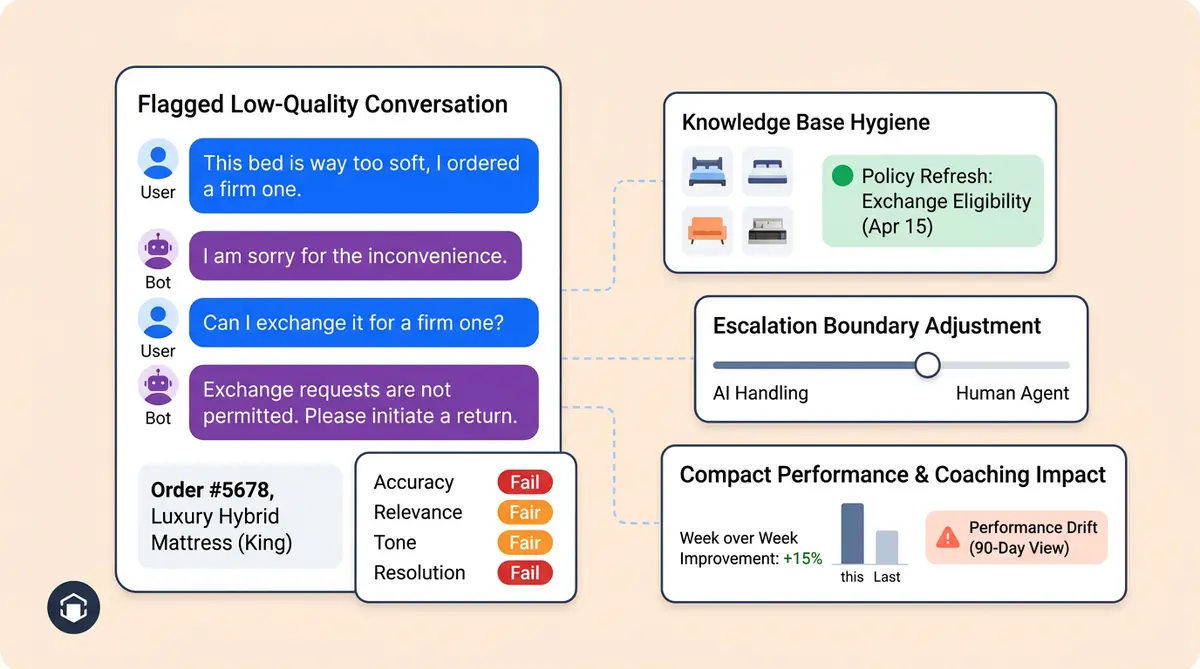
Every AI response should be evaluated on four dimensions:
- Accuracy (40% weight): Did the AI provide correct information? Was the product detail, policy, or order status factually right?
- Relevance (25% weight): Did the answer match what the customer actually asked? An accurate answer to the wrong question still fails.
- Tone (20% weight): Did the response match your brand voice? Was the voice too formal for a streetwear brand, or too casual for a luxury retailer?
- Resolution (15% weight): Did the customer get what they needed without escalating or asking again?
Score each dimension on a 3-point scale: pass, partial, fail. A conversation that scores "fail" on accuracy or "partial" on both relevance and tone goes into the weekly review queue automatically.
Spotting Customer Service Degradation Before Customers Do
The real value of scoring isn't grading individual conversations. It's spotting trends. If your accuracy score drops from 92% to 87% over three weeks, something changed. Maybe a product page was updated but the knowledge base wasn't. Maybe a new return policy contradicts an old FAQ entry. Maybe seasonal language patterns ("holiday gift," "Mother's Day shipping") are confusing the retrieval layer.
Alhena's Smart Flagging feature catches potential hallucinations before they reach customers, automatically surfacing responses that don't match verified product data. This is one area where the difference between general-purpose conversational AI and ecommerce-specific solutions shows up clearly: chatbots built for ecommerce ground responses in your actual product catalog, which makes hallucination detection far more precise.
Set a weekly threshold: if any scoring dimension drops more than 3 points from its 4-week rolling average, it triggers an investigation in that week's review session. Don't wait for customers to complain. The data tells you first.
Prompt and Knowledge Base Refinement: The Tuning Cycle
Scoring tells you what's broken. Tuning fixes it. This is the hands-on process of AI coaching: updating the knowledge base, adjusting prompts, testing changes against production systems against real conversation patterns.
Knowledge Base Management and Hygiene
Your AI is only as good as the information it draws from. Without tight integration between your product catalog, help center, and AI systems, responses go stale fast. When products change, policies update, or seasonal promotions start, the knowledge base and AI models need to reflect that within days, not months. Knowledge base operations should follow a clear cadence: For a deeper dive, see our training pipeline that takes AI agents from FAQ to 70% resolution.
- Weekly: Review and update FAQs flagged as incorrect or incomplete during conversation scoring. Remove outdated seasonal content (that Valentine's Day gift guide shouldn't surface in April).
- Biweekly: Audit the top 20 most-retrieved articles. Are they still accurate? Do they reflect current pricing, shipping timelines, and stock availability?
- Before major events: Load seasonal content 2-3 weeks before Black Friday, holiday sales, or product launches. Don't wait until the day of.
- After major events: Archive or de-prioritize seasonal content within one week of the event ending.
SearchUnify's 2026 research found that 40% of AI initiatives stall for companies without strong knowledge hygiene. The fix isn't complex. It's consistent.
Prompt Refinement That Actually Works
When conversation scoring reveals a pattern (the AI keeps suggesting out-of-stock items, or its tone shifts too formal during complaints), the fix usually lives in two places: the knowledge base systems or the prompt configuration.
Start with the knowledge base. If the AI gives wrong information, the source data is usually the problem. If the source data is correct but the AI models’ response still misses, the prompt needs work.
Good prompt refinement follows a test-then-deploy pattern. Change one thing at a time. Test it against 5-10 real conversations from the past week that triggered the issue. If the new prompt handles those conversations better without creating regressions elsewhere, push it live. If it fixes the original problem but creates a new one, roll it back and try a different approach.
Gorgias runs 10,000+ prompt iterations with thousands of evaluation reports, enabling updates tens of times daily. You don't need that velocity for a typical ecommerce operation. But you do need the principle: change, test, measure, repeat. The development cycle for prompt refinement should be measured in days, not quarters.
Escalation Threshold Tuning: When to Widen or Tighten the AI's Scope
Escalation thresholds define the boundary between what your AI handles and what goes to a human agent. Get this wrong in either direction and you face real challenges: too tight, and you're paying humans to answer questions the AI handles perfectly. Too loose, and frustrated customers get stuck in a loop with a chatbot that can't help them.
Signals That You Need to Tighten (Give AI More Tasks)
Look at your escalation log. If human agents are resolving certain ticket types in under 2 minutes with a one-message response, the AI should probably handle those tasks. Common examples: "Where's my order?" when the answer is a tracking link. "What's your return window?" when it's a straightforward policy question. "Do you have this in size 10?" when inventory data integration is connected.
Tightening escalation thresholds is where revenue impact shows up. Manawa cut customer service response times from 40 minutes to 1 minute and automated 80% of inquiries early on by progressively widening what their AI handled. Crocus reached 86% deflection with 84% CSAT, proving you can automate more without sacrificing quality, if you tune the thresholds carefully.
Signals That You Need to Loosen (Send More to Humans)
Watch for three red flags. First, repeat contacts: if a customer messages the AI, then messages again within 24 hours about the same issue, the AI didn't actually resolve it. Second, sentiment analysis drops on specific topic clusters: if CSAT for billing-related AI conversations drops below 70% while other categories stay at 85%+, billing needs a human for now. Third, escalation requests: if customers are explicitly asking to talk to a person, that topic isn't ready for full automation.
The discipline here is resisting the urge to set thresholds once and forget them. Your product catalog changes. Your customer expectations shift. A topic the AI handled well in January might need human intervention in April because you changed your warranty terms. Review thresholds monthly, and adjust after any major policy or product change.
Alhena's Agent Assist tool helps with the in-between cases. When the AI isn't confident enough to resolve fully but the topic doesn't need a cold transfer, Agent Assist gives human agents AI-drafted responses with full context, order history, and conversation context summaries, keeping the customer experience smooth and consistent during the handoff.
AI Coaching as a Permanent Customer Service Discipline
Here's the mindset shift that separates high-performing CX teams from everyone else: AI coaching isn't a customer service project with a completion date. It's a permanent operational function, like QA, like workforce management, like training new hires.
Harvard Business Review argues that "agent managers" are becoming essential in the AI era, comparing the role to how product managers emerged during the software revolution. Salesforce's own customer support operation employs an agent manager who spends his day in "dashboards, scorecards, and agent observability monitoring." Their AI resolves 74% of inbound cases autonomously, a number that only holds because someone actively manages it.
Gartner found that 58% of customer service leaders plan to upskill agents into knowledge management specialists. That's the ai customer support team evolution in customer service in action: your best support agents work as AI coaches, using their deep contextual understanding of customer problems to make the AI better week after week.
What the AI Coach Role Looks Like in Practice
An AI coach in an ecommerce customer service team spends roughly 4-6 hours per week on ai technology coaching activities, analyzing data in real time:
- 2 hours: Reviewing flagged and low-scored conversations, identifying patterns
- 1 hour: Updating the knowledge base (new FAQs, corrected articles, seasonal content)
- 30 minutes: Leading the weekly review session
- 30 minutes: Testing prompt changes and verifying fixes from last week
- 30 minutes: Reviewing escalation data and adjusting thresholds
This isn't a full-time role for most ecommerce companies. It's a discipline that lives within your existing CX teams and customer success team, typically owned by a senior agent or team lead who already understands your customers, your products, and your brand voice. For larger companies, it becomes a dedicated position. Either way, it needs to be someone's explicit responsibility, not an afterthought split across the team.
If you're building an AI-first CX team structure, the AI coaching and management function should be part of the org design from day one, not bolted on six months later when performance starts slipping.
Putting It Together: The Monthly Coaching Calendar
Here's a practical framework for orgs implementing AI coaching after initial adoption. CX teams ready to formalize their AI coaching practice:
Week 1: Performance review. Run the full weekly audit. Score a random sample of 50 conversations. Compare metrics to the 4-week rolling average. Identify the top 3 issues to fix this month.
Week 2: Knowledge and prompt tuning. Update the knowledge base for any issues identified in Week 1. Test prompt changes against real conversation samples. Push fixes live and tag them so you can measure impact.
Week 3: Escalation review. Analyze which topics are being escalated and whether those escalations are necessary. Adjust thresholds. Meet with merchandising (if applicable) to review product recommendation accuracy and seasonal content needs.
Week 4: Measure and plan. Compare this month's scores to last month's. Document what changed and why. Set development priorities for next month. Share a brief development summary with leadership: automation rate, CSAT, top improvements made, issues still open.
Between these structured sessions, keep a running "AI fix list" where anyone on the customer support team can log conversations where the AI gave a wrong or suboptimal answer. This list feeds directly into the weekly review and keeps the feedback loop tight.
McKinsey's research shows this kind of structured approach delivers real results: organizations and companies that actively manage their AI operations see 30% call volume reduction, 25%+ handle time reduction, and first-call resolution gains of 10-20 percentage points . The improvement compounds. Every fix this week means fewer bad conversations next week, which means fewer escalations, which means lower costs and higher customer experience satisfaction.
Key Takeaways
- AI coaching is a weekly discipline, not a launch-day task. Teams that skip ongoing coaching plateau at 50-60% automation. Teams that coach weekly reach 80%+.
- Score every conversation, not just 2-5%. Use a rubric covering accuracy, relevance, tone, and resolution. Set alerts for any dimension that drops more than 3 points from its rolling average.
- Update your knowledge base on a cadence, not on a crisis. Weekly FAQ reviews, biweekly article audits, and pre-event seasonal loading prevent degradation before it happens.
- Treat escalation thresholds as dials, not switches. Review monthly. Tighten when agents are resolving simple tasks in under 2 minutes. Loosen when repeat contacts or sentiment drops signal the AI is in over its head.
- Make someone accountable. The AI coaching function needs an explicit owner, whether that's a senior agent spending 4-6 hours per week or a dedicated AI operations role.
Ready to build an AI coaching practice on a platform designed for it? Book a demo with Alhena AI to see how built-in conversation scoring, smart flagging, and knowledge management make weekly tuning faster and more effective, or start free with 25 conversations and test the coaching workflow yourself.

Frequently Asked Questions
How often should ecommerce teams review AI chatbot performance?
High-performing ecommerce teams run a 30-to-45-minute weekly review session covering resolution rates, escalation reasons, low-scored conversations, knowledge base gaps, and recent product or policy changes. Monthly deep dives compare scores against rolling averages and set priorities for the next cycle. Gartner data shows 58% of service leaders are already upskilling agents into knowledge management roles that include this kind of recurring oversight.
What scoring rubric should I use to grade AI customer service responses?
A practical rubric scores each AI response on four dimensions: accuracy (40% weight), relevance (25%), tone (20%), and resolution (15%). Use a 3-point scale (pass, partial, fail) for each dimension. Flag any conversation that fails on accuracy or scores partial on two or more dimensions for human review. McKinsey research shows automated QA scoring reaches 90%+ accuracy compared to 70-80% for manual review.
Why do AI chatbots plateau at 50% automation after deployment?
AI chatbots plateau because of four types of drift that accumulate after launch: data drift (customer language changes while the model stays frozen), concept drift (policies and products change but the knowledge base doesn't), retrieval pollution (outdated content competes with current articles), and prompt brittleness (initial prompts fail against new query patterns). Without a weekly coaching cadence to catch and fix these issues, automation rates stall between 50-60%.
What does an AI coach do on an ecommerce support team?
An AI coach spends roughly 4-6 hours per week on five activities: reviewing flagged and low-scored conversations (2 hours), updating the knowledge base with new FAQs and corrected articles (1 hour), leading the weekly AI review session (30 minutes), testing prompt changes (30 minutes), and reviewing escalation data to adjust thresholds (30 minutes). For most ecommerce brands this is a part-time discipline owned by a senior support agent or team lead, not a separate full-time hire.
How do I know when to let AI handle more topics versus escalating to human agents?
Tighten thresholds (give AI more) when human agents resolve certain ticket types in under 2 minutes with a single message, like order tracking or basic policy questions. Loosen thresholds (send more to humans) when you see repeat contacts within 24 hours on the same issue, CSAT drops below 70% for a specific topic cluster, or customers explicitly request a human agent. Review escalation data monthly and after any major policy or product catalog change.