The Set-and-Forget Trap
Most ecommerce brands deploy an AI shopping assistant, check CSAT after a month, glance at deflection numbers, and either declare victory or disappointment. The problem: they're measuring unoptimized performance. A Gartner study found that organizations actively managing AI post-deployment see up to 40% higher accuracy within 90 days compared to those that leave systems untouched.
The first 30 days after deployment are the highest-leverage tuning window you'll ever get. Your ecommerce AI chatbot is encountering real shopper questions for the first time, revealing knowledge gaps, edge cases, and tone mismatches that no pre-launch ecommerce testing can fully predict. Brands that actively tune during this window reach 80%+ automation rates by month three. Brands that set and forget plateau at 50 to 60% and blame the chatbot technology instead of the tuning process.
This post is your week-by-week action plan for the critical first month of AI chatbot optimization in ecommerce. Whether you run a chatbot for ecommerce customer support or an AI shopping assistant, this playbook applies. Follow it, and you'll build an AI that compounds in accuracy every week across your ecommerce store. Skip it, and you'll spend month three debugging problems you should have caught in week one.
What AI Chatbots Do in Ecommerce (and Why They Need Tuning)
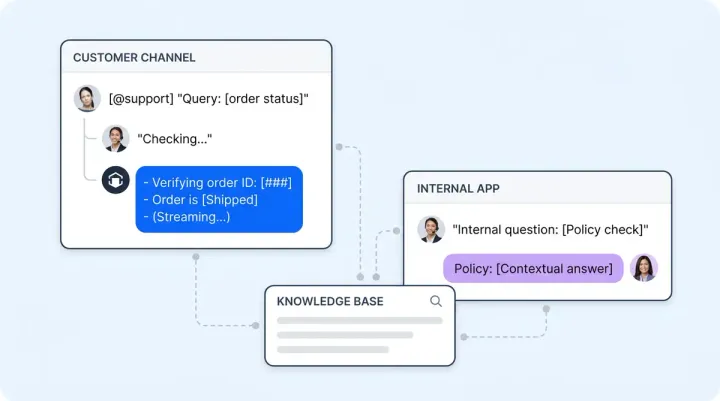
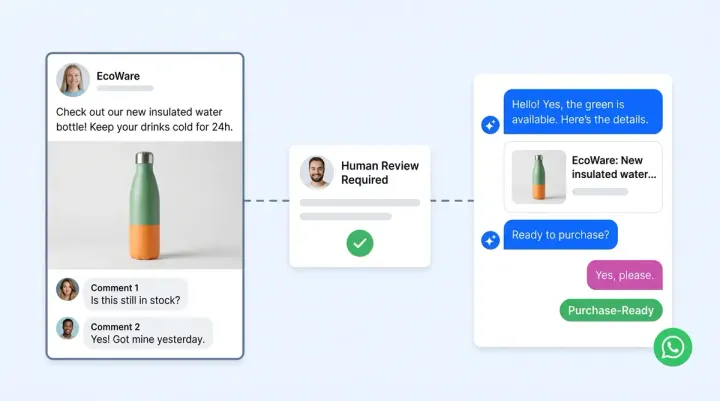
AI chatbots in ecommerce do far more than answer queries. The best AI chatbots combine conversational AI with natural language processing (NLP) to handle everything from personalized product recommendations to order management and order tracking. They work across ecommerce platforms like Shopify and WooCommerce, connecting live chat on your website with messaging apps like Facebook Messenger and WhatsApp. AI powered chatbots can manage abandoned carts through automated cart abandonment recovery sequences, deliver multilingual customer service, and drive customer engagement across omnichannel touchpoints. When these systems work well, the customer experience feels like talking to a knowledgeable human agent.
But here's what tools like ManyChat, Chatfuel, and Botpress won't tell you: even the best AI shopping assistant needs human oversight after launch. The bot might handle simple chat interactions flawlessly while fumbling personalization, giving incorrect response times for delivery, or missing upsell opportunities during live chat. Using AI without a tuning process is like hiring a new employee and never giving them feedback. The conversational experience degrades, customer experience suffers, and your analytics dashboard shows a slow decline in automated resolution rates. Human agents end up handling queries the AI should have resolved.
That's why the first 30 days of active tuning matter more than any pre-launch customization. Your ecommerce businesses need a structured approach to reviewing chat conversations, resolving knowledge gaps, and turning every customer interaction into training data. The CRM data you feed in, the queries customers actually ask, the cart recovery workflows you configure, and the recommendations the AI surfaces all need human review. This playbook covers exactly what to do, week by week, to push your AI from a basic bot to an AI powered revenue engine with real personalization.
Ecommerce platforms like Shopify offer dozens of AI chatbot integrations. ManyChat, Chatfuel, and Botpress each claim to be the best AI chatbot for online stores. But most of these conversational AI tools focus on simple bot automation: abandoned cart reminders, order tracking notifications, and basic FAQ responses. They don't offer the deeper conversational AI features that separate a basic bot from a true AI powered shopping assistant. Without human agents reviewing and correcting AI chatbot responses in the first weeks, even the best AI chatbots plateau. The automated workflows might trigger correctly, but the actual answers lack the personalized accuracy that drives conversions. That gap between basic chatbot automation and intelligent, personalized AI is exactly what your first 30 days of tuning should close.
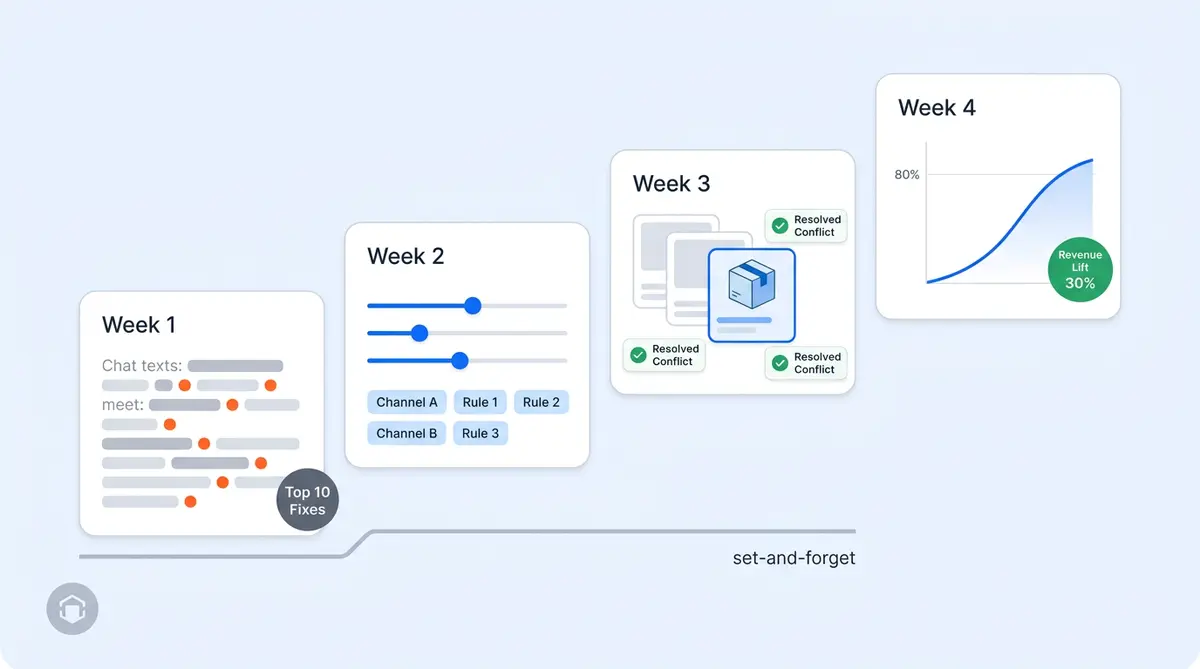
Week 1 (Days 1 to 7): Monitor and Correct
Your first week is about finding what's broken and fixing it fast. Ecommerce chatbots handle thousands of conversations in their first days, and every one is real-world training data for your AI training pipeline. Every conversation your AI handles in the first 48 hours is a data point. Review them all. Ecommerce chatbots can reveal patterns you never expected.
Review Every Early Conversation
Open your AI shopping assistant dashboard and search through conversations from the first two days. Early conversations reveal your most common questions and your biggest ecommerce knowledge gaps at the same time. You'll spot patterns quickly: the same shipping question asked five different ways, product comparison requests the AI fumbles, or return policy answers that miss a key detail.
Identify your top 10 questions the AI answers incorrectly or incompletely. These aren't edge cases. They're the bread-and-butter queries your shoppers ask every day, and getting them right has the biggest impact on resolution rate and CSAT.
Submit Human Feedback Corrections
For each incorrect answer, submit a correction through the human feedback workflow. In Alhena AI, this works in four steps: locate the question in your conversation log, review the backend answer sources to understand why the AI responded the way it did, submit your corrected answer or hints, and save. The AI learns from corrections in near real time.
Here's the part that makes this so powerful: every human feedback correction automatically generates a new FAQ entry in your knowledge base. That means the same mistake won't repeat. The AI uses that new FAQ to handle similar questions going forward. Check each auto-generated FAQ for accuracy and approve or edit it before moving on.
Establish Baseline Metrics
Document and report your week one numbers: conversation volume, resolution rate, CSAT score, and escalation rate. These baselines matter because you'll measure every subsequent week against them. Without baselines, you can't prove that your tuning work is producing results. Before worrying about pricing or ROI, if you need a framework for which metrics to track, our KPI-setting guide for AI shopping assistants covers the full list.
Week 2 (Days 8 to 14): Refine Voice and Behavior
Week one fixed what was wrong. Week two makes the ecommerce AI sound right. Tone mismatches erode trust even when answers are accurate. A shopper asking about a luxury skincare product expects a different voice than someone checking on a $12 phone case.
Evaluate Tone Across 20+ Conversations
Pull at least 20 conversations from your first week and read through them with one question in mind: does this sound like our brand? Explore different interaction types. How does the AI handle casual product questions? How is it handling complaint escalation? Complaint handling? Upselling moments? Post-purchase check-ins?
In Alhena AI, you adjust this through the Brand Voice configuration. The Identity setting defines who your agent is and its role. The Tone setting controls how it communicates, from business-formal to conversational with light humor. Get both right and your AI stops sounding like a generic chatbot.
Create 3 to 5 Core Guidelines
Guidelines are behavioral rules that shape how your ecommerce chatbot responds in specific situations. Create guidelines for your most common conversation flows and scenarios: returns, shipping delays, delivery status inquiries, out-of-stock responses, product comparisons, and promotional questions. Each guideline has a trigger condition (when it activates), an action (what the AI should do), and a scope (which channels and agents it applies to).
The Guideline Studio lets you test every change in the Playground before activating it. You see exactly how the guideline affects responses without risking live customer interactions. This is the difference between confident ecommerce AI tuning and guesswork.
Set Up Channel-Specific Guidelines
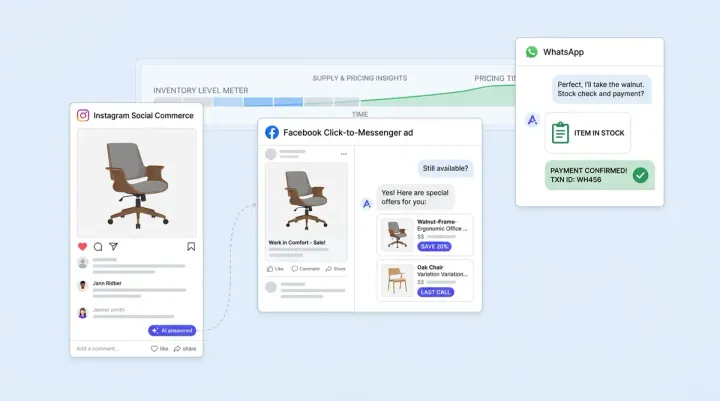
If you run multiple channels, your tone should vary. Instagram DMs and WhatsApp messaging call for a casual, emoji-friendly voice. Email support should feel more polished and structured. Alhena AI's guidelines support channel scoping so you can restrict specific rules to Website, Email, Instagram, Facebook Messenger, WhatsApp, or any combination. For brands running social commerce alongside web chat, this distinction in messaging tone makes a measurable difference in engagement rates and conversions.
Week 3 (Days 15 to 21): Expand and Optimize
By week three, you've fixed the biggest errors and dialed in your brand voice. Now it's time to expand the ecommerce chatbot's capabilities and start driving revenue, not just deflecting tickets.
Resolve FAQ Conflicts
Over the first two weeks, human feedback corrections and manual FAQ additions may have created conflicting entries in your knowledge base. Alhena AI automatically flags FAQs that appear to conflict, but it won't resolve them for you. Both conflicting FAQs remain active until you step in.
Review every conflict flag. For each one, decide: keep both entries, consolidate into a single FAQ, or delete the redundant one. Consolidation is usually the better move because it reduces maintenance overhead. You won't need to update the same information in two places when your return policy changes next quarter. Our AI knowledge base ops guide covers the ongoing process for keeping your ecommerce knowledge base clean as your catalog evolves.
Add FAQs for Unanswered Questions
Go back through weeks one and two and find every question your AI couldn't answer. These are knowledge gaps, and each one represents a missed opportunity. Add FAQs manually for each gap. The format is simple: a question and its answer, entered directly in your dashboard. Alhena AI will use these new entries the next time a shopper asks something similar.
Boost Priority Products
This is where your AI starts generating revenue, not just saving customer support costs. Product Boosting lets you prioritize specific items in AI recommendations. Boost 10 to 15 products in your online stores at scale: new arrivals, active promotions, high-margin items, and seasonal bestsellers. When a shopper asks "what running shoes do you recommend?" or "I need a gift under $100," your boosted products surface first in AI recommendations.
Brands like Victoria Beckham saw a 20% AOV increase after optimizing their AI's product recommendations. Tatcha achieved a 3x conversion rate and 38% AOV uplift with their AI shopping assistant. These results don't happen by accident. They happen because someone took the time to tell the AI which products to prioritize.
Configure After-Hours Guidelines
If you haven't set up after-hours behavior, week three is the time. Define how your AI handles requests outside business hours: collect email addresses for delivery updates and follow-up, adjust escalation behavior so shoppers aren't promised a human who isn't there, and modify tone for delayed resolution expectations. Alhena AI's guidelines support business-hours scoping with three options: always active, within business hours only, or after hours only.
Check Conversion Attribution
By day 15, your revenue analytics should show AI-attributed sales. If they don't, something is misconfigured. Check that your AI support concierge is properly tracking the full customer journey from conversation to purchase. Tatcha attributes 11.4% of total site revenue to their AI. Your numbers will vary, but you should see a clear signal by now.
Week 4 (Days 22 to 30): Measure and Plan
The final week of your ecommerce chatbot optimization is about proving what works and building a system that helps you scale AI without manual oversight.
Set Up Cart Abandonment Recovery
By week three, your AI chatbot should handle cart abandonment recovery as a core automation workflow. When shoppers leave abandoned carts behind, your conversational AI can reach them through live chat popups, messaging apps like Facebook Messenger and WhatsApp, or even SMS. Configure your bot to send personalized cart recovery messages that reference the specific items left behind. The best AI chatbots use customer engagement data from your CRM to tailor the messaging: first-time visitors get a different cart abandonment message than returning customers. This automated, omnichannel approach to cart recovery is one of the highest-ROI features you can activate in month one. Shopify merchants using AI powered cart abandonment sequences report 15 to 35% recovery rates, which directly impacts your ecommerce revenue attribution numbers.
Compare Week 4 Against Week 1
Pull your week four metrics and report the delta and set them side by side with your week one baselines. If you followed the playbook, expect 20 to 40% improvement in resolution rate and measurable conversion rate and AOV impact. Crocus, for example, reached an 86% deflection rate and 84% CSAT after actively tuning their AI. Manawa cut their response time from 40 minutes to 1 minute and automated 80% of inquiries.
If your numbers haven't moved, look at how many corrections, guidelines, and FAQ additions you actually made. Low ecommerce chatbot tuning effort produces low improvement. The correlation is nearly 1:1.
Document Your Tuning Process
Turn your first 30 days of ecommerce AI tuning into a repeatable playbook for your team. Document which guidelines you created and why. Record which ecommerce FAQ conflicts you resolved and what caused them. Note which product boost strategies worked for different campaign types. This prevents tribal knowledge about tuning workflows from walking out the door when someone changes roles.
Set Up a Recurring Cadence
The first 30 days get the most attention, but AI chatbot optimization doesn't stop at day 30. Establish a sustainable rhythm:
- Weekly: 30-minute FAQ review to catch new gaps and conflicts
- Monthly: Product boost rotation aligned to your merchandising calendar
- Quarterly: Full guideline audit to reflect policy and seasonal changes
This customer service review cadence takes less than two hours per month once the first 30 days are complete. For a deeper look at the ongoing maintenance process, see our guide on AI knowledge base ops.
Plan Month Two Experiments
With your foundation solid, plan advanced experiments to scale your ecommerce chatbot in month two. Test metadata-based guidelines that trigger different AI behavior based on customer segments (VIP shoppers, first-time visitors, high-LTV accounts). Experiment with agentic workflows and customer-segment-specific tone adjustments. Explore A/B testing different guideline actions to see which approach produces higher conversions or CSAT for specific question types.
The Compounding Effect: Why Month One Matters Most
Every tuning action you take in the first 30 days feeds a continuous learning loop. Every human feedback correction provides training data from real customer language. Every resolved FAQ conflict sharpens generative AI accuracy. Every guideline refinement improves tone consistency. Every product boost adjustment increases revenue relevance and conversions. These feedback flows create a self-improving system.
The benefits extend beyond simple customer service automation. As your AI chatbot learns from real conversations, it gets better at personalized product recommendations, multilingual support for international shoppers, and seamless handoffs to human agents when needed. Ecommerce businesses on platforms like Shopify and WooCommerce see the compounding effect most clearly in their customer experience metrics: NLP accuracy improves, conversational quality rises, and the chatbot handles more complex queries without escalation. Using AI this way turns your ecommerce chatbot from a cost center into a revenue engine.
This is why brands with chatbots in ecommerce following this playbook reach 80%+ automation by month three. Puffy, for instance, hit 63% automated inquiry resolution with 90% CSAT through active optimization. The compounding effect means that month two improvements build on month one's foundation, and month three builds on both, making your AI better each cycle.
Set-and-forget brands miss this entirely. Their ecommerce AI slowly degrades as product catalogs change, policies update, delivery timelines change, and seasonal questions shift. By month three, they're debugging problems they should have caught in week one.
Why Alhena AI Makes the First 30 Days Easier
Not every ecommerce AI platform gives you the tuning tools to execute this playbook. Alhena AI was built as an agentic, generative AI platform with every tool you need in one dashboard:
- Conversation Search: Review and search every interaction to spot patterns and gaps
- Human Feedback Workflow: Submit corrections that auto-generate FAQs, so fixes compound automatically
- Guideline Studio with Playground: Create and test behavioral rules in a sandbox before they go live
- Brand Voice Configuration: Control identity and tone so your AI sounds like your brand, not a generic bot
- Product Boosting: Prioritize key SKUs in recommendations to drive revenue from day one
- FAQ Management with Conflict Detection: Automatic flagging when knowledge base entries contradict each other
- Revenue Attribution Analytics: Track AI-influenced purchases, AOV impact, and conversion rates for chatbots in ecommerce week over week
Alhena AI software deploys in under 48 hours with no dev resources needed. If you're still in the deployment phase, our guide to what happens in the first 48 hours covers that process. And if you haven't run a pre-launch audit yet, the 47-point brand safety checklist ensures you're starting from a clean foundation.
The platform integrates with Shopify, WooCommerce, Magento, and Salesforce Commerce Cloud for ecommerce, plus Zendesk, Gorgias, Intercom, and more for support. Every integration connects to the same tuning dashboard, so the ecommerce chatbot tuning playbook above works the same way regardless of your tech stack.
Choosing an AI Chatbot Platform That Supports Active Tuning
Not all AI chatbot platforms are built for the kind of active tuning this playbook describes. Many ecommerce platforms offer basic chatbot integrations, but the best AI chatbot solutions give you direct control over conversational AI behavior, natural language processing accuracy, and automated workflow customization. When evaluating AI chatbots for your ecommerce store, look for these tuning capabilities: human feedback loops that improve the bot in real time, a conversational AI playground for testing changes before they go live, built-in analytics that track customer experience improvements week over week, and seamless integration with your existing ecommerce platforms.
Popular chatbot tools like ManyChat focus primarily on chat automation for messaging apps and Facebook Messenger, while Shopify's native chatbot features handle basic live chat and order management queries. These are useful starting points, but they lack the deeper conversational AI tuning, personalized recommendation engines, and multilingual NLP that AI powered ecommerce chatbots need to reach 80%+ automation. The best AI chatbot for your ecommerce business isn't the one with the most features at launch. It's the one that gives you the tools to keep improving the bot through personalization, customer engagement optimization, and ongoing automated workflow refinement. Ecommerce businesses that pick an AI chatbot platform based on day-one features without considering the tuning infrastructure end up switching platforms six months later.
Deployment Is the Starting Line, Not the Finish
The ecommerce brands that treat the first 30 days as their most important tuning window build AI that compounds in accuracy, tone, and revenue impact every month. The brands that deploy and walk away build AI that slowly degrades until someone finally asks "why isn't this working?"
You now have the week-by-week ecommerce AI tuning playbook. The question is whether you'll use it.
Ready to start your 30-day tuning sprint? Book a demo with Alhena AI to see every tuning tool in action, or start for free with 25 conversations. If you want to estimate the revenue impact before committing, check our pricing page for plan details, or, try our ROI calculator.

Frequently Asked Questions
What should I do in the first week after deploying an AI shopping assistant?
Focus on reviewing every conversation from the first 48 hours to identify your top 10 incorrect or incomplete answers. Submit human feedback corrections for each one through Alhena AI's correction workflow, which automatically generates new FAQ entries so the same mistakes don't repeat. Establish baseline metrics for conversation volume, resolution rate, CSAT, and escalation rate so you can measure improvement in the weeks ahead.
How do human feedback corrections automatically improve AI accuracy over time?
When you submit a correction through Alhena AI's human feedback workflow, the platform generates a new FAQ entry in your knowledge base in near real time. The AI then uses that FAQ to answer similar questions going forward, so a single correction can prevent hundreds of future errors. Over weeks and months, these corrections compound into a generative AI knowledge base that covers your most common customer questions with verified, accurate answers.
How can I test guideline changes before they affect live customer conversations?
Alhena AI includes a Playground environment inside the Guideline Studio where you can preview exactly how a new or modified guideline will change the AI's responses. Enter a sample user question, activate your draft guideline, and compare the response against the current behavior. This sandbox testing helps ensure you never push a change to live customers without seeing the impact first.
What does Product Boosting do for new arrivals and promotions in AI recommendations?
Product Boosting in Alhena AI lets you flag specific items (new arrivals, active promotions, high-margin products) so the agentic AI prioritizes them in recommendations during relevant conversations. When a shopper asks for product suggestions, boosted items surface first. Brands using this feature alongside active tuning have seen up to 38% AOV uplift and 3x conversion rates.
How do I identify and resolve FAQ conflicts in the AI knowledge base?
Alhena AI automatically flags FAQ entries that contain conflicting information whenever new entries are added, whether through human feedback or manual creation. You can review flagged conflicts in the FAQ management tab, where the system helps explain why it detected a contradiction. The best practice is to consolidate conflicting entries into a single, accurate FAQ to reduce maintenance overhead and prevent inconsistent answers.
What metrics should improve between week one and week four of active AI tuning?
Brands following a structured 30-day tuning playbook with Alhena AI typically see 20 to 40% improvement in resolution rate, measurable AOV impact from product boosting, and higher CSAT scores by week four. Escalation rates drop as FAQs fill knowledge gaps, and AI-attributed revenue at scale becomes visible in analytics by the end of week two or three.
How often should I review and optimize AI performance after the first 30 days?
After completing the initial 30-day tuning sprint, Alhena AI recommends a recurring cadence: a 30-minute weekly customer service FAQ review to catch new gaps and conflicts, a monthly product boost rotation aligned to your merchandising calendar, and a quarterly guideline audit to reflect policy and seasonal changes. This takes less than two hours per month and keeps your AI's accuracy and revenue impact compounding over time.