Your customers don't think in channels. A shopper messages on Instagram at lunch asking about a jacket. She emails that evening to check the return policy. She sends a WhatsApp message the next morning after placing her order to ask about delivery. Three channels, one conversation in her mind. But on your end? Three separate platforms and tools, three separate knowledge bases and data silos, three separate agents handling customer interactions from scratch.
That's the multichannel customer service trap. Most ecommerce organizations run one tool for email customer support tickets, another for social DMs, a third for live chat on your website, and maybe a WhatsApp provider bolted on top. Each tool has its own training data, its own brand voice settings, and its own analytics silo with siloed data. The result is a fragmented customer experience with inconsistent, duplicated training effort, inconsistent customer service answers, fragmented customer service reporting, and customers who have to repeat themselves every time they switch apps.
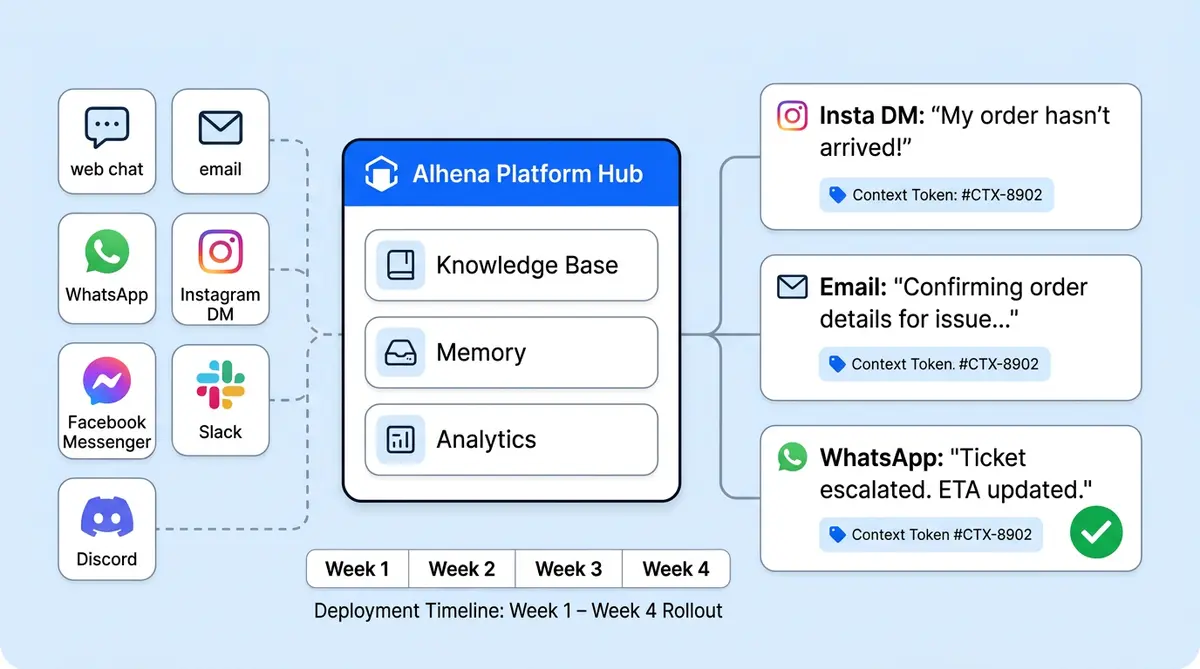
Unlike a basic chatbot approach, this guide shows you a different path to customer service. One AI platform, one knowledge base, seven connected customer channels and platforms (web chat, email, WhatsApp, Instagram, Facebook Messenger, Slack, <a href="https://alhena.ai/blog/discord-ai-ecommerce-automated-responses-ticketing/">Discord</a>, and SMS), and a four-week omnichannel strategy and deployment timeline that gets you from fragmented CX to fully omnichannel. Whether you're running a DTC beauty brand or a multi-category retail organization with multi-brand, you'll walk away with the strategic case for consolidation and the tactical steps you're looking for to make it happen.
Multichannel vs. Omnichannel: Two Sentences That Change Everything
Multichannel means being present on multiple channels simultaneously. Omnichannel means a single AI brain powers every channel with shared knowledge, unified communication, shared memory, and shared analytics, so a customer who starts on Instagram and switches channels to email seamlessly picks up exactly where she left off for a continuous experience.
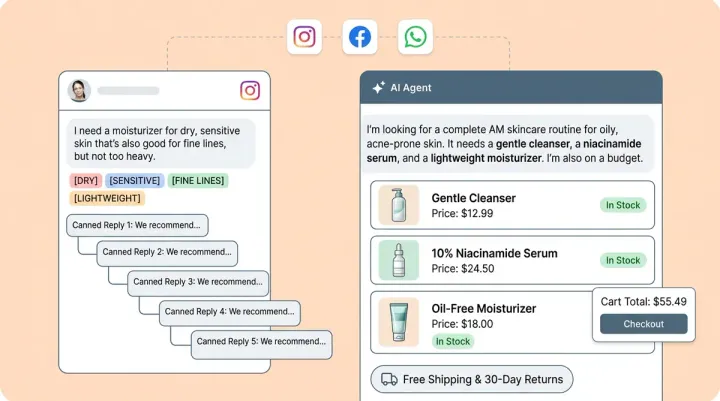
That distinction isn't semantic. It's operational. In a multichannel setup, each channel runs its own AI or bot with its own training. Update your return policy and you need to retrain or reconfigure every tool individually. Your Instagram bot might say "30-day returns" while your email bot still says "14 days" because someone forgot to update it. Customers notice.
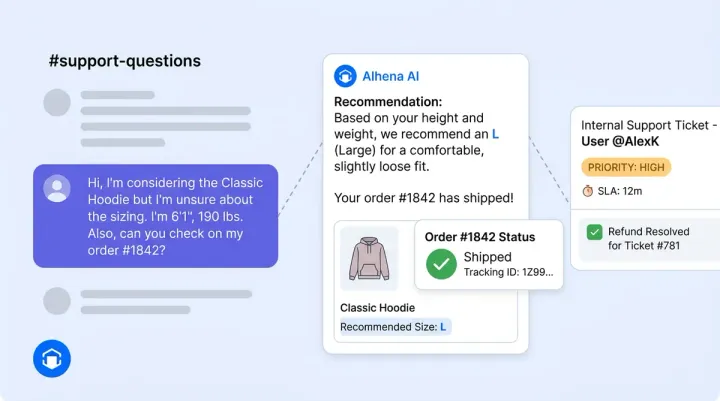
In an omnichannel AI customer support setup, you train the AI once. The same Product Expert Agent that recommends products on web chat also answers sizing questions on WhatsApp. The same Order Management Agent that processes customer support returns via email also handles refund requests on Instagram DMs. Update a policy, add a product, change a shipping timeline, and the that change seamlessly propagates to every channel. That's the power of a single knowledge base instantly without per-channel retraining.
The One-Knowledge-Base Architecture
Every omnichannel AI setup starts with the knowledge base. Not the channels. The knowledge base is the single source of truth that enables self service across all channels, and getting it right solves 80% of the challenge before you connect your first channel.
Here's what to feed into it:
- Product catalog: SKUs, descriptions, images, sizing charts, compatibility data, and pricing. Self service only works if your AI can recommend products it doesn't know about.
- Support policies: Return windows, refund processing times, shipping options, warranty terms, and exchange rules. Pull these from your help center and policy pages.
- Historical tickets: Past support tickets and conversations from your helpdesk, whether that's Zendesk, Gorgias, or Freshdesk, teach the AI the workflows your brand uses to handle customer service edge cases and brand-specific scenarios.
- Website content: Crawl and index your site so the AI understands your brand story, ingredient lists, material descriptions, and category structure.
- Internal docs: PDFs, Notion pages, and Slack threads containing tribal knowledge and data your support team uses every day.
Alhena AI trains on all of these sources at once. The same Product Expert Agent and Order Management Agent then power responses across every channel simultaneously. When you add a new product line next Tuesday, every channel can sell it by Wednesday morning. No per-channel configuration. No duplicate training workflows. No redundant processes.
Seven Channels, One AI Brain
Here's how each channel connects to the shared knowledge base and what it does best.
Web Chat (Live Chat)
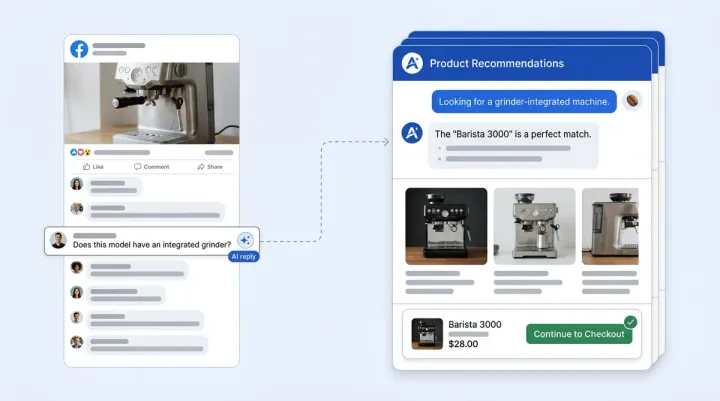
A JavaScript widget on your storefront powering conversational product search, personalized nudges on product pages, dynamic FAQs and answers, and agentic checkout that populates carts and pre-fills checkout fields. This is your highest-intent channel and typically your biggest revenue driver.
Alhena connects directly to your customer support email (Gmail, Outlook, or helpdesk email) through Settings > Integrations. The AI processes incoming emails against the knowledge base, enables self service by auto-resolving straightforward requests, and escalates when escalation is needed because it can't find an answer or a customer explicitly asks for a human. Escalation rules control when the AI routes to your team. You can start in draft mode so your agent reviews AI responses before full automation.
Setup uses Meta's embedded signup flow. Log in with your Meta Business credentials, authorize access, and the AI mirrors your web chat experience on WhatsApp for a consistent experience. Customers get catalog browsing, personalized tracking, and conversational commerce in real-time in the same messaging app they use with friends.
Connect your Instagram Business or Creator account through the official API. Alhena provides automated monitoring of comments on posts and Reels, generates contextual replies, and provides automated DM responses. The Social Conversations dashboard lets you review, edit, or approve AI-generated replies before they go live, with automated reply rules configurable by interaction type.
Facebook Messenger
The same Meta connection that powers Instagram also enables Facebook Page automation. Alhena responds to Messenger conversations and monitors post comments, with all customer interactions managed through the Social Conversations dashboard alongside Instagram.
Slack
A dual-mode bot for internal teams, B2B customers, and partner support. In channel mode, the AI answers when mentioned directly. In standalone mode, users chat with the bot as a direct app. Responses arrive in threaded conversations so follow-ups stay organized. This is the channel you add when your B2B buyers or internal teams need AI tools and AI systems providing service and answers.
Discord
Alhena's Discord bot answers community questions 24/7 in channels you configure. When the bot can't find an answer in the knowledge base, it stays quiet and lets your admins handle the escalation. Users can create private tickets for direct service and support, and an admin notification channel for escalation routing ensures nothing falls through the cracks.
For brands with developer communities on GitHub, Alhena AI extends the same omnichannel approach to automated GitHub community support, handling issues and discussions with the same AI training infrastructure that powers every other channel.
One Customer, Three Channels, Zero Repeated Context
Here's what the omnichannel experience looks like in practice.
A shopper named Maria DMs your Instagram account asking if a linen jacket runs true to size. The AI checks her browsing history, sees she viewed the jacket in Medium, and recommends she size up based on the product's fit notes. Maria hearts the reply and moves on with her day.
The next evening, Maria emails your support address asking about the return policy for that jacket. She doesn't mention Instagram. She doesn't reference the earlier conversation. But the AI recognizes her through unified memory, knows she was actually asking about the linen jacket, and responds with the product-specific return window and care instructions, not a generic policy paste.
Two days later, Maria ordered the jacket and sends a WhatsApp message asking when it'll arrive. The Order Management Agent pulls her order data and tracking data and customer data, checks the live tracking status, and gives her the estimated delivery date. One customer, three channels, zero repeated information.
This is what separates omnichannel from multichannel. The AI doesn't just answer questions. It remembers context and carries it across every touchpoint.
Which Channels to Connect First
Not every brand needs all seven channels on day one. Your channel mix depends on business needs, where your customers already are and what kind of customer service your business delivers.
- DTC fashion and beauty brand teams: Start with Instagram + WhatsApp + web chat. Your audience lives on social platforms and messaging apps, and these three channels cover discovery, pre-purchase questions, and checkout. Brands like Tatcha drove 3x conversion rates and 38% AOV uplift by focusing on channels where shoppers already browse.
- B2B and wholesale brands: Start with Slack + email + web chat. Your buyers communicate through Slack and email, and web chat catches prospects on your site. The Slack integration's threaded responses keep complex B2B conversations organized.
- Community-driven brands: Start with Discord + web chat. If you have an active Discord community, meet your customers where they already talk. The AI handles repetitive support questions so your community managers can focus on engagement.
- Multi-category retailers: Start with web chat + email, then add WhatsApp + Instagram in weeks two and three. You need high-volume channels first to stress-test the knowledge base before expanding to social.
The goal is simple: pick the channels that match your customer needs and preferences, and behavior, not the channels that look impressive on a features page. You can always add more later. Don't try to force channels that don't match your audience because adding a channel is configuration, not retraining.
The Four-Week Deployment Timeline
Here's the practical rollout sequence. Each phase builds on the last, and your customer service knowledge base keeps getting sharper through ongoing learning with every customer interaction.
Week 1: Web Chat + Email
Install the web chat widget on your storefront on your storefront and connect your support email. These channels are your highest-volume chat and support channels with existing workflows. You will see results faster than expected. Spend the week reviewing AI responses, filling knowledge gaps, and refining tone and letting the AI learn. Manawa cut response times faster, from 40 minutes to 1 minute, during this phase while achieving 80% automation of customer inquiries.
Weeks 2 to 3: WhatsApp + Instagram
Your knowledge base is now battle-tested. Connect WhatsApp through Meta's embedded signup and Instagram through the Business account API. Configure the Social Conversations dashboard so your team can review, edit, or approve AI-generated social replies. Configure automated rules: auto-post positive interactions, manually review sensitive ones.
Week 4: Facebook Messenger + Slack or Discord
Round out your channel coverage. Facebook Messenger connects through the same Meta authorization as Instagram. Add Slack if you have B2B customers or internal teams who need AI-powered answers. Add Discord if you run a customer community. By week four, all channels share seamlessly shares the same trained knowledge base, the same AI agents, across all channels and the same analytics.
The entire deployment takes days per channel, not months. Alhena AI deploys in under 48 hours for the initial setup, and each additional channel connects faster since it is a settings toggle plus authorization, not a new implementation project.
Unified Analytics Across Every Channel
Fragmented tools mean fragmented reporting. You end up pulling data from five dashboards, normalizing metrics manually, and still not knowing which channel actually drives revenue.
An omnichannel AI platform gives you a unified communication dashboard with everything in one place. Here's what Alhena's analytics dashboard tracks across all connected channels:
- Conversation volume by channel: See which channels best serve customer needs and carry the most traffic and how volume shifts throughout the week.
- AI vs. human handled interactions: Track automation rates per channel. Crocus hits 86% AI deflection with 84% CSAT across their connected channels.
- Revenue attribution: Cart and GMV analytics show exactly how much revenue each AI-assisted conversation generates. Tatcha attributes 11.4% of total site revenue to AI conversations.
- Customer satisfaction scores by channel: Customer satisfaction surveys after AI interactions let you spot which customer service channels perform and which need knowledge base updates.
- Trending topics: See what customers ask about most, broken down by channel, so you can proactively update the knowledge base.
The Social Conversations view manages Instagram and Facebook interactions together, showing pending replies, approved posts, and rejected suggestions in one interface. You can filter by platform, review in bulk, and track which social replies converted into conversations.
Use the Alhena ROI calculator to model your expected returns before launch.
Why One Platform Beats Seven Tools
The operational case for consolidation comes down to five things:
- One training investment: Train the AI once on your catalog, policies, and brand voice. Every channel benefits. No duplicate training workflows across separate tools.
- Consistent brand voice: The same AI agents power every response. Your customers across multiple channels get the same consistent, accurate, on-brand answers whether they reach you on WhatsApp or email.
- Unified customer memory: The AI recognizes returning customers across channels. No repeated context. No "can you tell me your order number again?"
- Single analytics dashboard: One view of conversation volume, customer service resolution rates, CSAT, and revenue attribution filtered by channel. No more stitching together reports from five different tools.
- Lower total cost: Fewer vendor contracts, fewer integrations to maintain, fewer dashboards to train your team to learn. Puffy automates 63% of inquiries with 90% CSAT, and that efficiency multiplies across every channel you add because the knowledge base investment is shared.
Omnichannel AI isn't about being everywhere. It's about delivering consistent CX everywhere. Fewer tools to license, one customer support team to manage, unified communication and unified analytics, and a CX where customer needs are remembered and shoppers never repeat themselves regardless of which channel or app they opened.
Ready to consolidate your channels into one platform? Book a demo with Alhena AI to see all seven channels running from a single knowledge base, or start free with 25 conversations on web chat and expand from there.

Frequently Asked Questions
What is the difference between multichannel and omnichannel AI customer support?
Multichannel means your brand is present on several channels, but each runs its own chatbot or tool with separate training and data. Omnichannel means one AI platform powers every channel with shared knowledge, shared memory, and shared analytics. With Alhena AI, a customer who starts a conversation on Instagram and follows up by email picks up exactly where she left off because the AI carries experiences and context across every touchpoint.
How many customer channels can connect from one Alhena AI platform?
Alhena AI supports seven communication channels from a single platform: web chat, email, WhatsApp, Instagram DMs, Facebook Messenger, Slack, and Discord. All seven channels share the same knowledge base, the same Product Expert and Order Management agents, and the same analytics dashboard. You can activate channels individually through Settings and Integrations without retraining.
Does adding a new channel require retraining the AI?
No. Alhena AI trains on your product catalog, policies, and brand documentation once during the onboarding and setup process. Each new channel you add is a configuration step, not a retraining project. Connect WhatsApp through Meta's embedded signup, toggle on Instagram through the API, or add Slack through OAuth, and the AI chatbot immediately serves the new channel with the same knowledge it already has.
How does the Social Conversations dashboard manage Facebook and Instagram together?
The Social Conversations dashboard in Alhena AI shows AI-generated replies across both Instagram and Facebook in one view. You can filter by platform, review pending replies, edit responses before they go live, approve in bulk, or reject suggestions. Auto-reply rules let you automatically post certain interaction types while flagging others for manual review.
Which channels should ecommerce brands connect first?
DTC fashion and beauty brands should prioritize Instagram, WhatsApp, and web chat because their audience lives on social platforms. B2B brands should start with Slack, email, and web chat. Community-driven brands should lead with Discord and web chat. Alhena AI recommends starting with chat and email in week one, then expanding to social channels in weeks two and three.
Is a customer recognized automatically across channels through unified memory?
Yes. Alhena AI's unified memory layer recognizes returning customers across channels providing self service without requiring them to re-identify. If a shopper asks about a product on Instagram and later emails about the same item, the AI references the earlier conversation and responds with product-specific details. This cross-channel recognition eliminates repeated context and reduces resolution time.
How do I measure omnichannel AI performance from one dashboard?
Alhena AI's analytics dashboard tracks conversation volume, AI vs. human resolution rates, CSAT scores, and revenue attribution across all connected channels in one view. You can filter by channel to compare performance, review trending topics to spot knowledge gaps, and use cart and GMV analytics to measure AI-assisted revenue per channel.