Why Slack Is Now the Default Support Channel
Slack has over 200,000 paid customers, and 77% of Fortune 100 companies use it daily. For B2B SaaS companies, shared Slack channels with customers are replacing email as the primary support surface. Everyone is already in Slack. There's no context switching. And response time expectations are minutes, not hours.
For internal teams, Slack is where employees already ask questions about policies, processes, and tools. HR gets the same PTO question every Monday. IT fields the same VPN reset request every week from a different person. The questions are predictable, but they still require a human to answer them one by one.
Most Slack "bots" don't solve this. They're notification pipes or keyword matchers that fire template responses. They don't understand context, hold multi-turn conversations, or answer from your actual knowledge base. The result is a channel full of questions that still require humans to respond manually.
An AI Slack help desk changes this. This guide covers how Alhena AI turns Slack into a structured, intelligent support channel for both B2B customers and internal teams, with threaded conversations, real-time streaming, and answers grounded in your verified knowledge base.
Alhena's Dual-Mode Slack Architecture
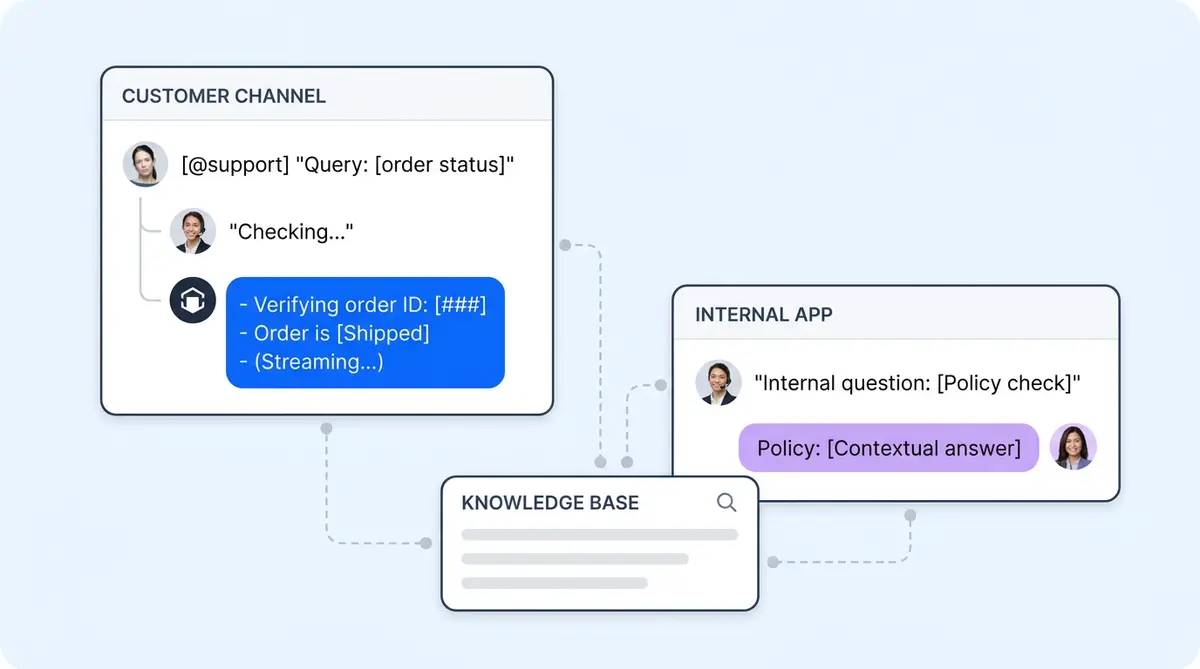
Alhena runs two distinct modes inside a single Slack workspace. Each mode is built for a different support pattern, and both share the same AI engine and knowledge base.
Mode 1: Channel Integration for B2B Customer Support
Add the Alhena bot to any Slack channel, including shared Slack Connect channels with external B2B customers. When someone @mentions the bot with a question, it creates a new thread and streams the response in real time as it generates. The answer appears progressively, word by word, feeling conversational rather than robotic.
Follow-up questions within the same thread maintain full context. A customer who asks about API rate limits, then follows up about error handling, then requests a code example gets coherent, contextual answers across the entire thread. The bot doesn't repeat background information or lose track of what was already discussed.
Mode 2: Standalone App for Internal Help Desks
The bot also appears in Slack's sidebar as an app. Users message it directly, like messaging a colleague. Each new question creates its own thread for clean organization.
This mode is ideal for internal help desks where employees need a private, always-available assistant. Questions about HR policies, compensation details, or IT access requests stay between the employee and the bot, without posting in a public channel. The AI Slack support agent handles sensitive topics with the same accuracy it brings to customer-facing questions.
Why Threaded Multi-Turn Conversations Matter
A B2B customer's Slack question rarely ends with one message. They ask a question, get an answer, then follow up with "what about this edge case?" and "can you show me an example?" The AI must maintain context across the entire thread, not treat each message as an isolated query.
Real-time streaming responses add to the natural feeling. The answer appears progressively as the AI generates it, matching the conversational pace of human Slack communication. There's no wall of text delivered after a long delay. The experience feels like chatting with a knowledgeable teammate who types fast.
For internal teams, threading keeps the help desk organized. Each employee question lives in its own thread with its own conversation history. An HR bot that handles 50 questions a day doesn't turn into an unreadable wall of messages in a single channel.
Three Scenarios Where This Changes the Workflow
Internal HR help desk: A new employee asks about the PTO policy in an HR help channel and gets an instant, accurate answer pulled from the company's policy documentation, without pinging an HR manager who's in the middle of a hiring review.
B2B customer support: A customer asks about API authentication in a shared Slack Connect channel and gets a code-grounded answer from the product's technical docs. The support team focuses on complex escalations instead of repeating documentation.
Agent Assist in internal channels: A support agent asks the bot about a product feature in an internal channel and gets instant context to help them resolve a customer ticket faster. The bot functions as an always-available Agent Assist, giving human agents the information they need without searching through wikis or pinging senior teammates.
Setup from the Alhena Dashboard
In the Alhena dashboard, navigate to Settings, then Integrations, then Slack. Authorize via Slack's OAuth flow, and the bot activates in your workspace. From there, manually add the bot to the specific channels where you want it responding.
The bot uses the same knowledge base, product catalog, and brand voice training as your web chat, email, and social channels. No separate Slack-specific training is required. If your AI shopping assistant already knows your product catalog, the Slack bot knows it too. Adding the bot to a new channel takes seconds.
There's no coding involved, no API keys to manage, and no Slack app manifest to configure. Teams go from decision to working bot in under 48 hours without pulling a single developer off their roadmap.
The Real Cost of Slow Slack Responses
Slack is already where your team and your customers spend their day. The question is whether questions asked in Slack get answered by AI in seconds or by a human 30 minutes later, after they finish what they were working on.
For B2B support, AI Slack response time directly correlates with customer retention. A customer waiting 40 minutes for an answer in a shared channel starts evaluating alternatives. Brands using Alhena AI see response times drop from 40 minutes to under 1 minute and 80% automation rates across support channels.
For internal teams, AI Slack response time directly correlates with employee productivity. Every question an AI answers instantly is a question that doesn't interrupt a subject matter expert. Companies running Alhena for internal knowledge base support report 86% deflection rates with 84% satisfaction scores.
Ready to turn Slack into a real support channel? Book a demo with Alhena AI or start free with 25 conversations to test it in your workspace.

Frequently Asked Questions
How does the Alhena AI Slack bot handle multi-turn follow-up questions within a thread?
Alhena AI maintains full conversational context across every message in a Slack thread. When a user asks a follow-up question, the bot references everything discussed earlier in that thread, so it doesn't repeat background information or lose track of the original topic. This means a customer can ask about API rate limits, follow up about error handling, and request a code example all in the same thread with coherent answers.
What is the difference between Alhena AI's channel integration mode and standalone app mode in Slack?
Channel integration mode activates when someone @mentions the Alhena AI bot in a Slack channel, including shared Slack Connect channels with B2B customers. The bot responds in a new thread visible to everyone in that channel. Standalone app mode lets users message the bot privately from Slack's Apps sidebar, with each question in its own thread. This mode is ideal for sensitive internal questions about HR policies, compensation, or IT access.
Does the Alhena AI Slack bot use the same training as web chat and email?
Yes. Alhena AI's Slack bot shares the same knowledge base, product catalog, and brand voice training as every other channel. If your AI shopping assistant on web chat already knows your product catalog and support documentation, the Slack bot knows it too. No separate Slack-specific training or configuration is required.
How do I set up the Alhena AI Slack help desk without developer resources?
In the Alhena dashboard, navigate to Settings, then Integrations, then Slack. Authorize through Slack's OAuth flow, and the bot activates immediately. You then add the bot to specific channels where you want it responding. The entire process takes minutes with no coding, no API keys, and no Slack app manifest to configure. Most teams go from decision to working bot in under 48 hours.
Can the Alhena AI Slack bot serve as an internal employee knowledge base for HR and IT questions?
Yes. Alhena AI's standalone app mode is built for exactly this use case. Employees message the bot directly from the Slack sidebar to get instant answers about PTO policies, VPN resets, onboarding steps, and other recurring questions. Each conversation stays in its own private thread. Companies using Alhena for internal knowledge base support report 86% deflection rates with 84% satisfaction scores.