The average small ecommerce brand pays $50 to $150 per agent per month for a helpdesk platform. For a five-person support team (common among small teams), that's $3,000 to $9,000 per year before you count setup time, admin overhead, and the learning curve. Most of these brands use about 20% of the platform's features. They don't need complex SLA routing, multi-brand ticket queues, or workforce management dashboards. They need customer emails answered quickly and accurately. Email automation should be simple, not enterprise-grade. You should be able to use AI for email support without buying a full helpdesk. What if you could replace that with simple email automation and skip the ticketing platform entirely and connect AI directly to your support inbox for 24/7 coverage?
That's exactly what Alhena AI's direct email integration makes possible. For small ecommerce teams with one to ten customer service staff, this approach cuts the cost and complexity of email support automation while improving response speed and accuracy. Here's how it works and when it makes sense for your brand.
How Direct Email-to-AI Support Works
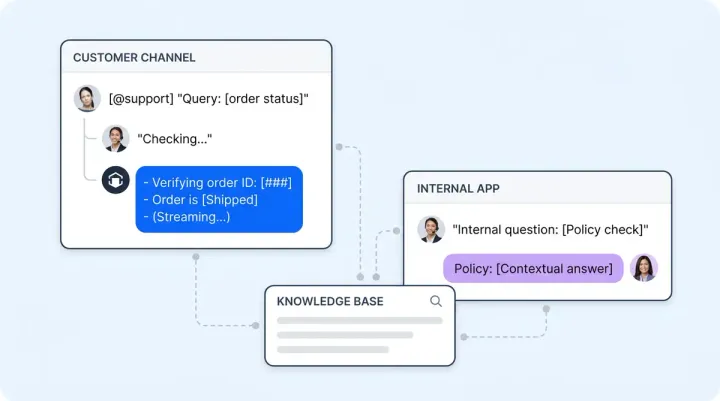
Alhena connects directly to your dedicated support email address through your email provider's authentication. There's no middleware layer, no ticketing platform sitting between your inbox and the AI. When a customer sends an email, the AI reads it, classifies the intent, and cross-references your product catalog, order data, and knowledge base. Its LLM generates an accurate, brand-voiced response grounded in your verified data, not generic internet knowledge.
The AI handles the full email lifecycle. It reads the incoming message, generates a response, and sends the reply from your support address around the clock, 24/7. Your customer sees a normal email from your brand, not a bot notification from a third-party platform. The experience feels personal because it comes from the same address they originally contacted.
This is the same AI engine that powers Alhena's web chat and social commerce channels. Your product catalog, knowledge base, and brand voice training carry across every channel. You don't configure email separately. You train the AI once, and it works everywhere: your website chat, social channels, and email.
Smart Filtering Keeps Junk Out of the Queue
Not every email hitting your support inbox is a real customer question. Order confirmations, shipping notifications, marketing replies, and automated system messages flood inboxes daily. Alhena's email integration automatically filters these out. The system ignores any email it identifies as coming from an automated system rather than an actual customer inquiry.
Only genuine customer questions trigger AI responses. You can review any conversation in the dashboard. This means your team doesn't waste time sorting through junk, and the AI doesn't accidentally reply to a shipping confirmation with a product recommendation.
One important detail: the AI only processes emails received after the integration is activated. It won't attempt to reply to your entire inbox backlog. This is deliberate. It prevents a flood of outdated responses and lets you start clean.
Four Escalation Triggers That Keep Humans in Control
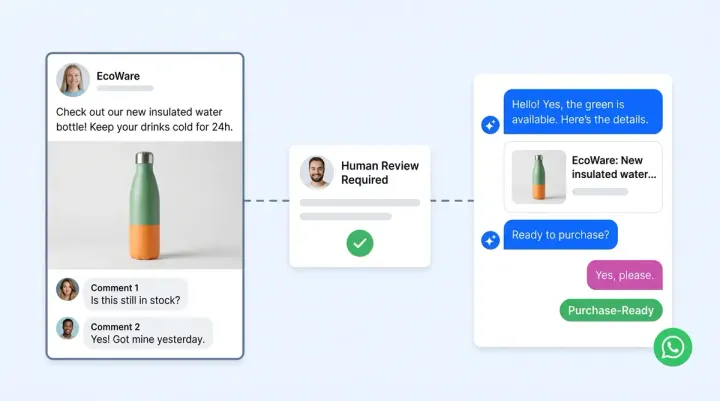
AI email support only works if customers can reach a real person when they need one. Alhena's direct email integration includes four specific escalation triggers that route conversations to human agents on your team.
The customer asks for a human. If someone writes "I want to speak with a real person," the AI steps aside and flags the conversation for your team. No arguing, no extra prompts. The escalation is immediate.
The AI can't find a confident answer. When the AI doesn't locate a strong match in your knowledge base, it escalates rather than guessing. This is how Alhena prevents hallucinated responses, a problem that plagues general-purpose LLM-based support tools that aren’t grounded in verified product data.
Custom guidelines trigger escalation. You define the rules. Warranty claims, formal complaints, VIP customers, legally sensitive topics: any scenario or edge cases you configure as requiring human judgment triggers an escalation to your team automatically.
A team member replies directly. If someone on your team replies to the customer from their email client, the AI recognizes this and steps back from the conversation. The human takes over, no handoff friction. You use AI for the volume and humans for the exceptions.
These four triggers ensure the AI handles the 60% to 80% of emails that are routine: product questions, order status inquiries, shipping timelines, and return policy clarifications, and simple resolution requests. The AI can resolve issues like these in seconds, not hours. This level of automation means your team focuses on the conversations that actually need a human touch.
Your Helpdesk Is Built Into the AI Platform
When an email requires human attention, all admins and bot profile members receive an email notification. The escalated conversation appears in the "Unassigned" tab on the Conversations page inside the Alhena dashboard. This creates a shared inbox queue your team checks without extra resources or logging into a separate ticketing platform.
Think of it as a lightweight helpdesk built into the AI platform you're already using. You see the customer's full conversation history, the AI's previous responses, , the reason for escalation, and the full escalation history. Your team can review the conversation, respond, and move on. No ticket IDs, no status dropdowns, no SLA timers counting down in red. No analytics dashboards you never open. Just a shared inbox with AI doing the heavy lifting.
For small support teams handling fewer than 500 emails per month, this workflow covers everything a full ticketing platform would, with far less overhead. It’s the best AI tool for teams that need email automation without ticket management complexity.
When You Still Need a Full Helpdesk
Direct email integration isn't right for every team, and it's worth being honest about that. If your support operation has grown past ten agents, needs complex SLA routing across multiple tiers, manages support queues for several brands from one team, or requires workforce management analytics, a dedicated ticketing platform like Freshdesk still makes sense for that level of customer service complexity.
Alhena integrates with major helpdesk platforms for exactly these scenarios, including Freshdesk, Gorgias, and Intercom. The AI works inside your existing ticketing workflow when you need that level of infrastructure.
But for teams of one to five support agents handling straightforward product inquiries and order cases, the direct email integration and its built-in automation handles everything at a fraction of the cost. You're not compromising on quality. You're cutting the features you never used in the first place.
Setup Takes Minutes, Not Weeks
You need one thing to get started: a dedicated support email address (not a personal inbox). In the Alhena dashboard, navigate to Settings, then Integrations, then Email. Enter your email credentials, authenticate with your email provider, review your settings, and activate the integration. The AI begins processing new incoming emails immediately.
The same product catalog, knowledge base, and brand voice training that powers your web chat and social channels also powers email responses. There's no separate email-specific configuration. If you've already set up Alhena for chat, your email channel is ready in under five minutes.
Brands like Puffy have achieved 63% automated inquiry resolution rate and 90% customer satisfaction scores using Alhena's AI. That same intelligence now sits behind your support inbox, answering emails with the same accuracy, 24/7, helping resolve issues before they become complaints.
The Real Cost Comparison
A five-person team paying $100 per agent per month for a helpdesk platform spends $6,000 per year on ticket management alone. Add implementation costs, admin time, team resources configuring workflows, and the ongoing maintenance of routing rules, workflows, and macros, and that adds up to a true cost far higher than the sticker price.
Alhena's direct email integration eliminates the per-agent seat model entirely. Your AI handles the volume. Your human agents handle the exceptions. You can check Alhena's pricing or run the numbers through the ROI calculator to see the difference for your specific website and support volume.
The question isn't whether you can afford AI email support. The question is whether you can afford to keep paying for a helpdesk platform you don't fully use when AI handles the same emails faster, more accurately, and at a fraction of the cost. For small support teams running ecommerce stores, Alhena's direct email integration isn't a compromise. It's the right-sized solution.
Ready to drop the helpdesk overhead? Book a demo with Alhena AI to see the direct email integration in action, or start free with 25 conversations and connect your support inbox today. No helpdesk required.
What Types of Emails Can AI Handle Without a Helpdesk?
Not every email requires human judgment. AI email support works best when most of your inbox volume falls into predictable categories. For small ecommerce support teams, these categories cover the bulk of daily messages.
Product questions. Customers ask about sizing, materials, compatibility, ingredients, and specifications. The AI assistant pulls answers directly from your product catalog and knowledge base. No guessing, no hallucination. If your product pages are accurate, your AI email replies will be too.
Order status and tracking. "Where is my order?" is the most common email support teams receive. The AI connects to your order management system, looks up the customer's order by email address, and replies with the current status and tracking link. This one category alone can resolve issues for 20 to 30 percent of your inbox volume.
Shipping and delivery timelines. Questions about delivery windows, international shipping costs, and carrier options. The AI references your shipping policies and provides accurate answers without your team touching the email.
Return and exchange policies. Customers want to know if they can return an item, how long they have, and whether they'll get a refund or store credit. Your AI reads your return policy from the knowledge base and gives a clear, consistent answer every time.
Restock and availability. "When will this be back in stock?" The AI checks your product catalog for availability data and responds accordingly. If you use AI to handle these routine emails, your support teams focus only on the conversations that need human judgment.
How AI Email Support Compares to a Traditional Helpdesk
Understanding the difference between a direct AI email integration and a traditional helpdesk platform helps you decide which approach fits your team. Here's how they compare across the areas that matter most to small ecommerce support teams.
Cost structure. Traditional helpdesk platforms charge per agent per month, typically $50 to $150 per seat. A five-person team pays $3,000 to $9,000 annually just for the platform. AI email support through Alhena eliminates the per-seat model. You pay for the AI tool, not for each person who might need to check the inbox.
Setup complexity. A helpdesk requires configuring ticket routing rules, SLA policies, canned responses, agent roles, and automation workflows. Most small support teams never finish this setup, leaving half the platform unused. Alhena's direct email integration takes minutes: authenticate your email provider, activate, and start. The AI uses the same knowledge base and product catalog you've already configured for web chat.
Response speed. Helpdesk platforms organize emails into tickets but don't answer them. An agent still has to read, draft, and send every response. AI email support generates and sends accurate responses the moment an email arrives. Customers get answers in seconds instead of hours, and your support teams only handle the escalated conversations that genuinely need a human.
Feature overhead. Helpdesks include features like multi-brand queues, workforce management dashboards, satisfaction surveys, and reporting suites. Valuable for enterprise support teams, but unnecessary complexity for a brand with three agents handling 200 emails per month. When you use AI for direct email support, you get exactly what you need: accurate replies, smart filtering, and a simple escalation queue.
Real Results from Ecommerce Brands Using AI Support
The best AI tool for email support proves its value through measurable results. Ecommerce brands already using Alhena AI across channels report significant improvements in speed, accuracy, and cost savings.
Tatcha, a luxury skincare brand, achieved a 3x conversion rate and 82% chat deflection rate with Alhena's AI. Their support teams handle only the high-value conversations that benefit from human expertise, while the AI manages routine questions across their inbox and web chat.
Manawa, a travel and experiences marketplace, cut their support workload by 43% and reduced response time from 40 minutes to under 1 minute. Their team uses AI to resolve issues quickly, and 80% of inquiries are now fully automated. These aren't theoretical improvements. They're production results from brands that decided to use AI instead of scaling headcount.
Crocus, a gardening and outdoor retailer, reached an 86% deflection rate and 84% customer satisfaction score. Their AI assistant handles product recommendations, planting advice, and order questions without human intervention. Every brand that tested Alhena's LLM-powered approach found the AI capable of handling the majority of their inbox volume.
Common Concerns About Dropping Your Helpdesk
Will customers know they're talking to AI?
Replies come from your brand's email address with your brand voice. The AI generates natural language responses using your LLM-powered engine grounded in your product data. Customers see a helpful, accurate email from your support address. Most won't notice it's AI unless you tell them.
What about email threads and follow-ups?
The AI tracks conversation context within email threads. If a customer replies to an AI response with a follow-up question, the AI reads the full thread and responds in context. It maintains the same helpdesk-quality conversation continuity, just without the helpdesk.
Can I see what the AI is sending?
Every AI conversation is visible in the Alhena dashboard. You can review responses, check accuracy, and monitor the escalation queue. This gives your support teams full visibility without needing a separate helpdesk interface. The AI isn't a black box. You see every email it sends, and you can step in at any point by simply replying from your email client.
Does this work with generative AI or is it rule-based?
Alhena uses generative AI and LLM technology, not rule-based templates. The AI understands customer intent, generates unique responses for each email, and draws from your product catalog, order data, and knowledge base. It's the same omnichannel AI that powers web chat, social commerce, and voice, applied to your email inbox.
AI Email Support vs Chatbot and Helpdesk Alternatives
Small ecommerce brands often evaluate several customer support options before choosing the right fit. Here's how AI email support stacks up against the most common alternatives.
Traditional helpdesk platforms like Zendesk, Help Scout, and Freshdesk organize incoming emails into tickets and assign them to agents. They excel at routing, SLA management, and team collaboration when you have ten or more agents. But for smaller support teams, the per-seat pricing and configuration overhead don't justify the return. Most small brands use AI email support to skip the helpdesk entirely and let AI agents handle the bulk of incoming messages.
Website chatbot tools take a different approach. A chatbot sits on your storefront and answers questions in real time, but it doesn't handle email. Alhena's AI assistant works across both channels: it powers your website chatbot for live conversations and handles your email inbox with the same knowledge base and brand voice. You don't need separate tools for chat and email customer support.
Some brands consider Help Scout or similar shared inbox tools as a middle ground. These tools are lighter than a full helpdesk but still require manual responses from agents. They organize your inbox, but they don't answer emails. When you add an AI assistant like Alhena to your email workflow, you get the inbox organization plus automated responses for routine questions. It's the best AI approach for teams that want automation without enterprise complexity.
Sentiment analysis is another area where AI email support adds value that traditional helpdesks miss. Alhena's AI agents read the tone and sentiment of customer emails, recognizing when someone is frustrated versus simply asking a factual question. Frustrated customers get escalated to human agents faster, while straightforward questions get immediate AI responses. This kind of sentiment-aware routing doesn't require manual SLA rules or tagging. The AI handles it automatically.
The bottom line: if your customer support needs center on email volume from product questions, order inquiries, and policy clarifications, an omnichannel AI assistant handles it better than a chatbot alone and at a fraction of the cost of a full helpdesk platform. You use AI agents to resolve the predictable emails and human agents for everything else. That's the right balance for small ecommerce support teams handling fewer than 500 emails per month.

Frequently Asked Questions
Can AI handle email support without a ticketing platform like Zendesk?
Yes. Alhena AI connects directly to your dedicated support email address through provider authentication, reading and responding to customer emails without any ticketing middleware. The AI cross-references your product catalog, order data, and knowledge base to send accurate replies from your brand's email address. For small e-commerce teams handling fewer than 500 emails per month, this replaces the need for a full helpdesk platform.
How does Alhena AI's direct email integration differ from connecting through a helpdesk?
The direct email integration bypasses the ticketing layer entirely. Instead of routing emails into a helpdesk and then applying AI, Alhena AI reads incoming emails, generates responses, and sends replies directly from your support address. This eliminates per-agent seat fees, complex routing rules, and the admin overhead of maintaining a separate ticketing platform.
What happens when the AI can't answer a customer email confidently?
Alhena AI escalates to a human through four triggers: the customer requests a person, the AI can't find a strong knowledge base match, a custom guideline flags the scenario, or a team member replies directly from their email client. All admins receive an email notification, and the conversation appears in the Unassigned tab on the Alhena dashboard for your team to pick up.
Does the AI respond from my brand's email address or a third-party address?
Alhena AI sends replies from your dedicated support email address. Customers see a normal email from your brand, not a bot notification or a third-party platform address. This keeps the experience consistent and professional, which is especially important for small support teams at ecommerce brands building customer trust.
How are automated and spam emails filtered out of the AI workflow?
Alhena AI automatically identifies and ignores emails from automated systems, including order confirmations, shipping notifications, and marketing replies. Only genuine customer inquiries trigger AI responses. The system also skips any emails received before the integration was activated, so it won't attempt to process your inbox backlog.
When should a small ecommerce team upgrade from direct email to a full helpdesk integration?
Consider upgrading when your team grows past ten agents, you need multi-tier SLA routing, you manage support for multiple brands from one team, or you require workforce management analytics. Alhena AI integrates with platforms like Zendesk, Freshdesk, Gorgias, and Intercom for these scenarios, so you can scale without switching AI providers.
How do I set up AI email support in the Alhena dashboard?
In the Alhena dashboard, go to Settings, then Integrations, then Email. Enter your dedicated support email credentials and authenticate with your email provider. Once activated, you use AI immediately as Alhena begins processing new incoming emails using the same product catalog, knowledge base, and brand voice training from your other channels. Setup takes under five minutes.