ChatGPT now processes 50 million shopping queries every day. That makes it one of the fastest growing product discovery surfaces in ecommerce, and brands without a properly configured product feed are invisible to all of it. The ChatGPT Shopping product feed is not a variation of your existing Google Shopping export (though the <a href="https://alhena.ai/blog/perplexity-shopping-merchants-setup-guide/" title="Perplexity Shopping merchants guide">Perplexity merchant program</a> does accept Google Shopping format feeds). It is a distinct data specification with its own format requirements, refresh cadence, ranking signals, and unique fields that determine whether your products surface in conversational shopping recommendations or get skipped entirely. This guide covers the full ChatGPT product feed specification, the merchant setup process, and what your team needs to do right now to get listed.
As AI checkout capabilities expand, product feeds become even more critical. Learn how this trend is reshaping ecommerce in our zero-click commerce guide.
ChatGPT Shopping Product Feed Formats and When to Use Each One
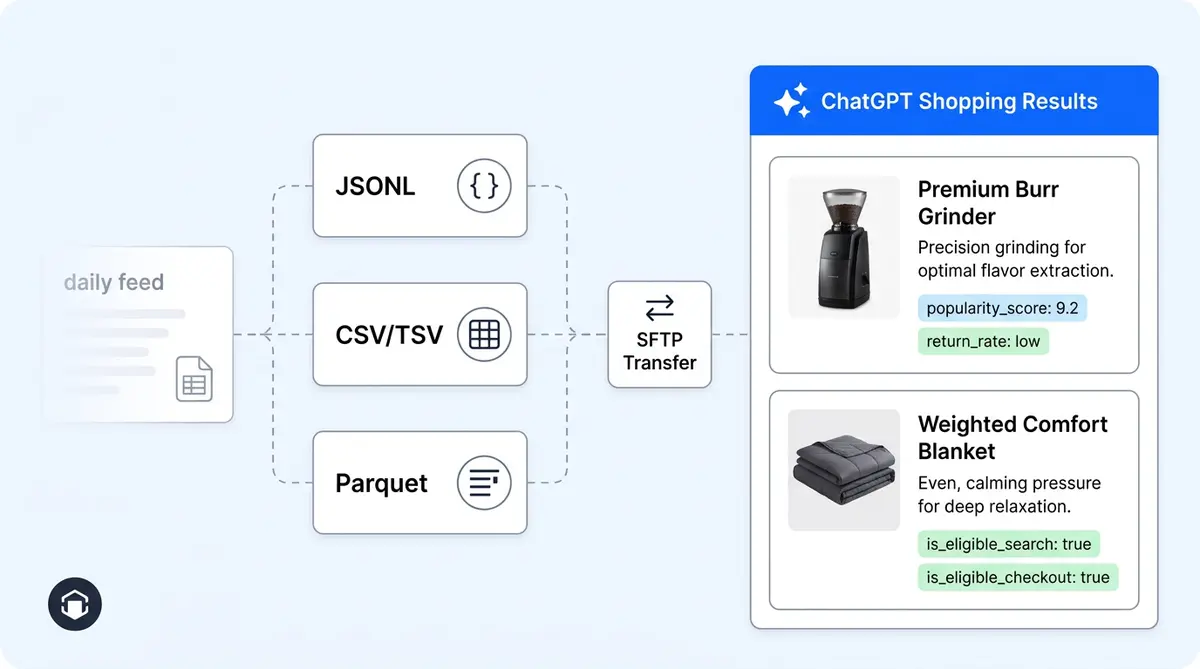
The ChatGPT product feed specification accepts multiple formats: JSONL (compressed with gzip), CSV (gzip-compressed), TSV (gzip-compressed), and Parquet with zstd compression. All files must use UTF-8 encoding. Unlike traditional shopping feeds where you upload to a merchant center, the ChatGPT feed uses a push model. Merchants deliver files via SFTP to an endpoint that OpenAI provides during onboarding.
For most mid-size catalogs under 50,000 SKUs, compressed JSONL is the cleanest option. It handles nested fields like variant arrays and multi-format descriptions without the escaping headaches that CSV creates. If your feed tooling already exports flat tabular data, CSV or TSV works, but you will need to flatten variant structures yourself. For enterprise catalogs above 100,000 products, Parquet with zstd compression is the recommended choice. It offers the best compression ratio and fastest parse times at scale, with a file size target under 500MB per shard and a maximum of 500,000 items per shard.
The 15-Minute Refresh Cycle Changes Everything
Traditional shopping feeds refresh once every 24 hours. The ChatGPT Shopping product feed accepts updates every 15 minutes. That is a 96x increase in update frequency, and it fundamentally changes how brands should think about inventory accuracy, pricing updates, and availability signals.
With a daily feed, a product can show as in-stock for up to 23 hours after it sells out. Customers click through, find it unavailable, and bounce. With 15-minute refreshes, your feed stays current with live inventory. Price changes from flash sales, competitor matching, or dynamic pricing engines can propagate to ChatGPT within minutes instead of waiting until the next day's crawl. Availability status fields support granular states including in_stock, backorder, preorder, out_of_stock, and discontinued, giving the AI precise signals about what to recommend.
One important constraint: ChatGPT feeds are full snapshots, not incremental updates. Every push replaces your entire catalog. This means your feed automation pipeline needs to export, compress, and push a complete file on each cycle. For brands running dynamic pricing, connecting your feed generation directly to your pricing engine is essential.
Ranking Signals: How ChatGPT Decides Which Products to Show
ChatGPT does not rank products the way traditional search engines do. There are no paid placements, no bidding, and no keyword matching. Recommendations are organic and driven by AI semantic reasoning. Here is what actually influences whether your products appear in shopping recommendations:
- Data completeness. Products with richer attribute sets get priority for specific queries. Materials, compatibility details, sizing information, and care instructions all contribute. A listing with 15 populated fields will outperform one with 5.
- Pricing transparency. Clear pricing including unit pricing metadata (amount, currency, measure, and reference) signals trustworthiness. The feed supports explicit unit pricing objects that most merchants overlook.
- Review signals. Product review count, product review rating, store-level review count, and store-level review rating are all feed fields that function as trust and quality indicators.
- Performance metrics. A
popularity_scorefield (0 to 5 scale reflecting sales velocity) and areturn_ratepercentage give ChatGPT direct signals about product reliability and demand. - Product specificity. ChatGPT interprets conversational queries where users describe needs, not keywords. Products with detailed, factual descriptions in plain text, HTML, and markdown formats simultaneously give the AI more context for matching.
- Structured attribute depth. Multiple taxonomy systems are supported (Google product categories, Shopify categories, and merchant-defined categories can coexist), letting the AI classify products more accurately across different query types.
- Rich media. Video links and 3D model files (GLB/GLTF format) boost discovery in visual and conversational contexts.
- Seller trust signals. Published policy links for privacy, terms, refunds, shipping, and FAQ within the feed itself contribute to merchant credibility scoring.
The Search Eligibility Fields That Control Your Visibility
The ChatGPT product feed includes control flags that do not exist in any traditional shopping feed. The is_eligible_search boolean determines whether a product appears in ChatGPT Shopping results at all. Setting it to false effectively removes the product from discovery without deleting it from the feed. The is_eligible_checkout boolean activates in-chat purchasing through the Instant Checkout flow, and enabling it automatically requires search eligibility.
These fields give merchants granular control over which products participate in AI-driven discovery. You can suppress seasonal items, gate premium products, or A/B test visibility at the SKU level. For brands running on Shopify or WooCommerce, syncing these flags with your existing product status workflows prevents stale listings from showing up in ChatGPT recommendations.
The description field is also unique. Unlike traditional feeds that accept plain text only, ChatGPT accepts plain text, HTML, and markdown descriptions simultaneously on the same product. This lets the AI parse structured formatting, bullet points, and rich content to better understand product attributes during conversational matching.
ChatGPT Merchant Setup: Step by Step
Getting your products into ChatGPT Shopping requires a structured onboarding process. Here is the walkthrough:
- Register at the ChatGPT Merchant portal. Submit your business details for verification. OpenAI reviews and approves merchants for feed ingestion.
- Receive your SFTP endpoint. After approval, OpenAI provides a unique, secure SFTP endpoint with authentication credentials for feed delivery.
- Build a sample feed. Start with approximately 100 representative products. Include all required fields:
feed_id,account_id,target_merchant,target_country(ISO 3166-1 alpha-2), productid, variantid, and varianttitle. - Format and compress. Export as
.jsonl.gz,.csv.gz, or Parquet. Ensure UTF-8 encoding throughout. - Submit for validation. Push the sample feed to your SFTP endpoint. OpenAI runs parsing and schema compliance checks.
- Fix rejection issues. Common rejection reasons include missing required fields, malformed data types, invalid URIs, non-unique product IDs, marketing language instead of factual descriptions, and pricing mismatches between the feed and your website.
- Push your full catalog. After sample validation passes, push a complete catalog snapshot.
- Automate the cycle. Set up automated feed pushes on your desired refresh interval, up to every 15 minutes.
- Set eligibility flags. Enable
is_eligible_search=trueon products you want discoverable. Optionally enableis_eligible_checkoutfor in-chat purchasing.
Prohibited product categories include adult content, alcohol, nicotine products, gambling, weapons, prescription medications, and unlicensed financial products. Attempting to submit these will result in feed rejection.
Ongoing Feed Maintenance That Most Merchants Skip
Submitting the feed is step one. Keeping it competitive requires continuous optimization. Monitor your product data completeness regularly. Every empty optional field is a missed ranking signal. Populate popularity_score from your sales data, update return_rate from your fulfillment metrics, and sync review counts from your review platform.
Use stable filenames and overwrite in place rather than creating new files on each push. Keep product IDs consistent across updates so ChatGPT can maintain continuity on listings. Watch for schema changes as the specification is still in draft status and evolving.
Alhena AI helps ecommerce brands monitor how their products appear inside ChatGPT Shopping results, identify feed gaps that cost visibility, and optimize product data to maximize AI recommendation rates. By connecting your ecommerce platform with Alhena's AI Support Concierge and Product Expert Agent, you get real-time intelligence on which products are surfacing in AI shopping conversations, which attributes are missing, and where competitors are winning visibility you should own. Brands like Tatcha have seen 3x conversion rates by ensuring their product data is complete, accurate, and optimized for AI-driven discovery.
Why Your Google Shopping Feed Won't Work Here
The biggest mistake merchants make is treating the ChatGPT product feed as a copy of their Google Shopping export. The differences are structural, not cosmetic. Google Shopping uses keyword matching and paid bidding. ChatGPT uses semantic reasoning with no ads and no bidding. Google refreshes daily. ChatGPT refreshes every 15 minutes. Google accepts plain text descriptions. ChatGPT accepts three formats simultaneously. Google has no performance signal fields. ChatGPT uses popularity scores and return rates as ranking inputs.
The ChatGPT Shopping product feed is a fundamentally different data requirement. Brands that optimize it natively, with complete attributes, frequent refreshes, performance signals, and proper eligibility controls, will capture a growing share of AI-driven product discovery. Those that paste in their existing feed and hope for the best will lose to competitors who take this channel seriously.
Ready to optimize your product data for AI shopping surfaces? Book a demo with Alhena AI to see how feed intelligence and AI product visibility monitoring can drive measurable revenue from ChatGPT Shopping, or start free with 25 conversations to explore the platform.

Frequently Asked Questions
How does the ChatGPT Shopping product feed differ from a Google Shopping feed?
The ChatGPT feed uses semantic AI matching instead of keyword bidding, refreshes every 15 minutes instead of daily, and includes performance signal fields like popularity_score and return_rate. Alhena AI helps merchants identify which feed attributes drive the most visibility in ChatGPT Shopping so they can prioritize optimization efforts.
What feed format should I use for ChatGPT Shopping if my catalog has over 100,000 SKUs?
Parquet with zstd compression is recommended for large catalogs, with a target of under 500MB per shard and 500,000 items maximum per file. Alhena AI connects to your ecommerce platform and monitors feed health so you can catch formatting errors and missing fields before they cost you AI product visibility.
How often should I update my ChatGPT product feed for best results?
ChatGPT accepts full-snapshot feed updates every 15 minutes. Brands with dynamic pricing or fast-moving inventory should push updates at least hourly. Alhena AI tracks which products surface in AI shopping conversations, helping you measure whether more frequent updates are translating into higher recommendation rates.
Can Alhena AI help me optimize my product data for ChatGPT Shopping visibility?
Yes. Alhena AI's Product Expert Agent analyzes your catalog for feed gaps, missing attributes, and data completeness issues that reduce your ranking in AI shopping results. Brands using Alhena have seen up to 3x conversion rate improvements by ensuring product data is accurate and complete across all AI discovery surfaces.
What are the most common reasons ChatGPT rejects a merchant product feed?
Common rejections include missing required fields, non-unique product IDs, marketing fluff instead of factual descriptions, pricing mismatches between feed and website, and prohibited categories. Alhena AI's feed intelligence flags these issues before submission so merchants can fix them proactively and avoid delays in getting products listed.