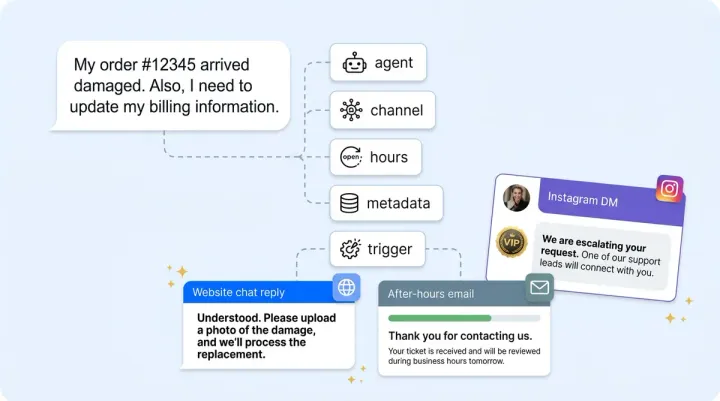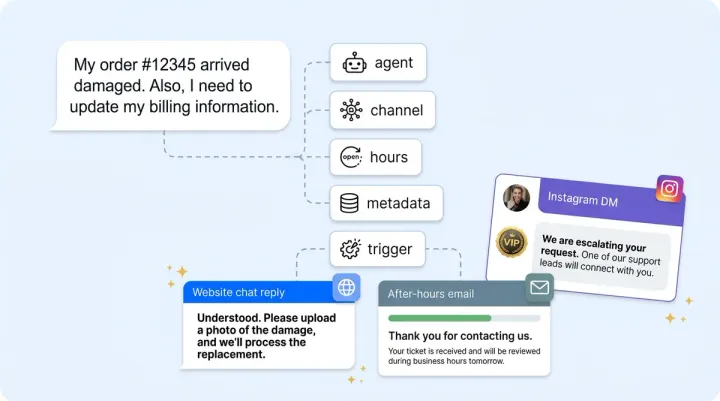
A detailed product comparison works great as an email response. It's terrible in an Instagram DM, where the shopper expects three sentences and a product link. A casual "hey!" opening with emoji works on WhatsApp. It feels unprofessional in a B2B Slack channel where your enterprise customer expects structured, direct answers.
Brands that deploy the same AI behavior across all channels feel "off" on every channel except the one they originally tuned for. The AI is accurate everywhere but appropriate nowhere. Connecting channels isn't enough (our complete omnichannel setup guide covers that step). Each channel needs its own behavioral profile that matches how real people actually communicate on that platform. Your ecommerce chatbot should deliver personalized, channel-appropriate responses, not generic ones. The key features of a trained ecommerce chatbot include product discovery, inventory awareness, and channel-specific delivery.
The Channel Behavior Matrix
Every channel your AI operates on carries its own communication norms. Shoppers don't just prefer different channels. They expect fundamentally different interaction styles on each one. Here's how a channel-specific AI chatbot should behave across all seven supported platforms.
Website chat: Medium-length responses in a professional-friendly tone. Shoppers expect instant answers and visual product presentation. Rich product cards, carousels, and quick-reply buttons all work here. AI-powered product discovery and intelligent recommendations convert browsers into buyers on this channel. This is your highest-intent channel for online shoppers, so lean into guided selling. Most e-commerce brands see their highest conversion rates from personalized web chat interactions.
Email: Longer, more detailed responses with formal structure. Include a greeting, organized body paragraphs, and a sign-off. Shoppers expect thoroughness over speed and want complete information in a single response. Don't send a three-sentence email when someone asked a detailed sizing question.
Instagram DMs: Short responses, under three sentences. Casual tone, emoji-friendly, visual-first. Send product image links instead of text descriptions. Language should feel current and conversational, not like a support ticket reply dropped into a DM.
Facebook Messenger: Casual-medium tone with conversational pacing. Quick responses work well here, along with structured options and inline product suggestions. Think of it as a slightly more polished version of Instagram, with more room for detail. Personalized product assistance works especially well in this chatbot ecommerce channel.
WhatsApp: Personal and concise, like texting a knowledgeable friend. Multimedia-friendly with product images and catalog links. Shoppers expect chat-speed responses, so brevity matters. This channel rewards warmth without formality. For a deeper look at WhatsApp and Instagram AI selling, see our <a href="https://alhena.ai/blog/ai-social-commerce-instagram-whatsapp-ecommerce/">social commerce revenue guide</a>. Ecommerce chatbots can handle order tracking, return questions, and product recommendations here because WhatsApp users expect quick, complete answers.
Slack: Professional and direct. Structured formatting with bullet points and clear headers. Typically used for B2B customer support or internal team knowledge. Skip the emoji unless the workspace culture invites it.
Discord: Community-oriented and casual, even playful. Match the server's culture. Thread-aware with concise answers that encourage follow-up conversation. This is where your brand can show personality without guardrails feeling too tight.
Implementing Channel-Scoped Guidelines
The channel behavior matrix isn't theoretical. You can implement it today using channel-scoped Guidelines in your AI Shopping Assistant. Each guideline pairs a trigger condition with a specific action, and you can scope any guideline to activate only on a particular channel. The setup takes minutes, not days. Because Alhena's chatbot platform connects through native integrations with Shopify, WooCommerce, and your CRM, your AI agents pull real product data into every personalized response.
Instagram guideline example: Set the trigger to "conversation on Instagram." Set the action to "keep responses under three sentences, use a friendly casual tone, include a product link or image instead of detailed text descriptions, and add one relevant emoji per response." Every Instagram DM now follows social-native communication patterns.
Email guideline example: Trigger is "conversation via email." Action is "include a proper greeting using the customer's name if known, structure the response with clear paragraphs covering the full question, reference specific product details and policy information, and end with a brand-appropriate sign-off." Your email responses now read like thoughtful replies, not chatbot outputs.
Slack guideline example: Trigger is "conversation on Slack." Action is "respond in a direct, structured format, use bullet points for multi-part answers, maintain professional tone without casual language, and keep responses focused on the specific technical or business question." B2B customers get the precision they expect. Each ecommerce chatbot guideline turns your virtual assistant into a channel-native agent with agentic capabilities that go beyond generic answers.
WhatsApp after-hours guideline: Trigger is "conversation on WhatsApp after business hours." Action is "respond warmly and concisely, resolve the question if the knowledge base covers it, including product discovery and recommendation queries, and if escalation is needed, let the customer know a team member will follow up by morning with a specific time expectation." This layers timing on top of channel behavior for even more contextual responses. Within days of implementing these actions, you can review how customer queries about return policies or order status get handled differently on each channel.
How the Layering Architecture Works
Global Brand Voice settings (Identity and Tone) establish the base personality that applies to every conversation across every channel. Channel-scoped guidelines then override specific behaviors like length, formality, formatting, and emoji usage for each platform without changing the underlying brand personality. The result: your AI sounds like the same brand on every channel but communicates in the way each channel's users expect.
This separation is what makes omnichannel chatbot behavior actually work. Your AI Support Concierge maintains one knowledge base, one set of product data, one brand identity. Only the delivery style adapts. This is how e-commerce chatbots can deliver personalized assistance across every channel without duplicating setup or training. Ecommerce chatbots built on this architecture handle everything from product discovery and shipping questions to personalized assistance. A skincare brand's AI knows the same ingredients and routines whether it's responding on Instagram or email. The difference is how it packages that knowledge.
Measuring Channel-Specific Performance
Track CSAT, resolution rate, and conversion by channel independently. Alhena's analytics filter performance by integration source, so you can see exactly how each channel performs in isolation.
If Instagram CSAT is lower than web chat, the channel-specific guidelines need adjustment, not the global personality. Channel-level analytics reveal which platforms need behavioral tuning without conflating performance across surfaces. Review your online e-commerce chatbot metrics by channel weekly to catch drops early. Brands like Tatcha, which drove 3x conversion rates and 11.4% of total site revenue through AI, measure and optimize at the channel level to maintain those results.
Common Mistakes to Avoid
Using the same response template across all channels. If you tuned your AI for web chat and pushed it everywhere else, it's guaranteed to feel wrong on most platforms. Each channel deserves its own behavioral profile. Generic ecommerce chatbots and one-size-fits-all bots lose shoppers because the tone feels wrong even when the answer is right.
Ignoring platform-specific length expectations. Instagram users abandon 200-word messages. Email recipients distrust three-word replies. Match the length norms of each platform or lose engagement. E-commerce shoppers want instant answers about inventory and sizing, but the format should fit where they're asking.
Being too formal on social channels. Shoppers expect conversational DMs, not corporate email tone. Being too casual on email is equally damaging, especially for high-ticket or B2B brands where credibility depends on polish.
Forgetting to layer business hours on channel behavior. Instagram DMs at midnight shouldn't offer live agent transfer. Combine channel scoping with time-based triggers for responses that fit both the platform and the moment.
Channel-Specific AI Is a Configuration Problem, Not a Development Project
With Alhena AI, channel-specific behavior is a configuration setting. Channel scoping in the Guidelines system lets you create behavioral rules that activate only on specific channels. Combined with global Brand Voice settings and business hours timing, you get an AI that adapts its communication style to match every platform's norms while maintaining consistent product knowledge, accuracy, and brand identity underneath.
Seven channels. Seven behavioral profiles. One AI brain. One knowledge base. Every digital ecommerce store running chatbots across ecommerce channels gets the same result: better engagement on every platform. That's what real omnichannel ecommerce AI looks like.
Omnichannel doesn't mean uniform. It means consistently on-brand while contextually appropriate. The AI that sounds perfect on your website but awkward on Instagram isn't a technology problem. It's a configuration problem that channel-specific guidelines solve in minutes. Book a demo with Alhena AI to see channel-scoped guidelines in action, or start a free trial with 25 conversations.

Frequently Asked Questions
How do I make an AI chatbot respond differently on Instagram versus email?
In Alhena AI, you create channel-scoped Guidelines that activate only on specific platforms. Set an Instagram guideline to keep responses under three sentences with casual tone and emoji, and set a separate email guideline to use formal structure with a greeting, detailed paragraphs, and sign-off. The AI applies the right behavioral profile automatically based on where the conversation happens.
Does channel-specific chatbot behavior require separate AI training for each platform?
No. Alhena AI uses one knowledge base and one trained model across all channels. Channel-specific behavior for chatbot e-commerce is handled through configuration, not retraining. You set Guidelines scoped to each channel that adjust tone, length, and formatting while the underlying product knowledge stays identical everywhere.
How do I set shorter casual responses for social DMs and longer detailed responses for email?
Create two Guidelines in Alhena AI with different channel scopes. For Instagram or WhatsApp, set the action to keep responses under three sentences with a conversational tone. For email, set the action to include full paragraphs, product details, and a sign-off. Each guideline activates only on its scoped channel, so the same AI adjusts length and formality automatically.
Can business hours change AI behavior differently on each channel?
Yes. Alhena AI lets you layer timing triggers on top of channel scoping. For example, a WhatsApp after-hours guideline can respond warmly and set follow-up expectations, while an email after-hours guideline can send a detailed auto-response with relevant help articles. Each combination of channel and timing gets its own behavioral rule.
How do I measure whether channel-specific AI configuration improves CSAT per platform?
Alhena AI's analytics filter CSAT, resolution rate, and conversion by integration source. You can compare Instagram CSAT before and after applying channel-scoped guidelines independently from web chat or email performance. If one channel's score drops, you adjust that channel's guidelines without touching the others.
What is the most common mistake when running the same AI across multiple channels?
Using the same response template everywhere. Brands that skip channel-scoped guidelines often tune their AI for web chat, then push it to Instagram and email unchanged. The result feels robotic on social channels and shallow on email. Setting distinct behavioral profiles per channel in Alhena AI takes minutes and fixes this mismatch immediately.
Do channel-scoped guidelines override the global brand voice or work alongside it?
They work alongside it. In Alhena AI, global Brand Voice settings (Identity and Tone) establish your base personality across every channel. Channel-scoped guidelines then adjust specific behaviors like length, emoji usage, and formality for each platform. The AI stays on-brand everywhere while adapting its communication style to match each channel's norms.