Running a Magento 2 store with Freshdesk for support creates a familiar problem. Your product catalog is complex, configurable products, custom attributes, multi-store views, enterprise-grade pricing rules, but your help desk has no idea any of that exists. When a customer emails asking whether a product is in stock or when their order ships, an agent has to leave Freshdesk, log into Magento's admin panel, run the lookup, and manually copy the answer back. At scale, this workflow bleeds time, accuracy, and money.
Alhena AI eliminates that gap. It connects natively to both Magento 2 and Freshdesk, creating an intelligent automation layer that reads live commerce data and responds to tickets without any agent involvement on routine queries. The result is faster resolution, lower support costs, and more time for your team to focus on high-value interactions.
See the product page AI Shopping Assistant.
The Technical Architecture: How Magento Meets Freshdesk Through Alhena
Alhena integrates with both platforms independently, then unifies their data at the AI layer.
On the Magento side, connection happens through Magento 2's REST API. You create a new integration in your Magento Admin under System > Extensions > Integrations, name it (e.g., "Alhena AI"), and grant API access to Sales (for order data) and Catalog (for product data). Magento generates four credentials: Consumer Key, Consumer Secret, Access Token, and Access Token Secret. You enter these in Alhena's dashboard under Settings > Integrations > Magento along with your store URL, and the connection is live.
Once connected, Alhena activates two specialized agents: an Order Management Agent that handles order inquiries, tracking, and order-related support, and a Product Expert Agent that provides detailed product information, specifications, and recommendations. Both agents query Magento's API in real time, every response reflects current order status, current inventory, and current pricing.
A key advantage for Magento stores: Alhena supports custom product fields. Magento's strength is its flexible attribute system, and Alhena lets you specify exactly which custom attributes to sync. If your catalog uses custom fields for material composition, warranty terms, compatibility specs, or certification data, you configure those attribute codes in Alhena and the Product Expert Agent can answer questions about them. Go to Settings > Integrations > Magento, scroll to Custom Product Fields, and add the attribute codes you want the AI to reference.
On the Freshdesk side, setup requires your Freshdesk domain and an API key. You retrieve the API key from your Freshdesk profile settings (Profile icon > Profile Settings > View API Key). In Alhena, navigate to Settings > Integrations > Freshdesk, enter the domain and API key, and click Connect. Alhena creates an "Alhena Bot" agent inside your Freshdesk account. Like the Magento integration, this is a native connection, no middleware, no third-party connectors.
How Ticket Routing and Resolution Works
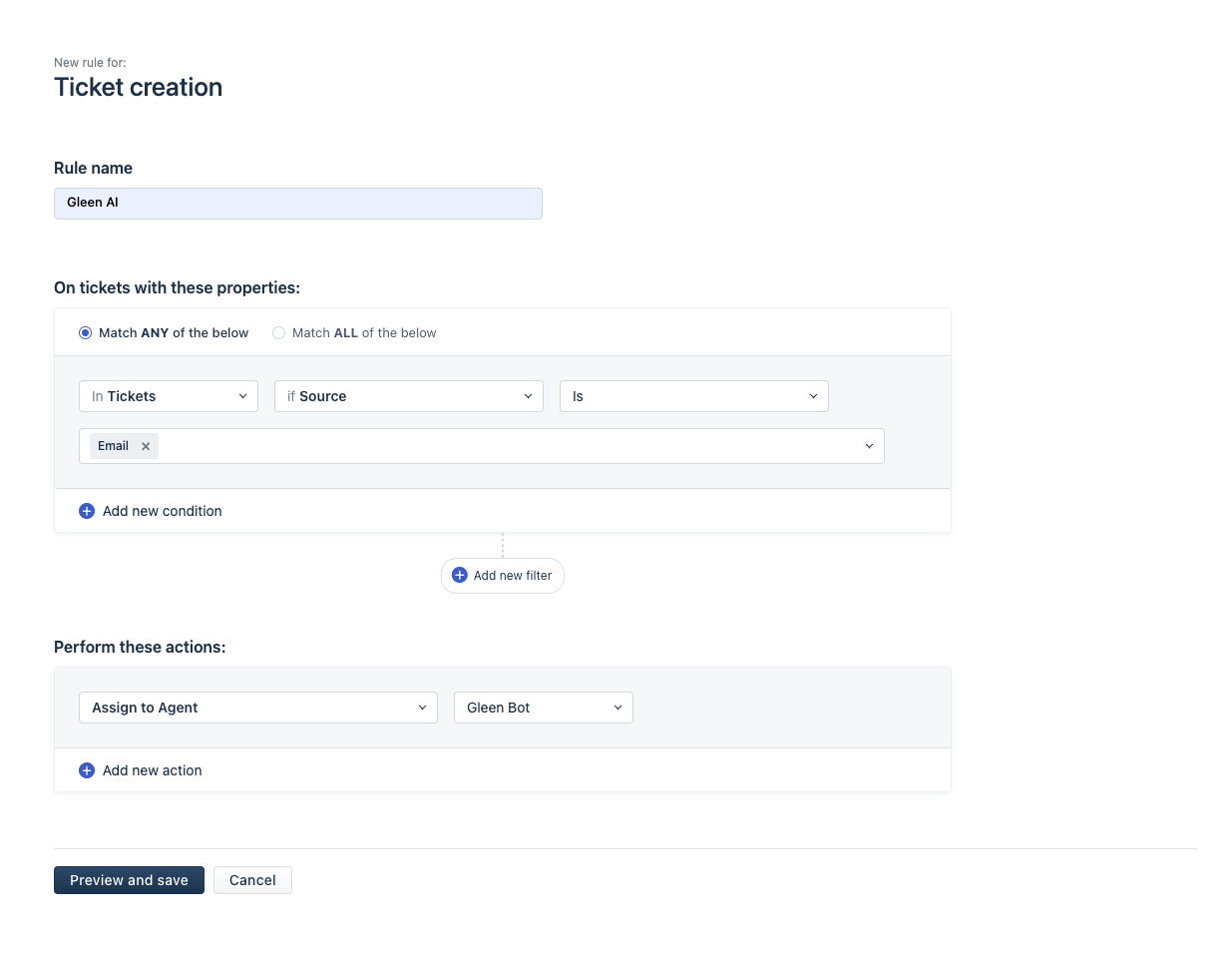
Alhena Bot only responds to tickets that are explicitly assigned to it. You control which tickets reach the AI through Freshdesk's automation rules.
In Freshdesk, go to Settings > Automations > New Rule, and create a rule that assigns incoming tickets (from email, chat, or any channel) to the Alhena Bot agent. You can scope this broadly, all new tickets, or narrow it to specific ticket types, customer segments, or email addresses.
When a ticket lands on Alhena Bot, the AI reads the customer's message, queries Magento for relevant data (order details, product information, inventory status), and composes a response. Once answered, Alhena moves the ticket to closed status. If the customer replies, Freshdesk automatically reopens the ticket, and Alhena picks it up again.
For stores running both Freshdesk and Freshchat, Alhena supports intelligent channel routing based on business hours. During business hours, website chat tickets route to Freshchat where agents can respond in real time. Outside business hours, those same tickets automatically route to Freshdesk for email-based follow-up. Alhena collects the customer's email address on handoff so nothing falls through the cracks. You configure business hours in Alhena under AI Settings > Connect Tools > Set hours for transfer.
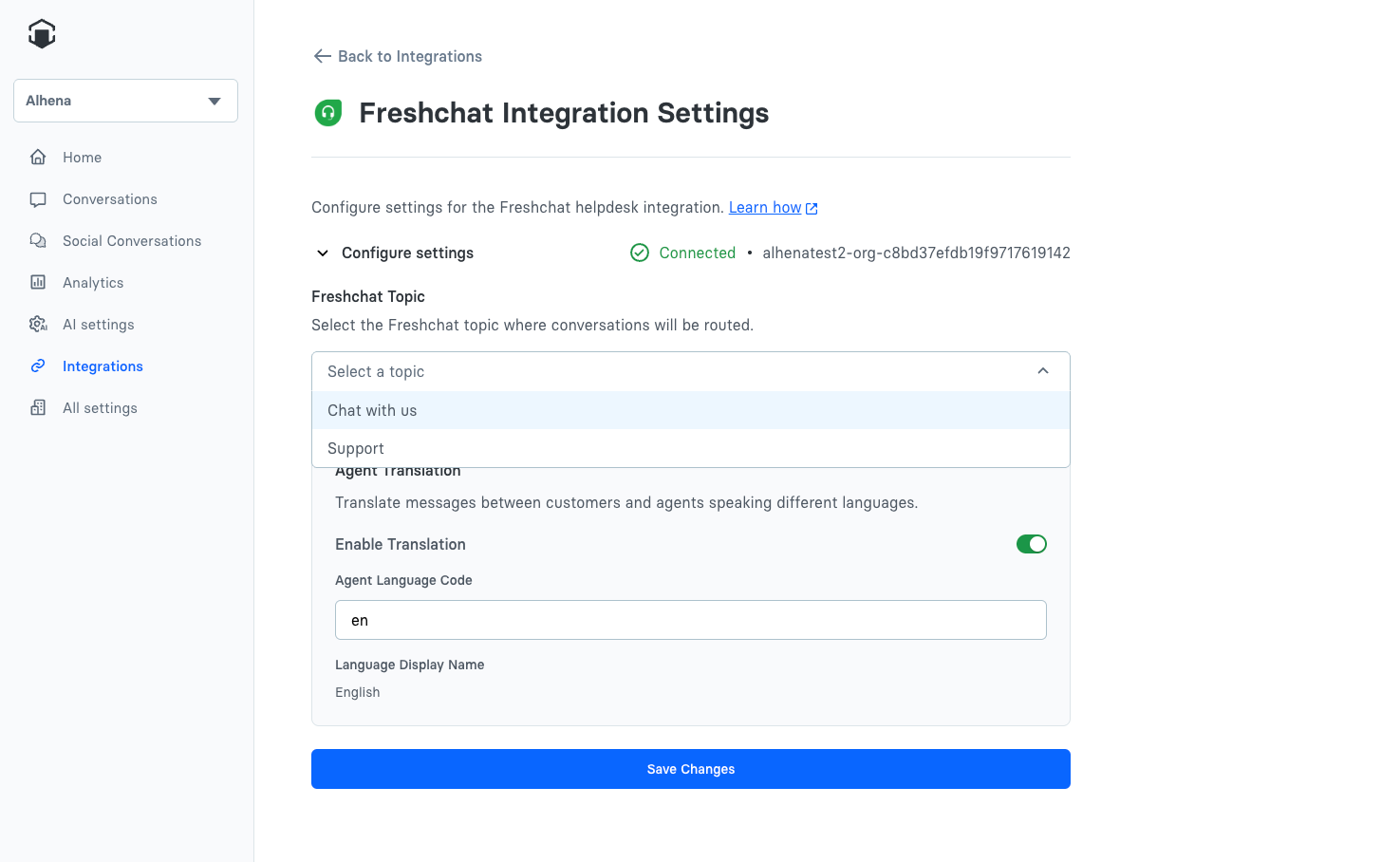
The Freshchat integration adds another layer of capability. It connects through Freshchat's API (Chat URL plus API key) and uses webhooks to sync messages bidirectionally. An optional agent translation feature can automatically translate between customer and agent languages, useful for Magento stores serving international markets. Enable it in Alhena's Freshchat settings with a language code, and customer messages are translated to the agent's language while agent replies are translated back to the customer's language.
See more about the product Agent Assist.
Human Transfer: When and How It Happens
Alhena's handoff rules are designed to catch every case where AI resolution would be inadequate.
The bot transfers to a human agent when a customer explicitly asks for a person, when the AI cannot find an answer in its knowledge base, or when a custom rule in your answering guidelines triggers. For email specifically, Alhena also routes to humans on automated system emails and forwarded messages (anything with "Fwd:" in the subject line), recognizing these often need human interpretation.
By default, Alhena unassigns the ticket from itself on transfer. If you want transferred tickets to land in a specific Freshdesk group, say, your senior support team or your billing department, you configure the Human Transfer Group in the integration settings. Human agents can also intervene at any point: manually respond to a ticket or reassign it away from Alhena Bot, and the AI immediately stops responding to that conversation.
Why This Stack Outperforms Freshdesk's Native Bot
Freshdesk includes its own chatbot builder. It can deflect basic questions using knowledge base articles and canned responses. But it operates in a silo, it has no awareness of your Magento catalog, no ability to look up a specific order, and no understanding of configurable product attributes.
Alhena's architecture is fundamentally different. The Product Expert Agent does not just search articles. It queries Magento's API, understands your custom product fields, and generates responses grounded in live catalog data. Alhena pulls the answer from your custom attribute, not from a generic FAQ article.
The Order Management Agent handles the entire order lifecycle: tracking, shipping status, return eligibility, and refund processing timelines. These are the highest-volume tickets in ecommerce support, and they require live data that no static knowledge base can provide.
You can also train Alhena on past Freshdesk ticket responses and canned responses. This means the AI learns not just what your documentation says, but how your team actually communicates, your phrasing, your escalation patterns, and your brand voice.
For Magento stores managing multiple brands or storefronts through a single Freshdesk account, Alhena supports bot profile mapping. Different support email addresses can route to different bot profiles, each with its own knowledge base and product catalog. One Freshdesk account, multiple AI agents, zero confusion.
Revenue Levers Beyond Cost Reduction
Ticket deflection saves money, but the Product Expert Agent actively generates revenue. When a customer opens a support conversation about sizing, compatibility, or product comparisons, the AI responds with accurate, real-time product data, and can recommend alternatives, suggest complementary items, or flag active promotions. These are not scripted upsells; they are intelligent, context-aware recommendations grounded in your actual catalog.
For Magento stores with complex product configurations, bundled products, grouped items, and configurable variants, this matters enormously. Customers frequently abandon purchases because they cannot get fast answers to product-specific questions. The Product Expert Agent removes that barrier, responding in seconds with data no human agent could retrieve as quickly.
The business hours routing between Freshchat and Freshdesk ensures you capture revenue opportunities around the clock. During business hours, live chat keeps customers engaged with immediate responses. After hours, the AI handles everything it can, and routes the rest to email with full context preserved for morning follow-up.
What You Need to Get Started
For Magento: a Magento 2 store with admin access and API credentials (Consumer Key, Consumer Secret, Access Token, Access Token Secret). You create these through a new integration in System > Extensions > Integrations.
For Freshdesk: admin access and your Freshdesk API key. Optionally, Freshchat credentials if you want live chat support with business-hours routing.
See the product page AI Support Concierge.
Connect both platforms in Alhena AI's integrations panel. Create a ticket automation rule in Freshdesk. Configure your custom product fields if your Magento catalog uses them. Add your store domain to training URLs. The entire setup takes under 30 minutes, and both AI agents, Order Management and Product Expert, activate automatically on connection.
Frequently Asked Questions
How does the Alhena AI chatbot integrate with my Magento store?
Alhena connects to Magento 2 (Adobe Commerce) through the REST API. You create an integration in your Magento admin under System > Extensions > Integrations, generate your API key and access credentials, and enter them in the Alhena dashboard. Once connected, the AI chatbot activates an Order Management Agent and a Product Expert Agent that query your store's catalog, inventory, and order data in real time.
What Freshdesk automation do I need to enable for the AI bot to work?
You create one automation rule in Freshdesk that assigns incoming support tickets to the Alhena Bot agent. Go to Settings > Automations > New Rule, configure the conditions (by channel, tag, email, or ticket type), and set the action to assign to Alhena Bot. The chatbot then auto-responds to every ticket it receives, resolves the inquiry, and closes the ticket. If the customer replies, Freshdesk reopens it and the bot picks it up again automatically.
Can Alhena handle Magento custom product attributes and extension data?
Yes. In the Alhena dashboard, navigate to your Magento integration settings and add the attribute codes for any custom fields you want the AI to access, material composition, compatibility specs, warranty info, configurable product options, or data from third-party Magento extensions. The Product Expert Agent uses these attributes to personalize responses to customer queries about product details.
What channels does the Freshdesk integration support for customer support?
Alhena resolves support tickets from email, website chat, and any channel that feeds into your Freshdesk helpdesk. If you also connect Freshchat via webhook and API, the AI chatbot handles live chat during business hours and routes conversations to Freshdesk for email follow-up after hours. The setup supports self-service resolution across every channel your ecommerce store uses.
How does the AI chatbot handle escalation to a human agent?
Alhena transfers the conversation to a human agent inside Freshdesk when the customer requests one, when the bot cannot find a confident response in its knowledge base, or when a custom escalation rule triggers. The bot passes full conversation history and order data so the agent picks up without asking the customer to repeat their inquiry. You can configure a default Human Transfer Group in your Freshdesk integration settings to route escalations to the right support team.
Does this integration work for Adobe Commerce (Magento 2) stores with multiple storefronts?
Yes. Alhena supports bot profile mapping, which lets you connect one Freshdesk helpdesk account to multiple Magento store views. Each bot profile maintains its own knowledge base, product catalog, and workflow configuration. Tickets route to the correct AI chatbot based on the support email address or admin-defined rules, no manual sorting required.
What kind of response time improvement can I expect from adding an AI chatbot to Freshdesk?
The AI chatbot responds to support tickets in seconds, compared to average agent response times of several hours on email. For high-volume inquiry types, order tracking, returns, stock availability, product queries, automation eliminates wait time entirely. Most ecommerce stores running this Magento + Freshdesk + Alhena AI integration see resolution times drop by 80-90% on L1 tickets and measurable gains in customer satisfaction.
Can I train the Freshdesk AI bot on existing ticket data and canned responses?
Yes. The Alhena team can sync your past Freshdesk ticket history and canned responses into the bot's knowledge base, so the AI learns your store's voice and resolution patterns. You can also add your Magento store domain to Alhena's training URLs, enabling the chatbot to learn from your product pages, help center, and FAQ content. This combination of real-time commerce data and trained helpdesk knowledge personalizes every interaction.