How to combine Shopify and Gorgias with an AI Shopping Assistant
Connect Shopify + Gorgias with Alhena AI to automate WISMO, returns, and product questions, deflect tickets, and boost conversions.
TL;DR
If you're already running your ecommerce store on Shopify and managing customer support in Gorgias, you're working with two of the most powerful tools in the industry. But here's the gap most teams don't talk about: Shopify handles your commerce data, and Gorgias manages your tickets, yet neither was built to proactively convert shoppers or autonomously resolve support before it becomes a ticket. That's exactly where Alhena AI fits in.
After talking to dozens of ecommerce operators who feel the same friction: Gorgias is great at centralizing tickets, and Shopify is the backbone of their store, but the automation layer between those two still relies too heavily on macros, rules, and human agents triaging the same repetitive WISMO queries every single day. According to industry benchmarks, over 60% of inbound support tickets across e-commerce brands are repetitive, pre- or post-purchase queries that a trained AI agent can handle instantly, without any human touch (Forrester CX Automation Report, 2025).
Alhena AI is that automation layer. Think of it as the intelligent connective tissue between your Shopify store and your Gorgias helpdesk, an AI agent that reads live product and order data, handles self-service queries autonomously, and escalates only the edge cases your team actually needs to own.
How Alhena AI Works as the AI Layer Between Shopify and Gorgias
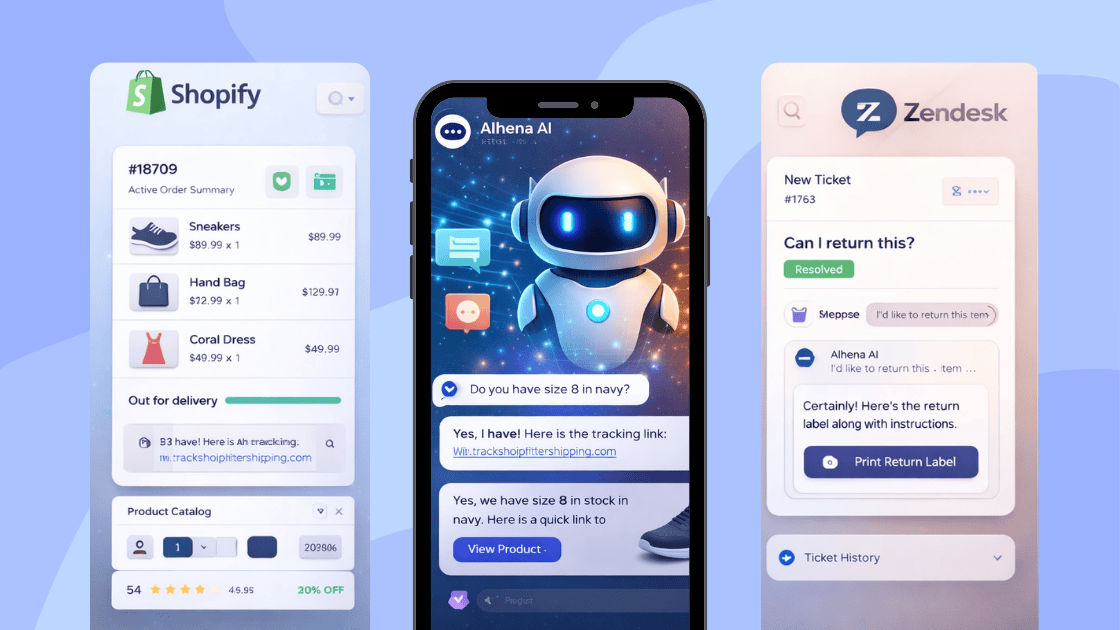
Alhena sits in front of your support workflow as a fully conversational AI agent. When a shopper lands on your Shopify store and opens the chat widget, Alhena handles the conversation end-to-end, pulling live inventory, order status, product specs, and return policies directly from Shopify. When a query falls outside what Alhena can confidently resolve, it creates a detailed ticket in Gorgias and hands off the conversation with full context: the transcript, detected customer intent, and any order IDs or customer data already collected.
Here are the top AI chatbots for Gorgias users.
The result is a clean two-tier architecture that most ecommerce brands don't realize they're missing:
| LAYER | TOOL | RESPONSIBILITY |
|---|---|---|
| Commerce data | Shopify | Products, orders, inventory, discounts |
| AI automation | Alhena AI |
Conversational support, product discovery, WISMO, returns, upsells |
| Human escalation |
Gorgias | Complex tickets, refunds, edge cases – handled by your team |
This workflow means your Gorgias agents spend their time on high-value interactions, not answering "What's my order status?" for the hundredth time this week.
Setting Up the Shopify Integration
Getting Alhena connected to your Shopify store takes minutes. You can install directly from the Shopify App Store or go to Settings → Integrations → Shopify inside Alhena and connect your store. Once authorized, two critical AI agents activate automatically:
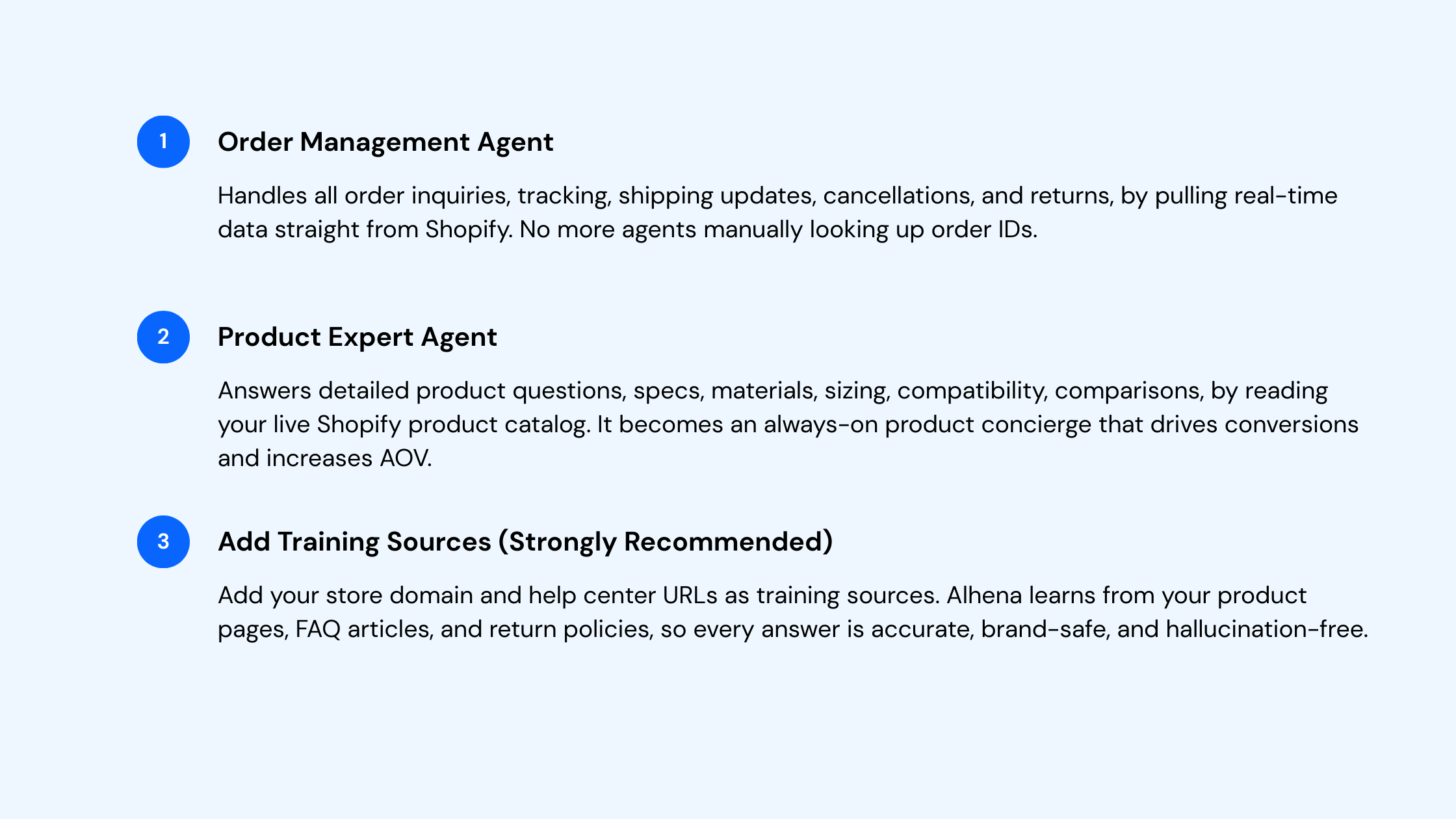
See the Shopify integration guide for details.
Setting Up the Gorgias Integration
Alhena integrates with Gorgias via API for real-time escalations and email ticket automation. Here's the setup flow:
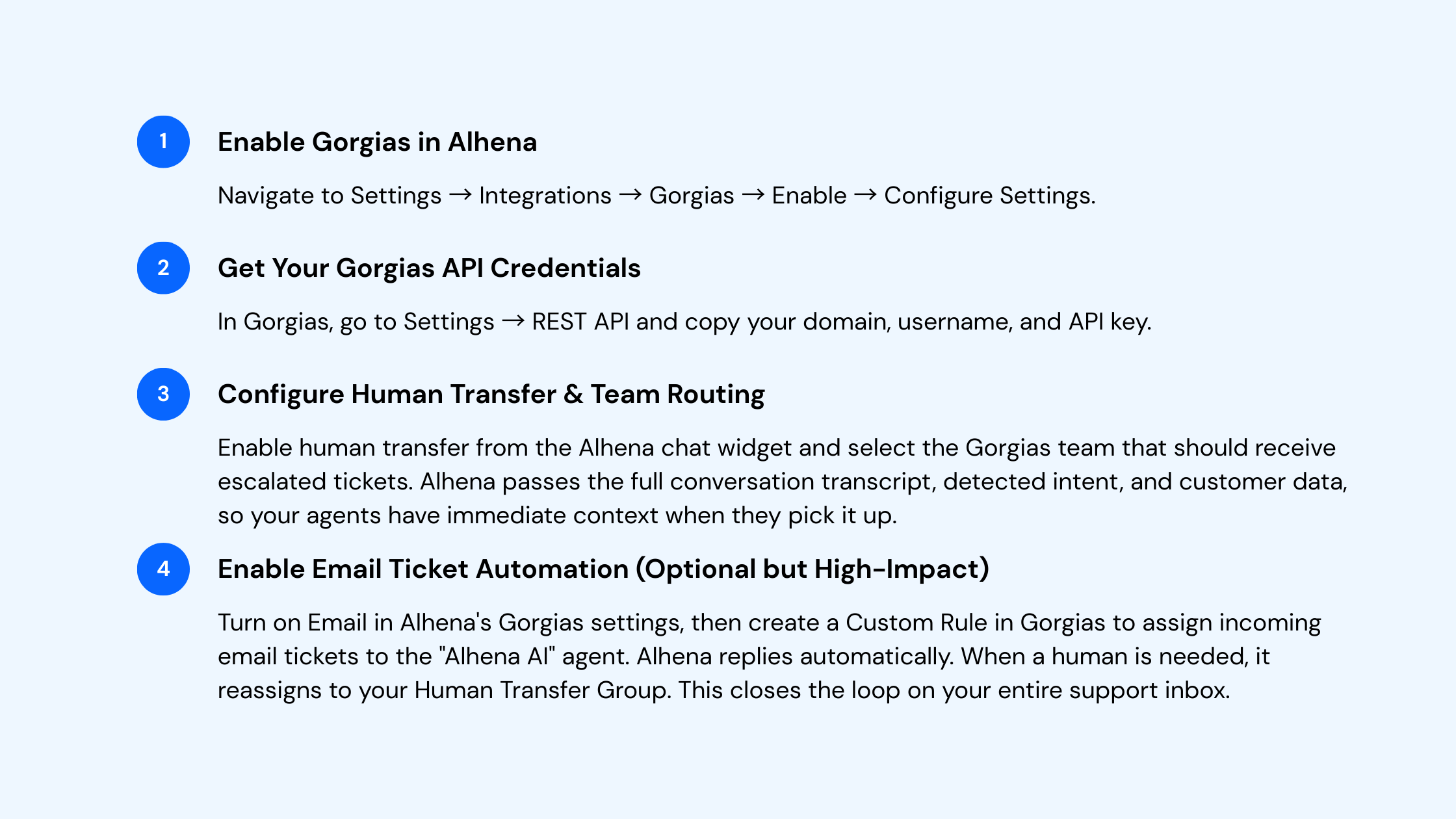
Full setup in the Gorgias integration guide.
Why This Combination Is a Competitive Advantage
Gorgias is arguably the best helpdesk built for ecommerce, used by nearly half of the top 1,500 Shopify stores. But Gorgias manages tickets; it doesn't prevent them. Alhena AI intercepts the conversation before it ever becomes a ticket. Brands comparing tools like Tidio, Freshdesk-based chatbots, Kustomer automations, Zendesk bots, Help Scout workflows, or even Zoho Desk rules will find they solve either support or sales, rarely both. Alhena is purpose-built to do both simultaneously, trained on your catalog, policies, and brand voice.
Specifically, when Alhena is layered on top of Shopify and Gorgias, here's what changes operationally:
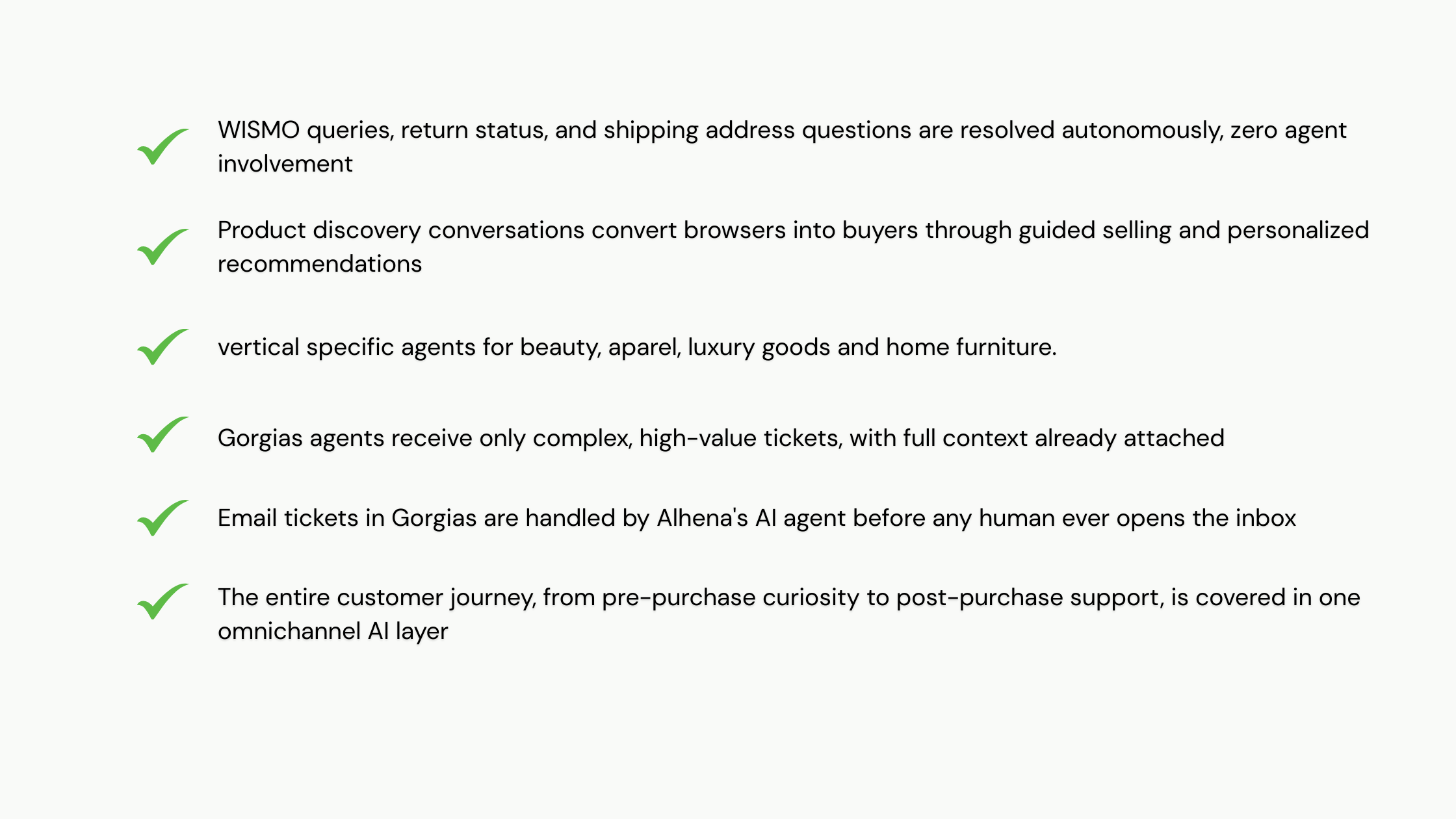
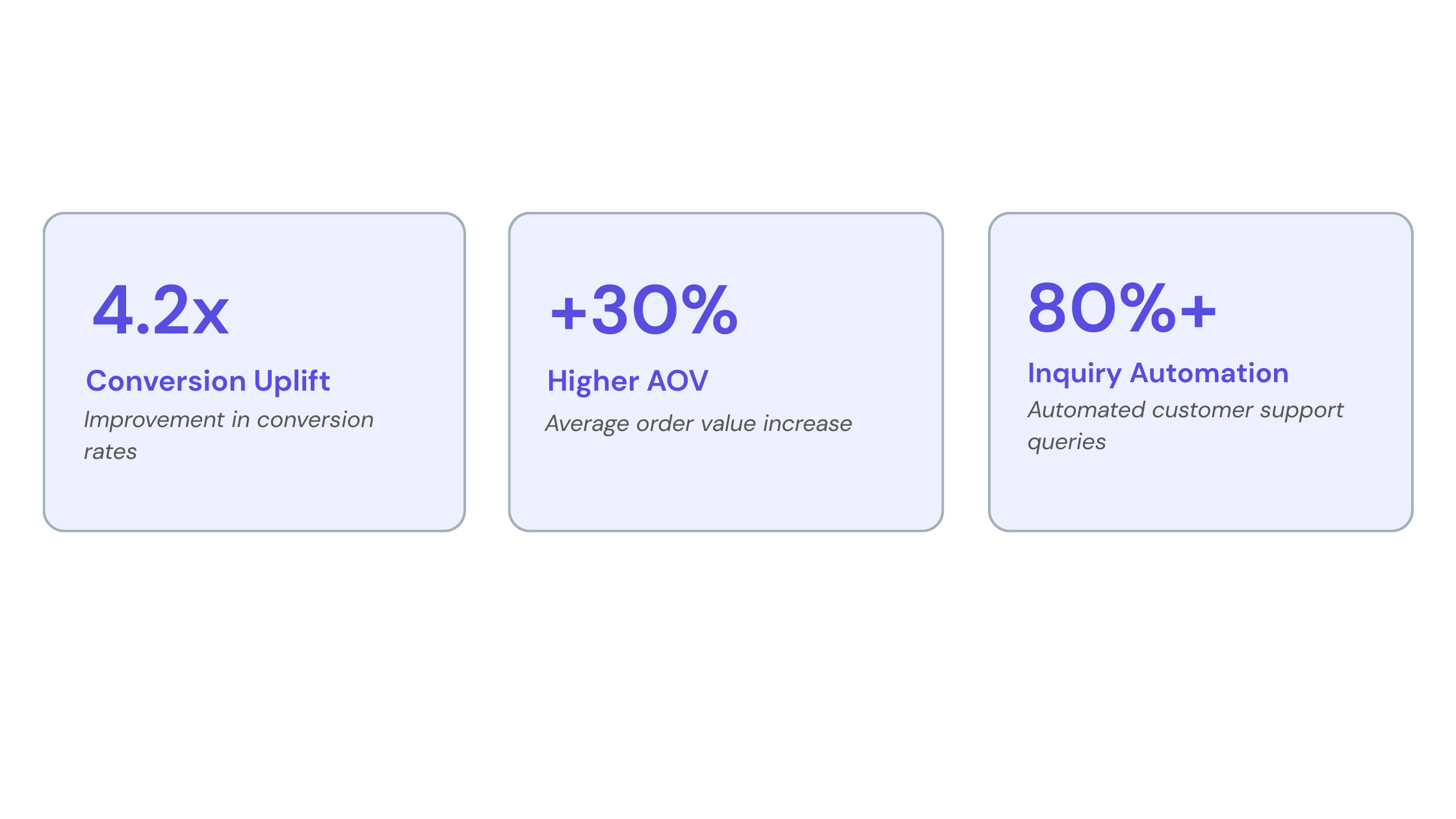
Alhena is designed to automate 80% of repetitive queries, with customers seeing autonomous resolution of L1 tickets, plus measurable gains in conversions and AOV. It transforms every support touchpoint into a shopping experience, something neither Shopify nor Gorgias alone is designed to do.
Here are the top AI chatbots for Shopify users.
Best-Practice Configuration for the Shopify + Gorgias Stack
Once both integrations are live, here's how to get the most out of the combined setup:
Start narrow, with your highest-volume use cases. Pull your top 10 repetitive Gorgias ticket categories, order tracking, return requests, size questions, and use them to run simulations in Alhena's Playground before going live. This validates accuracy before any customer interaction.
Keep training sources clean and current. Alhena learns from your Shopify product catalog, your help center URLs, and any policy pages you add as training sources. Outdated or conflicting documentation leads to inconsistent answers. Audit training URLs monthly and remove any stale content.
Review conversations weekly. In Alhena's conversation dashboard, filter for sessions where the AI said "I don't know" or the customer requested a human agent. These are your improvement signals. Update help articles or add new training URLs as your product catalog evolves.
Measure what matters. Track ticket deflection rate in Gorgias (you should see it drop meaningfully within the first month), AOV on sessions where Alhena's product expert agent was engaged, and CSAT on escalated tickets where Alhena handed off context cleanly.
The Bottom Line
If you're running Shopify and Gorgias, you already have two exceptional tools. What you're likely missing is the intelligent AI layer that connects them, one that can handle the full customer journey from product discovery to post-purchase resolution without burning out your support team or losing revenue to unanswered pre-sale questions.
Alhena AI is that layer. It's not a replacement for Gorgias or Shopify. It's what makes them meaningfully smarter together. Ecommerce leaders who want to automate response handling, reduce ticket volume, and drive measurable conversion lift are finding that the Shopify + Gorgias + Alhena stack is one of the most effective CX architectures available today, and the setup takes less than an hour.
See It Working on Your Store
Book a live demo and we'll show you exactly how Alhena AI integrates with your Shopify and Gorgias setup, with real data from your catalog and a walkthrough of the escalation workflow.
Frequently Asked Questions
How does Alhena AI integrate with both my Shopify store and Gorgias helpdesk at the same time?
Alhena acts as the AI layer that sits between your Shopify store and your Gorgias helpdesk, connecting to both via dedicated integrations. On the Shopify side, Alhena reads live product, order, and inventory data from your store so it can answer customer inquiries in real time, no manual syncing required. On the Gorgias side, the integration handles two critical workflow functions: automated response to inbound support tickets assigned to the "Alhena AI" agent, and intelligent escalation that creates detailed Gorgias tickets whenever a shopper needs a human. The result is a fully unified customer support workflow where Shopify feeds Alhena with commerce data and Gorgias captures every escalation with complete context, all from a single connected setup.
What customer support tickets does Alhena AI automate in Gorgias for Shopify merchants?
For ecommerce businesses running Shopify and Gorgias together, Alhena automates the highest-volume, most repetitive support tickets before they ever reach a human agent. This includes: order tracking and status updates (WISMO), refund eligibility checks and refund status inquiries, shipping address confirmations, discount code questions, return and exchange guidance, abandon cart follow-ups, and product-specific inquiries like sizing, materials, and compatibility. These ticket types collectively account for the bulk of inbound support volume for most Shopify stores, and automating them means your Gorgias agents can focus entirely on complex, high-value cases where human judgment genuinely matters. Customer service automation at this level typically yields a 60-80% reduction in manually handled ticket volume within the first 30 days.
How does Alhena AI handle refund requests and complex inquiries that need a human agent in Gorgias?
When Alhena encounters a refund request or any inquiry it cannot resolve confidently, whether due to complexity, customer sentiment, or policy edge cases, it escalates the conversation into Gorgias as a structured support ticket. That ticket carries everything the agent needs to act immediately: the full conversation transcript, the detected intent (e.g., "refund requested" or "shipping address mismatch"), any order IDs and customer profile data already collected, and relevant tags for routing. Your Gorgias team receives a pre-populated, contextualized ticket rather than a blank inbox entry, which dramatically reduces handle time and eliminates the frustrating customer experience of repeating themselves. You can also configure which Gorgias team or group receives each escalation type directly from the Alhena dashboard.
Can Alhena AI automate responses to inbound email tickets in Gorgias, not just the chat widget?
Yes, email ticket automation is one of the most impactful parts of the Gorgias integration for ecommerce businesses with high inbound message volume. Once you enable the Email setting in Alhena's Gorgias configuration, you then create a Custom Rule inside Gorgias that assigns incoming email tickets to the "Alhena AI" agent automatically. From that point, Alhena responds to those tickets without any human involvement, handling order status inquiries, refund status questions, shipping address lookups, discount code requests, and more. When Alhena determines a human agent is needed, it reassigns the ticket to your configured Human Transfer Group in Gorgias with full conversation context attached. This closes the loop on your entire support inbox and significantly streamlines multichannel customer support across both chat and email.
How does Alhena AI centralize customer support across Shopify and Gorgias without duplicating workflows?
Alhena is designed to centralize not duplicate, your existing support solution. It sits upstream of Gorgias, intercepting conversations through your Shopify store's chat widget and resolving them autonomously before they generate a ticket. Only escalated conversations flow into Gorgias, which means your helpdesk inbox stays clean and your agents aren't triaging noise. Within Gorgias, escalated tickets are tagged with intent data and customer profile information from Alhena, so they slot naturally into your existing team workflow without requiring agents to change how they work. There's no parallel system to manage: your Gorgias dashboard remains your team's central hub, and Alhena's analytics dashboard gives you visibility into automation performance, deflection rates, and conversation trends, all in one place. For ecommerce businesses already invested in this tech stack, it's an additive support solution, not a replacement.
Does Alhena AI integrate with other tools in my ecommerce stack beyond Shopify and Gorgias?
Yes. While Shopify and Gorgias represent the most common pairing for ecommerce merchants, Alhena integrates across a much broader commerce and helpdesk ecosystem. On the ecommerce side, Alhena connects with WooCommerce, Magento, Salesforce Commerce Cloud, and Solidus, so if your store runs on a different platform, the same AI automation applies. On the helpdesk side, Alhena integrates with Zendesk, Freshdesk, Kustomer, Help Scout, Zoho Desk, HubSpot, and more, giving you the same intelligent escalation and automate response capability regardless of your support platform. Alhena also integrates with Klaviyo for marketing workflow coordination, and offers custom extension support for teams with bespoke commerce infrastructure. The goal is to unify your entire customer support and commerce stack under one AI layer, not to lock you into a narrow integration.
How quickly can an ecommerce business get Alhena AI live on their Shopify store with Gorgias connected?
Most ecommerce businesses complete the full setup, Shopify integration, Gorgias connection, and initial training within a single business day. The Shopify integration takes 10-15 minutes via the Shopify App Store or directly through the Alhena dashboard under Settings → Integrations → Shopify. Connecting Gorgias requires your API credentials from the Gorgias REST API settings, which takes another 10–15 minutes to configure. The higher-value time investment is in adding your store domain, help center URLs, and policy pages as training sources this is what makes Alhena's responses accurate, on-brand, and store-specific. We recommend going live on the chat widget first, running simulations against your most common Gorgias ticket categories before enabling email automation. From there, most teams see measurable ticket deflection and improved customer journey coverage within the first week.