For the complete documentation index, see llms.txt. This page is also available as Markdown.

Fan-out Queries

The web searches and Google Shopping queries AI engines run under the hood while answering your prompts — and where you rank for each.

When an AI engine answers a question, it often runs several searches under the hood before writing its response. The Fan-out queries tab surfaces those behind-the-scenes searches for your tracked prompts — and where you rank for them.

Ranking for these queries gets you in front of the engines before they compose an answer, so it's one of the biggest (and most invisible) surfaces to influence.

A Web / Shopping toggle above the table switches between the two kinds of search an engine runs:

  • Web — ordinary Google searches, which decide which pages get cited as sources.

  • Shopping — Google Shopping searches, which decide which products appear as cards in the answer.

Web

These are ordinary Google searches. Whatever ranks for them is what the engine reads before it writes — so this table is, in effect, the shortlist of pages competing to shape every answer you're tracked on.

The Fan-out queries tab, filtered with the search box.
Summary cards

Card
What it tells you

Tracked queries

How many distinct searches your prompts fan out into.

Top 10 rankings

How many of those you rank in the top 10 for, with the shortfall underneath.

Avg position

Your average Google rank, counted only across queries where you rank at all. Lower is better.

The table

Column
Meaning

Query

The search itself, tagged with the topic (or topics) it belongs to. Near-identical wordings are grouped into one row.

Prompts

How many of your tracked prompts fan out into it. A query feeding five prompts is worth five times the effort of one feeding a single prompt.

Your position

Your page's Google organic rank. Green means top 10; Not ranking means outside the top 20.

Engines

Which AI engines ran this search.

Top ranking

The domains currently ranking highest for it.

Sort by Prompts to find the searches with the widest reach, or by Your position to find where you're closest to breaking into the top 10. Use the search box to narrow to a theme.

Inside a query

Expand a row for the full picture:

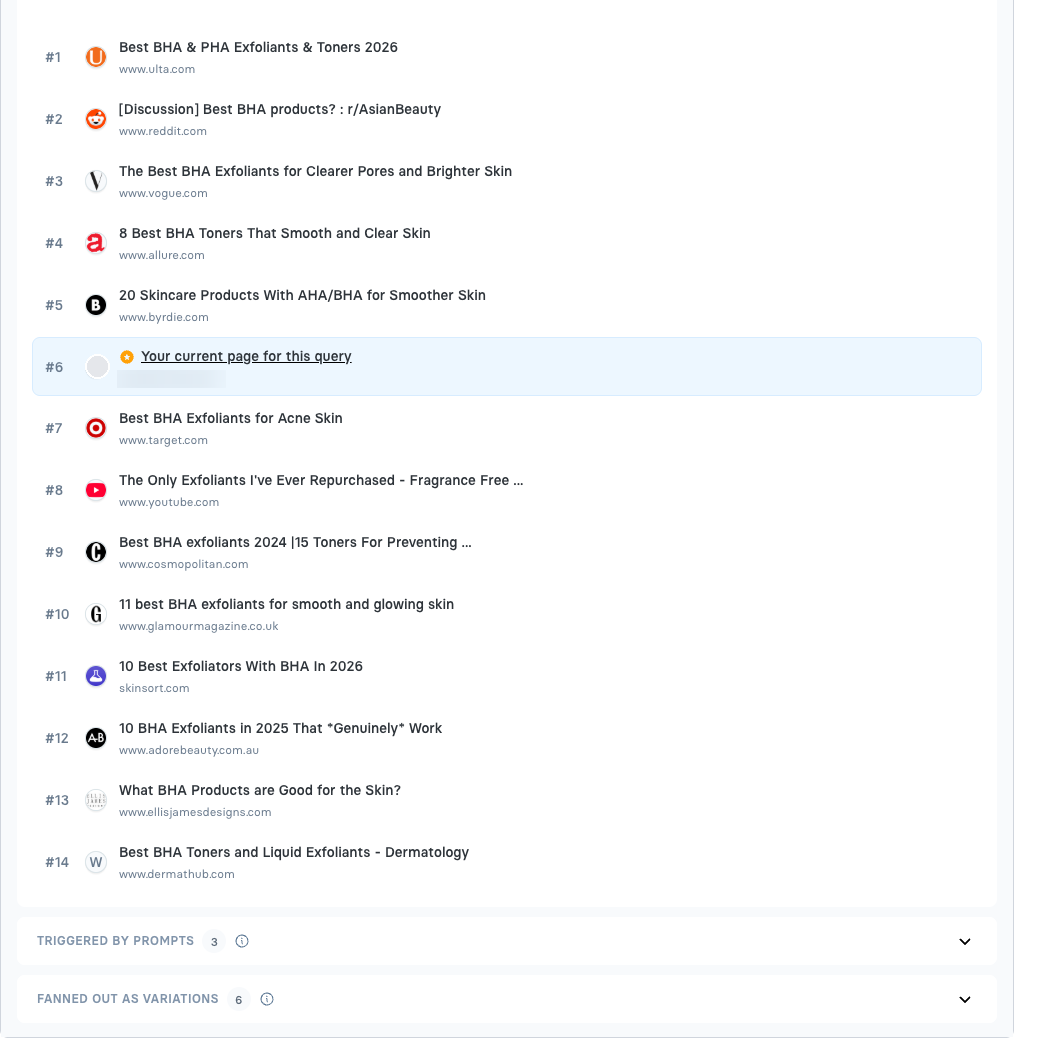
  • Top SERP results — Google's current top organic results, up to 20, each with its title and domain. Your own page is highlighted and starred wherever it appears, so you can see exactly which pages sit above you.

  • Triggered by prompts — which of your tracked prompts fan out into this search, each with its topic.

  • Fanned out as variations — the other wordings engines used for the same intent, all grouped into this one row.

Expanding a query: the live search results, with your page highlighted.
This is where classic SEO pays off — but not only your own SEO.

Two different things get you into these results, and you need both:

  • Rank your own pages. Everything that has always worked in search still works here: content that answers the query properly, sensible titles and headings, internal links, page speed, and authority. The Fanned out as variations list is a ready-made keyword set — real phrasing engines actually used, not guesses.

  • Get named on the pages that already rank. Look at the SERP for any query where you're absent: it's usually roundups, review sites, Reddit threads and buying guides, not brand pages. The engine reads those — so a mention of your brand or product inside one of them lands in the answer just as surely as your own page would, and often more credibly. Those pages are exactly what the Recommendations tab's off-site opportunities help you approach.

Ranking #1 for a query whose top results never mention you is still a partial win. Getting mentioned across the pages that do rank is the other half.

Shopping

When someone shops inside ChatGPT, it doesn't only search the web — it also queries Google Shopping and pulls product listings into the carousels you see in the answer. Those listings are chosen by Google Shopping's ranking, not by the chat model, which makes this a separate lever from everything else in AI Visibility: your page could be cited beautifully and your product still be missing from the carousel because its listing doesn't rank.

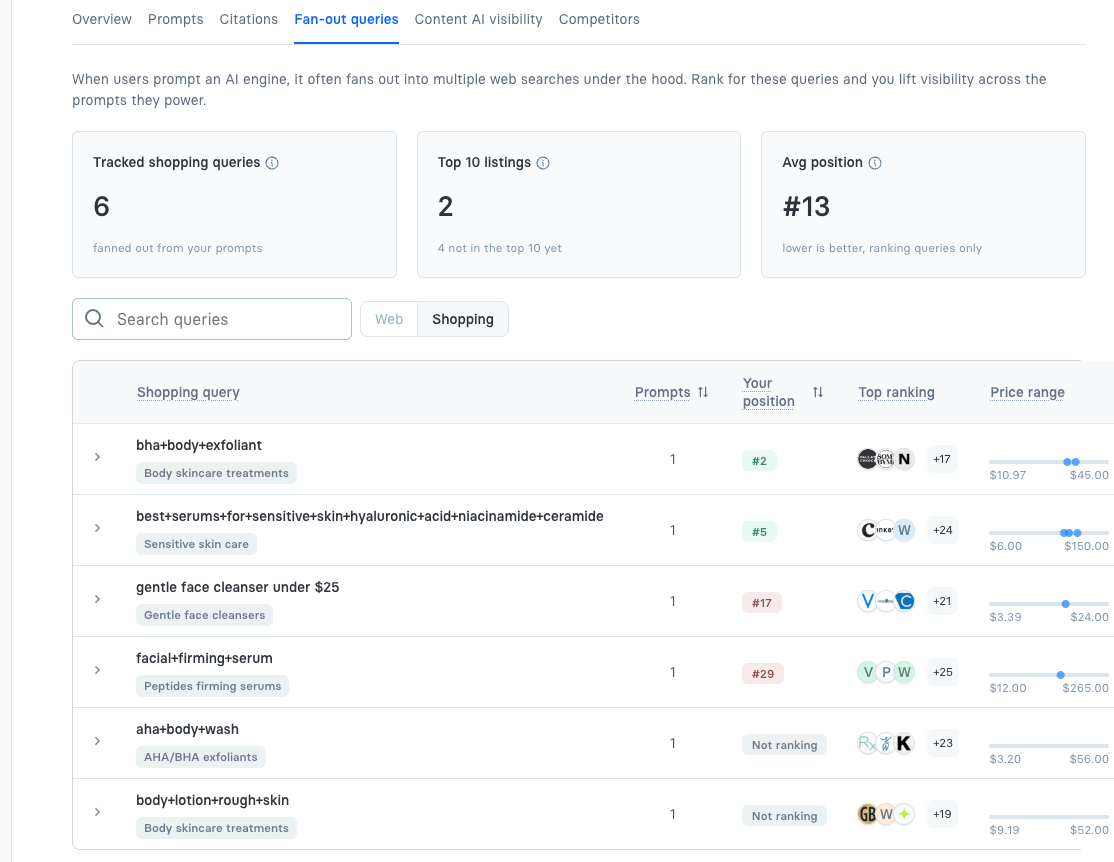
The Shopping view tracks those queries and where your listing sits in each.

The Shopping view of the Fan-out queries tab.

Summary cards

Card
What it tells you

Tracked shopping queries

How many Google Shopping searches ChatGPT runs for your prompts.

Top 10 listings

How many of those have one of your listings in the top 10, with the shortfall underneath.

Avg position

Your average Shopping position, counted only across queries where you appear at all. Lower is better.

The table

Column
Meaning

Shopping query

The Google Shopping search, with the topic it belongs to.

Prompts

How many of your tracked prompts fan out into it.

Your position

Where your listing ranks. Green means top 10; Not ranking means your listing isn't showing at all.

Top ranking

The brands whose listings currently rank highest.

Price range

The price spread across the top listings, with a dot for each of your listings placed by price rank — cheaper to the left. Hover a dot for its price.

The price bar is the quickest read on the tab: if your dot sits far right of a crowded cluster, you're the expensive option in a carousel where price is doing the sorting.

Inside a query

Expand a row to see:

  • Top shopping listings — the current Google Shopping results, up to 30, each with its price and brand. Your own listing is highlighted and starred, so you can see exactly who sits above you and at what price.

  • Triggered by prompts — which of your tracked prompts fan out into this query.

  • Fanned out as variations — other wordings ChatGPT used for the same shopping intent.

The top Google Shopping listings for one query, with your listing highlighted.

Shopping queries come from ChatGPT only — it's the engine that runs Google Shopping searches while answering. AI Overview has no fan-out queries or product cards of its own.

Where else this shows up

A product's Overview tab lists the shopping queries recorded for that one product. Clicking any of them opens this view, filtered to that query.

What to do about a poor position

A Shopping position is a merchant-feed problem, not a content problem. If your listing ranks badly or doesn't appear:

  • Check the product is actually in your Google Merchant Center feed and not disapproved.

  • Make sure the title and attributes use the words the query uses — the queries here are the exact phrasing to match.

  • Compare your price against the range shown in the row; the listings above you are the competitive set.

Last updated