> For the complete documentation index, see [llms.txt](https://alhena.gitbook.io/docs/llms.txt). Markdown versions of documentation pages are available by appending `.md` to page URLs; this page is available as [Markdown](https://alhena.gitbook.io/docs/features/ai-visibility/content-ai-visibility/content-recommendations.md).
# Recommendations
The Recommendations tab of a product or page: unanswered questions to turn into FAQs, new content to write, and off-site places worth getting mentioned.
The **Recommendations** tab is the to-do list for one product or page. Where [Overview](/docs/features/ai-visibility/content-ai-visibility/product-overview.md) shows how the product is performing, this tab shows what to change — and drafts most of the work for you.
It's split into three sections, shown as cards across the top. Click a card to switch sections; the count on each card is how many items are still open. A section with nothing in it stays visible but greyed out.
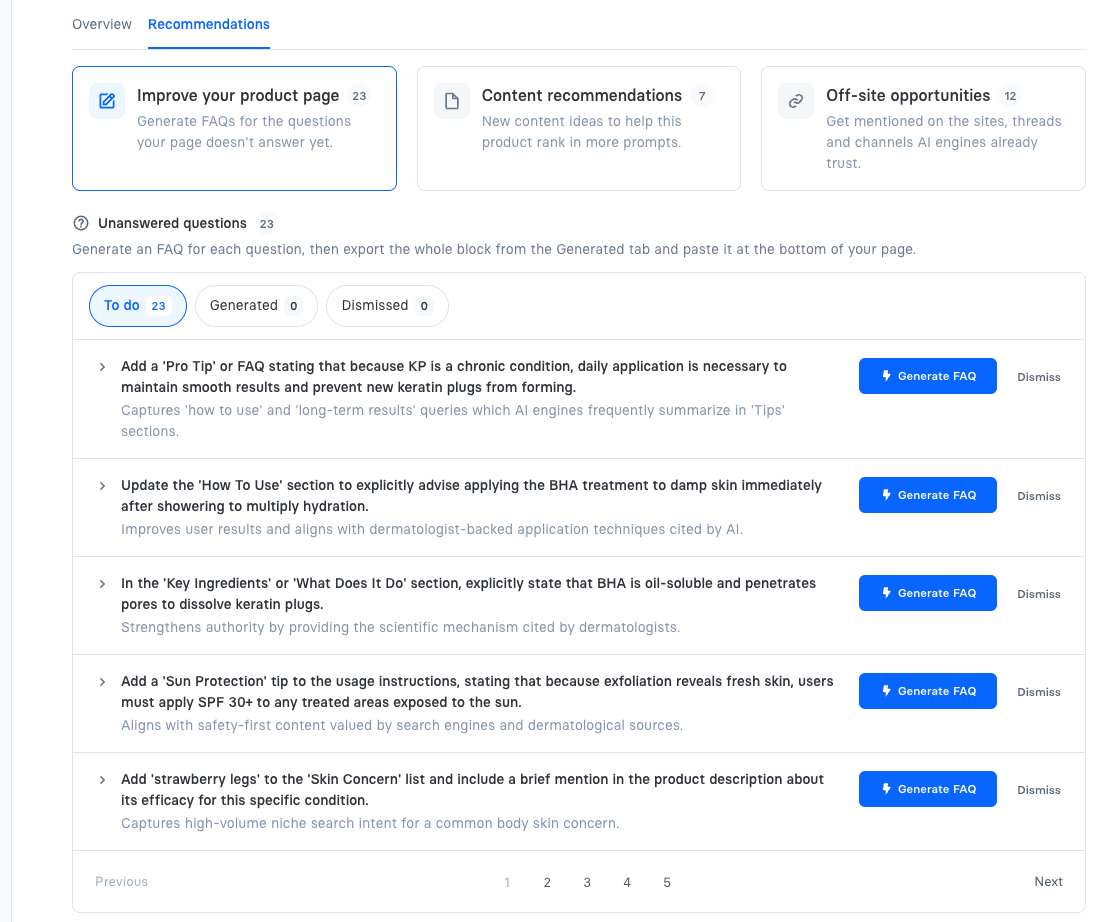
The Recommendations tab, with its three sections.
## 1. Improve your product page
**Unanswered questions** — gaps between what your product page says and what buyers actually ask. Each row is a specific edit: state that BHA is oil-soluble and dissolves keratin plugs; add a sun-protection note to the usage instructions; add "strawberry legs" to the skin concerns you list. Underneath each one, in grey, is why it's worth doing — the kind of question it would let an AI engine answer from your page.
They come from reading the pages engines currently cite for your prompts and comparing them with yours, so each gap is something a competitor's page already covers and yours doesn't.
For each one:
1. Click **Generate FAQ** and Alhena writes a question-and-answer pair covering that gap.
2. **Edit** it if you'd word it differently — your edit is what gets published.
3. **Dismiss** anything that doesn't apply. Dismissed rows move to the Dismissed filter and can be restored.
Use the **To do / Generated / Dismissed** filters to move through the work, and expand any row to see the competitor claim behind it.
### Getting the FAQs onto your page
Once you have generated FAQs, the **Generated** filter shows a card above them: **Add these FAQs to your product page**.
**On Shopify**, click **Publish to Shopify** and Alhena puts them on the live product page for you — and keeps them there as you edit, dismiss or generate more. See [Publishing FAQs to Shopify](/docs/features/ai-visibility/content-ai-visibility/content-recommendations/publish-faqs-to-shopify.md) for the one-time setup.
**Anywhere else**, expand the card to preview the whole block and copy it in the format that suits your site:
* **Plain text** — for pasting into a page editor.
* **HTML** — a ready-made FAQ section to drop into your page template.
* **JSON-LD** — structured data that search and AI engines read directly, added alongside your visible FAQ block.
Then paste it at the bottom of the product page.
{% hint style="success" %}
FAQs are the highest-leverage on-page fix: AI engines quote direct answers to direct questions, so a page that answers the question in plain language is far more likely to be cited than one that leaves it implied.
{% endhint %}
## 2. Content recommendations
New content to *write* — posts and guides that would put you in prompts this product page can't reach on its own.
A product page can only answer questions about that product. Plenty of the prompts you want to win are broader than that ("how often should you use a chemical exfoliant", "AHA vs BHA"), and engines answer those from guides and explainers, not from catalog pages. Each idea here is one such piece, chosen because competitors are already being cited for it.
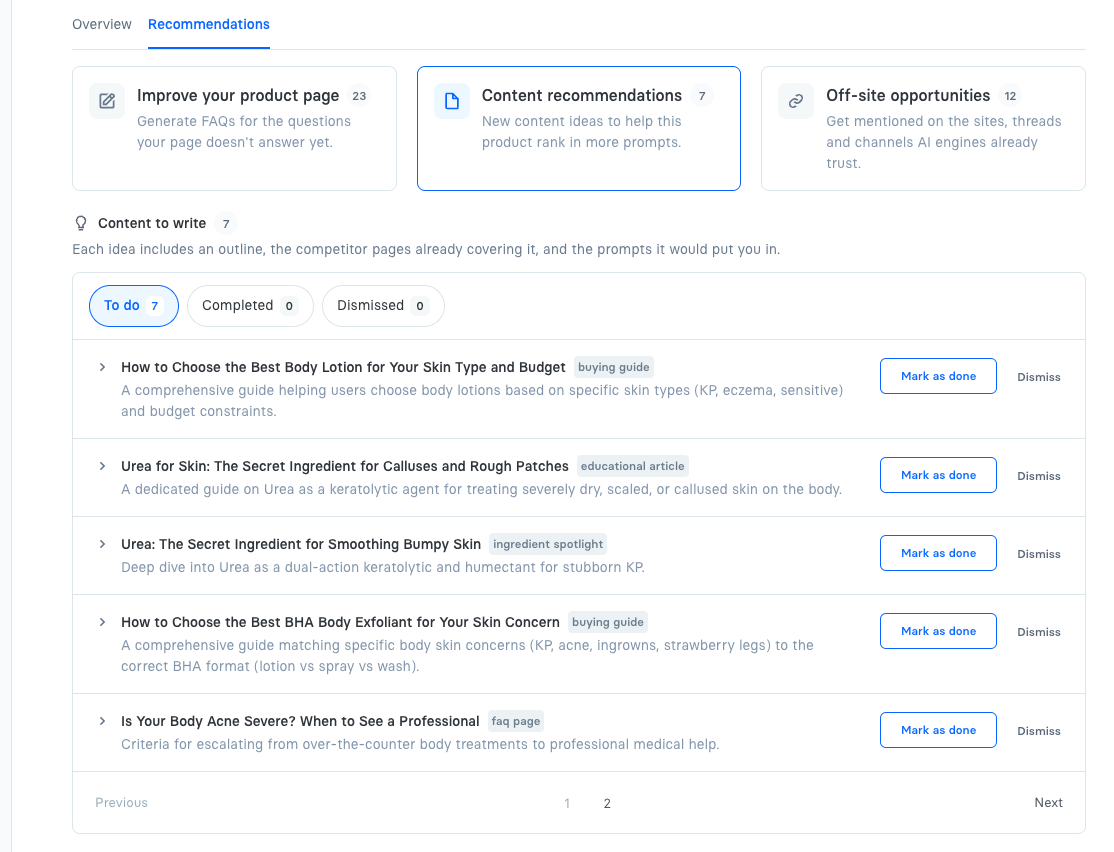
Each row gives you the headline you'd write to, a one-line brief, and a tag for the kind of piece it is — **buying guide**, **educational article**, **ingredient spotlight**, **faq page**. Expand a row for more:
* the suggested **outline**,
* the **competitor pages** already covering the topic — what you're writing against,
* and the **prompts** the piece would put you in.
Click **Mark as done** once you've published it, or **Dismiss** it. The status sticks to the idea itself, so it stays consistent everywhere that idea is recommended.
Content ideas, each with the kind of piece it should be.
## 3. Off-site opportunities
The places AI engines already build these answers from — pages that recommend your competitors and never mention you. Getting named on them is usually the fastest way to get pulled into more answers.
Every row here is a page an engine actually cited when answering this product's prompts, and every one of them currently makes your competitors' case for them. Alhena keeps only the ones where you're absent, so the list is opportunities rather than a citation report. They're ordered by how much each one shapes the answers, so start at the top.
Three kinds of opportunity, each in its own block:
**Blogger outreach** — independent sites: "best of" roundups, review blogs, buying guides, comparison posts. These are the single biggest source of AI product recommendations, because an engine asked "best vitamin C serum" leans on third-party lists rather than any brand's own page. One roundup that adds your product can change every answer that cites it. Getting in usually means asking the writer to consider you for the next update, often with a sample.
**Reddit threads** — real discussion threads where people ask for recommendations and other people answer. Engines weigh these heavily because they read as unpaid, first-hand experience. Contributing works when you're genuinely useful and open about who you are; a promotional drop-in gets downvoted and can do more harm than not posting at all. Check each subreddit's self-promotion rules before you comment.
**YouTube channels** — creators whose videos the engines pull from. These are the slowest of the three to pay off, since it means a creator actually covering the product, but a single review video keeps earning citations for years. Sending the product to a creator who already reviews your category is the usual opening.
### Reading a row
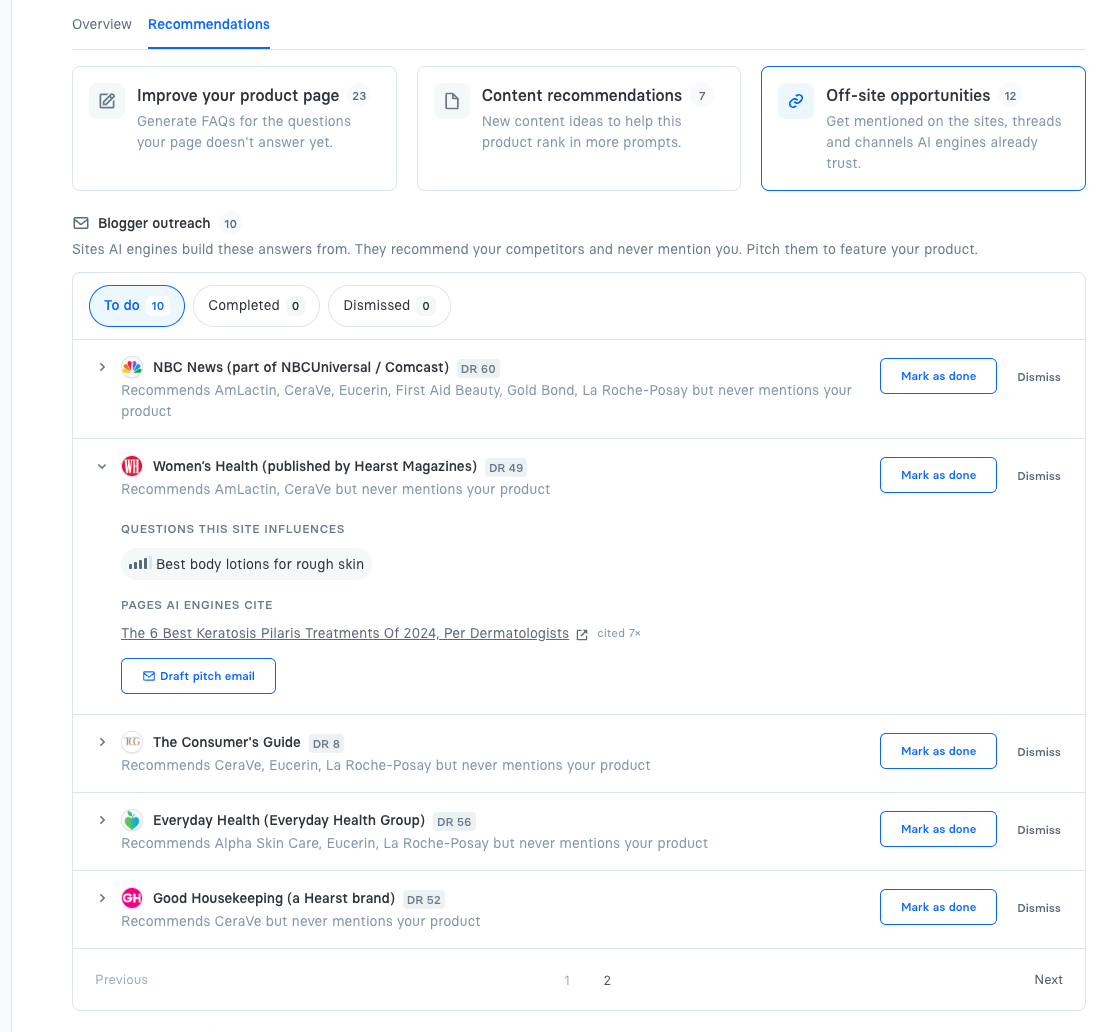
A site row names the publication, its **DR** (Domain Rating — how authoritative the domain is, 0–100), and the damning line: which competitors it recommends, and that it never mentions you. Reddit rows show the thread title and its subreddit; YouTube rows show the creator and how many of their videos got cited.
Expand a row and you get the evidence behind it:
* **Questions this site influences** — which of your tracked prompts its pages feed into.
* **Pages AI engines cite** — the exact article, with how many times it was pulled into an answer. A page cited seven times is worth far more effort than one cited once.
Off-site opportunities, with one site expanded to show the page engines cite.
### Drafting the outreach
The expanded row has a **Draft pitch email** button (**Draft comment** on a Reddit thread). Alhena writes it for you, referencing the specific article and the competitors already in it, with placeholders for the names to fill in. Regenerate with a note like *"shorter, more casual, mention free samples"* to steer the tone, then copy the final version out.
When you've sent or posted it, mark the row done (**Mark as done** / **Mark as sent** / **Mark as posted**) so it drops off your list.
{% hint style="info" %}
Alhena drafts and tracks this outreach — it doesn't send anything on your behalf. You always send the email or post the comment yourself.
{% endhint %}
## Pages and documents
Non-product pages (guides, help articles, blog posts) get the same three sections, plus a **Prompt opportunities** list at the top showing which prompts the page could appear in. They have no [Overview](/docs/features/ai-visibility/content-ai-visibility/product-overview.md) tab.