> For the complete documentation index, see [llms.txt](https://alhena.gitbook.io/docs/llms.txt). Markdown versions of documentation pages are available by appending `.md` to page URLs; this page is available as [Markdown](https://alhena.gitbook.io/docs/ai-configuration/tuning/guidelines.md).
# Guidelines
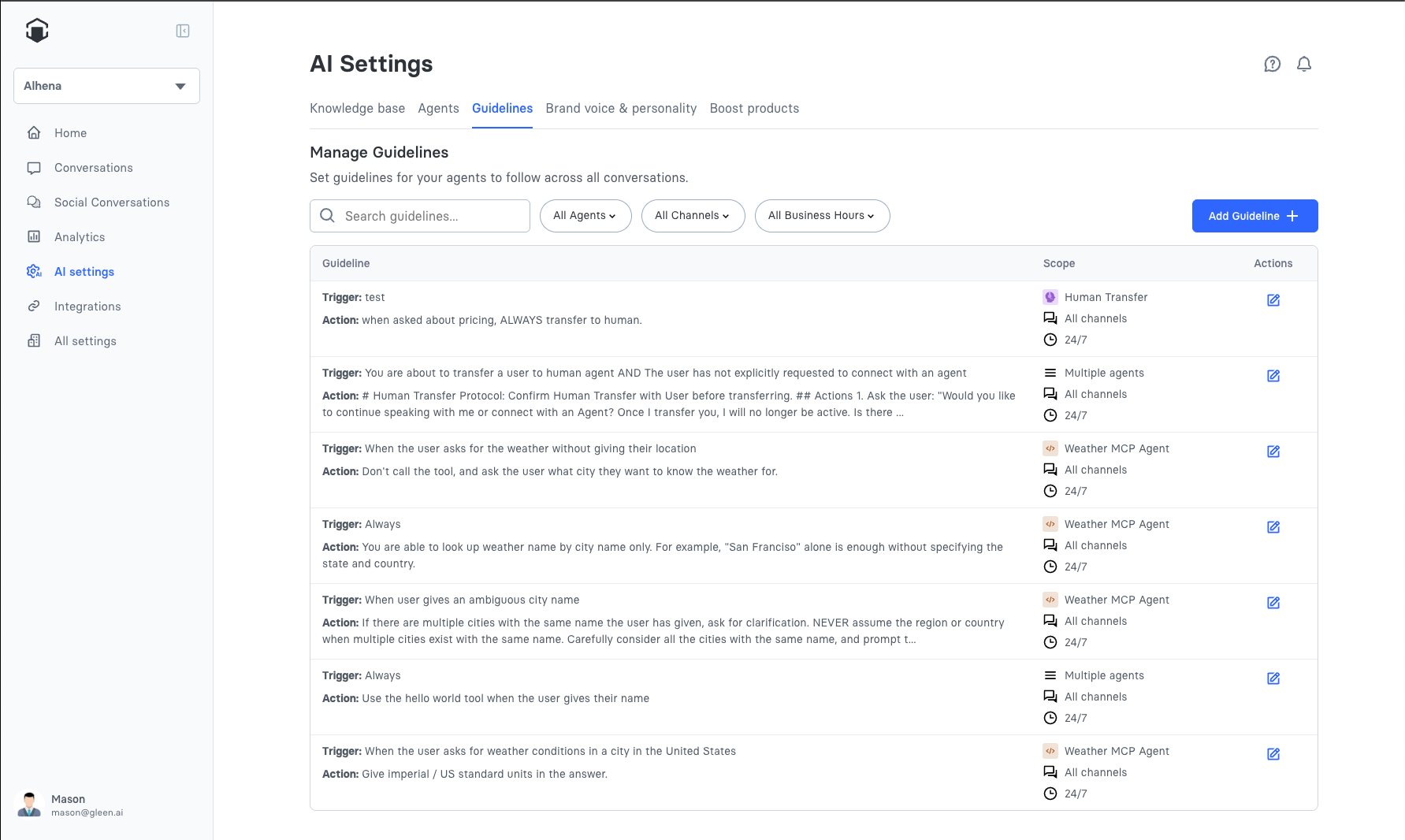
Guidelines are rules that control how your AI agents behave in specific situations. Use guidelines to customize agent responses, enforce business policies, and ensure consistent customer experiences across all channels.
## Accessing Guidelines
Navigate to **AI Settings > Guidelines** in your Alhena dashboard to view and manage your guidelines.
## Creating a Guideline
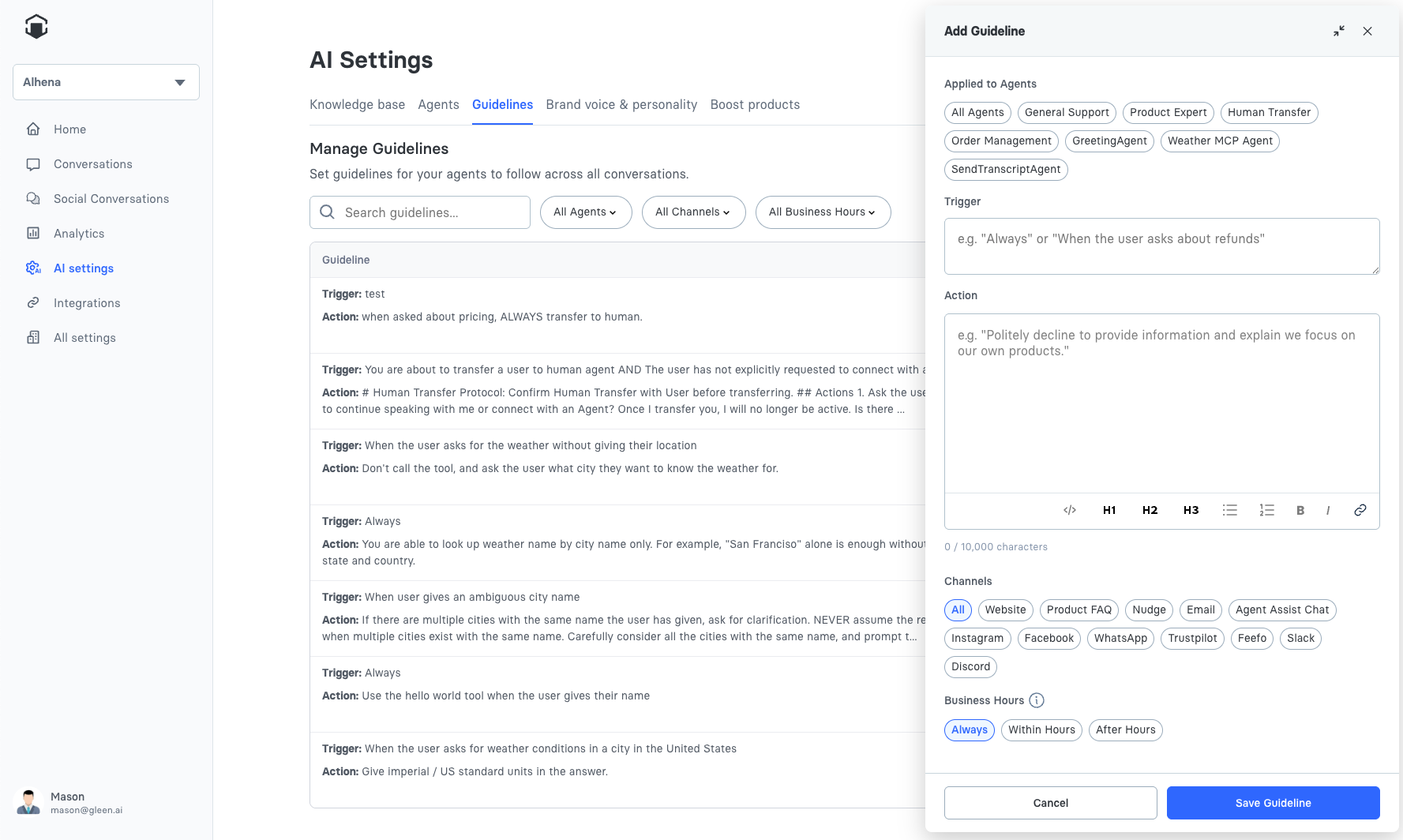
Click **Add Guideline** to create a new guideline.
Each guideline has the following fields:
### Trigger
The trigger defines **when** this guideline applies. Write a clear description of the situation or condition that should activate this guideline.
**Examples:**
* "When a customer asks about return policies"
* "When the customer mentions a competitor product"
* "When the conversation is about pricing or discounts"
* "When a customer expresses frustration or dissatisfaction"
* "Metadata in User Information contains 'ab\_variant\_group'" (for A/B testing)
* "Metadata in User Information 'subscription\_tier' equals 'premium'" (for user segmentation)
Be specific with triggers to ensure guidelines activate in the right situations. Vague triggers may cause guidelines to apply too broadly or not at all.
{% hint style="info" %}
Metadata-based triggers use data passed via the SDK's `userMetadata` configuration. See [A/B Test Guidelines](/docs/developer-reference/website-sdk/examples/ab-test-guidelines.md) for a complete example.
{% endhint %}
### Action
The action defines **what** the AI should do when the trigger condition is met. Write clear instructions for the desired behavior.
**Examples:**
* "Explain that returns are accepted within 30 days with original receipt. Offer to start the return process if the customer has their order number."
* "Acknowledge the competitor but focus on our product's unique benefits. Do not disparage competitors."
* "Never offer discounts unless the customer has a valid promo code. Direct them to our newsletter for exclusive offers."
Actions support rich text formatting including:
* **Markdown** for formatting (bold, lists, headers)
* **Code blocks** for specific scripts or templates
* **Links** to reference internal resources
### Agent Assignment
Select which agents should follow this guideline. You can assign a guideline to:
* **All agents** - The guideline applies universally
* **Specific agents** - Select one or more agents from the multi-select dropdown
Use agent assignment to create specialized behaviors. For example, assign pricing guidelines only to your Product Expert Agent, or return policy guidelines only to your Order Management Agent.
### Channel Scope
Control which communication channels the guideline applies to:
* **All channels** - Guideline applies everywhere
* **Specific channels** - Select one or more from:
* Website
* Product FAQ
* Embedded Agent
* Nudge
* Email
* Agent Assist Chat
* Instagram
* Facebook
* WhatsApp
* Trustpilot
* Feefo
* Slack
* Discord
* Phone
* ChatGPT
{% hint style="info" %}
Guidelines for [Voice AI agents](/docs/ai-configuration/agents/built-in-agents.md#voice-ai-agents) use a reduced channel set — only **Website** and **Phone** apply.
{% endhint %}
Channel-specific guidelines let you tailor responses to each platform. For example:
* Use emojis on social channels but not in email
* Provide shorter responses on chat, longer on email
* Adjust formality based on channel expectations
### Business Hours Scope
Define when the guideline should be active:
* **Always** - Guideline applies at all times
* **Within business hours** - Only applies during your configured business hours
* **After hours** - Only applies outside business hours
Business hours are configured in your account settings.
**Use cases:**
* After hours: "Let customers know that human support is available during business hours (9am-5pm EST) and offer to have someone follow up"
* Within hours: "Offer to connect the customer with a live agent for complex issues"
## Viewing and Restoring Previous Versions
Every time you save a guideline, Alhena keeps a copy of that version. If an edit makes things worse, or you just want to see what a guideline used to say, you can look back and restore an earlier version.
1. Open the guideline you want to check from **AI Settings > Guidelines**.
2. Under the **Edit Guideline** title, next to "Last updated on … by …", click **View revisions**. The link appears once a guideline has been saved more than once.
3. The **Revisions** window lists saved versions on the left, newest first, with the date and the person who saved each one. The newest is marked **Current**.
4. Click a version to see its trigger, action, and the agents, channels, and business hours it applied to.
5. Click **Restore this version** to load it into the editor.
6. Review the restored content, then click **Save** to make it live.
{% hint style="info" %}
Restoring a version doesn't change anything until you save. It only fills the editor with the older content, so you can still adjust it, or close the editor without saving to keep the current version. If the older version was assigned to an agent that is no longer enabled, that agent is left out of the restored assignment.
{% endhint %}
The **Revisions** window shows the 50 most recent versions of a guideline. History starts from when this feature was introduced, so guidelines that haven't been edited since may show only their current version.
## Guideline Examples
### Return Policy Guideline
**Trigger:** When a customer asks about returns, refunds, or exchanges
**Action:**
```
Explain our return policy:
- Items can be returned within 30 days of purchase
- Items must be unused and in original packaging
- Refunds are processed within 5-7 business days
If the customer wants to start a return, ask for their order number and email address.
```
**Agents:** Order Management Agent, General Support Agent
**Channels:** All channels
**Hours:** Always
***
### Social Media Tone Guideline
**Trigger:** Any customer interaction on social media
**Action:**
```
Use a friendly, conversational tone with appropriate emojis. Keep responses concise and engaging. Use line breaks for readability. Sign off with a friendly closing.
```
**Agents:** All agents
**Channels:** Instagram, Facebook Messenger, WhatsApp
**Hours:** Always
***
### After Hours Transfer Guideline
**Trigger:** When a customer requests to speak with a human
**Action:**
```
Let the customer know our support team is currently offline. Collect their email address and a brief description of their issue. Assure them a team member will follow up within one business day.
```
**Agents:** Human Transfer Agent
**Channels:** All channels
**Hours:** After hours
***
### A/B Test Guideline (Metadata-Based)
**Trigger:** Metadata in User Information contains "ab\_variant\_group"
**Action:**
```
Reply with a friendly greeting at the beginning of the conversation. Welcome the user warmly before addressing their question.
```
**Agents:** All agents
**Channels:** Website
**Hours:** Always
For the complete A/B testing implementation including SDK setup, see [A/B Test Guidelines](/docs/developer-reference/website-sdk/examples/ab-test-guidelines.md).
***
### Premium Customer Guideline (Metadata-Based)
**Trigger:** Metadata in User Information "subscription\_tier" equals "premium"
**Action:**
```
This is a premium customer. Prioritize their requests and offer expedited support options. Mention their premium benefits when relevant, such as priority shipping, extended return windows, and dedicated support channels.
```
**Agents:** All agents
**Channels:** All channels
**Hours:** Always
***
### Logged-In User Guideline (Metadata-Based)
**Trigger:** Metadata in User Information contains "user\_id"
**Action:**
```
The user is logged in. You can reference their account information when helpful. Offer to look up their order history or account details if relevant to their question. Address them by name if available.
```
**Agents:** Order Management Agent, General Support Agent
**Channels:** Website
**Hours:** Always
## Best Practices
### Keep guidelines focused
Each guideline should address one specific scenario or behavior. If a guideline becomes complex, split it into multiple focused guidelines.
### Write clear triggers
Specific triggers lead to more predictable behavior. Instead of "When discussing products," use "When a customer asks for product recommendations in the electronics category."
### Test your guidelines
Use the playground to verify guidelines work as expected. Try variations of customer queries to ensure the trigger activates appropriately.
### Review regularly
Business policies change. Review guidelines quarterly to ensure they reflect current policies and procedures.
### Don't overload with guidelines
Too many guidelines can create conflicts or unpredictable behavior. Start with essential guidelines and add more only when needed.
### Use guidelines, not FAQs
Guidelines are for behavioral rules, not factual information. Add factual content to your knowledge base instead of creating guidelines with FAQ-style content.
## Legacy Interface Note
Some accounts created before the agentic update may see a simplified guidelines interface without agent assignment or channel/hours scoping. [Contact support](/docs/troubleshooting/troubleshooting.md#contact-support) to upgrade to the full agentic experience.